
In 2026, the way people discover and engage with digital content has shifted. Traditional Search Engine Optimization (SEO) is no longer the only strategy that brings people to your website. Meet Generative Engine Optimization (GEO), the emerging frontier for organizations looking to earn visibility through AI-driven platforms like ChatGPT, Google’s Gemini, and Perplexity.
If your organization hasn’t begun adapting its content strategy for GEO, now is the time. Here’s what GEO is, why it matters, and how to start optimizing for it.
What is GEO and How Is It Different From SEO?
While SEO focuses on improving your visibility on traditional search engine results pages (SERPs) through keywords, backlinks, and technical performance, GEO is about making your content the answer in AI-generated responses.
Rather than presenting users with a list of links, GEO centers on AI tools that synthesize information. These platforms use large language models (LLMs) to provide direct answers to questions. Instead of competing for a top 10 ranking on Google, you’re aiming to be cited, summarized, or linked to by tools like Gemini or ChatGPT.
In short: SEO gets you found, GEO gets you featured.
Why GEO Matters in 2026
AI tools are no longer sidekicks to Google—they’re central to how people research, compare options, and make decisions. As of late 2025, ChatGPT receives over 4.5 billion monthly visits, while Perplexity processes over 500 million searches per month. Google remains the dominant force in online search with billions of daily visits, but with the direct integration of Gemini into search results, the way people find information is changing. Users can now get answers without ever clicking through to your website—a “zero-click search result.”
If your content isn’t showing up in AI answers, you’re missing visibility with a massive and growing segment of your audience. Depending on what your digital experience delivers, this affects brand recognition, traffic and lead potential, and your credibility as an authority in your space.
In 2026, AI summaries are the new front page of search.
How GEO Works: What AI Tools Are Looking For
Each generative engine has its quirks, but several patterns are emerging across platforms:
1. Structure Matters More Than Ever
AI tools rely on clear, structured content. Use schema markup generously—particularly FAQPage, Organization, Article, and Product types. Structured data helps AI understand your content contextually, making it easier to reference in generated answers.
Tip: Google’s Structured Data Markup Helper is a great place to start reviewing your schema.
2. E-E-A-T Principles Still Rule
Google’s Expertise, Experience, Authoritativeness, and Trustworthiness (E-E-A-T) framework, a core concept for SEO, now extends to AI tools like Gemini. Show credentials, cite data, link to reputable sources, and provide content authored by credible experts.
If you have certifications, awards, partnerships, or original research, feature them clearly.
3. Conversation > Keywords
GEO is less about keywords and more about natural language. Write in a conversational tone and frame your content in terms of questions and answers. Think: “What are the best family vacation spots in California?” instead of “California vacation destinations.”
4. Content Freshness is Key
AI platforms—especially Perplexity, which indexes content daily—prioritize content that’s up to date. Refresh evergreen posts annually and use a content calendar to track when to review content. Prioritize articles with titles like “Top” or “Best,” as these perform well in answer generation, particularly on ChatGPT.
5. Visuals Are Increasingly Important
Gemini and Perplexity are both investing in multimodal search. Media assets like charts, videos, and well-optimized images can increase the chance of being featured. Also make sure your image alt text, captions, and surrounding content are descriptive.
6. Prioritize Performance & Mobile-Responsiveness
A site that performs well on mobile loads quickly, displays clearly on small screens, and avoids frustrating interactions like unclickable buttons or pop-ups. Poor mobile performance—including slow Core Web Vitals—can hurt your rankings, which in turn reduces your visibility to LLMs that rely on search results as input sources.
Tool-Specific GEO Tips
Gemini (Google)
- Optimize for the Search Generative Experience (SGE) with crawlable content and Core Web Vitals in check.
- Use a hub and spoke content model to build topical authority. This model organizes content around a central “hub” topic page that then links to related and more detailed “spoke” pages.
- Regularly monitor impressions and click-through rates in Google Search Console. A dip in clicks with high impressions could signal that your content is being used in AI answers.
Perplexity
- With an emphasis on factual accuracy, source transparency, and user control over search scope, sources are essential. Focus on citations and factual, digestible content.
- Use Question & Answer formatting to align with Perplexity’s research focus.
- Include multimedia assets and data points that back up your authority—charts, diagrams, and maps in addition to video and images.
ChatGPT
- Embrace personalization. ChatGPT seeks out phrases like “top” or “best” that give users the feeling of receiving personalized insights.
- Optimize your About Us page to clearly articulate your mission and values. ChatGPT often uses this to evaluate trustworthiness and authority.
- Strengthen your backlink profile to compete with high-authority sources like Wikipedia, Reddit, and news outlets frequently cited by the model.
Tracking GEO Performance
A consequence of AI summaries is that websites may see a drop in clicks and visits within their analytics, particularly a decrease in organic traffic month over month. With users getting answers from AI-generated search responses, they may no longer need to visit your website for information. However, those users who do click through often stay longer and discover more pages than they did previously.
Websites may also see an increase in impressions or referrals from AI assistants. This data is increasingly important to track.
Even if AI tools don’t always send traffic directly, you can still measure their impact:
- Google Analytics 4 (GA4) Segmentation: Create segments by referral source (e.g., chat.openai.com, perplexity.ai, gemini.google.com) to track AI-specific sessions.
- Landing Page Analysis: AI tools often link deep into your site. Use GA4 to monitor which long-tail pages are receiving AI-generated traffic.
- Google Search Console: Identify FAQ-style queries with high impressions but low CTR. These may indicate your content is being summarized in AI answers.
What This Makes Possible
For organizations investing in GEO, the shift isn’t just about traffic—it’s about creating the foundation for how your brand shows up when decisions are made. When your content is structured, current, and authoritative, you’re positioned to be the answer AI platforms cite. That visibility translates into trust, consideration, and the ability to shape how your expertise is perceived across the platforms your audiences use most.
Organizations that optimize for GEO now are building systems that can adapt as AI search continues to evolve, ensuring their digital presence performs across both traditional and emerging channels.
Action Items for Digital Teams
- Audit your existing content with these optimization strategies in mind. You can use AI tools like Gemini to identify optimization opportunities for particular pages.
- Update schema across all major content types, especially Q&A and organizational pages.
- Refresh your high-performing or evergreen content regularly, especially pieces tied to seasons, events, or top lists.
- Revise your content strategy to include multimedia assets, structured data, and topic clustering.
- Optimize your About page and author bios to strengthen trust signals for LLMs.
Final Thoughts
Optimizing for GEO is a fundamental shift in how people find and interact with content. As AI-generated answers become a dominant part of the discovery experience, your organization’s ability to show up in these spaces affects whether you gain trust or go unnoticed.
By embracing schema, writing conversationally, and refreshing content with purpose, your digital presence can evolve to meet the moment—one where the best answer often wins over the best ranking.
Ready to optimize your content for AI-powered search? Let’s talk about what that looks like for your organization.
Drupal has long been known for its flexibility, robustness, and scalability. But for many marketers and content creators, that flexibility can come with a steep learning curve — especially when it comes to building layouts and managing design without the help of a developer. That’s about to change in a big way.
Enter Drupal Canvas (previously called Experience Builder), a new initiative in Drupal that promises to radically streamline and simplify how we build and design pages. While still in its early stages, Experience Builder is ready for testing and experimentation — and it’s something marketers should absolutely have on their radar.
What is Drupal Canvas?
Drupal Canvas is the evolution of Drupal’s current method of flexible page building called Layout Builder. It takes what we know from layout builder and expands it into a unified, user-friendly tool that allows non-developers to build and theme websites directly in the browser. It’s a huge leap toward making Drupal more accessible for site builders, marketers, and content creators alike.
Unlike other page builders, Canvas doesn’t just provide drag-and-drop layout tools. It leverages Drupal’s core strengths — structured data, fine-grained access controls, and reusable components — to ensure consistency across channels and scalability across enterprise-level websites. This makes it uniquely powerful for large organizations managing multiple digital properties.
Dries Buytaert, Drupal’s founder, described it as a response to the fragmented landscape of site-building options in Drupal today. The vision is to consolidate functionality from tools like Paragraphs and Layout Builder into a single, cohesive solution. One that’s intuitive, efficient, and packed with modern capabilities.
Here is a fantastic video demo from DrupalCon Atlanta that was shown by Dries during the keynote address:
Why Now?
The timing couldn’t be better. While Layout Builder was a step in the right direction when it launched in 2018, its limitations became clear as more site builders demanded easier workflows, styling tools, and richer content composition features.
At recent Drupal conventions, the community has rallied around the idea of enhancing user experience across the board. As part of the broader Drupal CMS, Canvas is a key component in bringing Drupal’s usability in line with the expectations of modern content teams.
Why I’m Excited About It
As an engineer who has worked closely with Drupal for years, what excites me most is how Canvas can bridge the many gaps in Drupal’s current page-building ecosystem. Today, there are so many ways to structure content — Blocks, Paragraphs, Layout Builder, Panels — that choosing the right one can be overwhelming.
Drupal Canvas is shaping up to be that “one-stop-shop” we’ve needed. It reduces decision fatigue and gives teams a faster way to get projects off the ground without needing to architect every page structure from scratch.
Even better, it supports creating single-page overrides, component-level editing, and even React-based components right in the editor. That’s something I’ve personally looked forward to for a long time. The ability to build and save reusable components that can be dropped into any page makes this a tool that truly enhances productivity — not just for developers, but for marketers and content creators, too.
My First Look
I had the chance to see Drupal Canvas in action at DrupalCon Atlanta this year. The live demos were impressive and really opened my eyes to what this tool could do, both for newcomers to Drupal and seasoned site builders. Along with Drupal CMS, and recipes, Canvas is easily one of the hottest topics in the Drupal ecosystem right now.
The energy in the room during the sessions was palpable — people are genuinely excited about this. It’s not just another experimental module; it’s a shift in how we think about building on Drupal.
A Game-Changer for Marketers
One of the biggest barriers for marketing teams has always been reliance on developers to make even small layout edits. That’s starting to change.
With Canvas, non-developers will be able to build out dynamic, visually engaging pages — without needing to dive into code. That’s a massive win, especially for small teams in government, education, or nonprofit sectors, where resources are limited and time is of the essence.
Being able to make changes quickly, reuse content intelligently, and maintain a consistent brand without touching a template file is something many organizations have wanted for years. Drupal Canvas delivers on that promise.
Want to Try It Yourself?
If you’re curious to see what the buzz is about, you have two great options to get started:
- Try it yourself: Head to Drupal.org and download the latest version of Drupal CMS. It now comes with an optimized installer that makes getting started faster than ever. Once you’re up and running, you can add the Drupal Canvas module and start exploring.
- See it in action: Not ready to dive in alone? Schedule an implementation consultation with our team for a live demo and personalized guidance on how Drupal CMS can work for your organization.
Looking Ahead
It’s important to note that this is just the alpha version of the Canvas initiative. The team behind it is committed to rapid iteration and community feedback, which means what we’re seeing today is just the beginning.
If this is the foundation, I can only imagine how powerful the tool will become in the next year or two. The Drupal community is known for its collaborative spirit and constant innovation — and Canvas is shaping up to be one of the most important steps forward in years.
So if you’re a marketer, content strategist, or anyone who’s ever been frustrated by the limits of page building in Drupal — now’s the time to dive in. Drupal Canvas is here, and it’s ready to change the game. Ready to explore Drupal Canvas for your organization? Contact us for a complimentary consultation.
Today I learned about a military term that has come into the culture: VUCA, which stands for volatility, uncertainty, complexity, and ambiguity. That certainly describes our current times.
All of this VUCA makes me concentrate on what is stable and slow to change. Its easy to get distracted by that which changes quickly and shines in the light. Its harder to be grateful for what changes slowly. Its harder to see what those things might even be.
In the face of AI and the way it will transform all industries (if not now, very soon), its important to remember what AI can not yet do well. Maybe it will learn how to create a facsimile of these traits in the future as it becomes more “human” (trained on human data with all its flaws might mean it has embedded within it those traits we find undeniably human). However, these skills seem like the ones that can help us navigate the VUCA that is life today.
Be Curious
AI can ask follow-up questions for clarification, but it does not (yet) ask questions for its own curiosity. It asks when it has been directed to do something. It does not sit idle and wonder what the world is like beyond the walls of the chat window.
Humans and high-order animals have curiosity. We seek information and naturally have questions about our world — why is the sky blue? why does the wind blow? why do waves crash onto the shore?
In our operations, Oomph prides itself on Discovery. This is our chance to ask the big questions — why does your business work the way it does? why are those your goals? who is your audience you have vs. the audience you want?
In life and work, curiosity is one of our best traits. This means trying new tools, changing our processes and habits for improved outcomes, and exploring something new just to see what it can do. Even with all the VUCA in the world, approaching uncertainty with curiosity keeps us open and engaged with what we can learn next.
Use Judgement
Another important human trait is judgement, and this continues to be invaluable as humans are needed to evaluate AI outputs.
AI is very good at creating dozens, if not hundreds of outputs. In fact, probabilistic (not deterministic) output is the strength and sometimes weakness of AI — you almost never get the same answer twice.
Our human expertise is needed to curate these outputs. We need to discard what is average and unremarkable to find the outputs that are surprising and valuable. We need to use our judgement and experience to find the ideas that are applicable to the client, the project, and the moment. Given the same 100 outputs, the right ones might be a different selection depending on the problem we want to solve and the industry in which it will be applied.
Exude Empathy
In the world of design and creating software for humans, empathy is what drives the decisions we need to make. In the flow of vibe coding, our judgments will drive technical and architectural decisions while empathy drives interface design and product feature decisions. Humans are still the ones who need to find the problems that are worth solving.
The language on the page, the helpfulness of the tooltip, and the order in which the form elements appear are some examples of how empathy drives interactions. Empathy helps team members identify confusion and redundancy.
Further, until we are designing for AI Agents and robots as our product’s primary users, we are designing for humans. This means we need to continue to ask humans for feedback, monitor human behavior on our sites and in our apps, and understand why they make the decisions they make. All of this continues to make empathy an important human trait to cultivate.
Make Connections
Mike Bechtel, Chief Futurist at Deloitte Consulting, gave a talk at SXSW this year about how the future favors polymaths instead of specialists. His argument boils down to this: AI is a specialist at almost anything but what humans have shown over time is that the greatest inventions and insights come from disparate teams putting their expertise together or individuals making new connections between disciplines.
Novel ideas are mash-ups of existing ideas more than brand-new ideas that have never been thought of. And these mash-ups come from curious humans who have broad experience, not deep specialization. They are the ones who can identify and bring the specialists together if need be, but most of all, they can make the connections and see the bigger picture to create new approaches.
Support Culture
No matter how smart AI gets, it doesn’t “read the room.” It doesn’t build relationships between others, react to group dynamics, or pick up on body language. In an ambiguous human way, it does not sense when something “feels off.”
In group settings, humans command culture. AI won’t directly help you build trust with a client. It won’t read the faces in the room or over Zoom and pause for questions. It won’t sense that people are not engaging and reacting, and therefore you need to change a tactic while speaking. AI is interested in the facts and not the feelings.
Broad team culture and the culture that exists between individuals is built and nurtured by the humans within them. AI might help you craft a good sales pitch, internal memo, or provide ice breaker ideas, but in the end, humans deliver it. Mentoring, supporting culture, collaborating, and building trust continue to be human endeavors.
Break Patterns
AI is very good at replicating patterns and what has already been created. AI is very good at using its vast amount of data to emphasize best practices with patterns that are the most prevalent and potentially the most successful. But it won’t necessarily find ways to break existing patterns to create new and disruptive ones.
Asking great questions (being curious), applying our experience and judgement, and doing it all with empathy for the humans we support leads to creative, pattern-breaking solutions that AI has not seen before. Best practices don’t stay the best forever. Changes in technology and our interface with it create new best practices.
The easiest answer (the common denominator that AI may reach for) is not always the best solution. There is a time and a place to repeat common patterns for efficiency, but then there are times when we need to create new patterns. Humans will continue to be the ones who can make that judgement.
Be Human
AI will continue to evolve. It may get better at some of the attributes I mention — or at best, it may get better at looking like it has empathy, supports culture, and mashes existing patterns together to create new ones. But for humans, these traits come more naturally. They don’t have to be trained or prompted to use these traits.
Of all these traits, curiosity may be the most important and impactful one. AI has become our answer-engine, making it less necessary to know it all. But we need to continue to be curious, to wonder about “what if?” AI shouldn’t tell us what to ask, but it should support us in asking deeper questions and finding disparate ideas that could create a new approach.
We no longer need to learn everything. All the answers to what is already known can be provided. It is up to humans to continue with curiosity into what we do not yet know.
Search and SEO are evolving rapidly in the wake of new AI options. Many of our clients are concerned about continuing to receive a return on their SEO investment. They worry about putting effort into the right places. And they worry about how to prepare for a drastic shift in the landscape, should it come.
The speed of evolution has made these questions difficult to answer with authority. But we conducted research, asked some experts, and have some theories that put these fears into context. Hopefully, they can help your organization navigate these uncharted waters.
Do AI Overviews reduce click-through rates?
In 2024, Google introduced AI-generated answers to queries in its search results. These “AI Overviews” are more likely to appear when a visitor phrases their search query like a question, using “what,” “how,” or “why” language. These overviews provide citations to their sources and a right sidebar (on laptops) with other references. Some are calling the traffic these overviews generate “zero-click” searches.

While the answer is yes, click-through rates have reduced by as much as 10%, others argue that most websites will be unaffected. For one, Google has scaled back their AI Overviews to only 1.28% of its billions of daily searches. This will likely increase now that AI has become less likely to provide incorrect answers, but the misconception that AI Overviews are everywhere is overblown.
Further, the same article goes on to assert that 96.5% of all AI Overviews appear for informational keywords — meaning very few overviews are created for transactional, navigational, and local searches. Informational questions are much easier and safer for AI to answer and will likely remain the dominant use case.
Others argue that AI Overviews keep low-performing traffic away from your site. For many years, Google has already been answering queries with information cards. When you Google a business, you are likely to get a card with the business name, phone number, web address, and even a map with their location. Popular businesses might include reviews and specific details like daily open hours. These information cards have already been taking traffic away from your site. But was that the traffic that you wanted?
These folks argue, if the searcher just wanted to know an answer to a question they had while having a conversation with a friend, they would have come to your site for that information and then left. Their visit would have counted as a bounce and negatively affected your monthly traffic data. Same with the ones that just needed a phone number or wanted to know what time you close. They would have come to your website for that one thing and then left.
Google’s own research says that when people use AI Overviews to start understanding a topic, they end up searching more frequently and express higher satisfaction with the results. Their position is that these overviews scratch the surface and help visitors ask more in-depth follow-up questions. Other recent studies have found that click-through increased for companies featured in AI Overviews, while those without an AI Overview lost traffic.
One thing is for sure: AI Overviews’ prominent position at the top of the results have pushed down organic results and made it harder for high-ranking organic websites to get noticed.
Takeaway:
Mixed. Yes, it is possible that AI Overviews are preventing click-through. It is also possible this traffic was not going to convert. And depending on your product and position in the market, AI Overviews might drive slightly more traffic than organic search. Either way, the result is an even more competitive search landscape than before.
Should I optimize my content for AI Overviews?
The most obvious next question is “How can my brand rank for AI Overviews?” While this is an important question, remember that AI Overviews often include citations from multiple sources. So while your business may rank for an overview, it is likely not going to be alone.
The answer to this question is more of the same things you should already know. In order to rank highly, you should:
- Follow SEO best practices
- Be authentic (leverage first-hand experiences like anecdotes, reference data sources, and be as unique as possible with your perspective)
- Anticipate next steps (what does someone need to learn and in which order)
- Use structured data (schema, JSON, etc.)
- Include multimedia (images, video, gifs)
Lots of SEO companies want to help your business rank, and AI Overviews is the next frontier. But from all the articles we have reviewed (and there were many), the same best practices apply — there are no shortcuts to great content.
Takeaway
Yes, optimize your content for AI Overviews, but this does not mean you need to do more than what you are already doing. To be a highly quoted source within your industry has benefits for brand recognition and trust, but just like long-tail keywords, these searches may have low volume. In the end, it is an investment vs. return question. There is a significant overlap between the sources cited in AI Overviews and the top organic search results, therefore, if your site already ranks well, you can’t do much more to get into an AI Overview.
Should I continue investing in SEO for Google?
Some clients worry that Google will be unseated as the dominant search engine now that tools like OpenAI’s ChatGPT have seen an explosion of millions of users. While these tools are indeed experiencing hockey-stick growth, Google completely dominates search volume.
SparkToro charted a 20% growth in search queries for Google in 2024, and crunched the numbers to conclude Google receives 373 times more searches than ChatGPT.
To put that into context, Google handles 14 billion searches per day. The next closest competitor is Bing search with 613.5 million per day, followed by Yahoo, DuckDuckGo, and then Chat GPT. In other words, your investment would see a larger return if your team optimized content for Bing.com than for ChatGPT.
These numbers are fresh from March 2025. Things can change, of course, but AI tools are not used only for search, have a relatively small market share, and do not get used daily. They suffer from not being the default tool at hand, which for most people, is a web browser. Google remains synonymous with search for a large percent of the population.
Takeaway
Yes, continue to invest in SEO for Google specifically. Google is still the biggest player in the search market, and their share is gaining, not decreasing (yet).
If we don’t implement structured data, are we losing out on AI crawler traffic?
Structured data is great for all SEO, so actually, you should implement structured data like Schema.org for across-the-board SEO value.
For those of you using Google Tag Manager (GTM), you might know that you get some structured data for free. When a Googlebot crawls your site, it includes structured JSON data that it creates client-side, which means that Google gets the structured data but it is inaccessible to any other crawler. If the data existed server-side, other bots could access it.
Most non-Google robot crawlers do not execute Javascript, therefore, they miss out on anything rendered in the browser. These crawlers include Bing, Yahoo, ChatGPT, Claude, and Perplexity. So again, server-side structured data would benefit all the search engine crawlers that are not Google.
But do LLMs really need structured data?
Large Language Models (LLMs) use statistical analysis to predict what word will follow the previous set of words. They do not understand language as much as they can mathematically reproduce its patterns. Therefore, they create structure from unstructured data all the time.
But while LLMs process and understand unstructured text, providing structured data would significantly help interpret and categorize your content effectively and accurately.
Takeaway
The short answer is no, LLMs do not require structured data to create meaningful connections between content and search intent. But structured data would help them and any other search service to correctly label, tag, and organize your data. The longer answer is an investment in structured metadata would pay off in dividends for all search engines and crawlers.
How can we prepare for SEO’s evolving future?
In mid-2024, when Google first introduced AI Overviews, some in the SEO/SERP industry claimed sites could lose up to 25% of their traffic. That has not come to pass, with some sites reporting as high as 12% and others lows of 8.9% and 2.6% — not insignificant, but lower than expected. And the data is still coming in, with others reporting increases in traffic with specific kinds of intent.
While AI increasingly shapes search results, content strategy will need to shift for sites to remain visible and relevant. High-quality, authoritative, and authentic content that offers depth, accuracy, and unique insights is still valuable currency. AI algorithms are designed to identify and prioritize quality, trustworthy, and well-researched content for inclusion in their summaries.
Sites should continue to target long-tail and question-based keywords to align content with visitor’s increase in natural language queries. This type of content is often more challenging for AI to fully synthesize and may still necessitate user click-through for a comprehensive understanding. Going deeper to investigate specific intents behind longer conversational queries could also be crucial for attracting relevant traffic.
Finally, diversifying content formats by incorporating video, infographics, and interactive elements will continue to enhance engagement and provide unique value that text-based AI summaries don’t fully replicate. And optimizing content for featured snippets remains important, as appearing in these snippets increases the likelihood of a website’s content being cited within AI Overviews.
Takeaway
The fundamentals of great content and best-practice SEO has not changed as dramatically as the tools that crawl your site and serve your content have.
Final Thoughts
Anything in the tech space evolves rapidly, and SEO is no exception. While the methods and the tools we leverage might change, the fundamentals remain strong. Keep doing what you have been doing, keep being curious, and keep asking these important questions of those in your circle whom you trust. We’re all figuring these things out in real time and can benefit from each other’s expertise.
If you have in-depth questions about SEO, content management, and the evolving AI-powered landscape, reach out to our team and we’ll always do our best to answer them thoughtfully and from multiple angles.
AI disclaimer: Google’s Deep Research was used for initial exploration and source gathering. All sources cited in this article were reviewed by the author. ChatGPT was used for follow up questions, as well as AI Overviews for examples of common questions. This article synthesizes these sources and was written by a human.
Digital accessibility can be difficult to stay ahead of. The laws have been evolving and now the European Union (EU) has entered the arena with their own version of the Americans with Disabilities Act (ADA).
If your business sells products, services, and/or software to European consumers, this law will apply to you.
The good news:
- The EU enacted this legislation to make it easier for businesses to comply across its various member states.
- Just like the ADA, many EU member states have specified the Web Content Accessibility Guidelines (WCAG) as their basis for measuring conformance.
The bad news:
- Each member country can define its regulations and its penalties. One infraction within the EU could accumulate fines from multiple countries.
Keep reading for a breakdown of how the Act works and what your business needs to prepare.
What is the European Accessibility Act?
In 2019, the EU formally adopted the European Accessibility Act (EAA). The primary goal is to create a common set of accessibility guidelines for EU member states and unify the diverging accessibility requirements in member countries. The EU member states had two years to translate the act into their national laws and four years to apply them. The deadline of June 28, 2025 is now looming.
The EAA covers a wide array of products and services, but for those that own and maintain digital platforms, the most applicable items are:
- Computers and operating systems
- Banking services and bill payments
- E-books
- Online video games
- Websites and mobile services, including e-commerce, bidding (auction) services, accommodations booking, online courses and training, and media streaming services
Who Needs to Comply?
The EAA requires that all products and services sold within the EU be accessible to people with disabilities. The EAA applies directly to public sector bodies, ensuring that government services are accessible. But it goes further as well. In short, private organizations that regularly conduct business with or provide services to public-facing government sites should also comply.
Examples of American-based businesses that would need to comply:
- Ecommerce platforms with customers who may reside in Europe. Ecommerce is typically worldwide, so this category is particularly important
- Companies that provide healthcare support via Telehealth services if offered to travelers from Europe. Drug manufacturers who offer products available to a European audience and are required to post treatment guidelines and side effects
- Hospitality platforms that attract European tourists. This includes hotels, cruise lines, tour guides and groups, and destinations such as theme parks and other amenities
- Universities and colleges who attract foreign students from Europe and elsewhere
- Banking and financial institutions who have European customers
There are limited exemptions. Micro-enterprises are exempt, and they are defined as small service providers with fewer than 10 employees and/or less than €2 million in annual turnover or annual balance sheet total.
What is required?
Information about the service
Service providers are required to explain how a service meets digital accessibility requirements. We recommend providing an accessibility statement that outlines the organization’s ongoing commitment to accessibility. It should include:
- A broad overview of the service in plain (non-technical) language
- Detailed guidelines and explanations on using the service
- An explanation of how the service aligns with the digital accessibility standards listed in Annex I of the European Accessibility Act
Compatibility and assistive technologies
Service providers must ensure compatibility with various assistive technologies that individuals with disabilities might use. This includes screen readers, alternative input devices, keyboard-only navigation, and other tools. This is no different than ADA compliance in the United States.
Accessibility of digital platforms
Websites, online applications, and mobile device-based services must be accessible. These platforms should be designed and developed in a way that makes them perceivable, operable, understandable, and robust (POUR) for users with disabilities. Again, this is no different than ADA compliance in the United States.
Accessible support services
Communication channels for support services related to the provided services must also be accessible. This includes help desks, customer support, training materials, self-serve complaint and problem reporting, user journey flows, and other resources. Individuals with disabilities should be able to seek accessible assistance and information.
What are the metrics for compliance?
The EAA is a directive, not a standard, which means it does not promote a specific accessibility standard. Each member country can define its regulations for standards and conformance and define their penalties for non-compliance. Each country in which your service is determined to be non-compliant can apply a fine, which means that one infraction could accumulate fines from multiple countries.
Just like the Americans with Disabilities Act, most EU member states are implementing Web Content Accessibility Guidelines 2.1 AA as their standard, which is great news for organizations that already invest in accessibility conformance.
If a member country chooses to use the stricter EN 301 549, which still uses WCAG as its baseline, there are additional standards for PDF documents, the use of biometrics, and technology like kiosks and payment terminals. These standards go beyond the current guidelines for business in the United States.
Accessibility overlays (3rd Party Widgets)
It should be noted that the EAA specifically recommends against accessibility overlay products and services — a third-party service that promises to make a website accessible without any additional work. Oomph has said for a long time that plug-ins will not fix your accessibility problem, and the EAA agrees, stating:
“Claims that a website can be made fully compliant without manual intervention are not realistic, since no automated tool can cover all the WCAG 2.1 level A and AA criteria. It is even less realistic to expect to detect automatically the additional EN 301549 criteria.”
The goals for your business
North American organizations that implemented processes to address accessibility conformance are well-positioned to comply with the EAA by June 28, 2025. In most cases, those organizations will have to do very little to comply.
If your organization has waited to take accessibility seriously, the EAA is yet another reason to pursue conformance. The deadline is real, the fines could be significant, and the clock is ticking.
Need a consultation?
Oomph advises clients on accessibility conformance and best practices from health and wellness to higher education and government. If you have questions about how your business should prepare to comply, please reach out to our team of experts.
Additional Reading
Deque is a fantastic resource for well-researched and plain English articles about accessibility: European Accessibility Act (EAA): Top 20 Key Questions Answered. We suggest starting with that article and then exploring related articles for more.
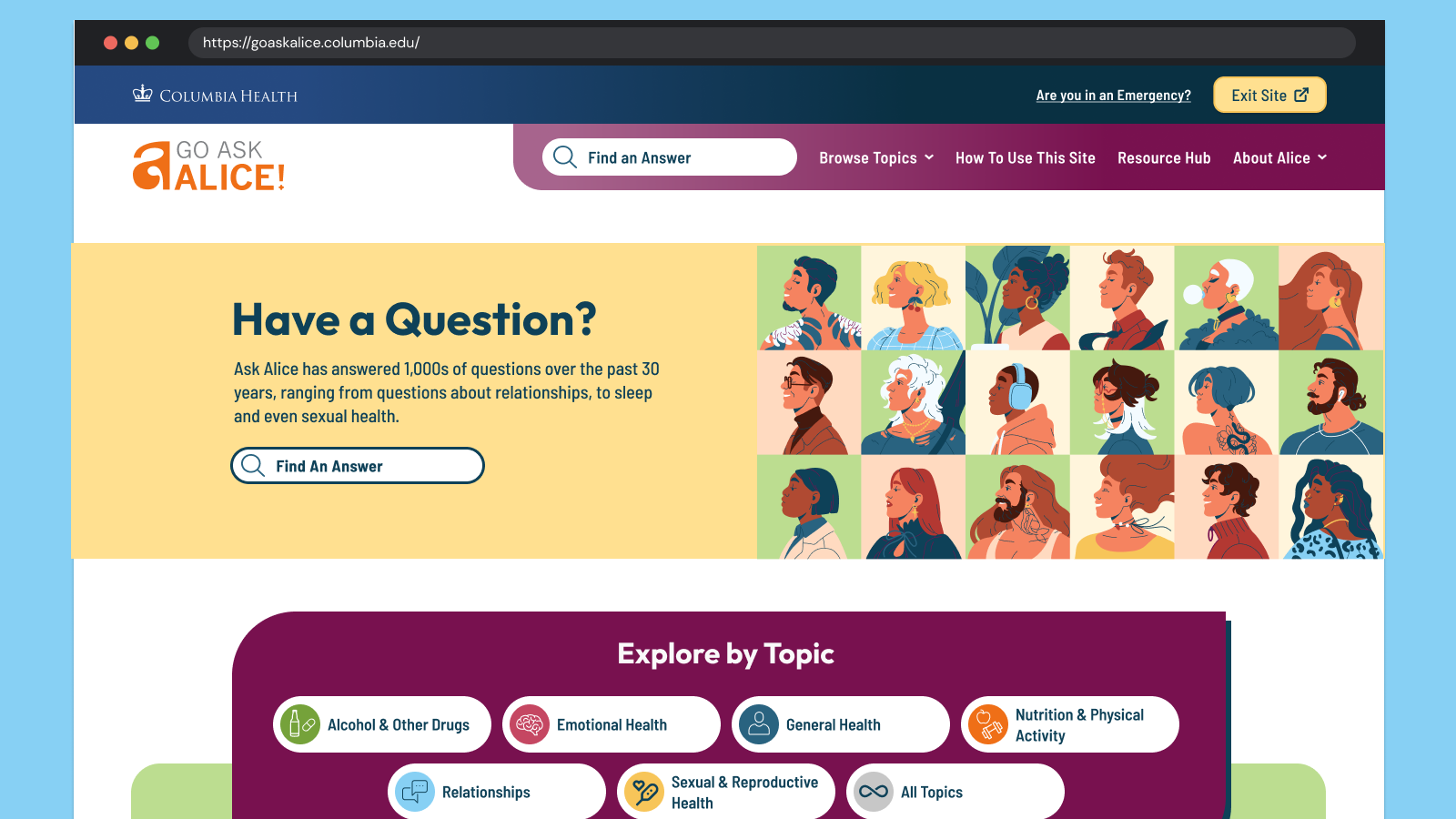
Go Ask Alice! (GAA!) is a judgment-free, anonymous question-and-answer site. It is part of Alice! Health Promotion, a department of Columbia Health. Their content has always been reliable, accurate, and thoroughly researched by professionals — humans, not Artificial intelligence (AI)! While organic search brings many different kinds of audiences across the globe to their answers, their primary audience is the college students of Columbia University. These digital natives need the content to speak their language and to look modern and relevant. Oomph leaned into the college-aged persona to create a user interface that was fun, unique, and approachable while acknowledging and respecting the gravity of the questions students ask.
The Brief
Empathize with both Visitors and Authors
We began by working to understand and empathize with their audience — which was easy. How many of us have gotten lost searching for answers to questions we might not ask our own close friends? Questions like, “Can I get Hepatitis A from eating raw seafood?”, “Do I have OCD?” or even “Why did my father abandon me?” Analytics supported how these types of questions were prevalent. They also showed that while many visitors found GAA! through search, those visitors found their answer and quickly left. While in some ways, this was positive — someone had a question and found a satisfactory answer — visitors missed lots of other answers to questions they might have.
For the Go Ask Alice! author team, technical issues often arose that were rooted in an overly complex content architecture and workflows that required lengthy workarounds. A complicated review and approval process and ineffective spam filters made combing through user submissions time-consuming. The longer it takes the team to create new answers, the less students will want to send GAA! their questions.
Our shared goals were to:
- Modernize the design and attract more web-savvy students to read answers to questions they didn’t know they should ask.
- Reinforce trust by being open about the process and the real human professionals behind the answers.
- Improve search, filtering, and findability by leading with topics first and guiding visitors to the types of questions that interest them most.
- Mitigate and simplify complex authoring processes to empower the small editorial team to answer more questions, support responses with engaging media, and reduce staff frustration.
The Approach
Modernization & Trust-building
Most Gen-Z students and younger generations won’t trust a site that isn’t designed well for a mobile screen. Our design process emphasized the small screen experience, keeping filters, sharing, citations, and recirculation in logical places. The Columbia Health brand is also a powerful lever for establishing trust with a young audience, but we were careful not to let it overpower GAA!’s own authentic brand.
Human responses feel human
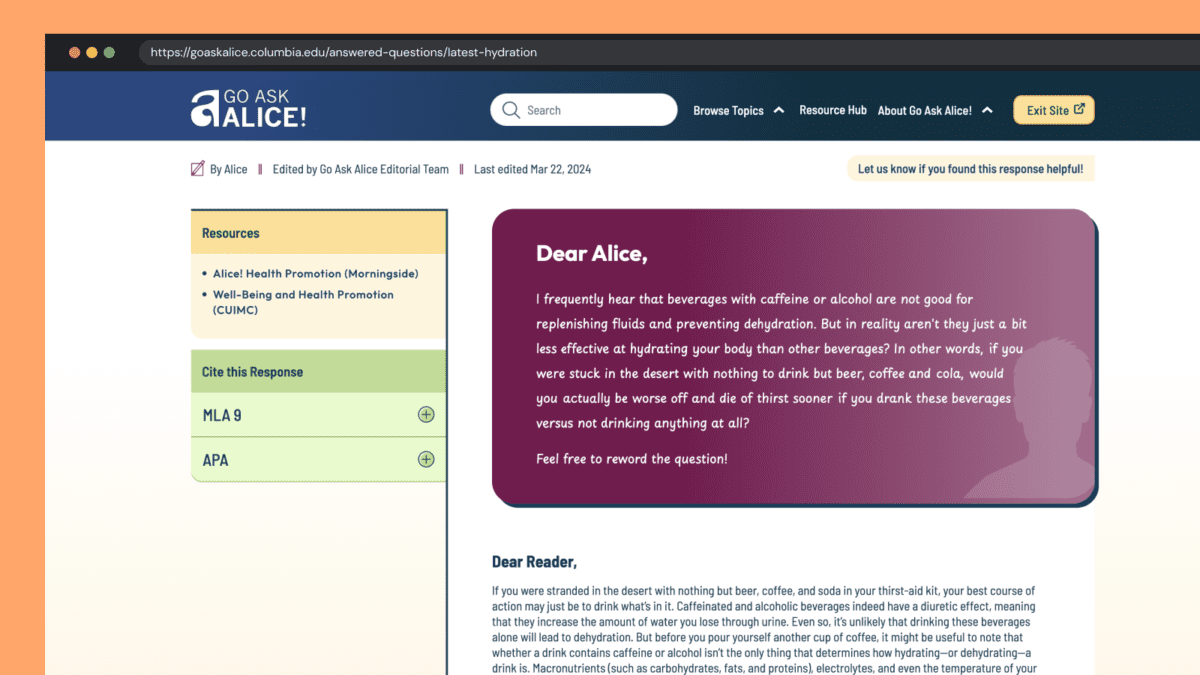
With the rise of AI and Google’s AI-generated search results, our design reinforced the humanity and empathy of GAA! by establishing a clear “Dear Alice” with a unique handwritten font and response from the author. When dealing with potentially sensitive and health-threatening answers, an authentic human voice is essential, and one that puts answers into context — is this thing I am asking about “normal”? What are the additional considerations I should know about? And so on. AI might give you one answer, but it won’t contain the context and nuance these anonymous human-generated questions require.
Unique Colors & Illustrations
Blue is strongly associated with Columbia Health and prevented the previous site from standing independently. Our design reduced focus on blue and shifted the site’s primary colors to maroon and yellow. Several other colors create wayfinding paths associated with answer topics. Scrolling the All Topics category page becomes a delightfully random color experience.
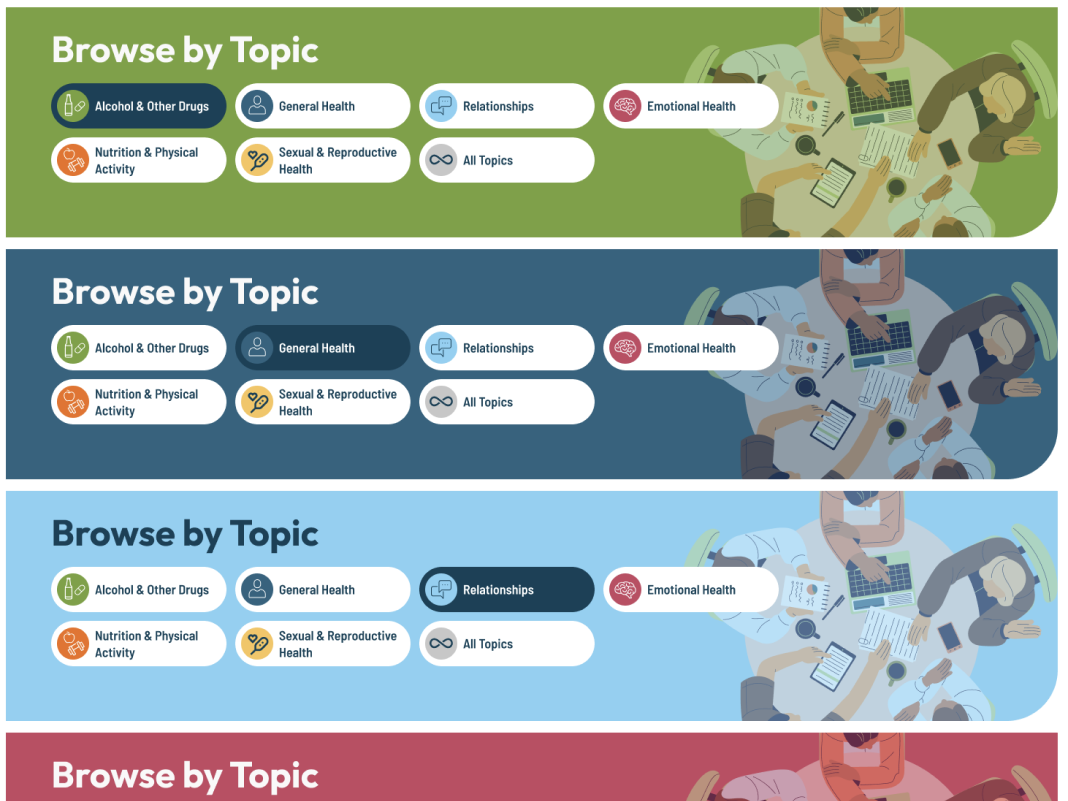
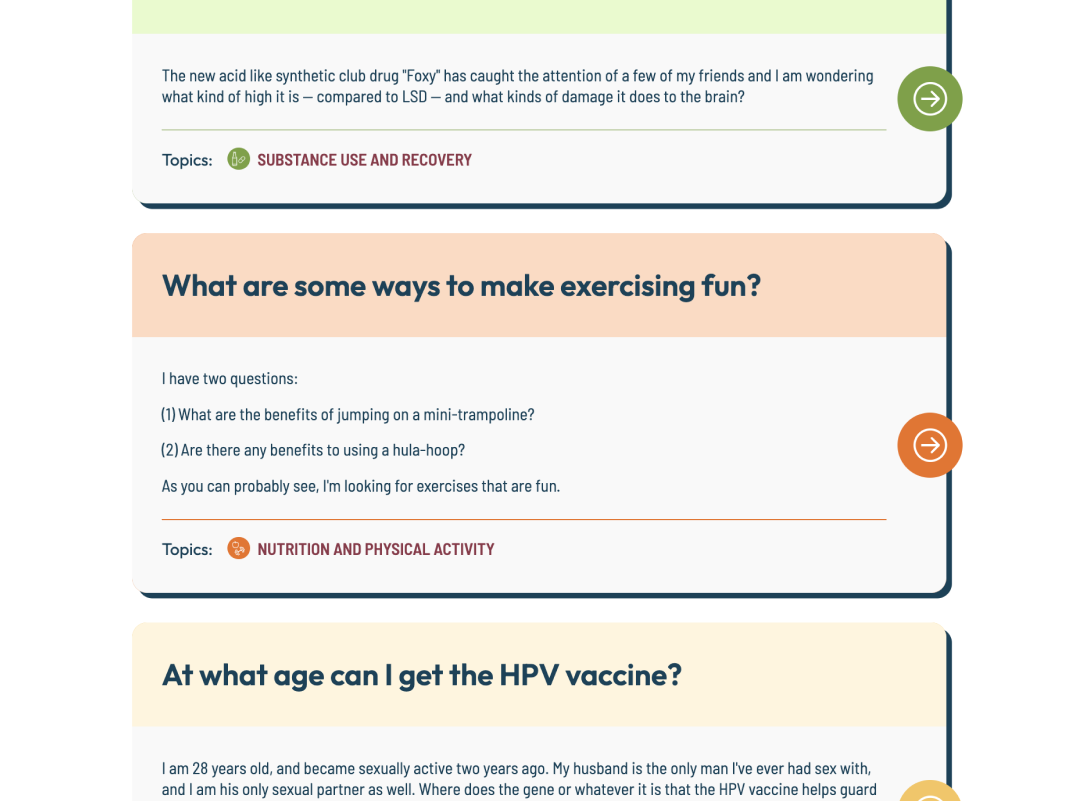
All color combinations adhere to WCAG 2.2 guidelines for Level AA, increasing the accessibility of this color-rich site for all visitors.
A new set of illustrations curates a sense of inclusivity better than stock photos could. A wide variety of humans were chosen to represent the diversity of student populations. Little details, like the randomized person in the site’s footer, add a sense of surprise and delight to the entire browsing experience.
Supporting Trust with New Features
Enhancement ideas started to surface during Discovery and continued throughout the process from both teams. Some of our favorites include:
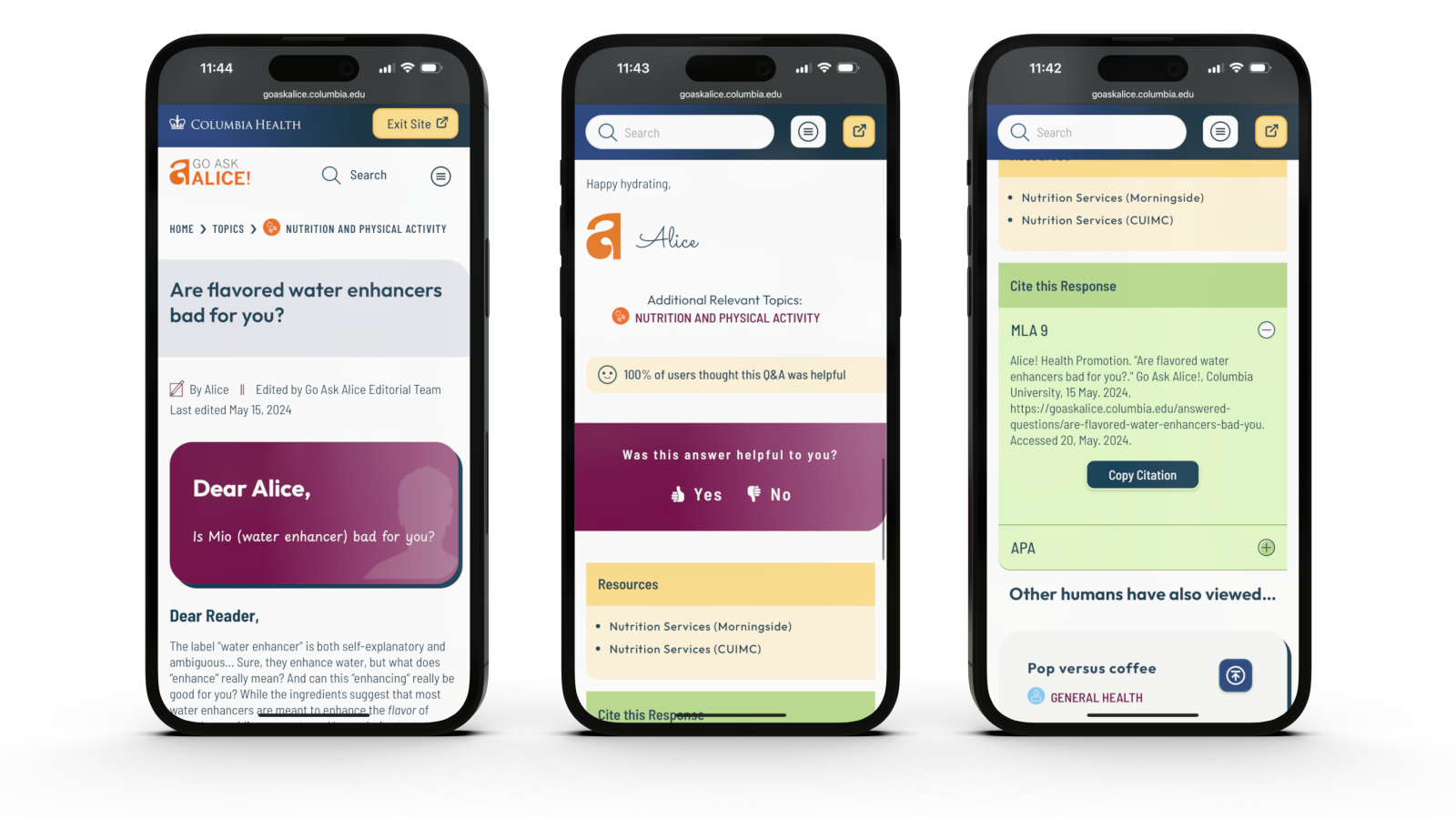
- The editor’s name, the answer’s published date, and its revision date were moved from the bottom of an answer and brought to the top. This information helps establish credibility quickly before reading an entire answer
- A feedback feature was added to individual answers, giving the GAA! team real-time data about the responses but also giving new visitors a greater sense of social proof
- A “Cite this Response” feature makes cutting and pasting an MLA (Modern Language Association) General Format- or Chicago-style academic citation into research papers easy. Since answers are so well-researched, these citations propagate GAA! further into academic culture
Increased User Engagement & Accessibility
Accessibility & Safety with a Quick Exit Button
Go Ask Alice! has many sensitive questions: questions about sexual abuse, suicide, drug use, and topics generally that you may not want someone else to see on your phone. We introduced a Quick Exit feature on each page of the site. When visitors click the button, a new tab is quickly opened, and the site’s browsing history is removed from their device. While this is not a well-known action in the general population, many in unsafe situations know how they work and what “Exit Site” means.
Oomph has written an in-depth article about the quick exit button and has released a Quick Exit Drupal Module to help other teams implement this feature.
Encouraging Question Browsing over Asking New Questions
It may seem counterintuitive, but one of the major workflows we redesigned was asking a question in the first place. The GAA! team has compiled thousands of great answers over the years and frequently updates old answers with new content to keep them current with changes in medical approaches. The small but mighty team didn’t want to answer the same questions over and over again by referring new askers to pre-published answers.
Our solution emphasized search and intentionally made access to the Question form difficult. Visitors are encouraged to search for answers to previously posted questions first. Quite often, they will discover an answer to their questions (and maybe some helpful answers to questions they did not expect). Only if they have searched first will they encounter the “Can’t find your question” call to action, which leads them through the steps of asking a new question.
The Results
The new site feels like a new beginning for the GAA! team. While the site has only recently launched, we look forward to seeing how it impacts key metrics like time on site and return visits. In the meantime, we’re also excited to see how the newly revamped admin experience helps the GAA! content team serve their audience even better than before.
When faced with a sensitive question about mental, nutritional, emotional, or sexual health, college students can continue to Go Ask Alice!
The tech industry has never been accused of moving slowly. The exponential explosion of AI tools in 2024, though, sets a new standard for fast-moving. The past few months of 2024 rewrote what happened in the past few years. If you have not been actively paying attention to AI, now is the time to start.
I have been intently watching the AI space for over a year. I started from a place of great skepticism, not willing to internalize the hype until I could see real results. I can now say with confidence that when applied to the correct problem with the right expectations, AI can make significant advancements possible no matter the industry.
In 2024, not only did the large language models get more powerful and extensible, but the tools are being created to solve real business problems. Because of this, skepticism about AI has shifted to cautious optimism. Spurred by the Fortune 500’s investments and early impacts, companies of every shape and size are starting to harness the power of AI for efficiency and productivity gains.
Let’s review what happened in Quarter Four of 2024 as a microcosm of the year in AI.
New Foundational Models in the AI Space
A foundational large language model (LLM) is one which other AI tools can be built from. The major foundational LLMs have been Chat GPT, Claude, Llama, and Gemini, operated by OpenAI & Microsoft, Anthropic, Meta, and Google respectively.
In 2024, additional key players entered the space to create their own foundational models.
Amazon
Amazon has been pumping investments into Anthropic as their operations are huge consumers of AI to drive efficiency. With their own internal foundational LLM, they could remove the need to share their operational data with an external party. Further, like they did with their AWS business, they can monetize their own AI services with their own models. Amazon Nova was launched in early December.
xAI
In May of 2024, X secured funding to start to create and train its own foundational models. Founder Elon Musk was a co-founder of OpenAI. The company announced they would build the world’s largest supercomputer in June and it was operational by December.
Nvidia
In October, AI chip-maker Nvidia announced it own LLM named Nemotron to compete directly with OpenAI and Google — organizations that rely on its chips to train and power their own LLMs.
Rumors of more to come
Apple Intelligence launched slowly in 2024 and uses OpenAI’s models. Industry insiders think it is natural to expect Apple to create its own LLM and position it as a privacy-first, on-device service.
Foundational Model Advancements
While some companies are starting to create their own models, the major players have released advanced tools that can use a range of inputs to create a multitude of outputs:
Multimodal Processing
AI models can now process and understand multiple types of data together, such as images, text, and audio. This allows for more complex interactions with AI tools.
Google’s NotebookLM was a big hit this year for its ability to use a range of data as sources, from Google Docs to PDFs to web links for text, audio, and video. The tool essentially allows the creation of small, custom RAG databases to query and chat with.
Advanced Reasoning
OpenAI’s 01 reasoning model (pronounced “Oh One”) uses step-by-step “Chain of Thought” to solve complex problems, including math, coding, and scientific tasks. This has led to AI tools that can draw conclusions, make inferences, and form judgments based on information, logic, and experience. The queries take longer but are more accurate and provide more depth.
Google’s Deep Research is a similar product that was released to Gemini users in December.
Enhanced Voice Interaction
More and more AI tools can engage in natural and context-aware voice interactions — think Siri, but way more useful. This includes handling complex queries, understanding different tones and styles, and even mimicking personalities such as Santa Claus.
Vision Capabilities
AI can now “see” and interpret the world through cameras and visual data. This includes the ability to analyze images, identify objects, and understand visual information in real-time. Examples include Meta’s DINOv2, OpenAI’s GPT-4o, and Google’s PaliGemma.
AI can also interact with screen displays on devices, allowing for a new level of awareness of sensory input. OpenAI’s desktop app for Mac and Windows is contextually aware of what apps are available and in focus. Microsoft’s Co-pilot Vision integrates with the Edge browser to analyze web pages as users browse. Google’s Project Mariner prototype allows Gemini to understand screen context and interact with applications.
While still early and fraught with security and privacy implications, the technology will lead to more advancements for “Agentic AI” which will continue to grow in 2025.
Agentic Capabilities
AI models are moving towards the ability to take actions on behalf of users. No longer confined to chat interfaces alone, these new “Agents” will perform tasks autonomously once trained and set in motion.
Note: Enterprise leader SalesForce launched AgentForce in September 2024. Despite the name, these are not autonomous Agents in the same sense. Custom agents must be trained by humans, given instructions, parameters, prompts, and success criteria. Right now, these agents are more like interns that need management and feedback.
Specialization
2024 also saw an increase in models designed for specific domains and tasks. With reinforcement fine-tuning, companies are creating tools for legal, healthcare, finance, stocks, and sports.
Examples include Sierra, who offers a specifically trained customer service platform, and LinkedIn agents as hiring assistants.
What this all means for 2025
It’s clear that AI models and tools will continue to advance, and businesses that embrace AI will be in a better position to thrive. To be successful, businesses need an experimental mindset of continuous learning and adaptation:
- Focus on AI Literacy — Ensure your team understands AI and its capabilities. Start with use cases that add value immediately.
- Prioritize Data Quality — AI models need high-quality, relevant data to be effective. Start cleaning and preparing your internal data before implementing AI at scale.
- Combine AI and Human Expertise — Use AI to augment human capabilities, not replace them. Think of AI as a junior employee who will require input, alignment, and reinforcement.
- Experiment and Iterate — Be willing to try new approaches and adapt based on results. Include measurement in your plans — collect data before and after to benchmark progress.
- Embrace Ethical AI — Implement policies to ensure AI is used responsibly and ethically. Investigate ways the company can offset carbon and support cleaner energy, as AI tools require more electricity than non-AI tools. Understand hallucinations and the new, more complex “scheming” in reasoning models problem.
- Prepare for Change — Understand that technology is constantly evolving, and business models will need to adapt.
While the models will continue to get better into 2025, don’t wait to explore AI. Even if the existing models never improve, they are powerful enough to drive significant gains in business. Now is the time to implement AI in your business. Choose a model that makes sense and is low-friction — if you are an organization that uses Microsoft products, start with a trial of AI add-ons for office tools, for example. Start accumulating experience with the tools at hand, and then expand to include multiple models to evaluate more complex AI options that may have greater business impact. It almost doesn’t matter which you choose, as long as you get started.
Oomph has started to experiment with AI ourselves and Drupal has exciting announcements about integrating AI tools into the authoring experience. If you would like more information, please reach out for a chat.
The Challenge
For nearly a decade, Oomph has been the strategic digital partner behind two key member engagement platforms for one of the largest health insurers in the United States. These platforms have consistently driven steady year-over-year growth, strengthening relationships between members and their healthcare provider.
However, as digital engagement in healthcare surged, the existing on-premise data center was no longer the right fit. Members increasingly relied on the platform for personalized health resources, wellness programs, and provider access, creating new demands for scalability, security, and performance.
With rising traffic and evolving member expectations, the insurer needed a future-ready infrastructure that could seamlessly scale, ensure compliance, and provide a frictionless experience for all users. To achieve this, Oomph led a full cloud migration—on time and without disruption.
The Approach
The legacy data center model had effectively supported planned growth, but it wasn’t built for unpredictable spikes in engagement or the flexibility needed for future expansion. Maintaining high performance without excessive fixed costs required a scalable cloud solution. After evaluating multiple cloud providers, Oomph selected AWS, supported by Cloudticity, a HIPAA/HITRUST-managed services provider specializing in healthcare security and compliance. In collaboration with our client and Cloudticity, our platform team executed the migration in just three months, ensuring:
- Scalable, cost-efficient infrastructure: Auto-scaling eliminated the need for expensive, fixed-capacity hardware.
- Enhanced security & compliance: Cloudticity’s advanced threat monitoring strengthened HIPAA/HITRUST compliance.
- More flexibility for engineering teams: Granular access controls empowered developers to optimize and scale faster.
The migration was seamless—no downtime, no disruption, just an infrastructure built for the future.
The Results
Performance, Security, and Agility at Scale
The transition to AWS + Cloudticity unlocked measurable performance gains and ensured the platform was ready for future growth, demand shifts, and disaster recovery scenarios.
- Speed & Performance: Faster load times and seamless functionality, even under peak traffic conditions.
- Stronger Security: Advanced HIPAA-compliant threat monitoring reduces risk and safeguards member data.
- Scalability & Flexibility: Auto-scaling enables instant resource allocation without wasteful over-provisioning.
- Engineering Autonomy: Granular access controls give internal teams greater agility in optimizing the platform.
What started as an infrastructure upgrade became a long-term strategic advantage. With a cloud-based foundation in place, this mission-critical platform is faster, more resilient, and primed for continued innovation.
Built for the Future of Digital Healthcare
Healthcare organizations can no longer afford rigid, outdated digital infrastructure—patients and members expect seamless, always-on access to trusted health resources.
If your platform isn’t built to scale, secure sensitive data, or adapt to evolving patient needs, it’s time to rethink your approach. Let’s talk about how we can help.
The U.S. is one of the most linguistically diverse countries in the world. While English may be our official language, the number of people who speak a language other than English at home has actually tripled over the past three decades.
Statistically speaking, the people you serve are probably among them.
You might even know they are. Maybe you’ve noticed an uptick in inquiries from non-English speaking people or tracked demographic changes in your analytics. Either way, chances are good that organizations of all kinds will see more, not less, need for translation — especially those in highly regulated and far-reaching industries, like higher education and healthcare.
So, what do you do when translation becomes a top priority for your organization? Here, we explain how to get started.
3 Solutions for Translating Your Website
Many organizations have an a-ha moment when it comes to translations. For our client Lifespan, that moment came during its rebrand to Brown Health University and a growing audience of non-English speaking people. For another client, Visit California, that moment came when developing their marketing strategies for key global audiences.
Or maybe you’re more like Leica Geosystems, a longtime Oomph client that prioritized translation from the start but needed the right technology to support it.
Whenever the time comes, you have three main options:
Manual translation and publishing
When most people think of translating, manual translation comes to mind. In this scenario, someone on your team or someone you hire translates content by hand and uploads the translation as a separate page to the content management system (CMS).
Translating manually will offer you higher quality and more direct control over the content. You’ll also be able to optimize translations for SEO; manual translation is one of the best ways to ensure the right pages are indexed and findable in every language you offer them. Manual translation also has fewer ongoing technical fees and long-term maintenance attached, especially if you use a CMS like Drupal which supports translations by default.
“Drupal comes multi-lingual out of the box, so it’s very easy for editors to publish translations of their site and metadata,” Oomph Senior UX Engineer Kyle Davis says. “Other platforms aren’t going to be as good at that.”
While manual translation may sound like a winning formula, it can also come at a high cost, pushing it out of reach for smaller organizations or those who can’t allocate a large portion of their budget to translate their website and other materials.
Integration with a real-time API
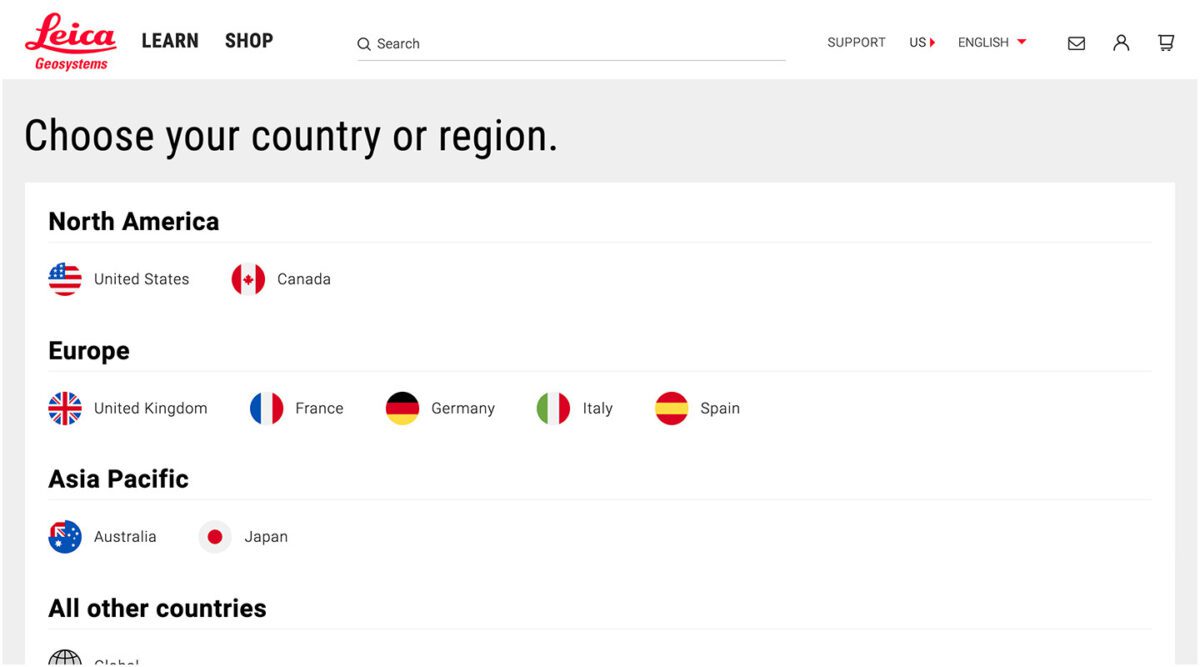
Ever seen a website with clickable international flags near the top of the page? That’s a translation API. These machine translation tools can translate content in the blink of an eye, helping users of many different languages access your site in their chosen language.
“This is different than manual translation, because you aren’t optimizing your content in any way,” Oomph Senior UX Engineer John Cionci says. “You’re simply putting a widget on your page.”
Despite their plug-and-play reputation, machine translation APIs can actually be fairly curated. Customization and localization options allow you to override certain phrases to make your translations appropriate for a native speaker. This functionality would serve you well if, like Visit California, you have a team to ensure the translation is just right.
Though APIs are efficient, they also do not take SEO or user experience into account. You’re getting a direct real-time translation of your content, nothing more and nothing less. This might be enough if all you need is a default version of a page in a language other than English; by translating that page, you’re already making it more accessible.
However, this won’t always cut it if your goal is to create more immersive, branded experiences — experiences your non-English-speaking audience deserves. Some translation API solutions also aren’t as easy to install and configure as they used to be. While the overall cost may be less than manual translation, you’ll also have an upfront development investment and ongoing maintenance to consider.
Use Case: Visit California
Manual translation doesn’t have to be all or nothing. Visit California has international marketing teams in key markets skilled in their target audiences’ primary languages, enabling them to blend manual and machine translation.
We worked with Visit California to implement machine translation (think Google Translate) to do the heavy lifting. After a translation is complete, their team comes in to verify that all translated content is accurate and represents their brand. Leveraging the glossary overrides feature of Google Cloud Translate V3, they can tailor the translations to their communication objectives for each region. In addition, their Drupal CMS still allows them to publish manual translations when needed. This hybrid approach has proven to be very effective.
Third-party translation services
The adage “You get what you pay for” rings true for translation services. While third-party translation services cost more than APIs, they also come with higher quality — an investment that can be well worth it for organizations with large non-English-speaking audiences.
Most translation services will provide you with custom code, cutting down on implementation time. While you’ll have little to no technical debt, you will have to keep on top of recurring subscription fees.
What does that get you? If you use a proxy-based solution like MotionPoint, you can expect to have content pulled from your live site, then freshly translated and populated on a unique domain.
“Because you can serve up content in different languages with unique domains, you get multilingual results indexed on Google and can be discovered,” Oomph Senior Digital Project Manager Julie Elman says.
Solutions like Ray Enterprise Translation, on the other hand, combine an API with human translation, making it easier to manage, override, moderate, and store translations all within your CMS.
Use Case: Leica Geosystems
Leica’s Drupal e-commerce store is active in multiple countries and languages, making it difficult to manage ever-changing products, content, and prices. Oomph helped Leica migrate to a single-site model during their migration from Drupal 7 to 8 back in 2019.
“Oomph has been integral in providing a translation solution that can accommodate content generation in all languages available on our website,” says Jeannie Records Boyle, Leica’s e-Commerce Translation Manager.
This meant all content had one place to live and could be translated into all supported languages using the Ray Enterprise Translation integration (formerly Lingotek). Authors could then choose which countries the content should be available in, making it easier to author engaging and accurate content that resonates around the world.
“Whether we spin up a new blog or product page in English or Japanese, for example, we can then translate it to the many other languages we offer, including German, Spanish, Norwegian Bokmål, Dutch, Brazil Portuguese, Italian, and French,” Records Boyle says.
Taking a Strategic Approach to Translation
Translation can be as simple as the click of a button. However, effective translation that supports your business goals is more complex. It requires that you understand who your target audiences are, the languages they speak, and how to structure that content in relation to the English content you already have.
The other truth about translation is that there is no one-size-fits-all option. The “right” solution depends on your budget, in-house skills, CMS, and myriad other factors — all of which can be tricky to weigh.
Here at Oomph, we’ve helped many clients make their way through website translation projects big and small. We’re all about facilitating translations that work for your organization, your content admins, and your audience — because we believe in making the Web as accessible as possible for all.
Want to see a few recent examples or dive deeper into your own website translation project? Let’s talk.
THE BRIEF
Three Organizations Working Towards One Goal
The American Foundation for Suicide Prevention (AFSP), the National Action Alliance for Suicide Prevention (Action Alliance), and the Suicide Prevention Resource Center (SPRC) have been commissioning The Harris Poll to conduct a bi-annual, nationally representative survey of adults in the U.S. to understand the public’s beliefs and attitudes about mental health and suicide.
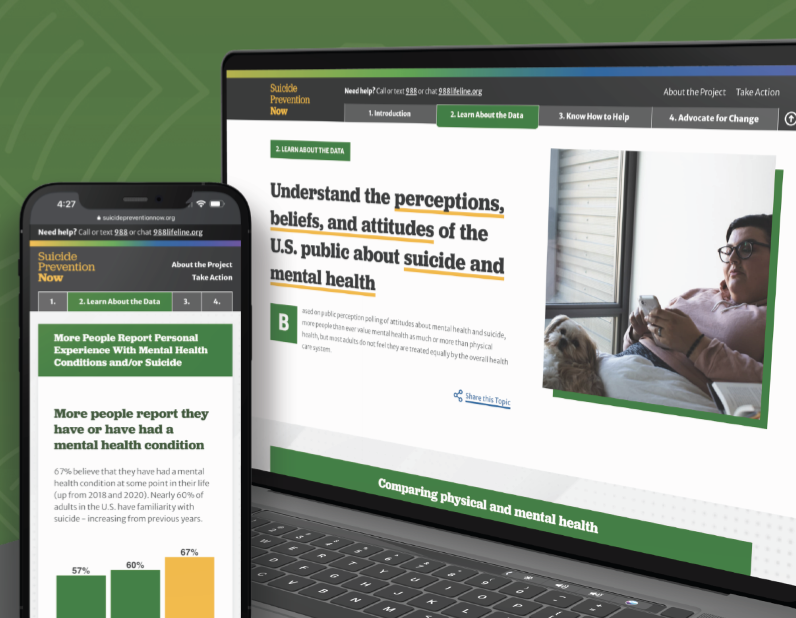


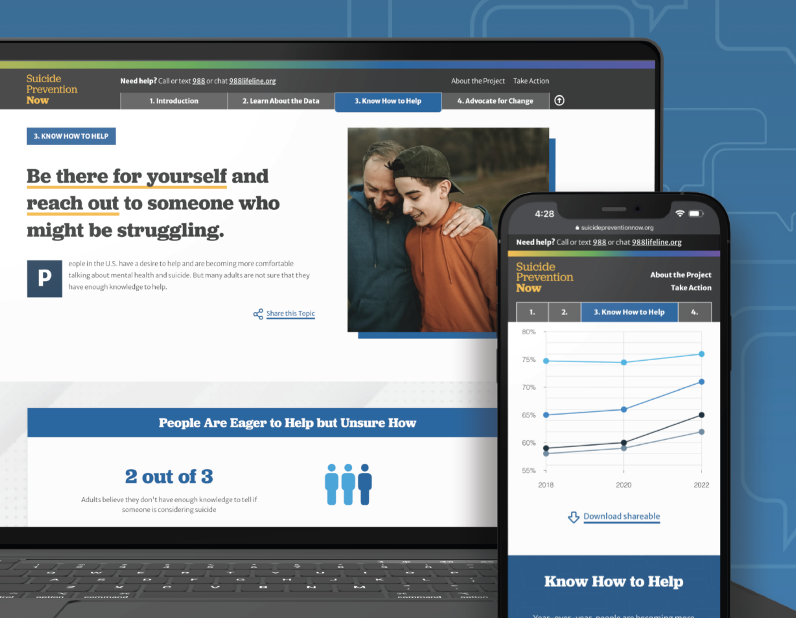
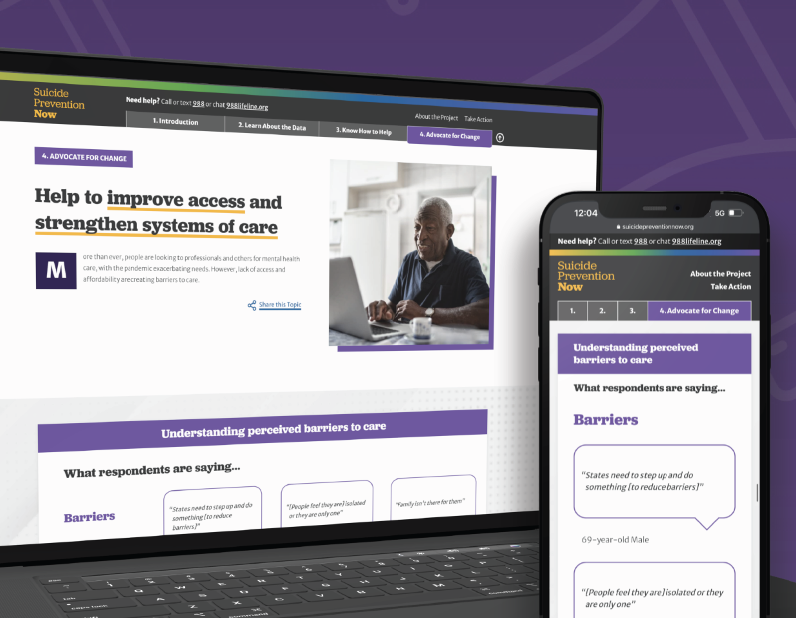
This year, 2022, all three suicide prevention organizations teamed up with Oomph to take that data and distill it into a microsite for easy consumption among professionals and the general public who visit the site.
The data from the poll shows that progress has been made, but there is still more to do. We all must continue to learn more about suicide and mental health, particularly through increased research efforts, teaching everyone how to help prevent suicide and strengthen mental health, and advocate for improved access to care and robust crisis services.
Oomph made sure our approach to information design, branding, and messaging came across effectively and clearly. How could we use data to show people which actions they could personally take to affect positive change?
THE APPROACH
Design Sprint to E-Learning Microsite
Our initial idea of the audience was more public facing rather than a specific audience. We started our design approach to be stylized and playful.
Taking a step back, we regrouped and determined that the audience was more academic and administrative, therefore it was to lean towards a professional tone. A new idea clicked — we could present this microsite as an e-learning experience.

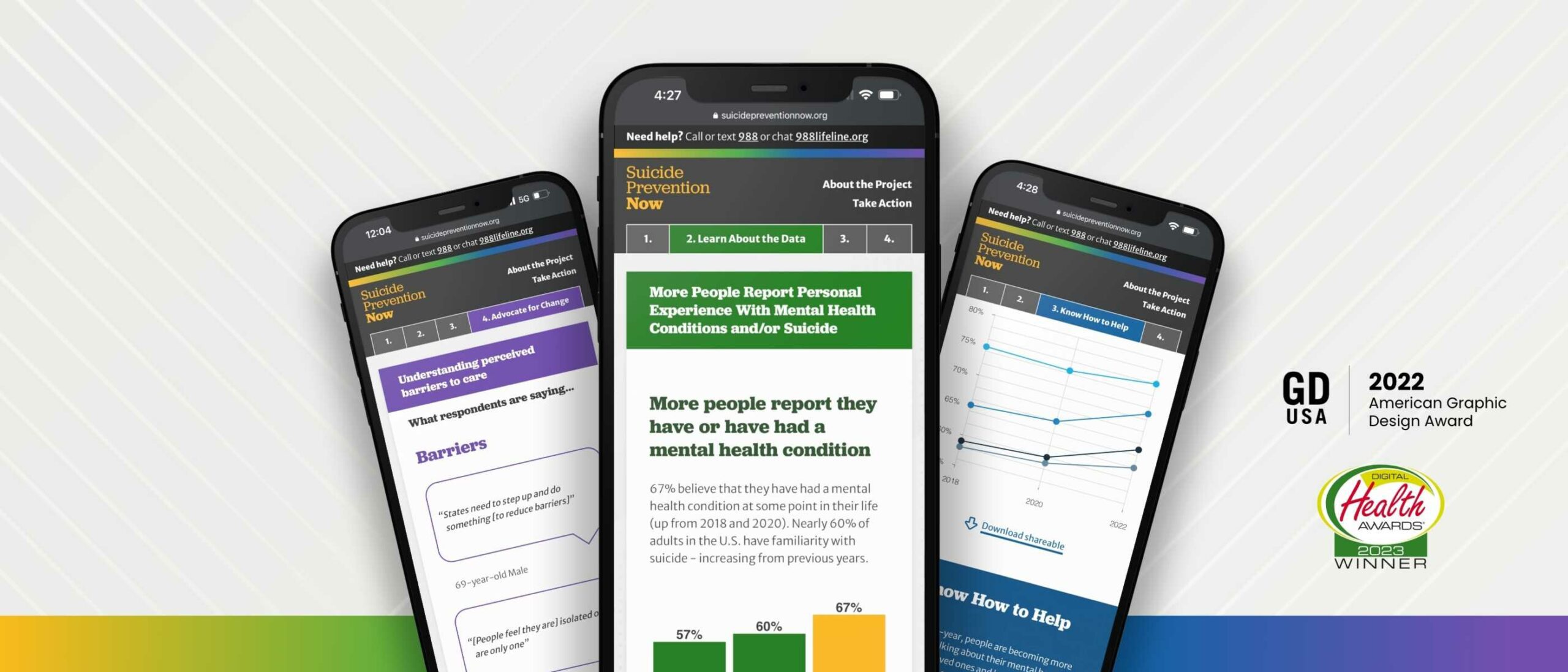
The new design direction features four key chapters: the Introduction, Learn About the Data, Know How to Help, and Advocate for Change. By implementing a tab-like navigation, it allows for users to hop to each section they may be most interested in, and reads as if it is an eBook.
Each section is color coded, and the navigation has a gradient that brings in all of the sections together in unity to showcase that message throughout. Each section follows a similar pattern: an introduction, data from the Harris Poll, an opportunity to find resources about the chapter, and shareable resources to help spread the message on the viewer’s own social channels. We hope that by the end of the microsite, the user is ready to inform themselves further by finding resources or sharing about the current perceptions of suicide.
THE RESULTS
Ongoing Public-education Impact
While Suicide Prevention Now is just one step of many, we hope that this project will help more people to become an advocate, or help spread awareness about suicide prevention. We hope it helps to save lives.
While working on this project, we became aware of a national suicide hotline number that is quick to dial and easy to remember, just like 911. Dial 988 to be connected to a friendly and helpful advocate if you or someone you know are having thoughts of suicide.
Working with Oomph was a great experience all the way around. From exploration to delivery, Oomph provided excellent guidance, and the quality of the final site is fantastic! I look forward to working with the team again in the future.
JONATHAN DOZIER-EZELL Director of Digital Communications,
American Foundation for Suicide Prevention
The Brief
Oomph has worked with Lifespan since 2010 and created the second version of their intranet on Drupal 7. A critical tool like an intranet needs regular maintenance. Even with regular updates, there comes a time when the whole platform needs a re-architecture to be flexible, secure, and performant.
In 2021, it was time to plan the next phase of the intranet on Drupal 9. Lifespan used the redesign as an opportunity to realign the employee journeys with the evolution of their work. And COVID-19 had provided an opportunity to reevaluate whether a security-first, HIPAA-compliant intranet could be available to those working from home.
Departments
Job & Clinical Tools
Staff Contacts
Critical Top-Tasks
The Oomph team ran a Discovery and research phase to gather requirements and understand employee expectations. We ran workshops with client stakeholders, identified important work tasks and created 5 employee personas, conducted one-on-one interviews with key persona types, and gathered feedback from employees with an online and email survey.
Through this research, we started to see two different types of tasks emerge: those that required speed to a destination and those that required exploration and unstructured browsing.
Tasks requiring speed to completion:
- Access health and safety policies
- Access a staff directory and immediately contact high-value individuals
- Access job tools, which are often 3rd-party digital services, for everything from timesheets to diagnostics to general education
- Access online forms to request items and services
- Access HR and employment benefits
Tasks requiring unstructured browsing:
- Access Department sites, particularly my department for relevant news & events
- Be exposed to company culture through up-to-date news and events, videos, seminars, and important business announcements or press coverage
- Access the internal job board to find advancement opportunities
- If I am a new employee, or a new manager, access onboarding material and quick links for new individuals
- Visit and browse the Bulletin Board
It became clear through our process that Lifespan employees needed to move quickly and slowly, often in the same session, depending on the important tasks they needed to complete. The intranet needed to support both types of journeys to remain a successful platform for getting work done and absorbing company culture.
The Approach
A Focused Priority on Search
Expectations about fast and accurate search are high because of you know who. When designing search for an employee intranet, the baseline requirements are even higher. We knew that we had to get the design and implementation of search right.
We took a learn-once, use-everywhere approach when it came to search interfaces. Search would be a core part of finding many types of content — tools, forms, people, departments, locations, and more. Each had to have a similar structure and set of filtering options to be the most useful.
The list of tools, locations, or people needed smart defaults. Before someone conducts their own search, each screen displays popular searches and the common content people need to access. In some cases, an employee does not even need to search in order to find what they need.
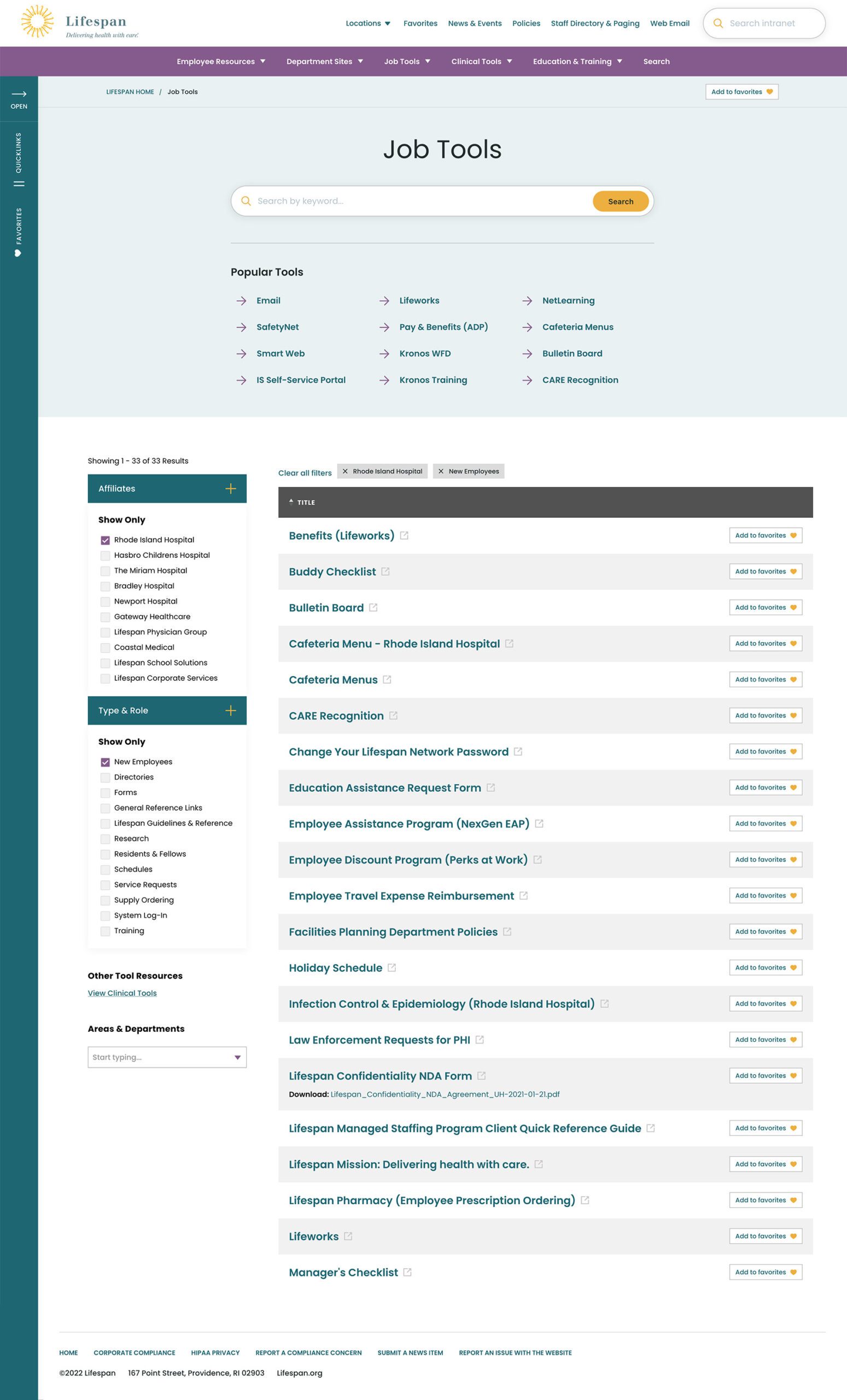
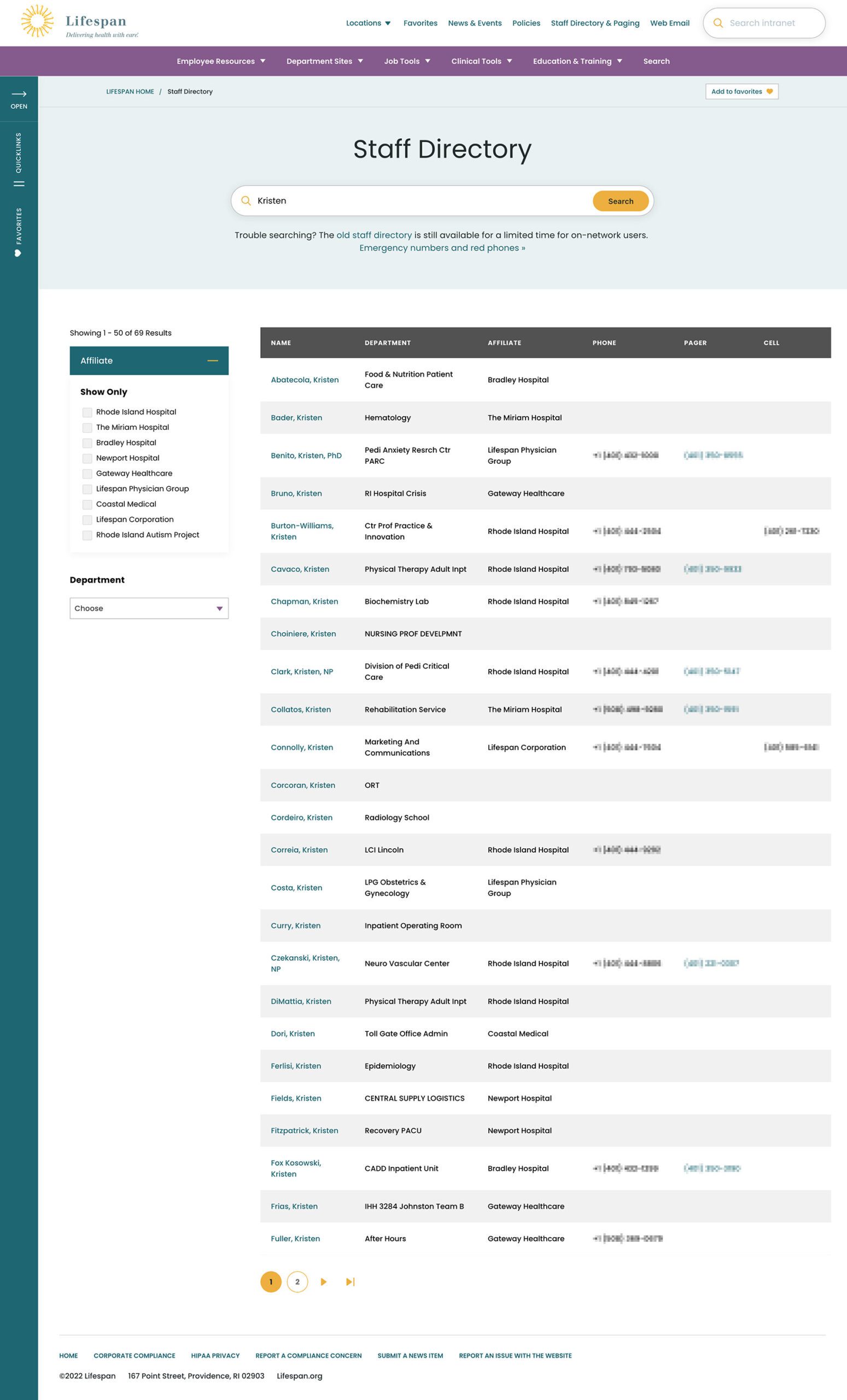
Two search pages, similar interfaces: The Job Tools search and Staff Directory follow similar patterns, adhering to our “learn once, use everywhere” rule
Personalization that follows Employees from Device to Device
Personalization had to be a part of our solution as well. Employees are able to use S.S.O. to access the intranet from their personal devices or workstation computers in the hospitals. Workstations are often shared between multiple clinical staff, therefore, our system needed to support stopping one task on on device and picking it back up on another.
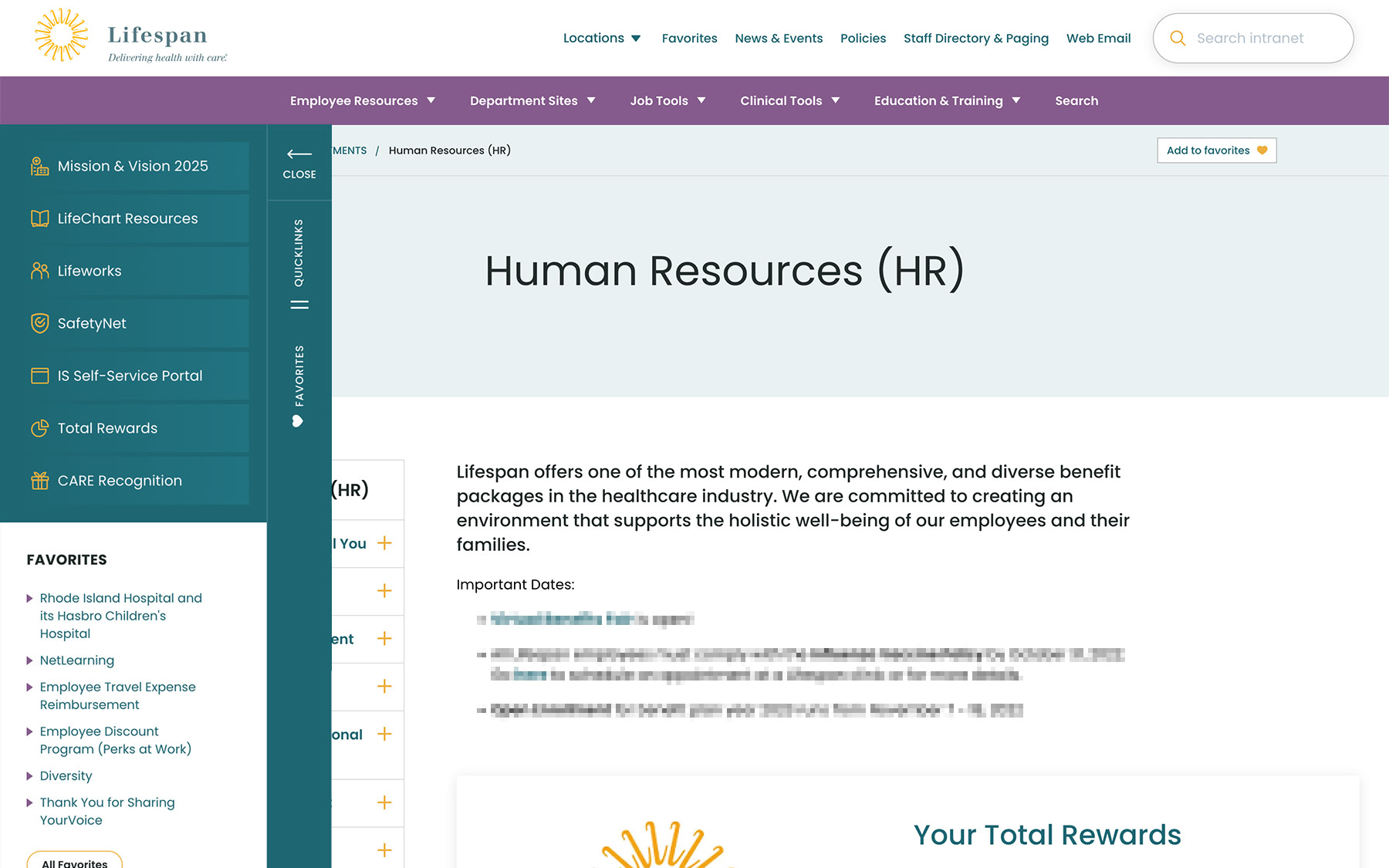
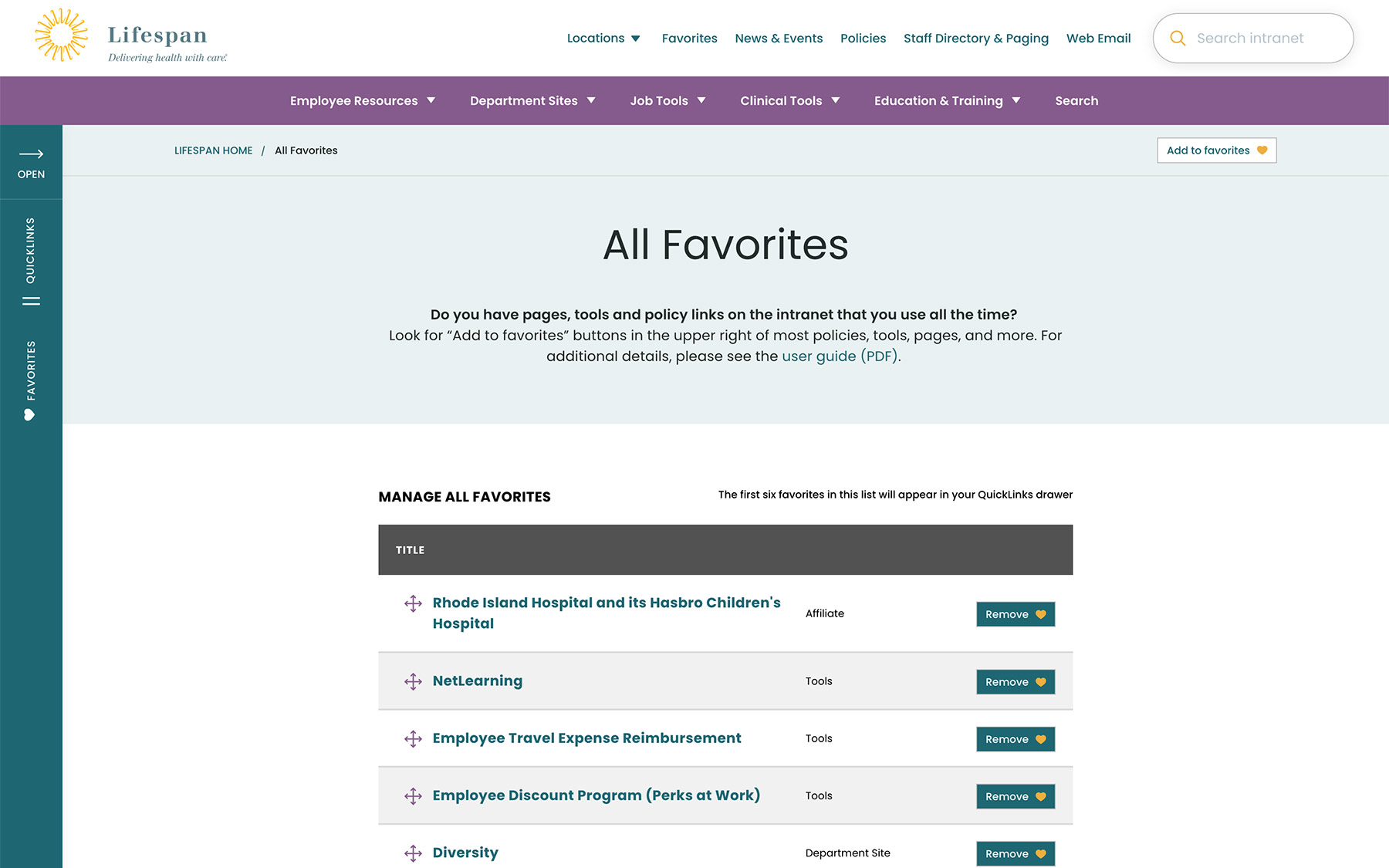
A Favorites feature allows employees to create their own transportable bookmarks. Almost everything on the site can be bookmarked, reducing the need to search for commonly used content and tools. Six custom favorites are available from the left drawer at all times, while the entire list of favorites is one more click away.
Supporting Speed and Engagement
Speed is at the heart of critical tasks and high-quality patient care. A nurse, at a shared workstation, needs to log in quickly, find the tool they need, and administer care. Time is critical. They don’t want extra clicks, a search that doesn’t work intuitively, or slow page load times. Staff don’t want it, and management doesn’t want it, either.
Engagement is slower and the intention is different. Speed is for tasks. Engagement is for exploring. This is how company culture is communicated and absorbed. This is when people catch up with department and company news, find events to attend, view a photo gallery from an event they missed, or browse a bulletin board to swap items with other employees. You can’t have an intranet that is ALL business just like you can’t have an intranet that is NO business.
A Dashboard Built for Speed or Browsing
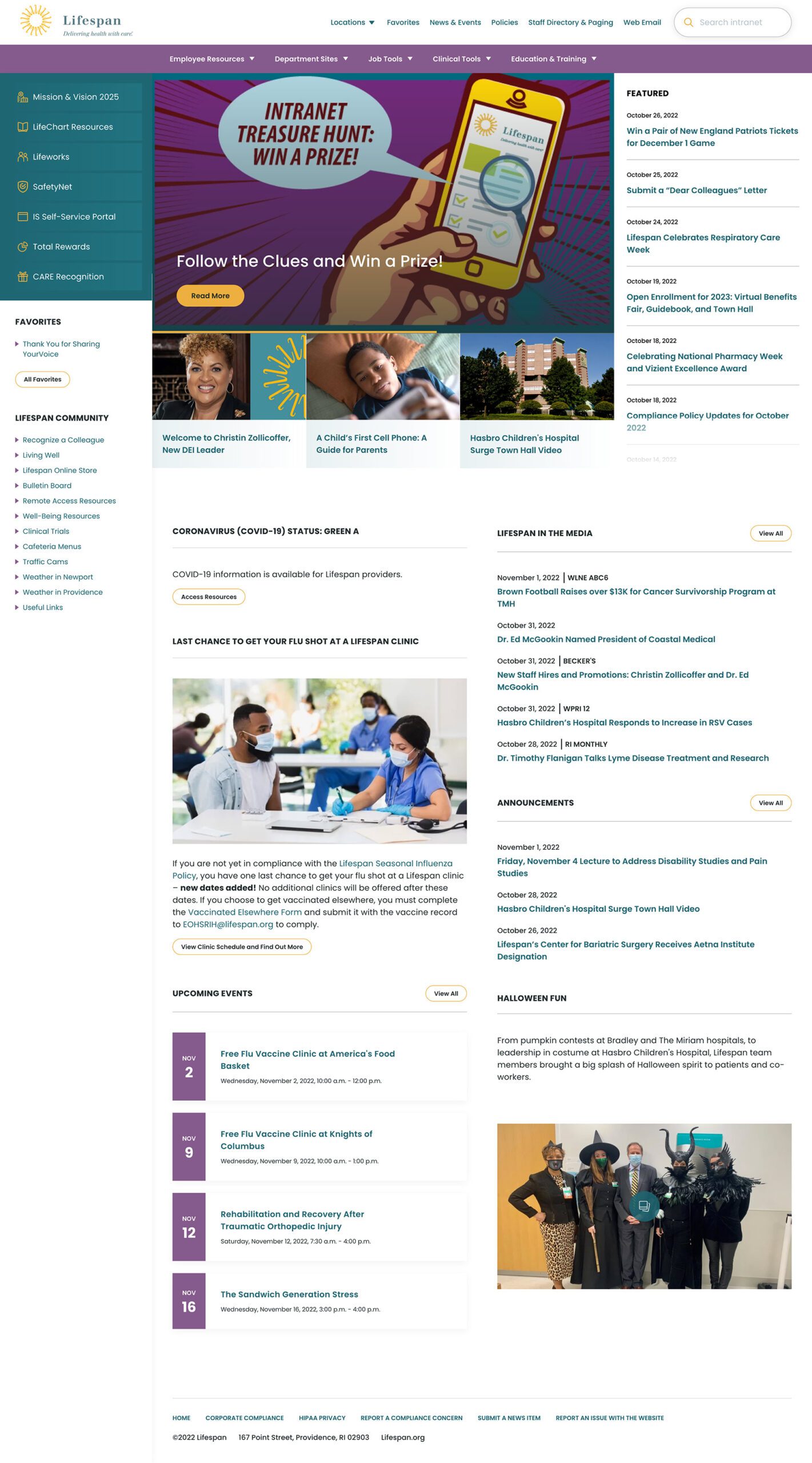
On the starting page, an employee might be in need for something immediate or might have time to explore. We do not know their intention, therefore, this page needs to support both.
The left drawer is open to employees on the dashboard. It is open to show them what it contains and to remove a click when accessing the important common destinations within. The first seven links are common items for any employee, curated by the Lifespan team. They are a mixture of tactical items — like time sheets — and company culture items — like the CARE recognition program.
Below that are the employee Favorites. The first six favorites are shown while all are available with an extra click.
The top navigation supports speed to common destinations, some of which are search interfaces and others which are built for browsing.
The rest of the page showcases engagement and company culture. Featured news stories with images are balanced with quick news and event lists. Flexible content sections allow authors to add and remove content blocks as new items are required.
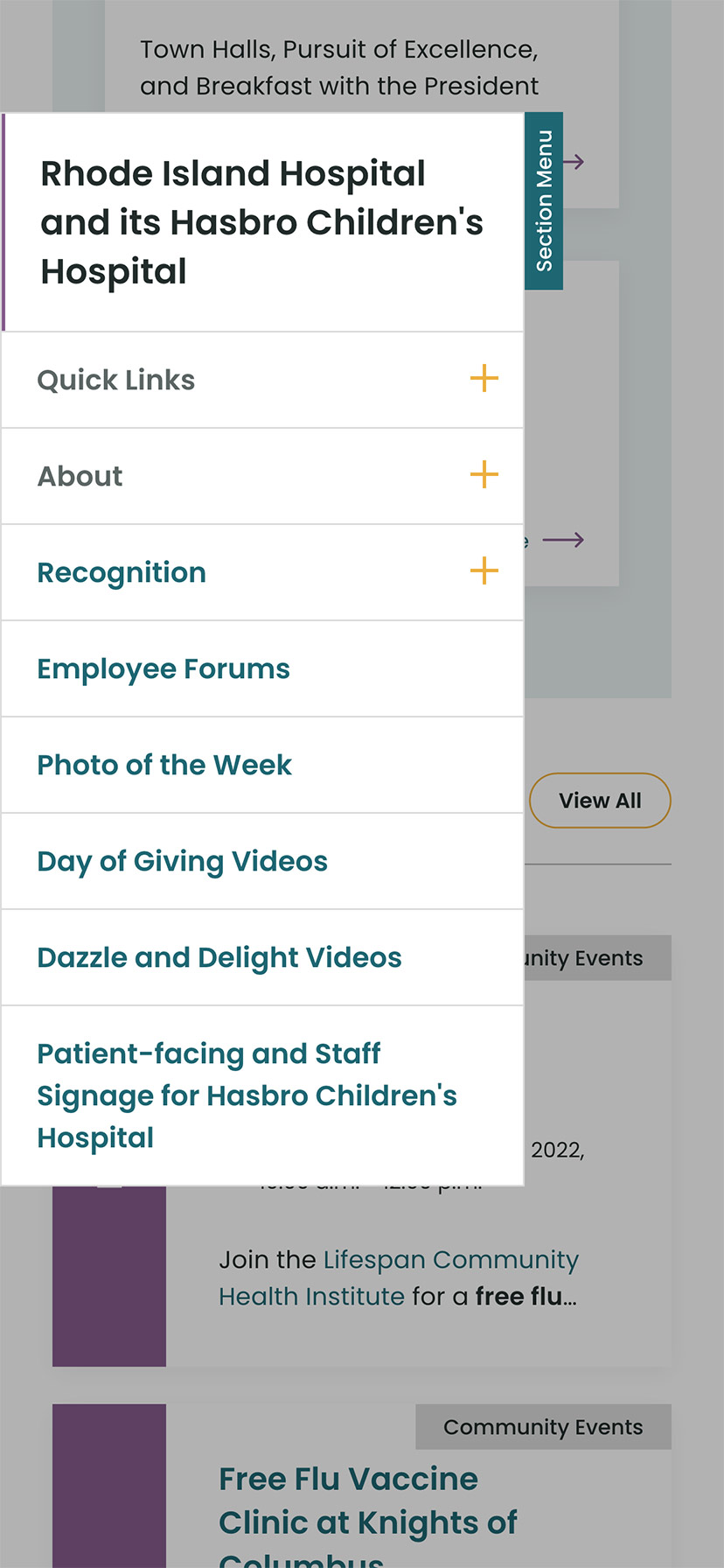
Other content pages that were focused on engagement are the deeper News and Events pages, customized Location pages (for each major hospital location), and a community Bulletin Board.

The Results
Smooth Onboarding and Acceptance
No matter how confident our teams were, we didn’t really know if the redesign was a success until employees moved from the older tools they were familiar with. The Lifespan team did a fantastic job creating walk through videos ahead of the launch. Old tools and directories stayed available for a period of overlap, but our teams saw quick adoption into the new tools in favor of the familiar.
Since the intranet is now available off of the closed Lifespan network, we have seen mobile traffic increase dramatically. The responsive design is an improved experience over the previous intranet and the numbers prove it. In fact, we have found that more employees engage in company culture content on their personal devices, while using the company workstations for their tasks.
Oomph is very proud to have worked with one of the largest private employers in the state, and we are very proud to have our work used by over 17,000 people every day. Oomph continues to support the Lifespan team and the intranet project, iteratively improving the features and evolving the toolset to be effective for all.