
Oomph has been quiet about our excitement for artificial intelligence (A.I.). While the tech world has exploded with new A.I. products, offerings, and add-ons to existing product suites, we have been formulating an approach to recommend A.I.-related services to our clients.
One of the biggest reasons why we have been quiet is the complexity and the fast-pace of change in the landscape. Giant companies have been trying A.I. with some loud public failures. The investment and venture capitalist community is hyped on A.I. but has recently become cautious as productivity and profit have not been boosted. It is a familiar boom-then-bust of attention that we have seen before — most recently with AR/VR after the Apple Vision Pro five months ago and previously with the Metaverse, Blockchain/NFTs, and Bitcoin.
There are many reasons to be optimistic about applications for A.I. in business. And there continue to be many reasons to be cautious as well. Just like any digital tool, A.I. has pros and cons and Oomph has carefully evaluated each. We are sharing our internal thoughts in the hopes that your business can use the same criteria when considering a potential investment in A.I.
Using A.I.: Not If, but How
Most digital tools now have some kind of A.I. or machine-learning built into them. A.I. has become ubiquitous and embedded in many systems we use every day. Given investor hype for companies that are leveraging A.I., more and more tools are likely to incorporate A.I.
This is not a new phenomenon. Grammarly has been around since 2015 and by many measures, it is an A.I. tool — it is trained on human written language to provide contextual corrections and suggestions for improvements.
Recently, though, embedded A.I. has exploded across markets. Many of the tools Oomph team members use every day have A.I. embedded in them, across sales, design, engineering, and project management — from Google Suite and Zoom to Github and Figma.
The market has already decided that business customers want access to time-saving A.I. tools. Some welcome these options, and others will use them reluctantly.
Either way, the question has very quickly moved from should our business use A.I. to how can our business use A.I. tools responsibly?
The Risks that A.I. Pose
Every technological breakthrough comes with risks. Some pundits (both for and against A.I. advancements) have likened its emergence to the Industrial Revolution of the early 20th century. And a high-level of positive significance is possible, while the cultural, societal, and environmental repercussions could also follow a similar trajectory.
A.I. has its downsides. When evaluating A.I. tools as a solution to our client’s problems, we keep this list of drawbacks and negative effects handy, so that we may review it and think about how to mitigate their negative effects:
- A.I. is built upon biased and flawed data
- Bias & flawed data leads to the perpetuation of stereotypes
- Flawed data leads to Hallucinations & harms Brands
- Poor A.I. answers erode Consumer Trust
- A.I.’s appetite for electricity is unsustainable
We have also found that our company values are a lens through which we can evaluate new technology and any proposed solutions. Oomph has three cultural values that form the center of our approach and our mission, and we add our stated 1% For the Planet commitment to that list as well:
- Smart
- Driven
- Personal
- Environmentally Committed
For each of A.I.’s drawbacks, we use the lens of our cultural values to guide our approach to evaluating and mitigating those potential ill effects.
A.I. is built upon biased and flawed data
At its core, A.I. is built upon terabytes of data and billions, if not trillions, of individual pieces of content. Training data for Large Language Models (LLMs) like Chat GPT, Llama, and Claude encompass mostly public content as well as special subscriptions through relationships with data providers like the New York Times and Reddit. Image generation tools like Midjourney and Adobe Firefly require billions of images to train them and have skirted similar copyright issues while gobbling up as much free public data as they can find.
Because LLMs require such a massive amount of data, it is impossible to curate those data sets to only what we may deem as “true” facts or the “perfect” images. Even if we were able to curate these training sets, who makes the determination of what to include or exclude?
The training data would need to be free of bias and free of sarcasm (a very human trait) for it to be reliable and useful. We’ve seen this play out with sometimes hilarious results. Google “A.I. Overviews” have told people to put glue on pizza to prevent the cheese from sliding off or to eat one rock a day for vitamins & minerals. Researchers and journalists traced these suggestions back to the training data from Reddit and The Onion.
Information architects have a saying: “All Data is Dirty.” It means no one creates “perfect” data, where every entry is reviewed, cross-checked for accuracy, and evaluated by a shared set of objective standards. Human bias and accidents always enter the data. Even the simple act of deciding what data to include (and therefore, which data is excluded) is bias. All data is dirty.
Bias & flawed data leads to the perpetuation of stereotypes
Many of the drawbacks of A.I. are interrelated — All data is dirty is related to D.E.I. Gender and racial biases surface in the answers A.I. provides. A.I. will perpetuate the harms that these biases produce as they become easier and easier to use and more and more prevalent. These harms are ones which society is only recently grappling with in a deep and meaningful way, and A.I. could roll back much of our progress.
We’ve seen this start to happen. Early reports from image creation tools discuss a European white male bias inherent in these tools — ask it to generate an image of someone in a specific occupation, and receive many white males in the results, unless that occupation is stereotypically “women’s work.” When AI is used to perform HR tasks, the software often advances those it perceives as males more quickly, and penalizes applications that contain female names and pronouns.
The bias is in the data and very, very difficult to remove. The entirety of digital written language over-indexes privileged white Europeans who can afford the tools to become authors. This comparably small pool of participants is also dominantly male, and the content they have created emphasizes white male perspectives. To curate bias out of the training data and create an equally representative pool is nearly impossible, especially when you consider the exponentially larger and larger sets of data new LLM models require for training.
Further, D.E.I. overflows into environmental impact. Last fall, the Fifth National Climate Assessment outlined the country’s climate status. Not only is the U.S. warming faster than the rest of the world, but they directly linked reductions in greenhouse gas emissions with reducing racial disparities. Climate impacts are felt most heavily in communities of color and low incomes, therefore, climate justice and racial justice are directly related.
Flawed data leads to “Hallucinations” & harms Brands
“Brand Safety” and How A.I. can harm Brands
Brand safety is the practice of protecting a company’s brand and reputation by monitoring online content related to the brand. This includes content the brand is directly responsible for creating about itself as well as the content created by authorized agents (most typically customer service reps, but now AI systems as well).
The data that comes out of A.I. agents will reflect on the brand employing the agent. A real life example is Air Canada. The A.I. chatbot gave a customer an answer that contradicted the information in the URL it provided. The customer chose to believe the A.I. answer, while the company tried to say that it could not be responsible if the customer didn’t follow the URL to the more authoritative information. In court, the customer won and Air Canada lost, resulting in bad publicity for the company.
Brand safety can also be compromised when a 3rd party feeds A.I. tools proprietary client data. Some terms and condition statements for A.I. tools are murky while others are direct. Midjourney’s terms state,
“By using the Services, You grant to Midjourney […] a perpetual, worldwide, non-exclusive, sublicensable no-charge, royalty-free, irrevocable copyright license to reproduce, prepare derivative works of, publicly display, publicly perform, sublicense, and distribute text and image prompts You input into the Services”
Midjourney’s Terms of Service Statement
That makes it pretty clear that by using Midjourney, you implicitly agree that your data will become part of their system.
The implication that our client’s data might become available to everyone is a huge professional risk that Oomph avoids. Even using ChatGPT to provide content summaries on NDA data can open hidden risks.
What are “Hallucinations” and why do they happen?
It’s important to remember how current A.I. chatbots work. Like a smartphone’s predictive text tool, LLMs form statements by stitching together words, characters, and numbers based on the probability of each unit succeeding the previously generated units. The predictions can be very complex, adhering to grammatical structure and situational context as well as the initial prompt. Given this, they do not truly understand language or context.
At best, A.I. chatbots are a mirror that reflects how humans sound without a deep understanding of what any of the words mean.
A.I. systems are trying its best to provide an accurate and truthful answer without a complete understanding of the words it is using. A “hallucination” can occur for a variety of reasons and it is not always possible to trace their origins or reverse-engineer them out of a system.
As many recent news stories state, hallucinations are a huge problem with A.I. Companies like IBM and McDonald’s can’t get hallucinations under control and have pulled A.I. from their stores because of the headaches they cause. If they can’t make their investments in A.I. pay off, it makes us wonder about the usefulness of A.I. for consumer applications in general. And all of these gaffes hurt consumer’s perception of the brands and the services they provide.
Poor A.I. answers erode Consumer Trust
The aforementioned problems with A.I. are well-known in the tech industry. In the consumer sphere, A.I. has only just started to break into the public consciousness. Consumers are outcome-driven. If A.I. is a tool that can reliably save them time and reduce work, they don’t care how it works, but they do care about its accuracy.
Consumers are also misinformed or have a very surface level understanding of how A.I. works. In one study, only 30% of people correctly identified six different applications of A.I. People don’t have a complete picture of how pervasive A.I.-powered services already are.
The news media loves a good fail story, and A.I. has been providing plenty of those. With most of the media coverage of A.I. being either fear-mongering (“A.I. will take your job!”) or about hilarious hallucinations (“A.I. suggests you eat rocks!”), consumers will be conditioned to mistrust products and tools labeled “A.I.”
And for those who have had a first-hand experience with an A.I. tool, a poor A.I. experience makes all A.I. seem poor.
A.I.’s appetite for electricity is unsustainable
The environmental impact of our digital lives is invisible. Cloud services that store our lifetime of photographs sound like featherly, lightweight repositories that are actually giant, electricity-guzzling warehouses full of heat-producing servers. Cooling these data factories and providing the electricity to run them are a major infrastructure issue cities around the country face. And then A.I. came along.
While difficult to quantify, there are some scientists and journalists studying this issue, and they have found some alarming statistics:
- Training GPT-3 required more than 1,200 MWh which led to 500 metric tons of greenhouse gas emissions — equivalent to the amount of energy used for 1 million homes in one hour and the emissions of driving 1 million miles. GPT-4 has even greater needs.
- Research suggests a single generative A.I. query consumes energy at four or five times the magnitude of a typical search engine request.
- Northern Virginia needs the equivalent of several large nuclear power plants to serve all the new data centers planned and under construction.
- In order to support less consumer demand on fossil fuels (think electric cars, more electric heat and cooking), power plant executives are lobbying to keep coal-powered plants around for longer to meet increased demands. Already, soaring power consumption is delaying coal plant closures in Kansas, Nebraska, Wisconsin, and South Carolina.
- Google emissions grew 48% in the past five years in large part because of its wide deployment of A.I.
While the consumption needs are troubling, quickly creating more infrastructure to support these needs is not possible. New energy grids take multiple years and millions if not billions of dollars of investment. Parts of the country are already straining under the weight of our current energy needs and will continue to do so — peak summer demand is projected to grow by 38,000 megawatts nationwide in the next five years.
While a data center can be built in about a year, it can take five years or longer to connect renewable energy projects to the grid. While most new power projects built in 2024 are clean energy (solar, wind, hydro), they are not being built fast enough. And utilities note that data centers need power 24 hours a day, something most clean sources can’t provide. It should be heartbreaking that carbon-producing fuels like coal and gas are being kept online to support our data needs.
Oomph’s commitment to 1% for the Planet means that we want to design specific uses for A.I. instead of very broad ones. The environmental impact of A.I.’s energy demands is a major factor we consider when deciding how and when to use A.I.
Using our Values to Guide the Evaluation of A.I.
As we previously stated, our company values provide a lens through which we can evaluate A.I. and look to mitigate its negative effects. Many of the solutions cross over and mitigate more than one effect and represent a shared commitment to extracting the best results from any tool in our set
Smart
- Limit direct consumer access to the outputs of any A.I. tools, and put a well-trained human in the middle as curator. Despite the pitfalls of human bias, it’s better to be aware of them rather than allow A.I. to run unchecked
- Employ 3rd-party solutions with a proven track-record of hallucination reduction
Driven
- When possible, introduce a second proprietary dataset that can counterbalance training data or provide additional context for generated answers that are specific to the client’s use case and audience
- Restrict A.I. answers when qualifying, quantifying, or categorizing other humans, directly or indirectly
Personal
- Always provide training to authors using A.I. tools and be clear with help text and microcopy instructions about the limitations and biases of such datasets
1% for the Planet
- Limit the amount of A.I. an interface pushes at people without first allowing them to opt in — A.I. should not be the default
- Leverage “green” data centers if possible, or encourage the client using A.I. to purchase carbon offset credits
In Summary
While this article feels like we are strongly anti-A.I., we still have optimism and excitement about how A.I. systems can be used to augment and support human effort. Tools created with A.I. can make tasks and interactions more efficient, can help non-creatives jumpstart their creativity, and can eventually become agents that assist with complex tasks that are draining and unfulfilling for humans to perform.
For consumers or our clients to trust A.I., however, we need to provide ethical evaluation criteria. We can not use A.I. as a solve-all tool when it has clearly displayed limitations. We aim to continue to learn from others, experiment ourselves, and evaluate appropriate uses for A.I. with a clear set of criteria that align with our company culture.
To have a conversation about how your company might want to leverage A.I. responsibly, please contact us anytime.
Additional Reading List
- “The Politics of Classification” (YouTube). Dan Klyn, guest lecture at UM School of Information Architecture. 09 April 2024. A review of IA problems vs. AI problems, how classification is problematic, and how mathematical smoothness is unattainable.
- “Models All the Way Down.” Christo Buschek and Jer Thorp, Knowing Machines. A fascinating visual deep dive into training sets and the problematic ways in which these sets were curated by AI or humans, both with their own pitfalls.
- “AI spam is already starting to ruin the internet.” Katie Notopoulos, Business Insider, 29 January 2024. When garbage results flood Google, it’s bad for users — and Google.
- Racial Discrimination in Face Recognition Technology, Harvard, 24 October 2020. The title of this article explains itself well.
- Women are more likely to be replaced by AI, according to LinkedIn, Fast Company, 04 April 2024. Many workers are worried that their jobs will be replaced by artificial intelligence, and a growing body of research suggests that women have the most cause for concern.
- Brand Safety and AI, Writer.com. An overview of what brand safety means and how it is usually governed.
- AI and designers: the ethical and legal implications, UX Design, 25 February 2024. Not only can using training data potentially introduce legal troubles, but submitting your data to be processed by A.I. does as well.
- Can Generative AI’s Hallucination Problem be Overcome? Louis Poirier, C3.ai. 31 August 2023. A company claims to have a solution for A.I. hallucinations but doesn’t completely describe how in their marketing.
- Why AI-generated hands are the stuff of nightmares, explained by a scientist, Science Focus, 04 February 2023. Whether it’s hands with seven fingers or extra long palms, AI just can’t seem to get it right.
- Sycophancy in Generative-AI Chatbots, NNg. 12 January 2024. Human summary: Beyond hallucinations, LLMs have other problems that can erode trust: “Large language models like ChatGPT can lie to elicit approval from users. This phenomenon, called sycophancy, can be detected in state-of-the-art models.”
- Consumer attitudes towards AI and ML’s brand usage U.S. 2023. Valentina Dencheva, Statistica. 09 February 2023
- What the data says about Americans’ views of artificial intelligence. Pew Research Center. 21 November 2023
- Exploring the Spectrum of “Needfulness” in AI Products. Emily Campbull, The Shape of AI. 28 March 2024
- AI’s Impact On The Future Of Consumer Behavior And Expectations. Jean-Baptiste Hironde, Forbes. 31 August 2023.
- Is generative AI bad for the environment? A computer scientist explains the carbon footprint of ChatGPT and its cousins. The Conversation. 23 May 2023
If you’ve been following along, Drupal 11 was set to be released during one of two windows in 2024 — either in July or later in the year in December — and a stable Drupal 11 release was just tagged earlier on Friday. The buzz is real because this major milestone is the first indicator that the community is on track to set the groundwork for the monumental efforts the Drupal community is rallying around with Drupal Starshot.
What is it?
Drupal 11 builds upon the significant updates that shipped with version 10.3, brings optimizations and the removal of old code, and sets the stage for upcoming releases that will support Drupal Starshot initiatives.
Drupal 10.4 (yet to be released) is being positioned as a long-term support (LTS) release that will continue to be supported until mid-2026, so there’s no urgency to update to Drupal 11 immediately. While in the past, site owners felt some urgency to upgrade as soon as possible, this time around there’s a longer runway before that needs to happen. That being said, sites will need to be upgraded to 10.3 before being updated to Drupal 11, so if you’re not yet on the current version of Drupal 10, that should be your priority.
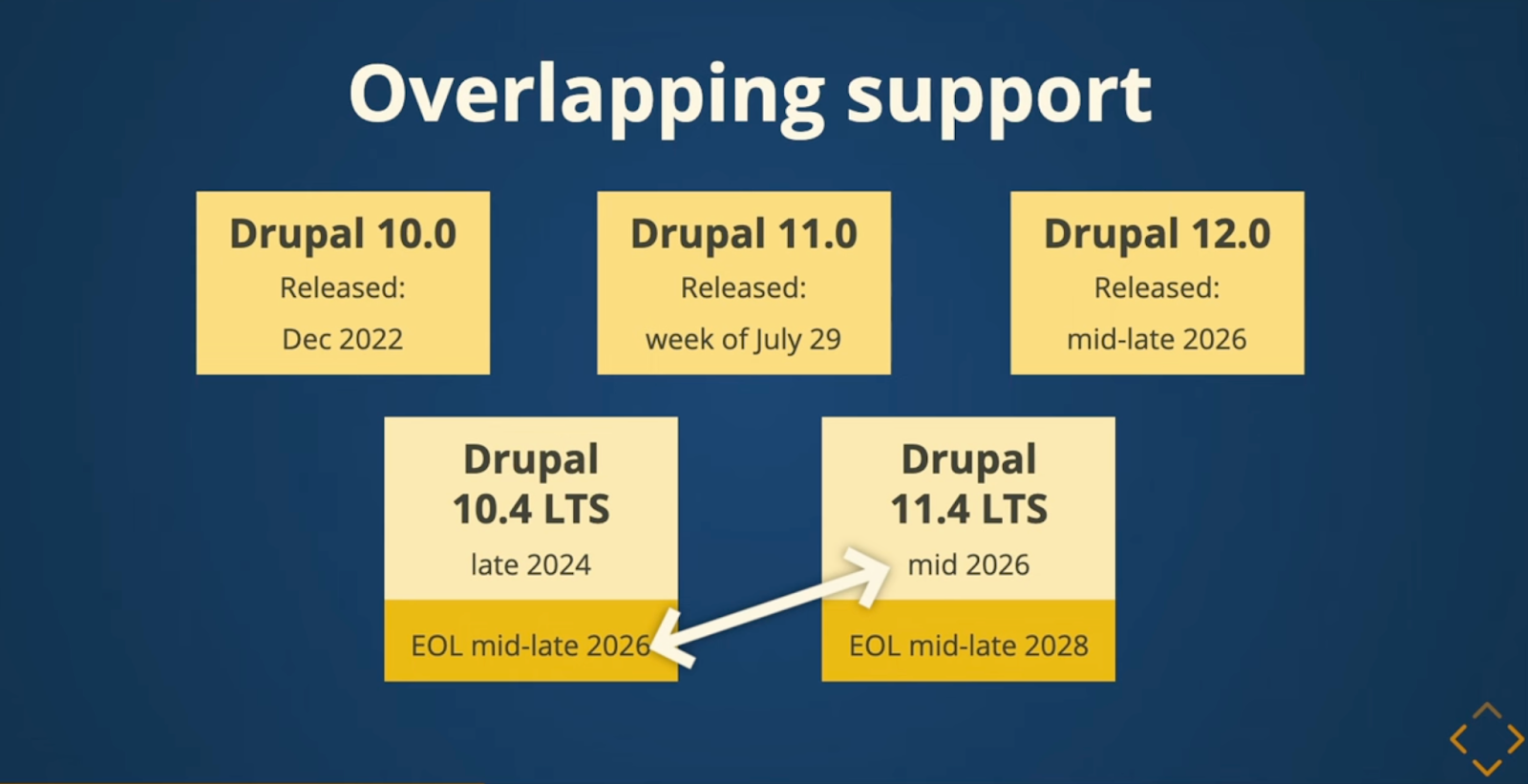
Slide shared at Drupalcon Portland outlining release plan for v10 support through mid-2026
Why is it important?
Over time software at all points in your technology stack will see updates — at least that is what we hope for! — which means that not only does Drupal get updated, but the technologies that Drupal is built to run on will see updates, too. One of the most important changes with Drupal 11 is the new platform requirements that include updating to PHP 8.3.
PHP 8.3 brings significant performance improvements that will result in a faster Drupal application as well as the opportunity for lower costs to run the application, which means less impact on the environment — a definite win in our book.
Beyond updates to support the latest and greatest platform versions, other improvements include the removal of some lesser-used core modules and deprecated code—so, some code-level housekeeping.
Most importantly, the introduction of official LTS releases means that site owners will have a more predictable roadmap for when updates need to happen without feeling like they need to be early adopters when contributed modules may be lagging behind the new core releases.
Why are we excited about it?
With Drupal 11 cementing changes that were introduced with Drupal 10.3.x, updating dependencies, and removing lesser-used features, this release lays the foundation for the Drupal Starshot initiative to build upon and includes Single Directory Components (this provides support for a component-based development approach) and (experimental) Recipes support, which is a Starshot initiative feature that will allow sites to add new complete features to a site through bundled configuration settings.
Oomph has been contributing to the Starshot initiative since it was announced at Drupalcon, and we’re really looking forward to what’s ahead! We’re also thrilled to see Drupal in a position to adopt newer versions of the libraries and packages it depends on because that means streamlined development support and the benefits of the updates and improvements that those communities are making to their software reach us as well.
Drupal 11 Release changes
Notable changes to Drupal 11 include:
- Removal of the following modules:
- Actions UI
- Activity Tracker
- Book
- Forum
- Statistics
- Tour
- PHP and database version requirements
- Updates to certain access restrictions
- Removal of non-essential admin paths
- Updates and removals to PHP and Frontend dependencies
See the release notes for full details.
Everyone’s been saying it (and, frankly, we tend to agree): We are currently in unprecedented times. It may feel like a cliche. But truly, when you stop and look around right now, not since the advent of the first consumer-friendly smartphone in 2008 has the digital web design and development industry seen such vast technological advances.
A few of these innovations have been kicking around for decades, but they’ve only moved into the greater public consciousness in the past year. Versions of artificial intelligence (AI) and chatbots have been around since the 1960s and even virtual reality (VR)/augmented reality (AR) has been attempted with some success since the 1990s (That Starner). But now, these technologies have reached a tipping point as companies join the rush to create new products that leverage AI and VR/AR.
What should we do with all this change? Let’s think about the immediate future for a moment (not the long-range future, because who knows what that holds). We at Oomph have been thinking about how we can start to use this new technology now — for ourselves and for our clients. Which ideas that seemed far-fetched only a year ago are now possible?
For this article, we’ll take a closer look at VR/AR, two digital technologies that either layer on top of or fully replace our real world.
VR/AR and the Vision Pro
Apple’s much-anticipated launch into the headset game shipped in early February 2024. With it came much hype, most centered around the price tag and limited ecosystem (for now). But after all the dust has settled, what has this flagship device told us about the future?
Meta, Oculus, Sony, and others have been in this space since 2017, but the Apple device has debuted a better experience in many respects. For one, Apple nailed the 3D visuals, using many cameras and low latency to reproduce a digital version of the real world around the wearer— in real time. All of this tells us that VR headsets are moving beyond gaming applications and becoming more mainstream for specific types of interactions and experiences, like virtually visiting the Eiffel Tower or watching the upcoming Summer Olympics.
What Is VR/AR Not Good At?
Comfort
Apple’s version of the device is large, uncomfortable, and too heavy to wear for long. And its competitors are not much better. The device will increasingly become smaller and more powerful, but for now, wearing one as an infinite virtual monitor for the entire workday is impossible.
Space
VR generally needs space for the wearer to move around. The Vision Pro is very good at overlaying virtual items into the physical world around the wearer, but for an application that requires the wearer to be fully immersed in a virtual world, it is a poor experience to pantomime moving through a confined space. Immersion is best when the movements required to interact are small or when the wearer has adequate space to participate.
Haptics
“Haptic” feedback is the sense that physical objects provide. Think about turning a doorknob: You feel the surface, the warmth or coolness of the material, how the object can be rotated (as opposed to pulled like a lever), and the resistance from the springs.
Phones provide small amounts of haptic feedback in the form of vibrations and sounds. Haptics are on the horizon for many VR platforms but have yet to be built into headset systems. For now, haptics are provided by add-on products like this haptic gaming chair.
What Is VR/AR Good For?
Even without haptics and free spatial range, immersion and presence in VR is very effective. It turns out that the brain only requires sight and sound to create a believable sense of immersion. Have you tried a virtual roller coaster? If so, you know it doesn’t take much to feel a sense of presence in a virtual environment.
Live Events
VR and AR’s most promising applications are with live in-person and televised events. In addition to a flat “screen” of the event, AR-generated spatial representations of the event and ways to interact with the event are expanding. A prototype video with Formula 1 racing is a great example of how this application can increase engagement with these events.
Imagine if your next virtual conference were available in VR and AR. How much more immersed would you feel?
Museum and Cultural Institution Experiences
Similar to live events, AR can enhance museum experiences greatly. With AR, viewers can look at an object in its real space — for example, a sarcophagus would actually appear in a tomb — and access additional information about that object, like the time and place it was created and the artist.
Museums are already experimenting with experiences that leverage your phone’s camera or VR headsets. Some have experimented with virtually showing artwork by the same artist that other museums own to display a wider range of work within an exhibition.
With the expansion of personal VR equipment like the Vision Pro, the next obvious step is to bring the museum to your living room, much like the National Gallery in London bringing its collection into public spaces (see bullet point #5).
Try Before You Buy (TBYB)
Using a version of AR with your phone to preview furniture in your home is not new. But what other experiences can benefit from an immersive “try before you buy” experience?
- Test-drive a new car with VR, or experience driving a real car on a real track in a mixed-reality game. As haptic feedback becomes more prevalent, the experience of test-driving will become even closer to the real thing.
- Even small purchases have been using VR and AR successfully to trial their products, including AR for fashion retail, eyeglass virtual try-ons, and preview apps for cosmetics. Even do-it-yourself retailer Lowe’s experimented with fully haptic VR in 2018. But those are all big-name retailers. The real future for VR/AR-powered TBYB experiences will allow smaller companies to jump into the space, like Shopify enabled for its merchants.
- Visit destinations before traveling. With VR, you could visit fragile ecosystems without affecting the physical environment or get a sense of the physical space before traveling to a new spot. Visitors who require special assistance could preview the amenities beforehand. Games have been developed for generic experiences like deep sea diving, but we expect more specific travel destinations to provide VR experiences of their own, like California’s Redwood Forest.
What’s Possible With VR/AR?
The above examples of what VR/AR is good at are just a few ways the technology is already in use — each of which can be a jumping-off point for leveraging VR/AR for your own business.
But what are some new frontiers that have yet to be fully explored? What else is possible?
- What if a digital sculptor or 3D model maker could create new three-dimensional models in a three-dimensional virtual space? The application for architects and urban planners is just as impactful.
- What if medical training could be immersive, anatomically accurate, and reduce the need for cadavers? What if rare conditions could be simulated to increase exposure and aid in accurate diagnoses?
- What if mental health disorders could be treated with the aid of immersive virtual environments? Exposure therapy can aid in treating and dealing with anxiety, depression, and PTSD.
- What if highly skilled workers could have technical mentors virtually assist and verify the quality of a build? Aerospace, automotive, and other manufacturing industry experts could visit multiple locations virtually and go where they’re needed most.
- What if complex mathematic-based sciences could provide immersive, data-manipulative environments for exploration? Think of the possibilities for fields like geology, astronomy, and climate change.
- What if movies were told from a more personal point of view? What if the movie viewer felt more like a participant? How could someone’s range of experiences expand with such immersive storytelling?
Continue the AR/VR Conversation
The Vision Pro hasn’t taken the world by storm, as Apple likely hoped. It may still be too early for the market to figure out what AR/VR is good for. But we think it won’t go away completely, either. With big investments like Apple’s, it is reasonable to assume the next version will find a stronger foothold in the market.
Here at Oomph, we’ll keep pondering and researching impactful ways that tomorrow’s technology can help solve today’s problems. We hope these ideas have inspired some of your own explorations, and if so, we’d love to hear more about them.
Drop us a line and let’s chat about how VR/AR could engage your audience.
A world without third-party cookies is fast approaching. Big-name browsers like Safari and Firefox already block them by default, and Google Chrome — the biggest browser of them all — is set to follow.
First, a quick refresher: Websites use cookies to store data in your browser specific to that website and other sites. The question, though, is who the website is storing the data for. Third-party cookies store data that allows advertising services to track your behavior on any given site, while first-party cookies are those a website uses for its own purposes.
Like most things, not all cookies are created equal. As browsers transition to these new defaults, some will make the grade, while others will be blocked for good. What does this mean for your website, and how can you get ahead of the change? We’ll walk you through it.
Are Cookies Really Going Away?
That depends on the type of cookies your site uses. Browsers are slowly blocking third-party cookies by default — those associated with cross-site tracking for ad networks like Facebook or LinkedIn — but first-site, or same-site, cookies will remain.
That means that if retargeting is essential to your paid marketing strategy, you may need to rethink your approach. But any cookies you use to support your site features and functionality can keep on keeping on, assuming your users have agreed to the use of those cookies on your site. For example, you may be able to keep track of previously viewed content and use that information to suggest other relevant content to that user. So don’t say goodbye to your cookie consent services either; you still have to give users the chance to opt out of any first-party cookies.
Why Now? Haven’t We Been Using Cookies Forever?
While cookies have been a web-surfing staple for almost as long as we’ve been using the internet, that’s not necessarily a good thing.
Legislation like GDPR in Europe, the California Consumer Privacy Act, and the New York Privacy Act are tightening restrictions on the use of consumer data, and rapidly increasing cybersecurity threats in recent years have illuminated the risks of large-scale data storage. Consumers have also begun to prize their privacy, realizing that their information is valuable and no organization should be looking over their shoulder as they browse.
Ultimately, phasing out third-party cookies is about doing what’s best for your users. Making the move now can help instill trust in your website, since users know you aren’t capturing their data behind the scenes. Cookie consent forms also put the data you do use out in the open, showing users that your organization takes their privacy seriously and is prepared to protect it.
How Will The End of Third-Party Cookies Impact My Industry?
Not all organizations will feel the shift equally. We’ve seen some verticals get ahead of the curve, while others are naturally less reliant on third-party cookies. Here are some key industry-specific areas to consider.
Healthcare
Strict privacy laws and regulations like the Health Insurance Portability and Accountability Act (HIPAA) have turned healthcare organizations into pioneers in this area. The Office of Civil Rights even published a bulletin warning organizations about third-party cookies.
Many of the healthcare brands we support at Oomph are already focused on safeguarding user privacy because they’re used to doing it with medical records. One of our clients, for example, is already exploring adopting an in-house analytics tool hosted on their own server. If your healthcare organization is relying on third-party cookies for any marketing efforts, analytic insights, or other website features, start thinking now about the best way to phase them out.
Higher Education
Many institutions we work with are using third-party cookies because of digital efforts to drive student enrollment. When implementing personalization cookies, be sure they are implemented with the proper “SameSite” attribute value. Then be sure to engage your vendors; we’ve encouraged many of our higher education clients to explore how their vendors are preparing for this transition.
Nonprofits
Like higher education, nonprofits should review the vendors and larger ad networks they rely on to build their volunteer base or drive donations. Many nonprofits don’t use these services, but those that do should get ahead of the change, otherwise you may stand to lose an important fundraising channel.
4 Steps To Prepare for the End of Third-Party Cookies
Cookies, analytics, and cross-site tracking might all sound like areas best left to the pros. But there’s a lot you can do to prepare your organization for the move away from cookies, as well as critical opportunities to pull in a vendor to maintain the functionality you need.
Audit Your Site
A website audit should always be your first step. Taking stock of the cookies you use is the best way to get a handle on the changes you’ll need to make. Tapping your web partner is a great idea here, too. Your vendor should be able to identify existing third-party cookie warnings, which can help shape your audit.
For example, while we were updating a client’s email marketing integration recently, Chrome notified our developer that our client’s vendor was sending third-party cookies. We then reached out to the vendor to continue the conversation, knowing that those cookies had to be addressed.
Identify Affected Cookies
The goal of your audit is to identify all third-party cookies that won’t make the cut. Don’t stop by just listing the cookie, either. Review what function it serves and the role it plays in your organization’s digital footprint. You may have to get rid of the cookie, but that doesn’t mean you have to ditch the strategy it’s tied to.
Reach Out to Your Vendors
Ask vendors about their plans to handle the transition away from third-party cookies, and feel out whether they’ll still be able to offer the service they currently provide. Consider it a red flag if the vendor is uninformed or unprepared; you might have to seek out alternatives if there’s even the slightest chance your current vendor will be defunct by the end of the year.
Design Alternatives
The end of third-party cookies is daunting, but it’s also exciting. Take this opportunity to innovate on your users’ behalf. How can you design engaging new experiences that still exceed their expectations? That’s more than possible, so long as you have the right tools in place.
This could be a self-hosted analytics tool you build yourself or new local storage solutions to replace the role of cookies. You might also consider a fully authenticated experience for the users of your site. Lean on a trusted partner here, too. Vendors with website expertise can guide you toward the right solution for you and your users.
Cookies on the Brain?
For many organizations, this is the most they’ve thought about cookies in years. Third-party cookies have become so essential to building a business online, and yet they’ve largely flown under our radar. But while this change may feel overwhelming, making the switch doesn’t have to be.
Here at Oomph, we see this as a golden opportunity for organizations to put their users first, and we’re already taking steps to help our clients do just that.
Need a hand bringing your website into a world beyond third-party cookies? Let’s talk about it.
High-quality content management systems (CMS) and digital experience platforms (DXP) are the backbone of modern websites, helping you deliver powerful, personalized user experiences. The catch? You have to pick your platform first.
At Oomph, we have a lot of love for open-source platforms like Drupal and WordPress. Over the years, we’ve also built applications for our clients using headless CMS tools, like Contentful and CosmicJS. The marketplace for these solutions continues to grow exponentially, including major players like Adobe Experience Manager, Sitecore, and Optimizely.
With so many options, developers and non-developers with a project on the horizon typically start by asking themselves, “Which CMS or DXP is the best fit for my website or application?” While that is no doubt an excellent question to consider, I think it’s equally important to ask, “Who is going to implement the solution?”
CMS/DXP Solutions Are More Alike Than You Might Think
I recently attended the annual Healthcare Internet Conference and spoke with quite a few healthcare marketers about their CMS tools. I noticed a common thread: Many people think their CMS (some of which I mentioned above) is hard to use and doesn’t serve them well.
That may very well be the case. Not all CMS tools are created equal; some are better suited for specific applications. However, most modern CMS and DXP tools have many of the same features in common, they just come at different price points. So here’s the multi-million dollar question: If most of these products provide access to the same or similar tools, why are so many customers displeased with them?
Common Challenges of CMS/DXP Implementation
Often, we find that CMS users get frustrated because the tool they chose wasn’t configured to meet their specific needs. That doesn’t necessarily mean that it was set up incorrectly. That’s the beauty of many of today’s CMS and DXP products: They don’t take a one-size-fits-all approach. Instead, they allow for flexibility and customization to ensure that each customer gets the most out of the product.
While enticing, that flexibility also burdens the user with ensuring that their system is implemented effectively for their specific use case. In our experience, implementation is the make-or-break of a website development project. These are just a handful of things that can derail the process:
- The implementation partner didn’t fully understand how their client works and configure features accordingly.
- The demands of user experience overshadowed the needs of content editors and admins.
- Hefty licensing fees ate away at the budget, leaving behind funds that don’t quite cover a thorough implementation.
- The project was rushed to meet a tight deadline.
- The CMS introduces new features over time that add complexity to the admin or editing experience.
- Old features get sunsetted as new capabilities take their place.
Most of the work we do at Oomph is to help our clients implement new websites and applications using content management systems like Drupal. We have decades of combined experience helping our clients create the ideal user experience for their target audience while also crafting a thoughtful content editing and admin experience that is easy to use.
But what does that look like in practice?
4 Steps for a Successful CMS Implementation
Implementation can be the black box of setting up your CMS: You don’t know what you don’t know. So, we like to get our clients into a demo environment as soon as possible to help them better understand what they need from their CMS. Here’s how we use it to navigate successful CMS implementation:
- Assess the Capabilities of the CMS
The first step can be the most simple at face value. Consider what the CMS needs to do for you, then find a CMS that includes all of those features. Content modeling (more on that below) is a key part of that process, but so is auditing your team’s abilities.
Some teams may be developer-savvy and can handle less templated content-authoring features. Others may need a much more drag-and-drop experience. Either use case is normal and acceptable, but what matters is that you identify your needs and find both a CMS and an implementation process that meets them. That leads us to the next point.
- Test-Drive the CMS Early and Often
You wouldn’t buy a car without test-driving it first. Yet we find that people are often more than willing to license a CMS without looking under the hood.
Stepping into the CMS for a test drive is a huge part of getting the content editing experience right. We’ve been designing and engineering websites and platforms using CMS tools for well over a decade, and we’ve learned a thing or two along the way about good content management and editing experiences.
Even with out-of-the-box, vanilla Drupal, the sky’s the limit for how you can configure it. But that also means that nothing is configured, and it can be difficult to get a sense of how best to configure and use it. Rather than diving into the deep end, we work with our clients to test the waters. We immediately set up a project sandbox that offers pre-configured content types, allowing you to enter content and play with a suite of components within the sleek drag-and-drop interface.
- Align User Experience with Content Authoring
Beyond pre-configured content and components, our sandbox sites include a stylish, default theme. The idea is to give you a taste both of what your live site could look like and what your content authoring experience might be. Since so many teams struggle to balance those two priorities, this can be a helpful way to figure out how your CMS can give you both.
- Finalize Your Features & Capabilities
While a demo gives you a good idea of the features you’ll need, it might include features you don’t. But discovering where our pre-built options aren’t a good fit is a good thing — it helps us understand exactly what YOUR TEAM does and does not need.
Our goal is to give you something tangible to react to, whether that’s love at first type or a chance to uncover capabilities that would serve you better. We’ve found this interactive yet structured process is the CMS silver bullet that leads to a better outcome.
Content Modeling
Another key part of our project workflow is what we call content modeling. During this phase, we work with you to identify the many content types you’ll have on your website or application. Then, we can visualize them in a mapping system to determine things like:
- What relationships exist between these different content types?
- Who should have access to a content type, and what governance should be in place to ensure all content is accurate, on brand, and approved for publishing?
- What features do you need to support content at every level? For example, at the field level, do you need a drop-down with predefined values that only certain people can edit, or do you need an open-text field a content editor can customize?
With a solid content model in place, we can have a higher level of confidence that our CMS implementation will create the right content editing experience for your team. From there, we actually implement the content model in the CMS as soon as possible so that you can test it out and we can make refinements before getting too far along in the process.
Content Moderation & Governance
Many clients tell us they either have too much or too little control over their content. In some cases, their content management system is so templated or rigid that marketing teams can’t quickly spin up landing pages and instead have to rely on development teams to assist. Other teams have too much freedom, allowing employees to easily deploy content that hasn’t been approved by the appropriate team members or strays from company brand standards.
Here at Oomph, our mantra is balance. A good content editing process needs both flexibility and governance, so teams can create content when they need to, but avoid publishing content that doesn’t meet company standards. Through discovery, we work with clients to determine which content types need flexibility and which ones don’t.
If a content type needs to be flexible, we create a framework that allows for agility while still ensuring that users can only select approved colors, font types, and font sizes. We also identify which content needs to be held in moderation and approved before it can be published on the website.
Taking the time to discuss governance in advance creates a CMS experience that strikes the right balance between marketing freedom and brand adherence.
Implementation Turns a Good CMS Into a Great One
Modern CMS/DXP solutions have mind-blowing features, and they will only continue to get more complex over time. But the reality is that while picking a CMS that has the features you need is important, how it’s configured and implemented might matter even more. After all, how helpful is it to have a CMS with embedded artificial intelligence if making simple copy updates to your home page is a nightmare?
Implementation is the “it” factor that makes the difference between a CMS you love and one you’d rather do your job without.
Interested in solving your CMS headaches with better implementation? Let’s talk.
The world of digital accessibility can be daunting. There are many regulations and ways in which a website can be accessible or inaccessible. Many of us don’t understand what a good or bad experience looks like, and we think we can’t possibly understand people who rely solely on assistive technology to use the web.
It doesn’t have to be daunting, though. And with anything, the key is to start small. To those who create websites or own/manage one, the first step to understanding accessibility is empathy. If more people used assistive technology, more people would understand the difference between a terrible experience and a great one. Don’t be scared of learning about accessibility tools, because you might already be more familiar with them than you realize.
Have you ever broken your dominant hand and been forced to use a keyboard instead of a mouse or trackpad? Have you tried to complete a payment form really quickly to snag concert tickets, and figured out that using the keyboard can be much faster?
Have you been in loud surroundings and tried to watch a video? How great are captions? Have you realized that captions are assistive technology? There are alternate modes of consuming content and using a digital product that are beneficial to a much wider audience than the audience it was created for.
With some instruction, we hope more people feel comfortable using a keyboard to navigate a website. We also hope that more of you are brave enough to try a screen reader as well, or at least watch our video to experience what that experience can be like.
Video Tutorial
Our video is 37 minutes and we provide a break-down of the different minute-marks below if you’d like to jump to a certain area. (All cookies must be accepted for the video to play. You may also view on YouTube directly.)
Table of Contents
- 00:00 — Using a Keyboard
- 02:00 — The tab key
- 02:20 — A “Skip to Content” link and why that is so useful
- 03:40 — “Focus ring” style
- 04:20 — An example of an inaccessible drop-down menu
- 05:40 — An example of an inaccessible link (no focus ring)
- 07:40 — Common article card patterns and how they work with a keyboard
- 10:45 — The Screen Reader Experience
- 11:10 — Invoking VoiceOver with Command F5
- 12:35 — Tabbing through interactive elements
- 12:54 — Skip to Content link
- 13:07 — Company logo
- 13:55 — Projects link
- 14:31 — Topics
- 15:55 — About Us link, inaccessible to keyboard users
- 16:16 — Reading of non-interactive elements with Control Option arrows
- 16:50 — Reading content, Headings, links
- 18:50 — Visually hidden heading but screen reader accessible
- 19:55 — Alt text image examples
- 20:06 — Kittens, no alt tag present
- 21:06 — Doggos, empty alt tag
- 23:00 — Squirrels, descriptive alt text
- 23:48 — Article content examples
- 23:53 — Article 1 example, too many links
- 25:37 — Article 2 example, too much content
- 26:32 — Article 3 example, hidden content
- 27:44 — Article 4 example, alternate pattern
- 30:02 — Voiceover’s Rotor Feature, control option U
- 30:15 — Headings menu
- 30:55 — Empty heading element
- 31:50 — Other Rotor menus
- 32:18 — Non-visited Links menu
- 33:01 — All Links menu
- 33:40 — “Click here” and “Read more” link text
- 35:09 — Landmarks menu
- 35:25 — Form Controls menu
- 36:06 VoiceOver off and wrap up
For those who want to learn a little more, below we collect a few keyboard command cheatsheets for navigating a webpage or using VoiceOver on a Mac. Links to additional resources for setting up and getting started with VoiceOver are also included.
More Resources
Keyboard User Cheatsheet
- Tab key — Navigate from link to link
- For sighted users who can still use a mouse: Getting started on a page might mean clicking into the top left corner to get the keyboard focus to be within the browser window and not on the desktop or in the browser (URL bar)
- In a Checkbox list in a form, the tab key will move from one element to another
- Return key (Enter) — “Presses” a link to open the destination or perform the one page action (for buttons)
- Spacebar
- When over an interactive element in a navigation, spacebar opens the element. Arrow keys may move up and down through the open list, or the tab key can be used. Spacebar again should toggle the element closed.
- In a Checkbox list in a form, the spacebar chooses the element currently in focus
- Escape key — Close most items that have been opened, like pop-up modal windows
- Arrows Up/Down — Generally, scrolls the page
- In a Radio Button group in a form, Tab will select the group of options while arrow keys will traverse the list
- With a Select list in a form, Tab makes the list active. Arrow keys traverses the list. Enter key selects the option in focus.
- Any letter key — With a Select list in a form, Tab makes the list active. When active and open, a letter key will jump to that letter in the list. Useful for long lists, like States or Countries.
VoiceOver Cheatsheet
These key commands reflect the default set-up for Mac OSX — I have not made any modifications. Of course, power users will modify these commands to fit their needs.
The default VoiceOver key command combination is ^Control ⌥Option. This combination is used to ensure key combinations do not conflict with other quick key commands through the OS and Apps.
Many key commands for navigating a webpage are the same as a Keyboard user. Return, Spacebar, and Arrow keys all work the same.
- ⌘Command F5 — Open and start Voiceover
- ^Control ⌥Option Arrow Right — Read next string of text
- ^Control ⌥Option Arrow Left — Read previous string of text
- ^Control ⌥Option Space — “Presses” a link or button
- For some elements, VoiceOver will announce that there are “Actions available.” Access the Actions menu with ^Control ⌥Option Space, and navigate the menu with the up and down arrow keys; press VO-Space to select a custom action.
- ^Control ⌥Option M — Access the Apple Menu (File, Edit, View, etc.). Escape Key returns to the web page content.
- ^Control ⌥Option H twice quickly — Commands Help menu
- While inside, arrow keys move up and down in lists. Left and Right arrows move from one list to another. Return key chooses an element from a list
- ^Control ⌥Option K — Keyboard Help. Similar to Command Help, but here, keys can be pressed without having any effect on the system (like a practice session). Escape key exits the Keyboard Help session
- ^Control ⌥Option U — Open the Rotor
- While inside, arrow keys move up and down in Rotor lists. Left and Right arrows move from one list to another. Return key chooses an element from a list, closes the Rotor, and moves focus to the selected element. Escape key exits the Rotor
- Traversing the page by Element Type:
- ^Control ⌥Option H — Find next heading
- ^Control ⌥Option L — Find next link (different from the Tab key as it will look for Links only, not buttons that perform on-page actions)
- ^Control ⌥Option J — Find next form control
- ^Control ⌥Option T — Find next table
- ^Control ⌥Option X — Find next list
- ^Control ⌥Option F — Find next frame
Additional Resources to Start Using VoiceOver
- Welcome to VoiceOver, Apple website
- Deep dive into using VoiceOver and customizing the system to work the way you prefer
Conclusion
With some practice, we hope you might find that using a keyboard to navigate can be your superpower. When filling out forms, for example, I use the keyboard almost exclusively to quickly move from one field to another and to find my state in a long drop-down list. Unless, of course, I run into another poorly coded form that is not accessible. Lucky for me, I can go back to using a mouse. But some do not have that option, and for them, our empathy should turn into empowerment and we shall demand better from our design and development practices.
For questions or to discuss how to make your next project more accessible, please contact us anytime.
More in Our Accessibility Series
Notable articles from the Accessibility category:
There’s a new acronym on the block: MACH (pronounced “mock”) architecture.
But like X is to Twitter, MACH is more a rebrand than a reinvention. In fact, you’re probably already familiar with the M, A, C, and H and may even use them across your digital properties. While we’ve been helping our clients implement aspects of MACH architecture for years, organizations like the MACH Alliance have recently formed in an attempt to provide clearer definition around the approach, as well as to align their service offerings with the technologies at hand.
One thing we’ve learned at Oomph after years of working with these technologies? It isn’t an all-or-nothing proposition. There are many degrees of MACH adoption, and how far you go depends on your organization and its unique needs.
But first, you need to know what MACH architecture is, why it’s great (and when it’s not), and how to get started.
What Is MACH?
MACH is an approach to designing, building, and testing agile digital systems — particularly websites. It stands for microservices, APIs, cloud-native, and headless.
Like a composable business, MACH unites a few tried-and-true components into a single, seamless framework for building modern digital systems.
The components of MACH architecture are:
- Microservices: Many online features and functions can be separated into more specific tasks, or microservices. Modern web apps often rely on specialized vendors to offer individual services, like sending emails, authenticating users, or completing transactions, rather than a single provider to rule them all.
- APIs: Microservices interact with a website through APIs, or application programming interfaces. This allows developers to change the site’s architecture without impacting the applications that use APIs and easily offer those APIs to their customers.
- Cloud-Native: A cloud-based environment hosts websites and applications via the Internet, ensuring scalability and performance. Modern cloud technology like Kubernetes, containers, and virtual machines keep applications consistent while meeting the demands of your users.
- Headless: Modern Javascript frameworks like Next.js and Gatsby empower intuitive front ends that can be coupled with a variety of back-end content management systems, like Drupal and WordPress. This gives administrators the authoring power they want without impacting end users’ experience.
Are You Already MACHing?

Even if the term MACH is new to you, chances are good that you’re already doing some version of it. Here are some telltale signs:
- You have one vendor for single sign-on (SSO), one vendor to capture payment information, another to handle email payment confirmations, and so on.
- You use APIs to integrate with tech solutions like Hubspot, Salesforce, PayPal, and more.
- Your website — or any website feature or application — is deployed within a cloud environment.
- Your website’s front end is managed by a different vendor than its back end.
If you’re doing any of the above, you’re MACHing. But the magic of MACH is in bringing them all together, and there are plenty of reasons why companies are taking the leap.
5 Benefits of MACH Architecture
If you make the transition to MACH, you can expect:
- Choice: Organizations that use MACH don’t have to settle for one provider that’s “good enough” for the countless services websites need. Instead, they can choose the best vendor for the job. For example, when Oomph worked with One Percent for America to build a platform offering low-interest loans to immigrants pursuing citizenship, that meant leveraging the Salesforce CRM for loan approvals, while choosing “Click and Pledge” for donations and credit card transactions.
- Flexibility: MACH architecture’s modular nature allows you to select and integrate individual components more easily and seamlessly update or replace those components. Our client Leica, for example, was able to update its order fulfillment application with minimal impact to the rest of its Drupal site.
- Performance: Headless applications often run faster and are easier to test, so you can deploy knowing you’ve created an optimal user experience. For example, we used a decoupled architecture for our client Wingspans to create a stable, flexible, and scalable site with lightning-fast performance for its audience of young career-seekers.
- Security: Breaches are generally limited to individual features or components, keeping your entire system more secure.
- Future-Proofing: A MACH system scales easily because each service is individually configured, making it easier to keep up with technologies and trends and avoid becoming out-of-date.
5 Drawbacks of MACH Architecture
As beneficial as MACH architecture can be, making the switch isn’t always smooth sailing. Before deciding to adopt MACH, consider these potential pitfalls.
- Complexity: With MACH architecture, you’ll have more vendors — sometimes a lot more — than if you run everything on one enterprise system. That’s more relationships to manage and more training needed for your employees, which can complicate development, testing, deployment, and overall system understanding.
- Challenges With Data Parity: Following data and transactions across multiple microservices can be tricky. You may encounter synchronization issues as you get your system dialed in, which can frustrate your customers and the team maintaining your website.
- Security: You read that right — security is a potential pro and a con with MACH, depending on your risk tolerance. While your whole site is less likely to go down with MACH, working with more vendors leaves you more vulnerable to breaches for specific services.
- Technological Mishaps: As you explore new solutions for specific services, you’ll often start to use newer and less proven technologies. While some solutions will be a home run, you may also have a few misses.
- Complicated Pricing: Instead of paying one price tag for an enterprise system, MACH means buying multiple subscriptions that can fluctuate more in price. This, coupled with the increased overhead of operating a MACH-based website, can burden your budget.
Is MACH Architecture Right for You?
In our experience, most brands could benefit from at least a little bit of MACH. Some of our clients are taking a MACH-lite approach with a few services or apps, while others have adopted a more comprehensive MACH architecture.
Whether MACH is the right move for you depends on your:
- Platform Size and Complexity: Smaller brands with tight budgets and simple websites may not need a full-on MACH approach. But if you’re managing content across multiple sites and apps, managing a high volume of communications and transactions, and need to iterate quickly to keep up with rapid growth, MACH is often the way to go.
- Level of Security: If you’re in a highly regulated industry and need things locked down, you may be better off with a single enterprise system than a multi-vendor MACH solution.
- ROI Needs: If it’s time to replace your system anyway, or you’re struggling with internal costs and the diminishing value of your current setup, it may be time to consider MACH.
- Organizational Structure: If different teams are responsible for distinct business functions, MACH may be a good fit.
How To Implement MACH Architecture
If any of the above scenarios apply to your organization, you’re probably anxious to give MACH a go. But a solid MACH architecture doesn’t happen overnight. We recommend starting with a technology audit: a systematic, data-driven review of your current system and its limitations.
We recently partnered with career platform Wingspans to modernize its website. Below is an example of the audit and the output: a seamless and responsive MACH architecture.
The Audit
- Surveys/Questionnaires: We started with some simple questions about Wingspan’s website, including what was working, what wasn’t, and the team’s reasons for updating. They shared that they wanted to offer their users a more modern experience.
- Stakeholder Interviews: We used insights from the surveys to spark more in-depth discussions with team members close to the website. Through conversation, we uncovered that website performance and speed were their users’ primary pain points.
- Systems Access and Audit: Then, we took a peek under the hood. Wingspans had already shared its poor experiences with previous vendors and applications, so we wanted to uncover simpler ways to improve site speed and performance.
- Organizational Structure: Understanding how the organization functions helps design a system to meet those needs. The Wingspans team was excited about modern technology and relatively savvy, but they also needed a system that could accommodate thousands of authenticated community members.
- Marketing Plan Review: We also wanted to understand how Wingspans would talk about their website. They sought an “app-like” experience with super-fast search, which gave us insight into how their MACH system needed to function.
- Roadmap: Wingspans had a rapid go-to-market timeline. We simplified our typical roadmap to meet that goal, knowing that MACH architecture would be easy to update down the road.
- Delivery: We recommended Wingspans deploy as a headless site (a site we later developed for them), with documentation we could hand off to their design partner.
The Output
We later deployed Wingspans.com as a headless site using the following components of MACH architecture:
- Microservices: Wingspans leverages microservices like Algolia Search for site search, Amazon AWS for email sends and static site hosting, and Stripe for managing transactions.
- APIs: Wingspans.com communicates with the above microservices through simple APIs.
- Cloud-Native: The new website uses cloud-computing services like Google Firebase, which supports user authentication and data storage.
- Headless: Gatsby powers the front-end design, while Cosmic JS is the back-end content management system (CMS).
Let’s Talk MACH
As MACH evolves, the conversation around it will, too. Wondering which components may revolutionize your site and which to skip (for now)? Get in touch to set up your own technology audit.
Feel like you’re seeing a lot more website pop-up banners these days asking about your cookie preferences? Those cookie banners are here to stay, and they’re a vital part of compliance for websites of all sizes.
As global standards for consumer privacy and data protection continue to climb, businesses are burning more time and resources to keep up. One VentureBeat article pegged the cost for a business of maintaining data privacy compliance at an eye-popping $31 million — and the costs of non-compliance can be even higher. Failing to stay on top of this complex patchwork of regulations can trigger real consequences, from steep fines and penalties to the indirect costs of reputational harm and lost business.
Cookie consent is one part of a holistic data privacy strategy — and an increasingly important one. Global privacy laws, such as the General Data Protection Regulation (GDPR), California Consumer Privacy Act (CCPA), and Brazil’s General Data Protection Law (LGPD), require companies to inform visitors about the data collected on their website via cookies and provide them with granular choices about what they’re willing to share. Cookie consent management solutions help users manage cookie preferences when they enter your site, presenting a banner that informs users about how cookies are used and letting them decide which information (if any) they want cookies to collect.
Cookie consent management solutions are rapidly evolving to keep up with changing data privacy standards. CookiePro is a solution from OneTrust designed specifically for small to medium businesses, offering a more automated way to ensure website and mobile applications stay compliant with cookie consent and global privacy regulations. At Oomph, we’ve helped several clients integrate CookiePro into their sites in recent months and think it’s on track to become an industry standard for cookie consent management.
For organizations that are already juggling multiple site integrations, does it make sense to add another? To answer that, let’s take a look at why cookie consent matters, how a tool like CookiePro can help, and if it’s right for you.
Why Do I Need a Cookie Consent Solution?
To comply with privacy laws and provide a transparent experience that builds trust, many website owners are rethinking how they manage compliance. Adding a cookie consent tool to your website can improve the experience for you and your users.
Ensure Compliance
Not taking data privacy seriously can cost you. In December 2022, Meta (the parent company of Facebook) agreed to pay $725 million to settle several class-action lawsuits that found Facebook had let third-parties access users’ private data and their friends’ data without user permission. Oracle has been sued for collecting 4.5 billion personal records from consumers who have specifically opted out of sharing, and Starbucks is potentially facing a lawsuit for continuing to “track customers ‘after they’ve declined all but required cookies.’”
While big-name companies get most of the bad press around data privacy, you don’t have to be a global enterprise to face similar consequences. In 2022, the total value of settlements for class-action lawsuits set a new record at $63 billion — and data breach and privacy class action settlements were among the top 10 settlement categories. Instead of risking a costly settlement, a much less expensive approach is to invest in a solution to help manage the work of compliance.
Build Trust
Beyond protecting your organization from legal action, demonstrating that you care about compliance helps your business build trust and long-term relationships with users. Data privacy is becoming more important to consumers of all ages, with 74% of people ranking data privacy as one of their top values.
A cookie consent solution lets users know that they’re in charge of their own data. It clearly discloses which information your business collects and uses, putting the power in their hands to control the data they share. If users want to change what they’re comfortable sharing later, they can easily update their settings. That level of transparency helps set the tone for your customer interactions, turning users into loyal brand advocates.
Optimize Efficiency
If your website serves users in multiple states or countries, keeping up with the patchwork of state, federal, and international laws is virtually impossible without software. Eleven states have unique data privacy laws in place right now, and 16 states introduced privacy bills during the 2022 to 2023 legislative cycle.
Factor in international regulations like GDPR, and it would take more hours than there are in a day to curate the individual preferences of your customer base. Plus, which of your team members is watching in case any regulations change? The most efficient approach is to use an automated cookie solution to curate consent requirements based on the user’s location and more.
What Is CookiePro?
Developed by OneTrust, which offers more robust data privacy solutions for enterprises, CookiePro started as a product in the OneTrust platform. After recognizing the need among small and medium businesses for a turnkey consent tool, OneTrust spun off CookiePro as a standalone solution.
CookiePro offers plans starting at around $40 per month, making it a budget-friendly alternative to enterprise solutions like OneTrust (or the cost of a lawsuit settlement). CookiePro comes with core compliance features like user-level consent management, acceptance customization, data mapping and recordkeeping, support for over 250 user languages, and additional security features.
After helping several of our clients implement CookiePro, there are a few key features that stand out for us:
- Easy installation: It just takes a few minutes to add a snippet of code to your website to enable CookiePro. It’s compatible with Drupal, WordPress, and other major site platforms.
- Automated cookie blocking: CookiePro’s auto-blocking tool scans your website to identify third-party tracking technologies, categorizes the cookies, and automatically blocks all cookies until users have given consent.
- Robust customizations: You can tailor your CookiePro banner to match your branding by customizing colors, content, and consent language. CookiePro also allows you to customize the user experience by choosing your consent approach and giving users granular control over their cookie settings.
- Upgrade path: Whether you have a small site or one with hundreds of thousands of visitors, CookiePro can support growing business needs. If you find that you need more support or functionality, you can upgrade to OneTrust’s Trust Intelligence Platform to unify all your data privacy management activities.
- Tag management system integrations: You can integrate tag management systems with your cookie consent solution if you use analytics and other platform tags on your website. CookiePro has integrations with many major tag management systems, including Google Tag Manager and Tealium, so you don’t have to change your current setup.
Beyond CookiePro, there are a growing number of other cookie consent solutions on the market, such as Termly and Cookiebot by Usercentrics. The right choice for you will depend on your existing tech stack, budget, and goals — the most important step is to put something in place to protect yourself and your users.
Where Should I Start?
Taking a proactive approach is key to ensuring data privacy for your users and avoiding costly consequences. Educate yourself on the different regulations and requirements, figure out the gaps in your compliance approach, and invest in tools that can help reduce risk and manual effort for your team.
Feeling overwhelmed or need a fresh perspective? Oomph’s accessibility and compliance audit is a great place to start. We can help you go beyond cookie consent to meet Web Content Accessibility Guidelines (WCAG), Americans With Disabilities Act (ADA), and other regulatory standards, helping you mitigate risk and deliver on user expectations. Reach out to us to schedule your site audit.
In our previous post we broadly discussed the mindset of composable business. While “composable” can be a long term company-wide strategy for the future, companies shouldn’t overlook smaller-scale opportunities that exist at every level to introduce more flexibility, longevity, and reduce costs of technology investments.
For maximum ROI, think big, then start small
Many organizations are daunted by the concept of shifting a legacy application or monolith to a microservices architecture. This is exacerbated when an application is nearing end of life.
Don’t discount the fact that a move to a microservices architecture can be done progressively over time, unlike the replatform of a monolith which is a huge investment in both time and money that may not be realized for years until the new application is ready to deploy.
A progressive approach allows organizations to:
- Move faster and allow for adjustments as needed
- Begin realizing returns on investments faster
- Reduce risk by making smaller investments and deployments
- Ease budgeting process by funding an overhaul in stages
- Improve quality by minimizing the scope of tests
- Save money on initial investment and maintenance where services are centralized
- Benefit from longevity of a component-based system
Prioritizing the approach by aligning technical architecture with business objectives
As with any application development initiative, aligning business objectives with technology decisions is essential. Unlike replatforming a monolith, however, prioritizing and planning the order of development and deployments is crucial to the success of the initiative.
Start with clearly defining your application with a requirements and feature matrix. Then evaluate each using three lenses to see priorities begin to emerge:
- With a current state lens, evaluate each item. Is it broken? Is it costly to maintain? Is it leveraged by multiple business units or external applications?
- Then with a future state lens, evaluate each item. Could it be significantly improved? Could it be leveraged by other business units? Could it be leveraged outside the organization (partners, etc…)? Could it be leveraged in other applications, devices, or locations?
- Lastly, evaluate the emerging priority items with a cost and effort lens. What is the level of effort to develop the feature as a service? What is the likely duration of the effort?
Key considerations when planning a progressive approach
Planning is critical to any successful application development initiative, and architecting a microservices based architecture is no different. Be sure to consider the following key items as part of your planning exercises:
- Remember that rearchitecting a monolith feature as a service can open the door to new opportunities and new ways of thinking. It is helpful to ask “If this feature was a stand alone service, we could __”
- Be careful of designing services that are too big in scope. Work diligently to break down the application into the smallest possible parts, even if it is later determined that some should be grouped together
- Keep security front of mind. Where a monolith may have allowed for a straightforward security management policy with everything under one roof, a services architecture provides the opportunity for a more customized security policy, and the need to define how separate services are allowed to communicate with each other and the outside world
In summary
A microservices architecture is an approach that can help organizations move faster, be more flexible and agile, and reduce costs on development and maintenance of software applications. By taking a progressive approach when architecting a monolith application, businesses can move quickly, reduce risk, improve quality, and reduce costs.
If you’re interested in introducing composability to your organization, we’d love to help! Contact us today to talk about your options.
Digital customer experience (DCX) is fast becoming a key factor in how consumers choose whom to do business with. Every digital interaction contributes to an overall feeling about your brand — which means digital touchpoints like apps and chatbots can play a big part in what customers think of your company.
What story do you want those interactions to tell? What kind of experiences do you want people to share with others?
This article covers five ways to assess and improve your digital customer experience so you can attract, delight, and retain your target customers.
But First – What IS Digital Customer Experience?
Customer experience, or CX, is the perception that customers form based on all of their interactions, in-person or online, with your brand. If CX is about carefully and consistently meeting your customers’ needs, Digital Customer Experience is the online expression of those efforts.
Digital customer experience is the part of your CX journey that involves digital interactions via your website, mobile app, social media accounts, digital kiosks, etc. Wherever your customers are engaging with your people, products, or services through the internet, it’s a digital experience.
DCX is their perception of those moments.
Brands with a great DCX provide a personalized and consistent online experience throughout the customer journey. Whether someone is considering becoming a client, placing an order, or searching for information, every digital interaction has to be easy and enjoyable.
5 Ways to Improve Your Digital Customer Experience
Technology is a wonderful tool for improving the customer experience, whether mining data for customer insights or leveraging AI for personalization. But technology alone can’t deliver an exceptional digital customer experience. Your DCX strategy must include a human component — one that focuses on customer care through empathy and authenticity. Here’s how to ensure your digital customer experience lives up to your users’ expectations.
Know your target audience
To deliver the kind of digital experience your customers will love, you have to know what they want. Who’s buying your product, and why? When they visit your website or app, what are they hoping to accomplish?
Delighting your customers requires knowing their goals, understanding their pain points, and providing interactions that meet their specific needs. The upshot? 68% of customers will spend more money with a brand that understands and treats them like an individual.
Here are three crucial steps:
- Use qualitative and quantitative analyses to learn about your audience. The more you understand their preferences and behaviors, the better you can create an experience that meets their needs.
- Apply a user-centered design process, which relies on deeply understanding your audience to craft usable, accessible digital interfaces.
- Incorporate personalization techniques to adapt the digital experience for individual users. More than anything else, this will help make the customer journey smooth and enjoyable.
Adopt an omnichannel mindset
Customers expect seamless interactions from brands throughout their journey, whether through digital or non-digital channels. In fact, brands with the strongest omnichannel customer engagement strategies retain an average of 89% of their customers, in comparison to 33% of companies with weak strategies.
Knowing that today’s consumers often jump from channel to channel as they browse, buy, or get in touch, DCX leaders embrace an omnichannel strategy. Note that this is different from a multichannel approach, where customers access multiple channels in separate interactions. An omnichannel approach integrates all digital touchpoints to create a seamless, personalized experience.
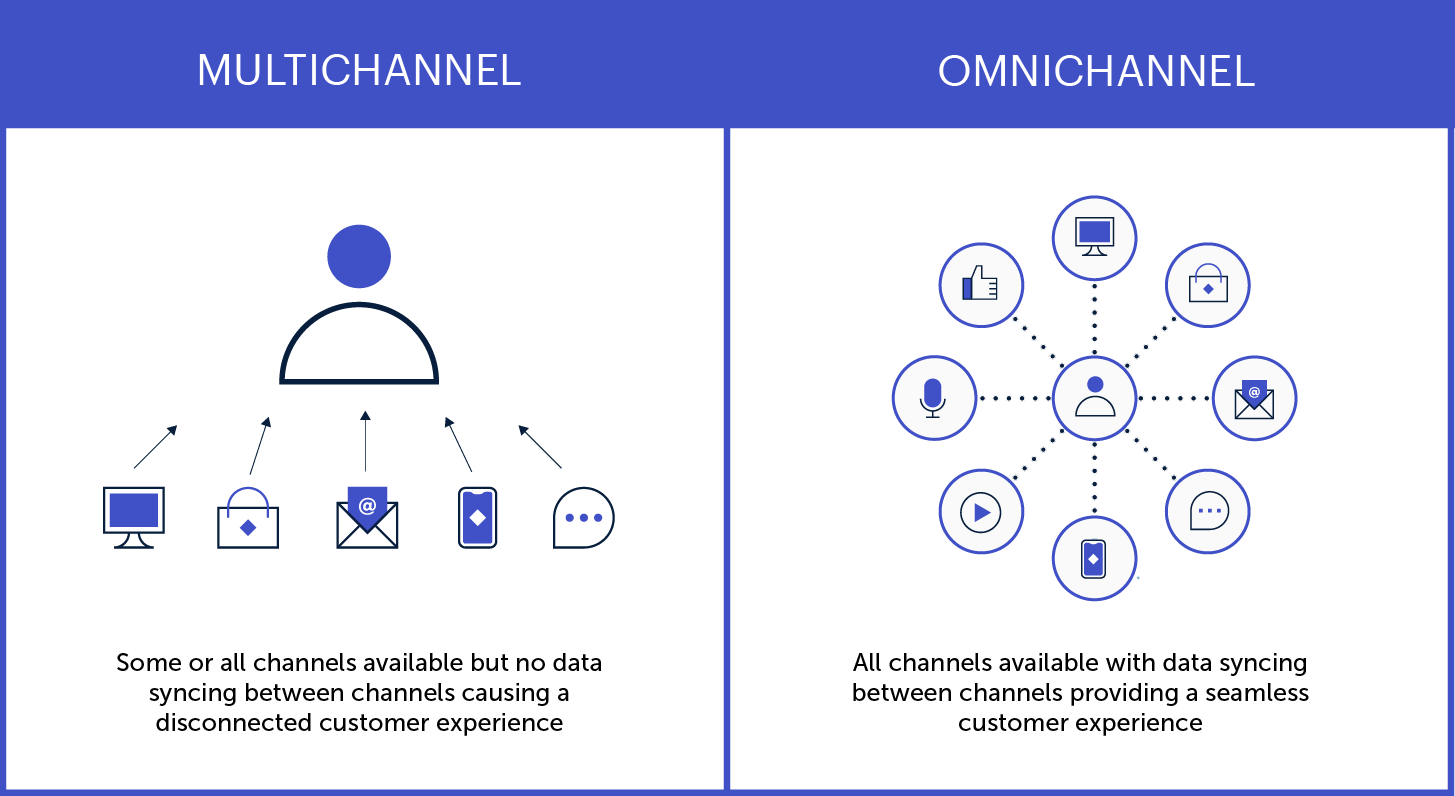
Here are a few key ways to create personalized experiences that resonate across all your digital channels:
- Use instantly recognizable brand elements and visual designs
- Make the transition from one channel to another easier
- Save search history and preferences across devices
- Synchronize ads and other promotional content
Get help from experts
Expert assessments can remove the guesswork around optimizing your digital customer experience. A digital CX audit, for instance, will show you what’s working and what could be better, as well as providing actionable insights and a prioritized roadmap.
CX specialists will look beyond the basic digital experience (clunky design, system bugs, etc…) to assess whether your digital channels are effectively serving your customers’ needs. A professional audit can help determine things like:
- Are there critical issues affecting usability and access?
- What elements of the journey most impact users’ experience?
- What are your competitors doing, and how can you differentiate?
- Where are your greatest strengths and growth opportunities?
Make customer feedback easy
Most companies know that customer feedback is crucial for improving the customer experience. But many fall short in providing easy, effective options for people to reach them.
Offering multiple, easy-to-use communication options across your digital channels is one more way to delight your customers. Help people engage with you via the medium of their choice, so they can communicate through the interface they’re most comfortable with.
That could be a chat function or contact form on your website, or the commenting and messaging features on your social profiles. Or, maybe it’s good old-fashioned phone calls and emails. Whatever the avenue, make it easy to find and intuitive to use.
One more thing: when someone does reach out, respond quickly. The faster a problem is resolved, the better the experience.
Plan for the post-launch reality
You might design and launch an amazing new website, app, or service that delights your customers and sends revenue through the roof. But, without a long-term plan to keep it effective and relevant, your digital CX will likely diminish over time.
To maintain the quality of customer experience across all your digital touchpoints, apply a measurement framework based on the principles above:
- Are you meeting users’ current and evolving needs?
- Do you provide a seamless omnichannel experience?
- Are you gathering — and implementing — user feedback?
Remember, too, that new technological trends are going to keep emerging and influencing consumer expectations. Be prepared to evolve what digital CX looks like for your business, especially if it means extending your digital services to new platforms or devices.
Putting the “C” in Digital CX
Technology has made so many things possible for today’s consumers that, ultimately, the power is in their hands. As digital capabilities continue to evolve, people may become increasingly selective about which brands earn their trust and business — and companies will need to make the digital customer experience more beneficial for both sides.
As you can see from the steps above, the key is putting your customers’ needs above all else.
If you’re not sure where to start, you’re not alone! We’ve helped dozens of clients dive into customer research, omnichannel strategies, and strategic planning for digital platforms. Reaching out to a digital CX expert (like Oomph) can help you do things right the first time, saving you time and money and, most importantly, building a foundation to get results.
Excited about crafting an exceptional DCX? So are we. Check out our DCX audit service to learn how we can help set you up for success.
If you’ve been tossing around these two terms interchangeably, it’s okay. We won’t hold it against you. With some overlapping features and functionality, websites and digital platforms are easy to confuse at first glance.
In reality, they provide very different user experiences — and knowing the difference can be crucial to meeting your business needs.
How are Websites and Platforms Different?
The fundamental difference between a website and a digital platform lies in how you approach user engagement. Websites provide one-way engagement, with users ingesting whatever content the website delivers. Platforms offer reciprocal engagement, with interactions between a platform and its users generating personalized experiences.
Websites rely on implied audience data capture, meaning that users are grouped into broad buckets. If, say, lots of people click on a particular article, the site will assume that most visitors are interested in that topic and will feature it prominently. Essentially, websites are always working with the majority, not the individual.
By contrast, platforms use expressed data capture, where users provide identifying information by registering and logging in. Once someone becomes an authenticated user, you can learn about them directly through multiple touchpoints. That might include filling out forms, participating in discussions, adding comments, completing quizzes or surveys, or bookmarking content. By supplying a platform with real data, users get experiences tailored specifically for them.
Personalized data also allows platforms to streamline business workflows. Take HR processes, for example. When someone logs into a company intranet, they could receive a reminder to complete any unfinished HR forms — a tool that’s convenient and efficient for both the employee and the HR department.
Website Examples
Users generally can’t personalize anything on websites; they visit them for information. Here a few kinds of traditional websites:
- Editorial news: MSNBC, Buzzfeed, The New York Times
- Non-profits: United Way Worldwide, Tourism Saskatoon, Girls Who Code
- Marketing: Well, this one that you are reading right now 🙂
Platform Examples
Platforms encourage users to actively contribute to the digital experience. Here are some examples of what you can do with a platform:
- Amazon: lets you shop faster and more efficiently with personalized recommendations
- Wingspans: uses personalized content discovery to help students explore careers
- MyFund: an easy-to-use, mobile-friendly web app for charitable donations
- Company intranet: provides digital interactions that enhance company culture
- Mirror: customizes workouts based on your goals, preferences, and performance
The Impact of Engagement
Owners of both websites and platforms are generally aiming to increase engagement as a measure of success. But what does that look like?
For a website, increased engagement is indicated by metrics like increased page views, longer “time on page” stats, lower bounce rates, and higher conversions (such as contact form completions or button clicks). Note that all of those metrics point to things that benefit website owners, not users.
News sites want more page views and longer page sessions so they can sell more advertising. Business sites get people to download whitepapers or fill out contact forms, generating sales leads. These are marketing websites designed to capture users’ interest. When a user clicks on a call to action, it shows they want to know more about what the site is advertising.
Platforms are more likely than websites to turn users into loyal brand ambassadors because they get something of value in return.
Once someone engages with a digital platform’s content, however, a two-way conversation begins. The goal is not to just push out content, but to ensure the audience interacts with it. That’s why platforms measure engagement in terms of personalization, community building, and loyalty metrics — things that indicate whether the platform is meeting the needs of both owner and users.
Platforms are also more likely than websites to turn users into loyal customers and brand ambassadors. To get someone to be an advocate for your company, they need to get something of value in return. Websites provide information that’s convenient, but users aren’t getting anything personal from the experience. A platform, by contrast, provides a highly personal connection between a business and its audience.
Which One is Right For You?
The answer, as with many things business-related, is that it depends on your goals.
The purpose of a website is to get users to consume content and return to the site to consume more. If you mainly need an informational site that serves as marketing for your business, a website is likely a good fit.
But what if you need more than that? Maybe community-building is important for your business, whether you need the network effects of a large user base (like social media) or you’re looking to increase employee engagement (as with an intranet). If your business goals require truly understanding your users and building meaningful two-way relationships, you need a digital platform.
In the end, it comes down to how much you need to personalize the user experience to support your business goals, and whether the extra engagement will provide a real return on investment. If you’re pushing out content for marketing purposes, go with a website. If personalization and loyalty are core factors in your business success, build a digital platform.
Looking for a partner to build the right platform for your business? Contact us today to learn how we can help.
In the age of hyper-personalization by the likes of Amazon and Netflix, customized user experiences are now table stakes for digital platforms. Businesses that invest in personalization are rewarded with loyalty and revenue. Those that don’t, get left behind.
But making that investment isn’t a straightforward affair. Many services that pitch themselves as personalization tools don’t even come close to creating a truly customized experience. And today’s savvy web users aren’t fooled:
- 74% of customers feel frustrated when website content isn’t personalized.
- 84% of consumers say being treated like a person, not a number, is important to winning their business.
Where we’ve seen businesses stumble is in substituting personification for true personalization. While personalization involves tailoring content based on direct personal information, personification is based on categories of consumers, not individual people.
Here’s what you need to know about the difference.
Perils of Personification
Gartner defines personification as “the delivery of relevant digital experiences to individuals based on their inferred membership in a defined customer segment, rather than their personal identity.” It’s the digital equivalent of calling someone “buddy” or “champ” because you can’t remember their name. I know that I know you, but I don’t know who you are.
Personification tools can track user behavior and use AI to place users into, say, one of several marketing personas you’ve developed. But in terms of driving meaningful, personalized interactions with users, personification falls down.
Here are a few critical issues with commonly used personification tools:
User Session Data
Information about a user’s interactions with an application is stored temporarily on the application’s server, not the browser.
EXAMPLE: During this session, I see that you’ve visited a piece of content that falls in a specific category. For the rest of your session, I can serve up other content tagged with the same category (often in Featured, Related, or You May Also Like sections).
PROBLEM 1: As soon as the browser session is closed, the user data is lost.
PROBLEM 2: The moment you switch from one device (e.g. mobile) to another (e.g. tablet) you lose all session data.
Contextual Data
Marketing automation or location intelligence software can use AI to gather environmental data about a user to deliver customized content or services.
EXAMPLE: I see that you’re in Los Angeles, California. Knowing your local weather, time zone, and other regional attributes, I can tailor the content you see to be more specific to your area.
PROBLEM: I have to ask you first if I can track your location, and you might say no.
First Party Cookie Data
By storing information about a user’s behavior directly on a domain, site owners can collect analytics data and remember language settings, among other functions.
EXAMPLE: Last time you visited my website, you commented on a certain piece of content. I may even have asked, “Do you want to see more of this type of content?” Now that you’re back, I can serve up newly published content of the same type. I can even feature it right on the homepage.
PROBLEM 1: I need to ask you if I can use cookies with you, and you can say no.
PROBLEM 2: If you clear the cookies in your browser, I’ll lose that valuable data.
PROBLEM 3: Another family member is using the same application on the same device, and now I’m getting mixed signals. This is completely messing with my AI.
Bottom line: personification is not really personalization. Even worse, you may lose your data and have to start from square one. To deliver true personalization, you need first-party data from authenticated users. Instead of guessing who your customer is, get to know who they really are.
Next-Level Personalization
True personalization is difficult to achieve outside of a digital platform, where people register as users (versus just casually visiting a website). Once someone becomes an authenticated user, it’s easier to learn a number of things about them.
83% of consumers are willing to share their data to enable personalized experiences. Platform users in particular are more open to providing personal information, because they’re specifically looking for a customized experience. With that first-party data, you can track preferences and interactions to improve the user experience. And you’re not going to lose the historical data when a user closes a session or clears their cookies.
Here are some key benefits:
- I actually know who you are, and over time I can continue to learn more about you and your interests. Plus, I’ll only lose that data if you quit my tool, service, or platform.
- Your data follows you across any devices where you use my application (mobile, tablet, desktop, etc.).
- I can start a two-way conversation with you, so you can tell me how you want to personalize your experience and what kind of content you want to see.
- I can reach out to you with personalized suggestions, driving more engagement and giving you a reason to return more often.
- While you can always say no to first-party cookies if you have privacy concerns, by signing up for my platform, you’re indicating a level of trust and consent.
Looking for Middle Ground?
In the end, you’ll deliver the best personalization (and earn the most engagement) by building an interactive platform and leveraging first-party data. But what if you have a decent website, and you’re not ready to shift to a platform?
You could approach it as a testing ground for personalization instead. By creating a series of micro-interactions using personification tools, you can test whether your users actually want a personalized experience, and if so, what they want to personalize.
Let’s say you’re a news outlet. You could just let people come and read your content online. At the next level, you can try to guess who they are through personification (via cookie requests, location prompts, etc.). If users are interacting with your prompts, it’s likely they’re interested in having a personalized experience.
Finally, you could build a platform for registered users and offer true personalization. You’ll not only deliver a better user experience, you’ll increase engagement and return visits — not to mention sales and other revenue.
At whatever level you can, go the extra mile and give your users what they want. We’re happy to help! Contact us today to learn more.