
AI agents don’t read content the way humans do. They operate inside strict token budgets — fixed limits on how much text they can process at once. When your content exceeds that budget, the agent doesn’t skim. It cuts. Understanding where those cuts happen, and why, is the actual foundation of AI content strategy right now.
The optimization community has spent two years talking about “writing for AI” without confronting this constraint directly. Token limits aren’t a technical footnote. They’re the architectural fact that determines whether your content gets cited, summarized, or silently discarded.
Context Windows Don’t Determine What Agents Actually Read
Modern language models advertise context windows measured in hundreds of thousands of tokens. GPT-4o handles 128,000. Claude 3.5 handles 200,000. It’s tempting to assume that means an AI agent will happily consume an entire website and synthesize it. That’s not how deployed agents work in practice.
Most AI systems that retrieve web content use a retrieval-augmented generation (RAG) architecture. The agent doesn’t read your page from top to bottom. It queries a vector database, pulls the passages most semantically relevant to the query, and feeds only those passages into the model’s active context. The effective reading window for any single passage runs between 375 and 1,500 words.
Your content competes passage by passage, not page by page.
The agent isn’t evaluating whether your article is good. It’s evaluating whether a specific block answers the query it’s trying to resolve.
Sequential Content Architecture Fails at Passage-Level Extraction
Oomph’s GEO audit work across clients in multiple verticals has surfaced one consistent pattern: the passages that earn AI citations contain a complete unit of information within 150 to 300 words, with claim, evidence, and implication all present. Passages that require surrounding context get retrieved less often, and cited almost never.
The explanation is structural. Most web content is written to be read in order. Context builds across sections. Arguments develop over paragraphs. Evidence appears after setup. Sequential structure serves readers who move through an article from beginning to end. AI retrieval systems pull individual passages without surrounding context, which means content that relies on sequential reading will fail at the extraction stage.
When a RAG system pulls a passage from your article, it gets that passage without surrounding content. If your best insight sits in paragraph four of section three, after two paragraphs of setup and a transition, the retrieved passage is incomplete. The agent gets the insight without the framing that makes it intelligible. It can’t cite what it can’t understand in isolation.
Token-Aware Content Architecture Prioritizes Information Density Over Narrative Flow
SEO-first content prioritizes keyword density, internal linking, and time-on-page signals. Token-aware content organizes around a different variable: how much answerable information exists per unit of text, and whether each block can stand alone.
The practical difference shows up in four places.
Opening sentences carry the full answer. AI retrieval systems, including those powering Perplexity, ChatGPT search, and Google’s AI Overviews, are trained to extract the first one to two sentences of a passage as the primary answer candidate. If your opening sentence is context-setting (“The world of digital marketing has changed dramatically…”), that slot is wasted. If it’s answer-first (“Brands that structure content for passage-level extraction appear more frequently in AI-generated responses across the major platforms”), the agent has something to pull.
Headers state findings, not topics. “Content Strategy Best Practices” tells an AI agent nothing about whether this section answers its query. “Passage-Dense Content Gets Retrieved More Often Than Narrative-First Content” gives the agent a decision signal before it reads the body text. Header specificity is a retrieval signal, not just a UX preference.
Paragraph length maps to token chunks. Most RAG implementations chunk content at natural paragraph breaks. A 600-word paragraph becomes a single chunk that may or may not surface as a coherent answer. Five 120-word paragraphs, each containing a discrete claim with evidence, become five distinct retrieval candidates that an agent can evaluate independently.
Lists and tables survive extraction better than prose. Structured data holds up under chunking because each list item or table row is a self-contained unit. Narrative that relies on transitional connectives (“building on that point,” “as we saw above”) breaks when extracted from context.
None of these principles require abandoning good writing. They require front-loading the substance. The writer who saves the insight for the closing paragraph is writing for suspense. The content that gets cited leads with the answer.
Technical Signals Tell Agents Where to Look and What to Trust
Content structure gets you into the retrieval pool. Technical signals affect whether you’re weighted toward the top of it.
The llms.txt standard is the clearest example of a technical signal designed specifically for AI agents. A file placed at your domain root tells AI crawlers which content is authoritative, which is supplementary, and which sections are meant to inform rather than be cited. Oomph has implemented llms.txt across multiple client properties. The consistent finding is that agents using this signal weight the flagged authoritative content over other content on the same domain that isn’t marked up.
Structured data functions as a secondary retrieval signal. An FAQ schema turns a list of questions into machine-readable answer pairs. An Article schema with explicit author attribution, publication date, and about markup gives an AI agent metadata that affects both retrieval ranking and citation confidence. Agents are more likely to cite content when they can verify its provenance without inference.
Robots.txt deserves specific attention here. Blocking AI crawlers with a broad disallow rule does more than limit indexing. It determines whether any AI system trained on web crawl data ever incorporates your content into its model weights. Companies that blocked AI crawlers in 2023 and 2024, reasoning that they didn’t want their content used for training, may now find themselves underrepresented in AI responses across platforms they didn’t anticipate. The decision to block or allow specific crawlers (GPTBot, ClaudeBot, Anthropic-ai, PerplexityBot) affects citation share of voice, not just training data.
A Token-Aware Content Audit Finds Three Failure Modes Every Time
Running a token-aware audit on an existing content library typically surfaces the same problems across clients and verticals.
The first is setup debt. A significant portion of most articles’ opening sections contains no retrievable information: context-setting, background, and framing that made sense in a sequential reading model. An audit quantifies this debt and flags it for rewrite priority.
The second is information burial. High-value claims, the specific sourced insights that AI agents want to cite, frequently appear in the middle or end of articles. This is a holdover from the long-form content era of 2012–2016, when longer articles ranked better and writers front-loaded engagement hooks rather than answers. An audit maps where citable claims live relative to passage boundaries.
The third is structural mismatch. Social sharing content follows emotional arcs: story, tension, release, punchline. That pattern performs poorly under AI retrieval. An audit distinguishes between content that should keep its social-sharing structure and content that should be restructured for agent consumption, and flags which pieces warrant investment in both.
The Gap Still Favors Brands That Restructure First
The signals that drove content strategy for the past decade (keyword rankings, time-on-page, backlink profiles) don’t disappear. A new constraint joins them, one that’s structurally different from anything in traditional SEO: can an AI agent extract a complete, citable unit of information from your content without reading the whole article?
That question has a concrete answer for every piece of content on your site. Each passage either holds up in isolation or it doesn’t. The same binary applies to every header and every technical signal on the page.
The brands showing up in AI-generated responses right now aren’t necessarily the ones with the best content. They’re the ones whose content happens to be structured the way AI agents retrieve it. The gap between those groups is still wide enough that structural changes move fast. It won’t stay that way.
Ready to find out how your content holds up under AI retrieval? Oomph’s GEO audit process maps exactly where your content gets cut, buried, or missed, and what to restructure first. Get in touch with our team to start with a token-aware content audit.
Brands with strong traditional SEO rankings are getting skipped by ChatGPT, Perplexity, and Google’s AI Overviews. Not because their content is bad, but because it’s structured for a retrieval system that AI pipelines don’t use. Four days at SEO Week NYC 2026 laid out exactly what’s broken and what fixes it.
You’ve likely watched this play out already: rankings hold, but traffic from AI-generated answers goes to competitors. Or a prospect mentions they “looked it up” before calling, more recently meaning they asked an AI. The problem isn’t your SEO. It’s that the signals AI systems use to decide what to cite are often different than the signals that determine traditional rankings, and most brand sites haven’t been built for them yet.
AI Systems Filter Out Most Content Before They Ever Read It
AI retrieval pipelines evaluate content through a series of eligibility checks before a model ever sees it. Content that fails those checks can’t be cited, regardless of its quality or ranking. Krishna Madhavan, Principal Product Manager at Microsoft AI, opened the conference by describing what he called the “invisible, converged web”: a layer of grounding confidence scores, safety filters, publisher controls, and attribution signals that sits between your content and the AI systems your audience is using. If your content doesn’t carry the right signals, it gets filtered out at that layer. It never reaches the model.
This is the structural gap most brands don’t know they have. A page can rank on the first page of Google and be completely absent from AI-generated answers on the same topic, because ranking signals and retrieval eligibility signals are different. Google evaluates pages. AI pipelines evaluate whether individual content blocks are structured, sourced, and verified enough to ground a response. Madhavan’s framing was precise: modern SEO and GEO now feel less like ranking tactics and more like a distributed systems challenge, where the goal is coordinating the signals that let AI pipelines trust and reuse your content.
In every GEO audit we run at Oomph, most brand sites are missing at least two of those signals. The most common gaps are invisible in standard SEO tooling, which is exactly why brands with strong traditional performance are still surprised when their AI citation share is near zero.
Traffic Metrics Will Lie to You About Your AI Search Performance
AI Overviews, ChatGPT, and Perplexity are answering questions in your category and not sending traffic to your site, but your analytics won’t show you that as a problem, because there’s no traffic to track. Jori Ford, Chief Marketing and Product Officer at FoodBoss, introduced the HEO (Hybrid Engine Optimization) framework at SEO Week specifically to address this measurement gap. Her Hybrid Engine Score is a weekly composite that tracks both traditional ranking performance and AI citation performance in a single number. Measuring them separately, or measuring only one, gives you an incomplete and often misleading picture of your actual search visibility.
Dale Bertrand of Fire&Spark extended this into the CFO conversation that most marketing leaders are currently losing. If your traffic is down but AI-influenced conversions are up, you’re actually winning. GA4 misses most AI-driven attribution, so you look like you’re failing. Bertrand’s work with global brands showed that revenue-focused GEO consistently produces stronger business outcomes than traffic-focused SEO when you measure far enough downstream. The brands building that measurement and implementation frameworks now are the ones who’ll be able to defend AI search investment in 12 months, when leadership starts asking why organic traffic hasn’t recovered.
“Revenue-focused GEO consistently produces stronger business outcomes than traffic-focused SEO.”
A Weak Paragraph Loses to a Strong One Every Time
AI systems retrieve at the paragraph level, not the page level, which means every paragraph on your site now competes independently to be cited. Mike King’s session was the most direct of the conference on this point. His framing: Google has been operating semantically for over a decade, most SEO tooling still does keyword math, and the gap between what tools measure and what AI systems actually evaluate has become the opportunity for brands willing to close it. A well-structured, well-evidenced paragraph on a thinner site gets cited ahead of a buried, unfocused paragraph on a high-authority domain.
The practical consequence for your content team is specific. Paragraphs need to open with their conclusion, not build toward it. Each paragraph should address one provable idea with enough context that it can be extracted and stand alone. Sourcing needs to be explicit and named. An unnamed statistic is an assertion an AI system can’t ground.
The brands we work with who’ve rebuilt their content architecture around these requirements are seeing measurable improvement in AI citation rates within 60–90 days. That improvement shows up in AI Overview appearances and third-party platform citations before it shows up in traffic numbers.
Four Technical Requirements Now Sit Between Your Content and AI Citation
Structured, sourced, crawlable, and machine-readable content gets cited by AI systems. Content missing any one of those properties gets filtered before retrieval. Andrea Volpini, CEO of WordLift, described the staged retrieval process AI systems use: models don’t consume your site whole, they pull from a pre-filtered subset of content that met a minimum bar for structure and verifiability. Content that isn’t structured, connected, and verifiable gets excluded from that subset, regardless of how good it is as writing.
The four technical requirements that determine whether your content clears that bar are: AI crawler access confirmed in your robots.txt; schema markup that is complete, accurate, and present on key pages; an llms.txt file that correctly tells AI agents what they can use from your site; and content blocks written so individual paragraphs can stand alone as cited answers. In every GEO audit we run at Oomph, most brand sites are missing at least two. None of these are advanced configurations. They’re the new baseline for being retrievable. Platforms like Scrunch can show you exactly where you stand across ChatGPT, Perplexity, Gemini, and Google AI Overviews: which prompts surface your brand, which source pages are driving citations, and where competitors are getting cited in your place.
The Brands That Close This Gap First Will Be Significantly Harder to Displace
AI citation compounds the same way that traditional search authority compounds. Brands that establish consistent citation history build a signal advantage that takes competitors real time to close. The difference from traditional SEO is that the window to build that advantage early is shorter, because the field is moving fast and the gap between brands actively building for AI retrieval and brands waiting to see how it develops is widening every month.
The sequencing for closing that gap is straightforward. Technical access for AI crawlers comes first, because you can’t be cited if you can’t be read. Schema markup and structured data come next, because they’re the verification signals AI systems use to trust your content.
Passage-level content architecture follows. Reformatting existing strong content for standalone paragraph retrieval is often faster than creating new content. Third-party brand presence on the platforms AI models train on comes last, because it’s the authority signal that determines whether an AI system treats your content as a credible source or skips it in favor of one it recognizes.
At Oomph, we run GEO audits that score your site across all four of these dimensions and return a prioritized 30-day action plan. If you’re not sure where your brand stands on AI visibility, the audit tells you exactly which gaps are costing you citations right now. Talk to us about a GEO audit.
Overview
Catch Carbon is powered by Rare, a global conservation organization with 40 years of experience driving behavior change across 60 countries. Their mission depends on mobilizing individuals and communities to take actions that benefit both people and the planet.
To expand the voluntary carbon credit market, Rare needed a digital platform that could explain carbon offsets clearly, build trust with everyday users, and convert awareness into action. Nothing quite like it existed. Oomph partnered with Rare across two phases: first to bring the concept to market quickly, then to build the infrastructure to sustain and scale it.
The Challenge
The voluntary carbon market had a visibility problem. Carbon offsets represent a powerful tool for individual climate action, but public awareness remained low. Most people didn’t understand what carbon offsets were, why they mattered, or how to purchase them confidently.
Rare needed more than a website. They needed a digital experience system that could:
- Educate and convert users unfamiliar with carbon markets
- Publish and iterate content quickly as they tested messaging and engagement strategies
- Scale efficiently without recurring platform constraints or cost bloat
- Maintain design and message consistency across all content and user journeys
And they needed it fast, with the flexibility to learn and adjust as real user behavior emerged.

The Approach
Phase 1: Design and Launch
Oomph led discovery, experience design, and development for Catch Carbon’s initial launch, bringing the platform to market in under three months.
We started with a cohort analysis of more than 20 platforms, from other emerging carbon marketplaces to crowdfunding sites like Kickstarter and Kiva, to understand the landscape and identify what was missing. The research confirmed there were no established best practices; Catch Carbon would need to set its own.
From there, we focused on connection and credibility. User journey mapping helped us anticipate visitor mindsets at every stage: curious on arrival, inspired while browsing, confident at checkout. Our approach included synthesizing project data to showcase aggregate impact, simplifying navigation, standardizing project descriptions, and introducing “Collections” that bundled multiple projects to help users maximize their contribution.
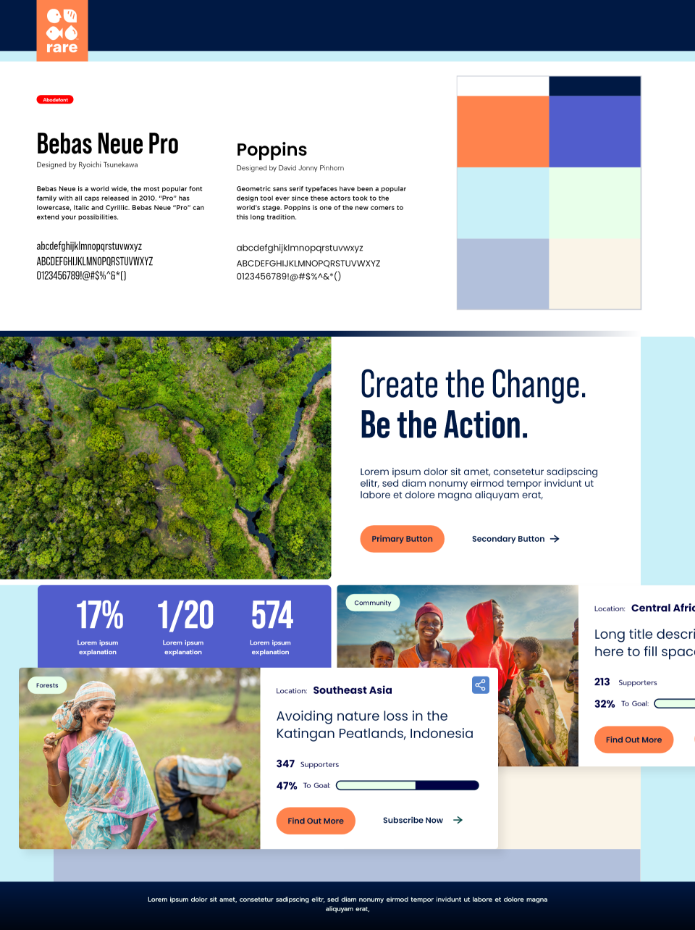
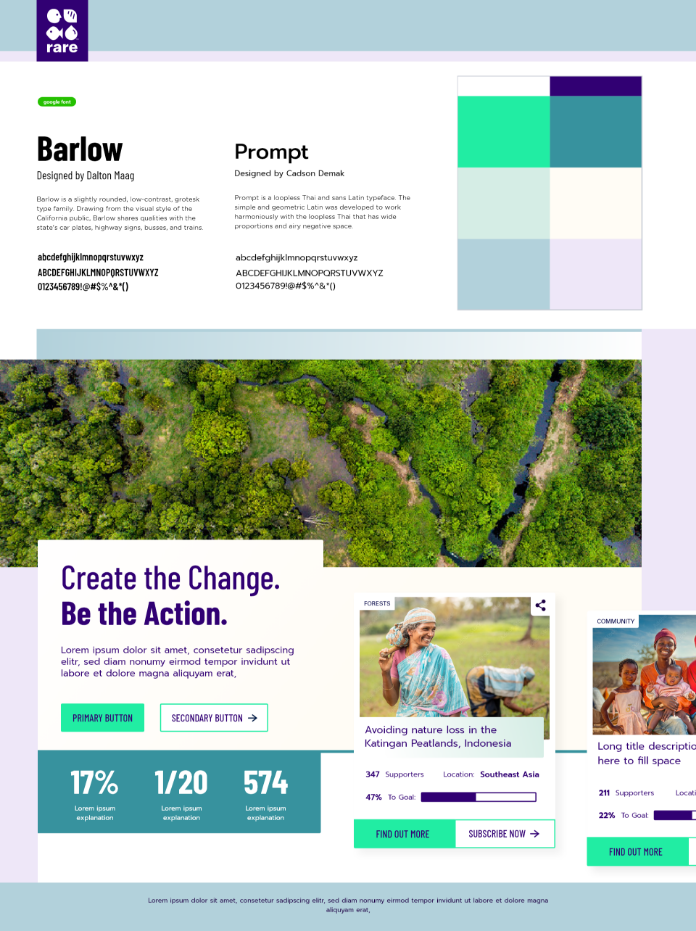
We led Rare through a design language workshop, used style tiles to align on aesthetics quickly, and refined full page designs in real time as we tested the internal API. Seven weeks after kickoff, Catch Carbon launched publicly.
Phase 2: Platform Rebuild
With the concept validated, Rare needed infrastructure to match their ambitions. Oomph designed and built a modern, flexible platform, leading both design and engineering.
We recommended Contentful as the content foundation and React for the front-end experience. This headless architecture separated content management from presentation, giving Rare’s team the ability to update messaging, launch campaign pages, and refine user flows without developer dependencies.
We built a modular design system that balanced clarity, trust, and accessibility across every component, from educational explainers to conversion flows. On the engineering side, we extended Rare’s existing API to support the new platform, working alongside their internal team to ensure seamless data flow and operational continuity.
Throughout, we treated the platform as a system to operate, not a project to complete.
What This Made Possible
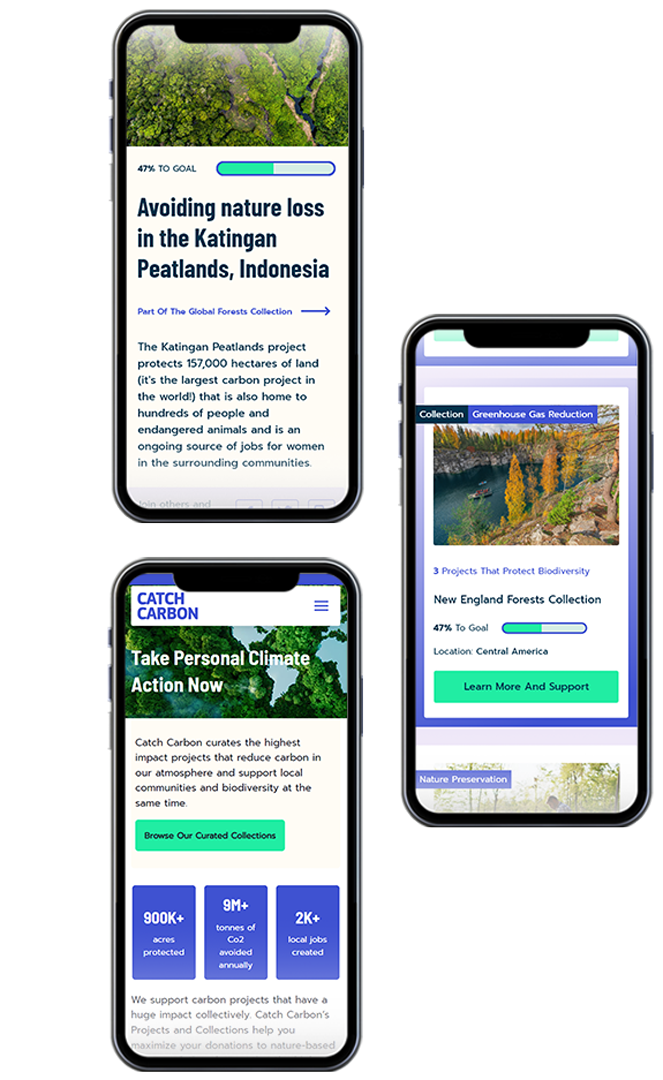
Two things made this work: Oomph’s ability to balance speed with rigor, and our commitment to operating as a true partner with Rare. In Phase 1, we moved from vision to launch in weeks without sacrificing design quality. In Phase 2, we built on what had been learned rather than starting over, preserving continuity for users while dramatically improving the underlying infrastructure.
Oomph is personally invested in the kind of environmental work Rare does, which made this collaboration something more than a project.
The Result
Catch Carbon launched v1.0 to the public in seven weeks, marking a milestone for the voluntary carbon credit market and democratizing access for everyday consumers. The platform has since been rebuilt on a modern headless architecture that gives Rare the operational flexibility to test, iterate, and scale on their own terms, supported by a design system that maintains quality and consistency as the audience grows.

Why This Matters
Most organizations in the climate and nonprofit space face the same trade-off: build something fast and limited, or invest in systems that take too long and cost too much. Catch Carbon is proof that speed and sustainability aren’t mutually exclusive. They just require the right partner and the right approach.
By treating digital infrastructure as a system to operate rather than a project to deliver, Rare gained the foundation to test, learn, and scale. And by staying in the partnership across both phases, Oomph helped ensure that what was built in Phase 1 wasn’t discarded. It was built on.
It’s nice to have a partnership [with Oomph] where you guys are so honest, straightforward, hardworking, and thoughtful.
— Catch Carbon
Structured content distribution is the decoupling of content from presentation through a headless CMS and Content as a Service (CaaS) architecture. It is a sound strategy for organizations managing complex content distribution networks across multiple channels.
To be the most successful, this digital transformation requires organizations to change both their publishing workflows and their content ownership structures. Governance complexity affects 41% of CaaS adopters (PDF), workflow mismatches impact a third, and training requirements average 14 to 18 weeks.
We have implemented these systems for clients in healthcare, financial services, and higher education, and the pattern is consistent: the three failures that kill structured content initiatives are the preview gap, the ownership vacuum, and the training deficit. Here is what we have learned about each one — and what actually works.
The Promise
The pitch for structured content distribution is compelling: create content once, store it as modular data in a headless CMS, deliver it via API to any channel (web, mobile, kiosks, AI agents) without reformatting. The CaaS market is projected to reach $2.8 billion by 2035, and over 65% of enterprises have adopted headless CMS architectures.
What they do not tell you is that integration challenges affect 46% of adopters using legacy CMS platforms, and that 31% of enterprises encounter deployment delays exceeding six months. The technology works, but the governance requires just as much attention and is often overlooked. We have seen this avoidable pattern repeat across many structured content implementations.
Why Do Structured Content Migrations Stall?
In short, because organizations implement the technology without redesigning how their teams create, review, approve, and own content. That’s the governance problem.
A headless CMS decouples content from presentation. But most editorial teams have spent years, sometimes decades, working in systems where creating content and seeing how it looks are the same activity. WordPress, Drupal, and even SharePoint have a visual editing experience: build a page, see the page, publish the page.
Structured content does not work this way. Authors fill in fields like title, body, metadata, and related entries to publish content objects, not pages. As one analysis of Contentful’s editorial interface notes, “content editors work in structured content entry forms without seeing how content will render in production.” The front-end determines how those objects appear to users.
That architectural distinction is the correct one for consistent omnichannel delivery. It is also the one most likely to break editorial workflow expectations when teams do not deliberately plan for this big shift. In our experience, three governance failures account for the vast majority of structured content stalls.
What Is the Preview Gap, and Why Does It Derail Teams?
The preview gap is the loss of visual context that editorial teams experience when moving from a WYSIWYG (what you see is what you get) environment to a structured content interface, and it is the most immediate friction point in any headless CMS migration.
Authors who previously built pages visually are now filling in form fields and trusting that a front-end will render them correctly. The shift from “building a page” to “managing a content object” takes adjustment, and “once teams adapt, the structured approach tends to produce more consistent, reusable content.” The problem is what happens before they adapt.
What happens is that authors create workarounds. They paste formatted content into rich text fields, breaking the structured model. They submit tickets to developers asking “what will this look like?” multiple times per week. They maintain shadow documents in Google Docs so they can see their work in context. Every workaround is a governance failure — content that exists outside the system, formatting that undermines the content model, and developer time consumed by preview requests instead of feature development.
The planning that pays off includes building live preview environments for as many content sources as possible. This development work typically gets deprioritized because it is not user-facing, but it determines the success of the new system. As one migration guide puts it, headless platforms deliver excellent editorial experiences “when configured correctly — visual editing, live preview, flexible page-building, role-based permissions. But that configuration is work, it doesn’t happen by default.” Budget for it, build it first, and do not launch editorial access without it.
What Is the Ownership Vacuum?
The ownership vacuum is what happens when structured content crosses departmental boundaries without clear governance over who maintains the content model, who approves changes to shared components, and who is accountable when content is reused in a context the original author never intended.
In a traditional CMS, the marketing team owns the marketing pages, the product team owns product pages, etc. Structured content breaks this model deliberately — a product description created once might appear on the website, in a mobile app, in an email campaign, and through a chatbot simultaneously. But governance complexity affects 41% of CaaS adopters, and multi-team collaboration across 6 to 10 departments increases governance overhead by 27%.
Questions seldom asked include:
- When the compliance team changes a regulatory disclaimer, who is responsible for verifying that the change renders correctly across every channel consuming that content object?
- When marketing adds a field to the product content type, who assesses the downstream impact on the mobile app and the support knowledge base?
We have seen organizations discover these questions six months post-launch, usually during a content audit that reveals inconsistencies no one can trace. In regulated industries — healthcare, financial services, higher education — those inconsistencies are compliance risks.
Knowing these pitfalls ahead of time can lead to the establishment of a content model governance board before migration begins. A small, cross-functional group (typically 3 to 5 people spanning content strategy, development, and compliance) owns the content model as a shared organizational asset. They approve changes to content types, evaluate reuse implications, and maintain a living inventory of where shared content objects appear. This role does not exist in traditional CMS organizations because it’s not needed. But in structured content environments, it is absolutely necessary.
Why Does the Training Deficit Compound Everything?
Because organizations allocate 90% of their transformation budgets to technology and implementation, and only 10% to change management — the part that determines whether anyone actually uses the system they built.
Training requirements for CaaS implementations average 14 to 18 weeks, the elapsed time from initial exposure to genuine editorial fluency. This training creates the confidence for authors to create, structure, and publish content without reverting to old habits or filing developer tickets. Most implementation budgets account for a one-day training session and a knowledge base article. The gap between that and actual fluency is where adoption dies.
The compounding effect of the training deficit makes this particularly damaging. Undertrained authors hit the preview gap and panic. Without clear governance ownership, there is no one to answer their questions authoritatively. They build workarounds. Those workarounds corrupt the content model. The corrupted content model undermines the case for structured content. Stakeholders lose confidence. The transformation stalls.
BCG’s study of 850+ companies found that only 35% of digital transformations meet their value targets globally. The failure rate is a change management problem that looks like a core problem with the technology itself.
To avoid this failure spiral, structure editorial onboarding as a phased engagement, not a one-and-done event. In our implementations, we start with a pilot group of 3 to 5 authors working with the system while the front-end is still being built. They surface friction points the development addresses in real-time. When the broader editorial team is onboarded, the common pain points have been resolved, and the pilot group serves as advocates who can answer questions and support their peers. This approach adds little cost and dramatically improves adoption velocity.
What Should Organizations Do Before Starting a Structured Content Migration?
Treat governance design as a foundation to build a successful digital transformation:
- Audit your editorial workflows as they actually operate. Map who creates content, who reviews it, who approves it, and where informal workarounds exist. As one migration planning guide advises, most publishing workflows “are often based on legacy systems, informal approvals, or staff availability. The result? Delays, missed steps, and content that never quite gets finished.” Your structured content governance must account for the real workflow, not the theoretical one.
- Define content model ownership before selecting a platform. Determine who will own the content model as an organizational asset, who can request changes, and what the approval process looks like. This governance structure should be platform-agnostic — it is an organizational decision, not a technical one. We have helped clients build this through our roadmapping and strategy engagements, and it consistently reduces mid-project governance confusion.
- Budget for editorial experience parity. If your authors currently have WYSIWYG editing, live preview, and visual page building, do not assume they will accept a simpler and more limiting form-based interface. Calculate the development effort required to provide contextual preview in your new architecture and include it in the implementation scope, not as a phase-two enhancement. Phase two rarely arrives before editorial frustration does.
Wrap Up
The CaaS pitch is not wrong. Structured content distribution is the right architecture for organizations publishing across multiple channels, and it is increasingly the right architecture for AI readiness — structured data is what AI systems consume most effectively. But the promise underestimates the organizational effort to make it successful.
Technology is the easy part. Governance, training, and editorial adoption are harder, and that is where implementations succeed or fail.
We have built these systems on Contentful, Drupal, and composable architectures for organizations in regulated industries where getting content wrong has real consequences. The lesson we keep relearning is the same one: start with the team, not the platform.
Summary
On April 20, 2026, the Department of Justice extended ADA Title II web accessibility compliance deadlines by one to two years for state and local government entities. The extension does not pause underlying accessibility obligations, and it does not extend the separate HHS Section 504 deadline that may apply to hospitals and nonprofits receiving federal funding. Organizations tracking a single calendar are exposed to what we call the two-deadline trap. The right response is to use the extension to systematize accessibility, not to defer it.
This article is not legal advice. Confirm which rules apply to your organization with qualified counsel.
Four days before the original compliance date, the DOJ reset the clock.
Per a summary from Jackson Lewis, state and local governments with populations over 50,000 now have until April 26, 2027 to comply with WCAG 2.1 Level AA under Title II. Smaller entities and special districts have until April 26, 2028.
If you run digital for a public entity, exhale. If the extension made you slow down, recalibrate. The deadlines moved, but the risk did not.
What actually changed, and what did not?
The DOJ pushed back the date that specific technical requirements become enforceable.
What did not change: the underlying ADA obligation to provide accessible programs and services. Title III public-accommodation risk for hospitals, providers, and nonprofits is unaffected. Demand letters and accessibility-related litigation continued straight through the extension announcement; they did not pause for it.
The compliance date is a deadline, not a start date. Organizations that wait will spend the extension period accumulating debt in templates, content, and vendor contracts, then attempt to remediate it in a sprint. That sprint is where the avoidable risk lives.
Why doesn’t the extension help hospitals and nonprofits?
The DOJ rule covers state and local government entities. It does not cover hospitals and nonprofits whose accessibility obligations come from a different source: federal financial assistance under Section 504 of the Rehabilitation Act.
Jackson Lewis notes that HHS has a separate Section 504 web accessibility compliance date, and as of this writing it has not been extended. Until HHS acts, plan as if it holds.
If your organization receives HHS funding, operates patient portals, runs scheduling or billing flows, accepts donations online, or hosts learning and event platforms, your timeline is likely shorter than the DOJ headline suggests. Title III public-accommodation exposure runs alongside it.
What is the two-deadline trap?
The two-deadline trap is the assumption that a single, well-publicized accessibility deadline is the only one that applies to your organization.
It happens when leadership tracks the DOJ Title II extension and treats it as the program’s primary clock, while a separate Section 504 or Title III obligation governs the actual exposure. The result is a roadmap pegged to the wrong date and a remediation budget that arrives late.
Avoiding it requires confirming, in writing and with counsel, which rules apply, which deadlines govern, and which user-facing services fall inside each scope.
What does day-one compliance actually look like?
Day-one compliance is the day your organization can demonstrate that new content is published accessibly, high-impact user flows work with assistive technology, vendors are managed as part of your posture, and governance is in place.
In our experience working with regulated organizations, the failure mode is rarely the homepage. It is the publishing system that keeps creating new accessibility debt — new pages, new PDFs, new embedded forms, new third-party widgets — faster than remediation can clear it. A defensible program stops the inflow before it works down the backlog.
That means accessibility moves upstream into design system components, CMS templates, content briefs, QA gates, and vendor intake. “Archived content” stops being a folder name and becomes a governance decision with rules. Procurement language changes so the next contract renewal does not lock in another year of vendor risk.
Will an accessibility overlay protect you?
No. Overlays can adjust some visual and interaction settings for some users, but they do not remediate the underlying barriers in your templates, components, content, or third-party tools. The Overlay Fact Sheet, signed by hundreds of accessibility practitioners and organizations, documents the consensus position.
If a widget is your strategy, assume you still need code-level fixes in templates, manual testing with assistive technology, content authoring training, and a third-party tool plan. The widget is not a substitute for any of those, and a number of overlay vendors have themselves been named in accessibility lawsuits.
What should accessibility leaders do this week?
Five actions, in order.
- Confirm which rules apply, and which deadline governs. Title II, Section 504, Title III, or more than one. If there is uncertainty, this is a counsel question, not an internal one.
- Name a single accessibility owner. Not a committee, but one person responsible for coordinating across IT, content, legal, and procurement. Accountability is the program.
- Test your top five user-critical flows manually. Forms, authentication, scheduling, payments, donations, patient portal — whatever blocks access to your primary services. Manual keyboard-only and screen reader software spot checks find what automated scanners miss.
- Inventory third-party tools and audit their contracts. Where contracts are silent on accessibility, flag them as priority renewals. Your compliance posture runs through every embedded vendor whether the contract says so or not.
- Write a 90-day plan and share it with leadership. Specific, resourced, and tracked beats comprehensive and aspirational every time.
The extension is not a year off. It is a year to put a defensible program in place before the rules apply more explicitly than they already do. Use it wisely.
As direct website traffic decreases and LLMs slurp up text from multiple sources to mix together and redistribute to users, it has never been more important to maintain high-quality online content. A ROT analysis — which stands for Redundant, Obsolete, Trivial — is a framework through which we can evaluate site content to improve it for usability, SEO, retrieval, and GEO.
This is a flexible exercise that can apply to a variety of digital properties: web pages, PDFs, intranets, social media pages, call center databases, support knowledgebases… Anywhere that you, as an organization, are speaking to your audience, you have an opportunity to share knowledge, build trust, and solidify your brand image.
Similarly, ROTten content can mislead users, seed doubt, and damage your reputation.
When you use a ROT analysis to kickstart a content clean-up project, you’re ensuring that users and bots alike find only your latest, clearest, most accurate and relevant information. When done properly, it can even set up your team for better content production and management in the future.
How Oomph Approaches Content ROT Analyses
Every ROT analysis looks a little different depending on the industry, content, and what a particular audience needs.
Make a Plan
Before jumping into dashboards and spreadsheets, we start with a conversation. With any project, we need to understand what problems your organization needs to solve: What’s important to you and your users? Where are you struggling? This is our chance to understand the why behind your content.
As we learn more about what you need, we’ll define what ROT is for your organization. What existing policies do you have in place around archiving old or outdated content? If you don’t have policies, what makes sense for you? What key user journeys should the analysis focus on? We’ll answer these questions and more to make sure we’re going into the analysis with a clear vision of what your content should look like so we can see where it’s missing the mark.
Find the ROT
Let’s get into what ROT looks like specifically and where we look for it.
Redundant means the content communicates information in more than one place. This can result in an inefficient information architecture and messy user paths. There are times duplicate content can be helpful, like when separate task flows require some of the same information. That’s why it’s important to know upfront what journeys are most important to prioritize. In these cases, when the same content shows up in multiple places across a website or app, it’s important to have a method for keeping all content in sync. If it’s possible to edit this content in a single place while distributing it across multiple pages, that can be a great method for maintaining a single source of truth.
Redundant might also refer to several articles written over time that deal with the same topics in similar ways. This can result in the newest content on the topic having its SEO/GEO cannibalized by older content on the same topic. Users might more easily find older content when you want them to find the latest.
Obsolete content includes outdated information, language, and (probably broken) links. This type of ROT is especially damaging when it’s related to products, services, or something users are trying to take action on. It’s important to keep in mind your entire digital landscape; Maybe you’ve updated the content on your main service page, but did you remember to update automated emails, support articles, and meta descriptions? What pages aren’t built directly into a user flow but can still be found by Google?
Consider whether it makes sense to archive or unpublish old content, like past news and events. And consider your audience: Is there a reason users would be looking for a historical record, and is that need strong enough to justify keeping it available? If you do choose to keep outdated information published, make sure that it’s clear to users that the content is old and consider providing a link to the latest version.
Trivial content can be harder to define and is highly subjective based on the organization. This might look like “fluff” pieces shared for the sake of SEO or maintaining a publishing schedule, or excessive marketing language that ultimately doesn’t serve you or your users. It might be low-traffic fine print details that apply to a specific audience who typically finds it another way. Maybe it’s content that is related to but outside of your core business function. You’ll need to make some decisions about what is important to you.
To find ROT, we’ll use a variety of collection and measurement tools. SortSite, Screaming Frog, and Siteimprove can locate broken links, orphaned pages, and other SEO issues. Google Analytics, Hotjar, Contentsquare, and MS Clarity can show common user flows and help identify trivial content. Data from these tools can also prioritize the analysis by surfacing what content is most important to users. If a page gets a lot of traffic, we know that it needs to be clear, up-to-date, and accurate. If a page isn’t visited much, we need to ask whether it should be more highly trafficked, consolidated with higher performing content, or removed.
Deliverables and Next Steps
After all this sorting and evaluating, you might be wondering what you’ll tangibly get out of the process. We know content teams are busy, and going through a review can feel like adding more work to the pile. How can we help prioritize meaningful progress here?
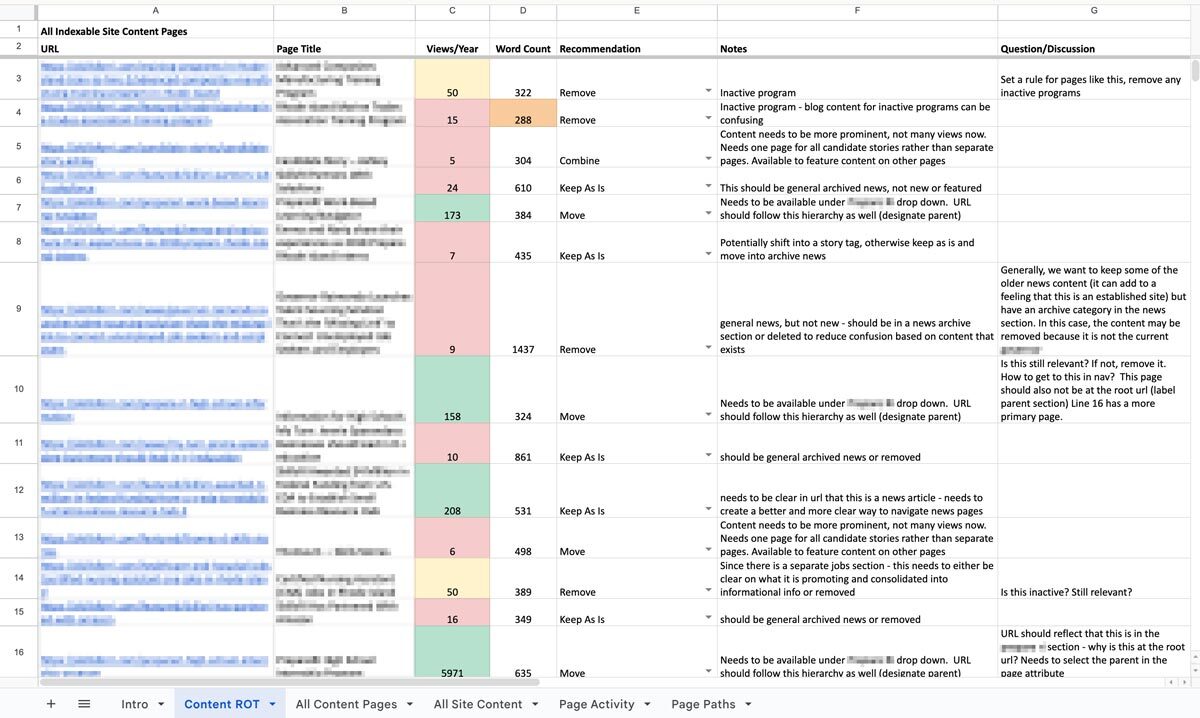
The big outcome is one of my personal favorites: a clean, annotated, actionable spreadsheet. Specifically, we’ll put together an audit of your content with links, page titles, notes on whether the content falls into any of the three ROT categories, and what to do about it: keep, modify, combine, or delete. Depending on the tools your content team uses or what you are willing to subscribe to, we might prepare dashboards and reports directly within an app that your team can use as an ongoing progress tracker. Wherever this list of to-do’s lives, we’ll help you prioritize it so you can start ticking off the most crucial items. Depending on what we decided in early scoping agreements, we can even help work through some high-impact issues, like bulk deleting content, suggesting rewrites, and fixing broken links.
We can also set up an ongoing content hygiene plan. While a dedicated content ROT analysis is a great way to identify and work through issues, an effective content plan should prevent ROT as much as possible and reduce the need for a large effort in the future. This might involve setting up policies, practices, and tools to guide future content management. We’ll help you find ways to see the bigger picture when updating or developing new content to make sure all pieces are accounted for. And when ROT falls through the cracks, you’ll have a plan to regularly review site content, setting ahead of time the when, what, and who.
One Piece in the Puzzle of Strong Content
As we continue to inspect the quality of your website and other digital properties, we can use this ROT analysis as a jumping off point. The initial audit may lead directly into a deeper content audit to evaluate URL paths, heading usage, performance metrics, reading level, and more. As we consider reworking, combining, and cutting entire pages, we may find the need to restructure your information architecture and taxonomy structures, in part or in whole, informed by research exercises like card sorts and tree tests. Depending on what we’ve found in the existing content and how it needs to change, we might suggest changes to your content model, adding, modifying, or removing content types and the relationships between them.
A content ROT analysis is a flexible and fruitful way to take a fresh look at your content ecosystem. If you need help getting started, let us know. We’d love to dig in with you!
Overview
As Out & Equal evolves alongside an ever-changing corporate landscape, its digital presence needs to best reflect who they are and the role they play for their sponsors and community.
This redesign project focused on aligning the brand with its identity as a trusted guide—helping organizations navigate complexity with clarity, confidence, and care, while remaining grounded in its LGBTQ+ roots and its commitment to belonging at work.
The work introduced a refreshed visual identity and a redesigned story-telling experience that clearly communicates purpose, narrative, and direction, providing a foundation for consistent expression across channels.

The approach
The redesign began with a focus on clarity and coherence—ensuring the brand could be expressed consistently while remaining flexible enough to evolve.
Key elements of the refresh included:
- A new color palette that signals confidence and warmth
- A refined logo that improves legibility and adaptability
- Visual storytelling that better reflects the organization’s values and future direction
To support long-term adoption, these changes were documented and operationalized through a centralized Brand Site. The site serves as a single source of truth for brand guidelines and assets, enabling internal teams and partners to apply the new identity with confidence.Brand assets are maintained directly in Figma, allowing designers to update and manage the system without engineering support and ensuring the brand remains current as it evolves.


Why This Matters
For Out & Equal, this redesign wasn’t simply about updating visuals—it was about clearly defining who they are and the role they play for the organizations and communities they serve, especially in a time of heightened scrutiny.
As a trusted guide, Out & Equal helps organizations navigate complexity with clarity, confidence, and care. The redesign ensures this role is immediately understood, while remaining deeply rooted in their LGBTQ+ origins and their long-standing commitment to belonging at work.
By aligning visual identity, storytelling, and governance, the new digital presence reflects Out & Equal’s purpose with intention. It provides internal teams with a clearer foundation to work from and offers external audiences a more confident understanding of where the organization is headed—and how they can move forward together.


Contentful is no longer just an alternative CMS—it’s become a foundational platform for organizations navigating complexity, regulation, and rapid digital change. In 2026, the question isn’t what is Contentful? It’s why are so many organizations rebuilding their digital ecosystems around it? The answer lies in how digital experiences are built, managed, and scaled today.
Contentful Is Built for Systems, Not Pages
Traditional CMS platforms were designed around pages and templates. That model breaks down when content needs to move faster, live in more places, and remain consistent across teams and channels.
Contentful takes a different approach. It treats content as structured data, not static pages. That means teams create content once and deliver it anywhere—websites, apps, portals, email, or future channels that don’t yet exist.
In 2026, this isn’t a “nice to have.” It’s how modern digital platforms operate.
Composable Architecture Is Now the Default
Composable architecture has moved from trend to standard. Organizations want the freedom to choose best-in-class tools without being locked into monolithic platforms.
Contentful fits cleanly into this model. It integrates with design systems, analytics platforms, personalization tools, consent managers, and AI services through APIs—without forcing teams into rigid workflows.
This flexibility allows organizations to evolve their stack over time instead of rebuilding every few years.
AI Depends on Structured Content
AI-driven experiences are only as good as the content behind them. In 2026, organizations are using AI to support personalization, search, localization, content optimization, and automation.
Contentful’s structured content model makes this possible. Clean, well-defined content enables AI tools to understand, reuse, and adapt content accurately—without introducing risk or inconsistency.
For teams exploring AI responsibly, Contentful provides the infrastructure needed to scale with confidence.
Governance and Compliance Are Built In, Not Bolted On
For regulated and mission-driven organizations, governance isn’t optional. Publishing controls, audit trails, permissions, and review workflows are essential.
Contentful supports these needs at scale. Teams can define roles, control who edits or publishes content, and maintain visibility into changes across environments. This level of governance is critical in industries like healthcare, legal, finance, and the public sector.
In 2026, compliance isn’t something teams add later—it’s designed into the platform from day one.
Marketing and Development Work Better Together
One of Contentful’s biggest advantages is how it aligns marketing and engineering teams. Developers maintain design systems and integrations. Content teams manage content without breaking layouts or workflows.
This separation of concerns reduces friction, speeds up delivery, and minimizes production errors—especially as digital ecosystems grow more complex.
Ready to explore what Contentful could do for your organization? Whether you’re evaluating platforms, planning a migration, or looking to optimize your current setup, Oomph can help you build a content infrastructure designed for the long term. Let’s talk about your next move.

Why Organizations Move to Contentful Now
Organizations typically migrate to Contentful when legacy systems start holding them back. Common triggers include:
- Slow publishing workflows
- Heavy developer dependency
- Difficulty scaling across channels
- Growing compliance requirements
- The need to support AI and personalization
In 2026, Contentful isn’t chosen because it’s new. It’s chosen because it’s resilient.
For organizations new to the platform, getting started doesn’t have to mean a complete rebuild. Oomph’s Contentful Kickstart Package helps teams move from decision to deployment with a structured, low-risk approach—giving you the foundation to scale as your needs evolve.
The Takeaway
Contentful has evolved alongside the modern digital landscape. It’s not just a CMS—it’s a content platform designed for scale, governance, and change.
For organizations planning beyond their next website launch and toward long-term digital maturity, Contentful provides the flexibility and confidence needed to move forward.
Ready to explore what Contentful could do for your organization? Whether you’re evaluating platforms, planning a migration, or looking to optimize your current setup, Oomph can help you build a content infrastructure designed for the long term. Let’s talk about your next move.
For many organizations, privacy regulations like GDPR and CCPA seem like distant legal concerns rather than operational priorities. In practice, however, websites serve as the primary point of data collection—making compliance far more relevant than most teams assume. If your site collects user data in any form, privacy compliance isn’t optional.
Understanding When GDPR and CCPA Apply
GDPR governs the collection of personal data from users in the European Union, while CCPA applies to personal data collected from California residents.
Crucially, these regulations are triggered by user location, not company headquarters. A U.S.-based organization serving a global audience may be subject to both frameworks.
Why Websites Are at the Center of Compliance
Most modern websites collect data through multiple channels:
- Contact and intake forms
- Newsletter subscriptions
- Analytics and tracking tools
- Cookies and personalization technologies
- Third-party embeds and integrations
Each of these collection points creates compliance obligations around consent, transparency, and user control.
Moving Beyond Cookie Banners
Meaningful compliance extends well beyond footer disclaimers. Effective privacy management requires:
- Clear consent and opt-out mechanisms
- Transparent communication about data usage
- The ability to update policies efficiently
- Controlled publishing workflows
- Comprehensive auditability for content and data modifications
Legacy CMS platforms frequently lack the flexibility and governance capabilities needed to meet these requirements.
The Role of Your CMS in Privacy Compliance
Your content management system is instrumental in supporting privacy obligations. A modern, composable CMS enables organizations to:
- Decouple content from data logic
- Integrate consent and privacy tools seamlessly
- Manage access and publishing permissions effectively
- Deploy compliance updates across all channels instantly
- Minimize risk by limiting unnecessary data exposure
For regulated and mission-driven organizations, CMS limitations can translate directly into compliance vulnerabilities.
The Cost of Non-Compliance
While regulatory penalties are a concern, the greater risk lies in eroding user trust.
Today’s users expect transparency and control over their personal information. Organizations unable to deliver on these expectations risk damaging their reputation with customers, donors, and partners.
Final Thoughts
GDPR and CCPA represent more than legal obligations—they present fundamental digital experience challenges. Websites built on flexible, compliance-ready platforms are better positioned to adapt as privacy expectations continue to evolve.
In today’s environment, privacy compliance shouldn’t be viewed as a constraint. It’s an essential component of delivering a modern, trustworthy digital experience.
Need help ensuring your website meets modern privacy standards? Our team specializes in building compliance-ready digital platforms that protect your users and your organization. Let’s discuss your requirements.
In recent months, Generative Engine Optimization (GEO) has been gaining attention, often positioned as the next evolution beyond traditional Search Engine Optimization (SEO). For some clients, this presents an exciting opportunity to rethink and restructure their digital content. For others, it can feel overwhelming, raising more questions than answers. As AI-powered search tools like ChatGPT, Perplexity, and Gemini change how people discover content online, clients increasingly ask: What is GEO, and how can we prepare our sites for it?
The following handy Q&A guide aims to demystify Generative Engine Optimization (GEO), explain why it matters, and provide practical steps your team can take to get started.
Q: What is GEO and how is it different from SEO?
A: GEO stands for Generative Engine Optimization. While SEO (Search Engine Optimization) focuses on getting your content to rank in traditional search engines like Google (via keywords, backlinks, and site performance), GEO focuses on getting your content mentioned, referenced, summarized, or cited in AI-generated answers from tools like ChatGPT, Gemini, and Perplexity.
Think of SEO as getting your content listed, whereas GEO is about making your brand and its content the answer.
Q: Why should my organization care about GEO?
A: AI platforms are rapidly becoming the first stop for users looking for answers, especially younger audiences and professionals. If an answer appears via Gemini on the top of a Google search, fewer people may scroll further down the page to look for other sources. They got the answer they needed from just one search. If your content isn’t optimized for these tools, you’re missing out on certain traffic data, visibility, and an opportunity to build trust.
In 2026, ChatGPT alone sees over 4.5 billion visits per month, and Perplexity handles nearly 500 million monthly queries.
Q: How is GEO impacting my site’s analytics?
A: Likely a lot. Generative engines often summarize content without requiring a click. That means you may see fewer impressions and clicks, even if your content is powering the AI’s answer. Most websites are seeing direct traffic declining across the board. With that said, users who do click through to sites are often engaging more deeply, leading to longer session durations and higher conversion rates.
Because of this, it’s crucial to learn these new patterns and recognize them within your site’s analytics by setting up new reports.
Q: How do AI engines choose which content to cite?
A: AI tools evaluate a number of factors, with the most important being:
- Authority: Are you a trusted source? Do you have backlinks, credentials, or media citations?
- Structure: Do you use schema markup, headings, and clear Q&A formatting?
- Freshness: Is your content updated regularly?
- Relevance: Does your content align with how users ask questions in natural language?
Each tool has its own algorithm, but clear, factual, structured content with recent updates from trusted sources performs best.
Q: What kind of content works best for GEO?
A: Content that answers questions directly, especially with a conversational tone, tends to work well. Additionally, you want your content to explain not just the what, but also the why and how, since generative engines often expand on user intent. Content structures that perform well for GEO include:
- Q&A sections
- “Top” or “Best” lists (Examples: Top Restaurants in Providence, Rhode Island or Best fall events in California)
- Evergreen guides that are updated annually
- Content that is organized for machines and humans (aka clear headings, mobile-friendly, structured data and metadata)
Q: How can we tell if our content is being featured in AI tools?
A: While most AI platforms don’t yet provide native analytics, you can track GEO success through:
- GA4 segmentation: Filter referral traffic by sources like chat.openai.com or perplexity.ai
- Landing page patterns: AI-driven referrals often land users deep into your site (e.g., specific blogs, not just the homepage)
- Google Search Console: Look for queries with high impressions but low click-through rates, these may indicate your content is being shown in AI Overviews
- Manual Testing: In an incognito window, search for the types of queries you want your site’s content to appear for and see what answers are returned. These might be simple questions like “What does [your organization] do?” or more in-depth research questions that your popular articles have addressed.
- Third Party Tools: As the field continues to develop, more third party tools are becoming available or adapting their analytics to provide insight into GEO success. SEMrush in particular is a tool that we recommend for clients interested in uncovering more data.
Q: Is there a way to make our site more “AI-friendly”?
A: Yes! Here are key GEO best practices:
- Use schema markup: Help AI models understand your content’s structure and intent. You can use schema.org to help guide you through improving your site’s markup.
- Write in a Q&A or conversational format: More people are asking full questions or prompts in ChatGPT—rather than just listing keywords. Match your content with how users phrase queries in AI tools.
- Optimize your About page: Make sure that your About page is thoughtfully written to answer who you are, what you do, and why. ChatGPT, for example, pulls from these pages to assess trustworthiness and authority.
- Refresh content: Update existing articles with new data and a clear structure (aka headings, bullets, FAQ sections, summaries). Note: You don’t need to create new URLs, just refresh the content to make sure it is relevant and current for today.
- Include citations and data points: Wherever possible, add data and sources. These increase your authority and credibility.
Q: Do we need to optimize differently for each AI tool?
A: The core strategies (trustworthiness, schema, natural language, performant) apply across all platforms, but there are nuances:
- Gemini: Heavily tied to Google’s ecosystem. Focus on crawlability and Core Web Vitals.
- Perplexity: Prefers cited, factual content and uses real-time web data.
- ChatGPT: Draws from authoritative sources like Wikipedia, news outlets, and Reddit. Strong personalization and structured content help here.
Q: Can we block AI tools from using our content?
A: Yes, but be thoughtful about what you are blocking. Adding a file like robots.txt can block AI crawlers, but doing so may reduce your visibility and lead to attribution from AI tools. It could also block legitimate crawlers and thus negatively impact both SEO and GEO, so be thoughtful about how you compose and format that file.
Note: If your brand has legal or content ownership concerns, we can help you assess what should or shouldn’t be available for AI training or citation.
Q: Do AI Tools honor authenticated access?
A: Yes, but remain mindful. Models like ChatGPT can’t “log in” or bypass authentication. If full research content is only available behind a user login, it won’t be included in training data or scraped summaries. But still pay attention to how content is displayed. If your research is behind a login or subscription paywall, ensure that:
- No full-text content is available to crawlers
- Abstracts or summaries shown publicly are limited in detail
Q: What is llms.txt and should I add it to my site?
A: llms.txt is a proposed convention for websites to provide a lightweight, machine- & human-readable summary (in Markdown) of the “important” parts of the site, to help large language models (LLMs) more easily crawl, interpret, and use content. More sites are starting to add it to their sites to help guide which pages AI should pay attention to. However, it is not yet a universally supported or enforced standard. Many LLMs or AI platforms do not currently yet automatically look for or honor llms.txt. As of now, you can think of it as a nice-to-have, not a requirement.
Q: How often should we update content for GEO?
A: Best practice recommends updating at least once a year for evergreen content. Prioritize updates for:
- Posts using phrases like “top,” “best,” or “recommended”
- Pages that receive seasonal traffic or include stats
- Key content that’s losing impressions or traffic in Google Search Console
Even simple updates like reordering information, adding new facts, or improving layout can go a long way with AI engines.
Q: Is GEO just another passing trend?
A: Not at all. GEO is a direct response to how AI is changing digital search and content discovery. Platforms like Google are rethinking their search experience through tools like Gemini, as more people turn to these tools for answers. GEO is how brands stay visible in this new AI landscape.
Q: What’s the first step we should take for GEO Optimization?
A: Start with a content and schema audit of your top-performing pages. From there, apply structured markup, rewrite headlines for clarity, add Q&A sections where applicable, and refresh key posts. A phased approach focused on high-value content will have the biggest immediate impact.
Need help figuring out what content to prioritize for GEO? Our team at Oomph can assess your current visibility and build a roadmap tailored to AI performance.
For more insights into GEO optimization, read…
- Everything You Should Know About Optimizing for GEO in 2026
- How LLMs Index Your Site — and How Accessibility Improves Their Answers and Your GEO
Generative Engine Optimization (GEO) is making organizations scramble — our clients have been asking “Are we ready for the new ways LLMs crawl, index, and return content to users? Does our site support evolving GEO best practices? What can we do to boost results and citations?”
Large language models (LLMs) and the services that power AI summaries don’t “think” like humans but they do perform similar actions. They seek content, split it into memorable chunks, and rank the chunks for trust and accuracy. If pages use semantic HTML, include facts and cite sources, and include structured metadata, AI crawlers and retrieval systems will find, store, and reproduce content accurately. That improves your chance of being cited correctly in AI overviews.
While GEO has disrupted the way people use search engines, the fundamentals of SEO and digital accessibility continue to be strong indicators of content performance in LLM search results. Making content understandable, usable, and memorable for humans also has benefits for LLMs and GEO.
How LLM systems (and AI-driven overviews) get their facts
Understanding how LLMs crawl, process, and retrieve web content helps us understand why semantic structure and accessibility best practices have a positive effect. When an AI system generates an answer that cites the web, several distinct back-end steps usually happen:
- Crawling — Bots visit URLs and download page content. Some crawlers execute javascript like a browser (Googlebot) while others prefer raw HTML and limit their rendering.
- Chunking — Large documents are split into small, logical “chunks” of paragraphs, sections, or other units. These chunks are the pieces that are later retrieved for an answer. How a page’s content is structured with headings, paragraphs, and lists determines the likely chunk boundaries for storage.
- Vectorization — Each chunk is then converted into a numeric vector that captures its semantic meaning. These embeddings live in a vector database and enable systems to find chunks quickly. The quality of the vector depends on the clarity of the chunk’s text.
- Indexing — Systems will store additional metadata (URL, title, headings, metadata) to filter and rank results. Structured data like schema metadata is especially valuable.
- Retrieval — A user asks a question or performs a search and the system retrieves the most semantically similar chunks via a vector search. It re-ranks those chunks using metadata and other signals and then composes its answer while citing sources (sometimes).
The Case for Human-Accessible Content
There are many more reasons why digital accessibility is simply the right thing to do. It turns out that in addition to boosting SEO, accessibility best practices help LLMs crawl, chunk, store, and retrieve content more accurately.
During retrieval, small errors like missing text, ambiguous links, or poor heading order can fail to expose the best chunks. Let’s dive into how this can happen and what common accessibility pitfalls contribute to the confusion.
For Content Teams — Authors, Writers, Editors
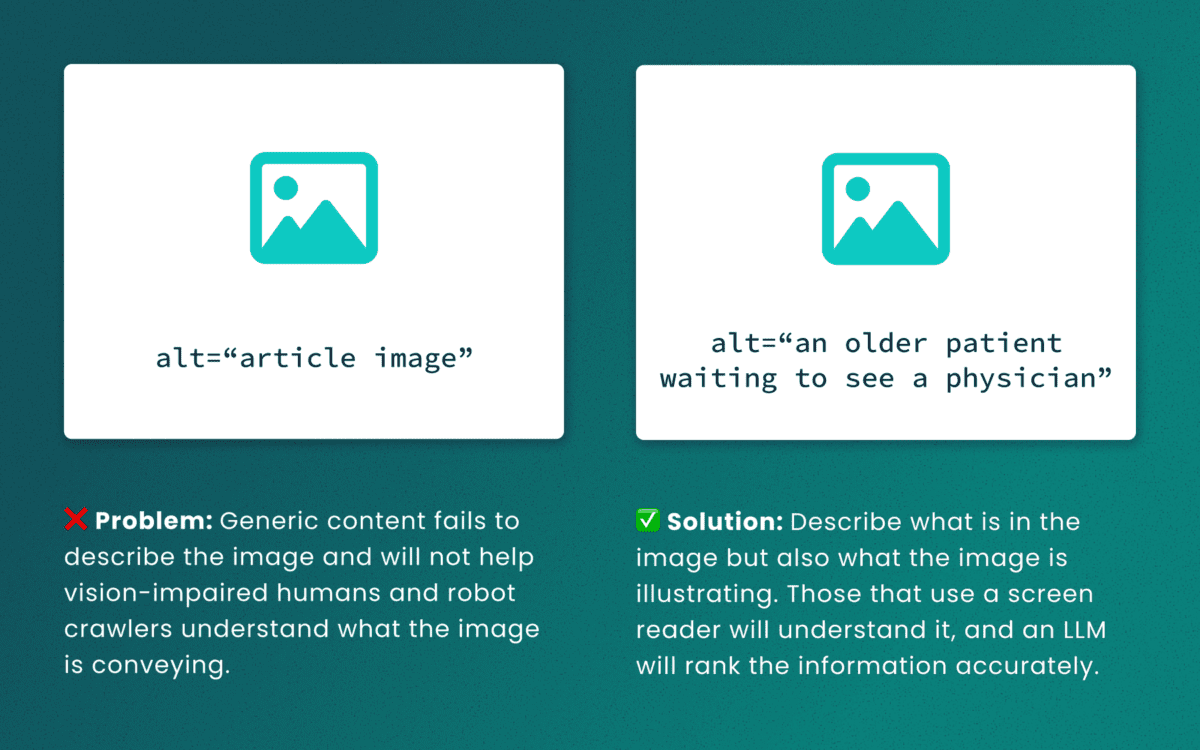
Lack of descriptive “alt” text
While some LLMs can employ machine-vision techniques to “see” images as a human would, descriptive alt text verifies what they are seeing and the context in which the image is relevant. The same best practices for describing images for people will help LLMs accurately understand the content.
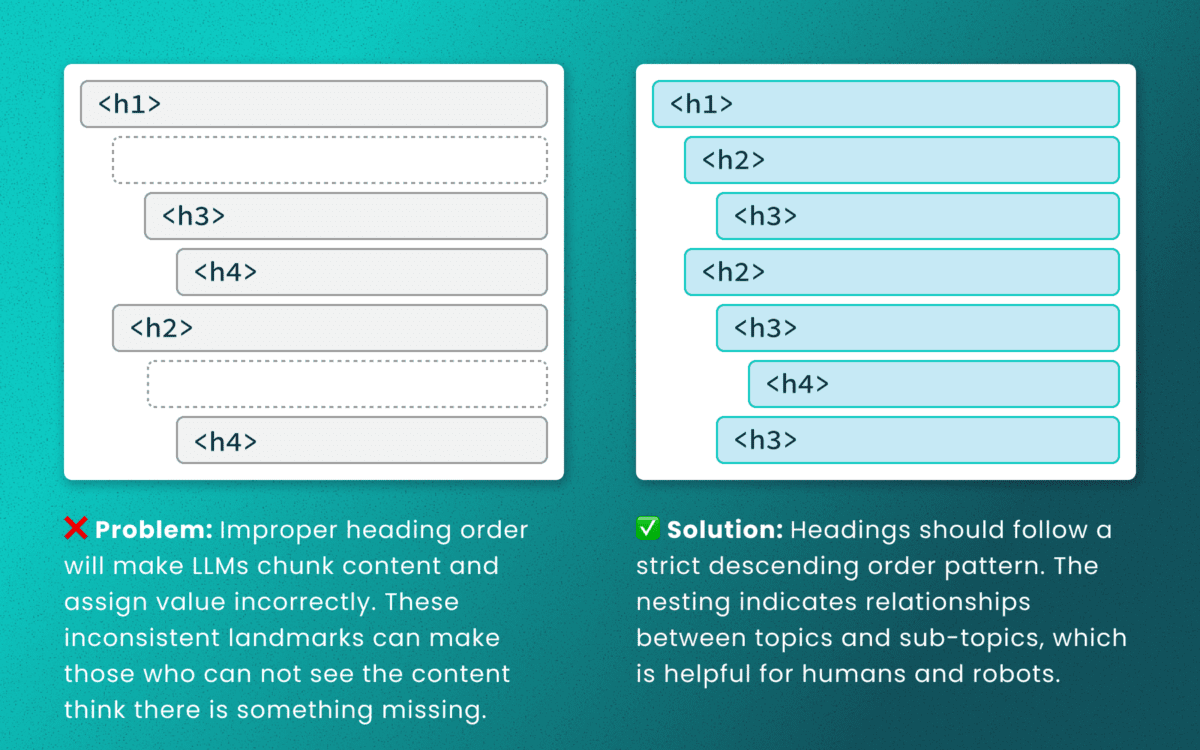
Out-of-order heading structures
Similar to semantic HTML, headings provide a clear outline of a page. Machines (and screen readers!) use heading structure to understand hierarchy and context. When a heading level skips from an <h2> to an <h4>, an LLM may fail to determine the proper relationship between content chunks. During retrieval, the model’s understanding is dictated by the flawed structure, not the content’s intrinsic importance. (Source: research thesis PDF, “Investigating Large Language Models ability to evaluate heading-related accessibility barriers”)
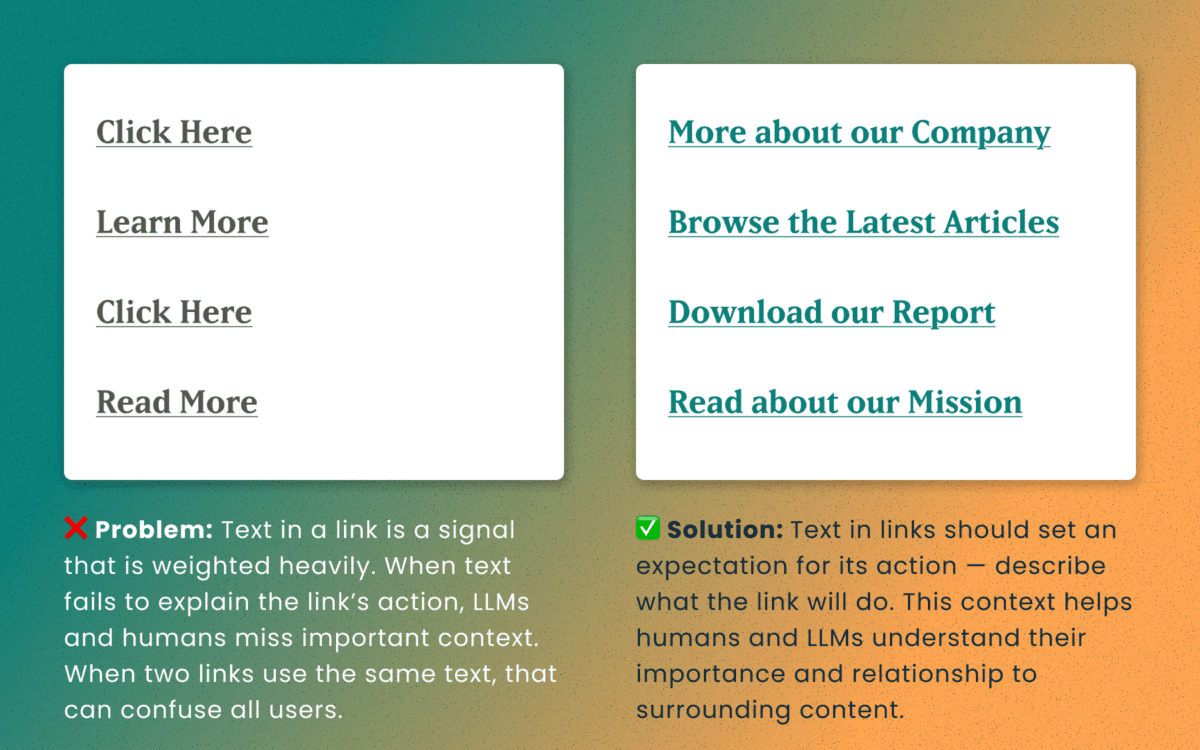
Descriptive and unique links
All of the accessibility barriers surrounding poor link practices affect how LLMs evaluate their importance. Link text is a short textual signal that is vectorized to make proper retrieval possible. Vague link text like “Click here” or “Learn More” does not provide valuable signals. In fact, the same “Learn More” text multiple times on a page can dilute the signals for the URLs they point to.
Using the same link text for more than one destination URLs creates a knowledge conflict. Like people, an LLM is subject to “anchoring bias,” which means it is likely to overweight the first link it processes and underweight or ignore the second, since they both have the same text signal.
Example of the duplicate link problem: <a href=“[URL-A]”>Duplicate Link Text</a>, and then later in the same article, <a href=“[URL-B]”>Duplicate Link Text</a>. Conversely, when the same URL is used more than once on a page, the same link text should be repeated exactly.
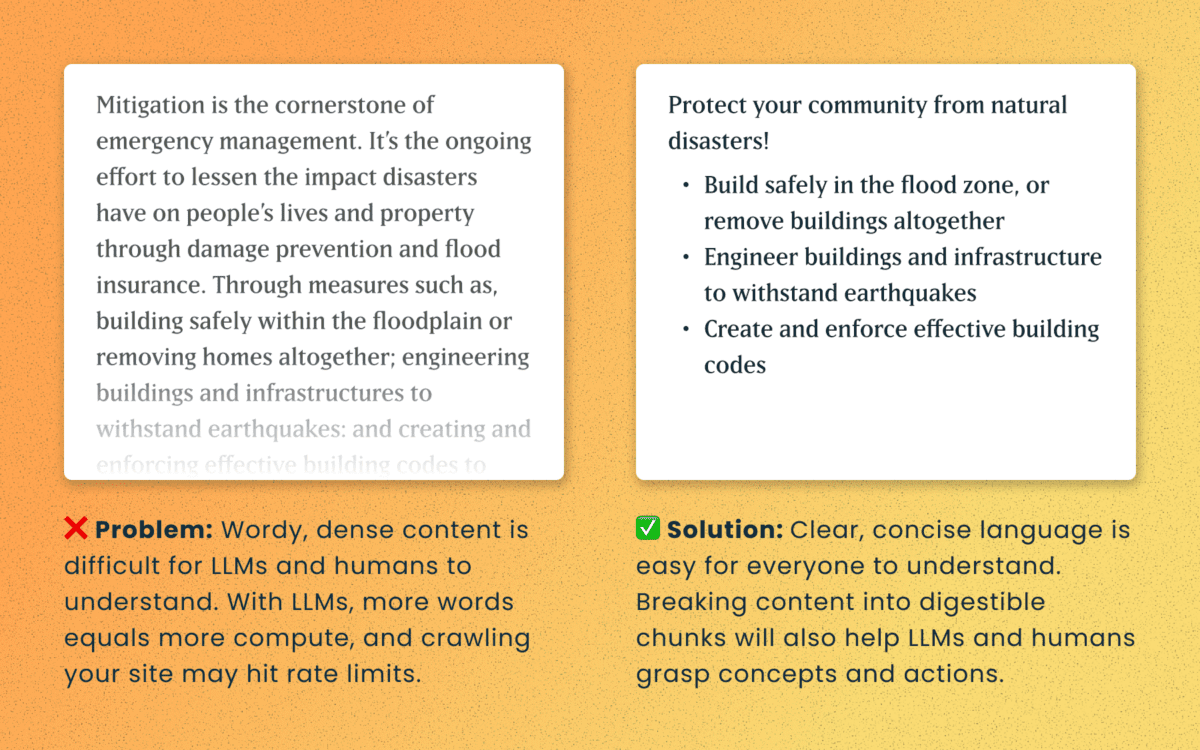
Logical order and readable content
Simple, direct sentences (one fact per sentence) produce cleaner embeddings for LLM retrieval. Human accessibility best practices of plain language and clear structure are the same practices that improve chunking and indexing for LLMs
For Technical Teams — IT, Developers, Engineers
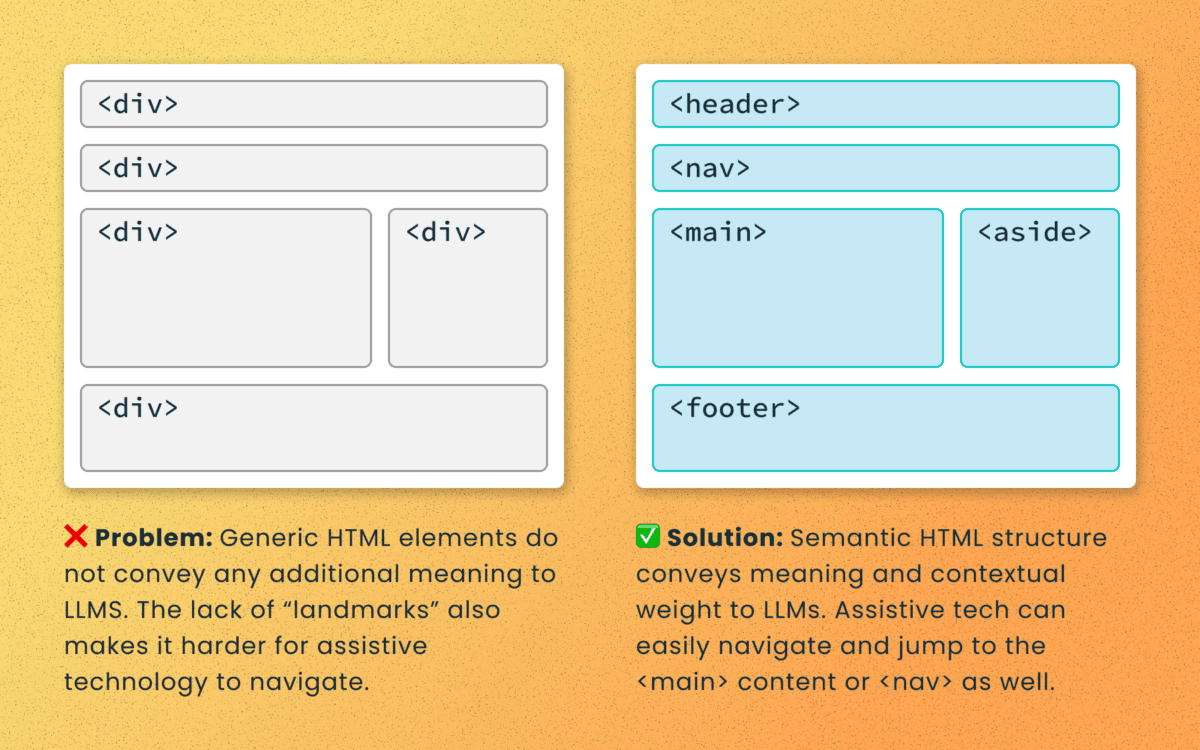
Poorly structured semantic HTML
Semantic elements (<article>, <nav>, <main>, <h1>, etc.) add context and suggest relative ranking weight. They make content boundaries explicit, which helps retrieval systems isolate your content from less important elements like ad slots or lists of related articles.
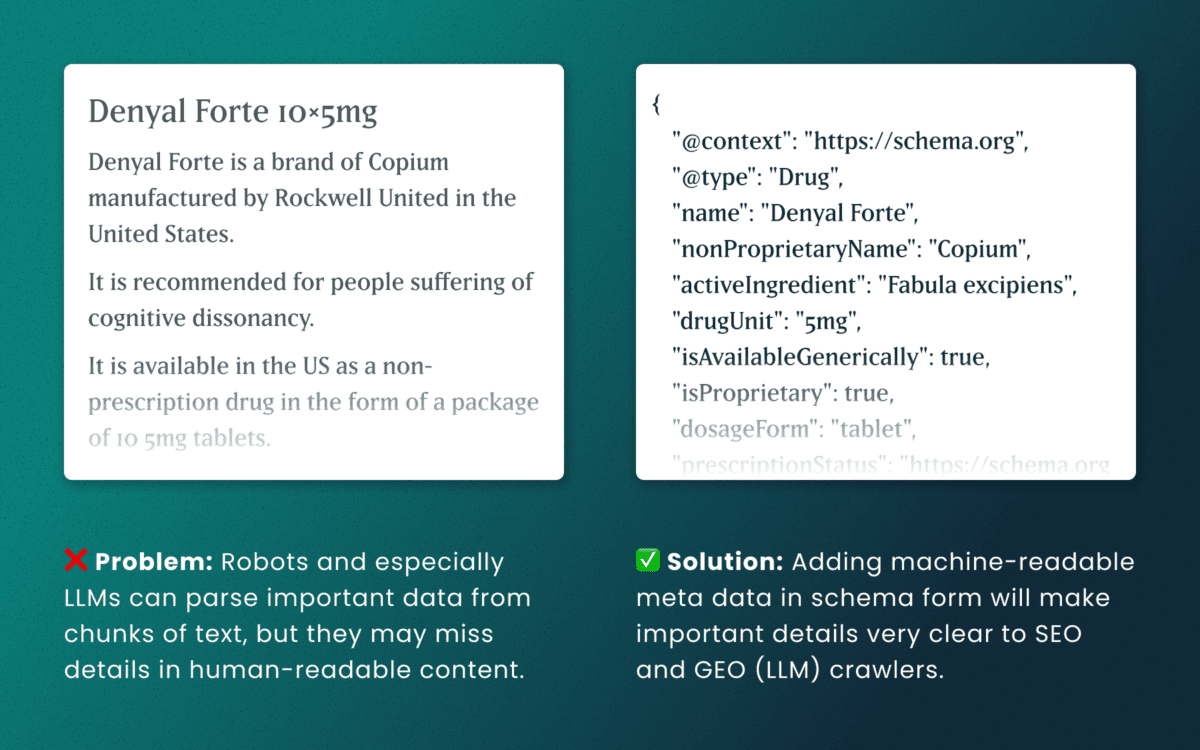
Lack of schema
This is technical and under the hood of your human-readable content. Machines love additional context and structured schema data is how facts are declared in code — product names, prices, event dates, authors, etc. Search engines have used schema for rich results and LLMs are no different. Right now, server-rendered schema data will guarantee the widest visibility, as not all crawlers execute client-side Javascript completely.
How to make accessibility even more actionable
The work of digital accessibility is often pushed to the bottom of the priority list. But once again, there are additional ways to frame this work as high value. While this work is beneficial for SEO, our recent research uncovers that it continues to be impactful in the new and evolving world of GEO.
If you need to frame an argument to those that control the investments of time and money, some talking points are:
- Accurate brand representation — Poor accessibility hides facts from LLMs. When customers ask an AI assistant for “best X for Y,” your content may not be shown — or worse, misrepresented. Fixing accessibility reduces brand risk and increases content authority.
- Engagement boost — Improvements that increase accurate citations and AI visibility can increase referral traffic, feature mentions, and lead quality. In a landscape where AI Answers are reducing click-through rates, keeping the traffic you have on your site for longer and building brand trust becomes vital.
- Increased exposure — Digital inclusion makes your content widely accessible to machines and the machines that assist humans. Think about a search engine as another human-assistive device, just like a keyboard or screen reader.
- Multi-pronged benefits — Accessibility improvement improves traditional SEO, can benefit mobile performance, and reduces the risks associated with accessibility compliance policies.
Staying steady in the storm
Let’s be clear — this summer was a “generative AI search freak out.” Content teams have scrambled to get smart about LLM-powered search quickly while search providers rolled out new tools and updates weekly. It’s been a tough ride in a rough sea of constant change.
To counter all that, know that the fundamentals are still strong. If your team has been using accessibility as a measure for content effectiveness and SEO discoverability, don’t stop now. If you haven’t yet started, this is one more reason to apply these principles tomorrow.
If you continue to have questions within this rapidly evolving landscape, talk to us about your questions around SEO, GEO, content strategy, and accessibility conformance. Ask about our training and documentation available for content teams.
Additional Reading
- AHREFs.com: Is SEO Dead? Real Data vs. Internet Hysteria
- SearchEngineJournal.com: How LLMs Interpret Content: How To Structure Information For AI Search
- InclusionHub.com: SEO and Web Accessibility: What You Need to Know (from 2020, but still relevant)
One question we frequently hear from clients, especially those managing web content, is “How can we implement accessibility best practices without breaking the bank or overwhelming our editorial team?”
It’s a valid concern. As a content editor, you’re navigating the daily challenge of maintaining quality while meeting deadlines and managing competing priorities.
When your team decides to prioritize website accessibility, the initial scope can feel daunting. You might wonder “Does this really make a difference?” or “Is remediation worth the effort?” The answer is always a resounding yes.
Whether you’re working on a small site or managing thousands of pages, accessible content improves user experience, ensures legal compliance, boosts SEO performance, and reinforces your brand as inclusive and responsible. As a content editor, you have the power to make steady, meaningful progress with the content you touch every day.
Why Accessibility Creates Business Impact
Accessible content delivers measurable outcomes across multiple business objectives:
Expanded Market Reach: When your content is inaccessible to users with disabilities, you’re limiting your potential audience. Consider that disabilities can be temporary, like a broken arm, and 70% of seniors are now online—a demographic that often benefits from accessible design principles.
Risk Mitigation: Inaccessible websites can lead to legal complaints under the ADA and other regulations, creating both financial and reputational risks.
Enhanced User Experience: Clear structure, descriptive alt text, and keyboard-friendly navigation improve usability for all users while boosting SEO performance.
Brand Differentiation: Demonstrating commitment to accessibility positions your organization as inclusive and socially responsible.
Implementing Accessibility in Your Editorial Workflow
The challenge isn’t whether to implement accessibility—it’s how to do it efficiently without overwhelming your team or budget.
The Fix-It-Forward Approach
Rather than attempting to overhaul your entire site overnight, we recommend a “fix-it-forward” strategy. This approach ensures all new and updated content meets accessibility standards while gradually improving legacy content. The result? Steady progress without resource strain.
Leverage Open Source Tools
Many CMS platforms offer free accessibility tools that integrate directly into your editorial workflow:
Drupal: Editoria11y Accessibility Checker, Accessibility Scanner, CKEditor Accessibility Auditor
WordPress: WP Accessibility, Editoria11y Accessibility Checker, WP ADA Compliance Check Basic
These tools scan your content and flag common WCAG 2.2 AA issues before publication, transforming accessibility checks into routine quality assurance.
Prioritize High-Impact Changes
Focus your efforts on fixes that significantly improve usability for screen reader and keyboard users:
- Missing image alt text
- Poor heading structure
- Duplicate or unclear link text
- Links that open new windows without warning
- Insufficient color contrast (may require developer collaboration)
Less critical issues can be addressed during routine content updates, spreading the workload over time.
Manage Legacy Content Strategically
Don’t let your content backlog create paralysis. Prioritize high-traffic pages and those supporting key user journeys. Since refreshing legacy content annually is already an SEO best practice, use these updates as opportunities to implement accessibility improvements.
Build Team Capabilities
Make accessibility part of your content culture through targeted education and resources. Provide internal training, quick reference guides, and trusted resources to keep editors confident and informed.
Recommended Learning Resources:
Track Progress and Celebrate Wins
Measure success by tracking pages published with zero critical accessibility issues. Share achievements in editorial meetings to reinforce your team’s impact and maintain momentum.
Scaling Your Accessibility Program
While regular content checks provide immediate value, sustainable accessibility success requires periodic comprehensive assessments and usability testing. If your team lacks bandwidth for advanced testing, consider adding this to your 1-2 year digital roadmap. Consistent attention over time proves more sustainable and cost-effective than attempting massive one-time remediation.
Start with Free Tools: Google Lighthouse provides immediate insights into accessibility issues and actionable remediation guidance.
Advanced Assessment Options: For teams ready to expand their program, tools like SortSite, SiteImprove, and JAWS screen reader testing offer comprehensive assessments. These advanced tools can uncover complex issues beyond content-level checks, though they may require developer collaboration for implementation.
Quarterly Program Goals:
- Regular Google Lighthouse assessments for incremental improvements
- Full-site scans or top-page audits with developer support
- Remediation prioritization based on traffic and business value
- Ongoing WCAG 2.2 AA compliance tracking
Consider engaging someone who navigates the web differently than your team does. This perspective will expand your understanding of accessibility’s real-world impact and inform more effective solutions.
Accessibility as Continuous Improvement
Accessibility isn’t a one-time project—it’s an ongoing commitment to inclusive digital experiences.
By integrating accessibility best practices into your publishing workflow, you’ll build a stronger, more inclusive website that protects your brand, empowers your users, and demonstrates digital leadership.
The fix-it-forward approach transforms what seems like an overwhelming challenge into manageable, sustainable progress.
Ready to Accelerate Your Accessibility Journey?
Explore additional insights from our team:
- More than Mouse Clicks: A Non-Disabled User’s Guide to Accessible Web Navigation
- How Does the European Accessibility Act Affect Your Business?
Ready to take action? Contact Oomph to see how we can support your accessibility journey. We start with targeted accessibility audits that identify your highest-impact opportunities, then collaborate with your team to develop a strategic roadmap that aligns with your internal goals while respecting your resources and team size.