
When you’re responsible for your organization’s digital presence, it’s natural to focus on what’s visible: the design, the content, the user experience. But beneath every modern website lies a complex ecosystem of technologies, integrations, and workflows that can either accelerate your team’s success or create hidden friction that slows everything down.
That’s where a technical audit becomes invaluable. It’s not just a diagnostic tool—it’s a strategic opportunity to understand the foundation of your platform and make informed decisions about your digital future.
It’s Like a Home Inspection for Your Website
Think about buying a house. You walk through focusing on the big picture—does the kitchen work for your family? Is there enough space? But a good home inspector looks deeper, checking the foundation, examining the electrical system, and spotting that small leak under the bathroom sink that could become a major problem later.
A technical audit takes the same comprehensive approach to your digital platform. We examine not just what’s working today, but what might impact your team’s ability to execute tomorrow. The goal isn’t to find problems for the sake of finding them—it’s to give you the complete picture you need to plan strategically.
Creating Shared Understanding Across Your Entire Team
One of the most powerful outcomes of a technical audit is alignment. Whether you’re managing internal developers, partnering with an agency, or preparing to issue an RFP, having a clear baseline allows everyone to ask better questions and make more accurate decisions.
A strategic technical audit delivers:
Proactive Problem-Solving: Surface technical issues before they become roadblocks to important campaigns or launches.
Performance Optimization: Identify specific improvements that will measurably enhance user experience and conversion rates.
Workflow Enhancement: Reveal friction points that slow down content updates, campaign launches, or day-to-day management tasks.
Vendor Enablement: Provide partners and potential vendors with the context they need to scope work accurately and ask intelligent questions.
Strategic Planning: Create a foundation for long-term digital strategy decisions, from infrastructure investments to editorial tooling.
The organizations we work with often tell us that a technical audit helped them transition from reactive maintenance to proactive digital platform management—a shift that pays dividends across every initiative.
What We Typically Discover
While every platform is unique, certain patterns emerge across industries and organization types. Technical audits frequently reveal:
Security and Maintenance Opportunities: Outdated software, plugins requiring updates, or access configurations that can be strengthened with minimal effort. This often includes ensuring accessibility compliance meets current standards.
Performance Enhancements: Specific optimizations in areas like image compression, caching strategies, or database queries that directly impact user experience. Modern audits also examine search visibility and performance optimization.
Scalability Considerations: Code or architectural decisions that work fine today but could limit growth or flexibility as your needs evolve. This includes evaluating search infrastructure and international expansion capabilities.
Process Improvements: Gaps in version control, deployment workflows, or change management that create unnecessary risk or slow down development cycles.
Editorial Workflow Optimization: Content management processes that feel cumbersome or inconsistent, often because they evolved organically rather than being designed strategically. For global organizations, this includes reviewing translation and localization systems.
Many of these findings aren’t urgent fixes—they’re strategic insights that become incredibly valuable when you’re planning a redesign, launching a major campaign, or evaluating new partnerships.
When a Technical Audit Delivers Maximum Value
You don’t need to wait for problems to emerge. Technical audits are particularly valuable when:
Taking Over Digital Responsibility: You’ve inherited a platform and need a comprehensive understanding of what you’re working with and where the opportunities lie.
Planning Major Initiatives: Before investing in a redesign, platform migration, or significant feature development, understanding your current foundation prevents costly surprises.
Preparing for Vendor Selection: Whether you’re issuing an RFP or evaluating agencies, giving potential partners accurate technical context leads to better proposals and more realistic timelines.
Developing Digital Strategy: When you’re ready to create a roadmap for digital growth, grounding decisions in technical reality rather than assumptions leads to better outcomes. This is especially important when considering AI integration or generative engine optimization strategies.
Our Approach to Technical Audits
We design our audits to build clarity and confidence, not overwhelm you with technical jargon. Rather than simply delivering a report, we walk through findings with your team, prioritize recommendations based on your specific goals, and translate technical insights into actionable business language you can share with stakeholders.
Our methodology goes beyond code analysis. We examine how your platform supports your current workflows, aligns with your organizational objectives, and positions you for future growth. This combination of technical depth and strategic perspective ensures you get insights that drive real business outcomes.
The audit process focuses on partnership, not judgment.
We’re not looking for flaws to criticize—we’re identifying opportunities to help you and your partners make smarter decisions. The result is visibility into the hidden layers of your digital platform and a foundation for more strategic planning, better technology investments, and sustainable long-term success.
Ready to understand what’s really happening under the hood of your digital platform? Let’s talk about how a technical audit could support your goals and strengthen your team’s ability to execute on your digital vision.
Key Outcomes
Within three weeks of launch, the redesigned digital experience system demonstrated measurable improvements across every key visitor behavior:
Homepage engagement time
Exhibition page views
“Inside the Collection” engagement time
Beyond the metrics, the new system fundamentally changed how the Gardner operates online:
- Operational efficiency: Staff can now find and update content without external search tools, reducing technical dependencies and accelerating publication cycles
- Foundation for iteration: Clear analytics, accessible components, and logical content structure enable ongoing testing and optimization based on visitor behavior
- Inclusive access: WCAG 2.2 AA compliance extended reach to visitors with disabilities while improving usability for everyone
- Strategic content pathways: Improved architecture creates discovery opportunities, extending engagement beyond transactional tasks to collection content, exhibitions, and membership
The Organization
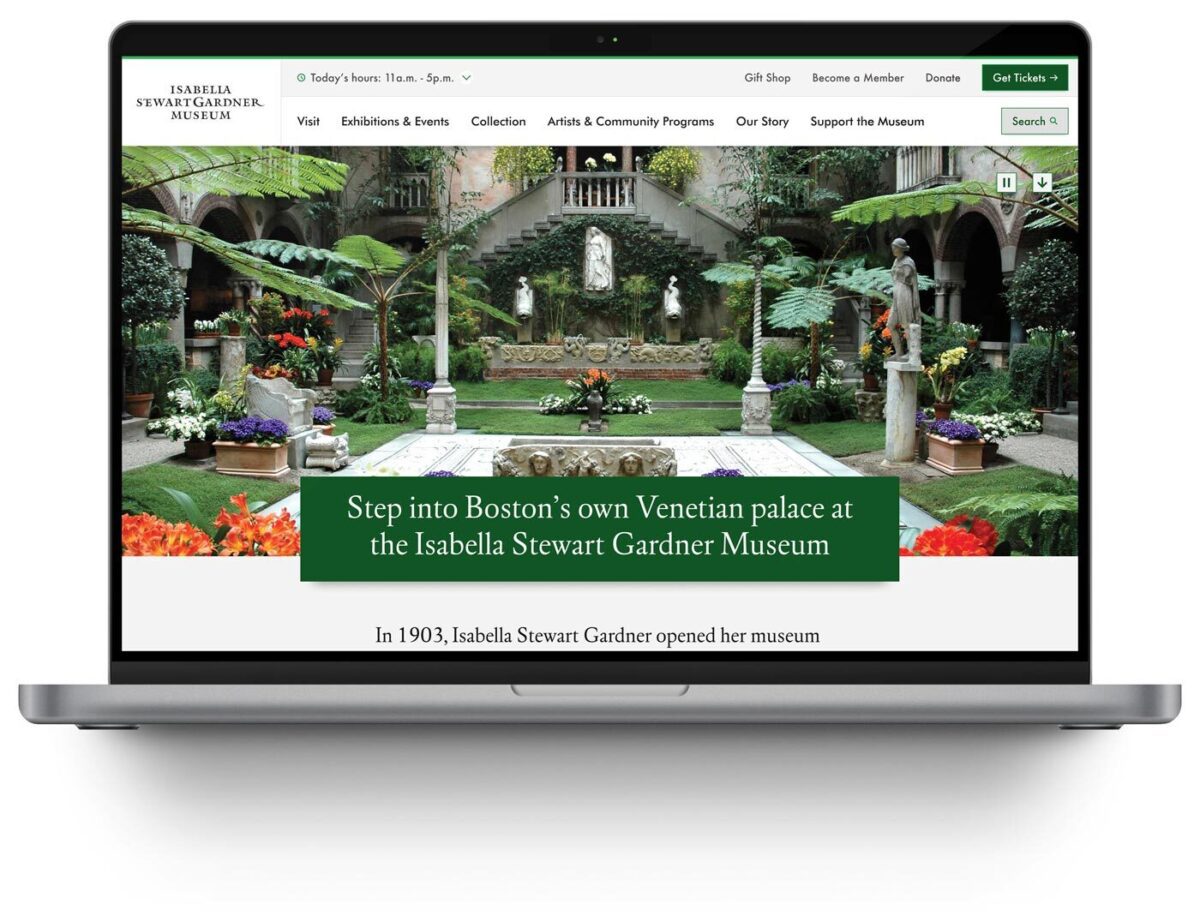
The Isabella Stewart Gardner Museum is one of Boston’s most distinctive cultural institutions. Founded by Isabella Stewart Gardner herself, the Museum offers an intimate, unconventional art experience—no labels, personal curation, and a transportive environment that defies typical museum expectations.
For an institution built on intentionality and access, digital experience shapes whether people visit, how they prepare, and whether they return. When the Museum’s website became a barrier rather than a bridge, they needed a partner who could modernize their digital experience system without erasing what makes the Gardner extraordinary.
The Challenge
The Gardner’s digital presence had become operationally unsustainable and strategically misaligned:
- Internal navigation failures: Staff routinely used Google to find content on their own website, signaling fundamental architecture problems
- Accessibility gaps: The site failed WCAG 2.2 AA standards, excluding visitors with disabilities and contradicting the Museum’s commitment to inclusive access
- Scattered information architecture: Exhibition details, ticketing, and visitor resources lacked clear relationships or pathways, creating friction at critical decision moments
- Inflexible content management: The component system forced workarounds that undermined performance and brand coherence
These systemic barriers prevented the Museum from achieving core digital objectives: inspiring visits, supporting trip planning, and extending engagement beyond the physical experience.
The Approach
Oomph designed and implemented a comprehensive digital experience system—a fundamental rearchitecture of how the Museum operates online:
- Strategic alignment: Stakeholder workshops across departments established shared priorities, success metrics, and institutional identity through synthesis of member surveys, analytics, and internal insights
- User-centered architecture: Mapped visitor journeys for key personas—Museum Members, first-time ticket buyers, on-site visitors, and online researchers—ensuring structure supported real tasks
- Information architecture transformation: Rebuilt navigation and menu hierarchy from the ground up, validated through TreeJack testing before visual design
- Accessibility-first component system: Developed component library meeting WCAG 2.2 AA standards, proving accessibility and aesthetic excellence reinforce each other
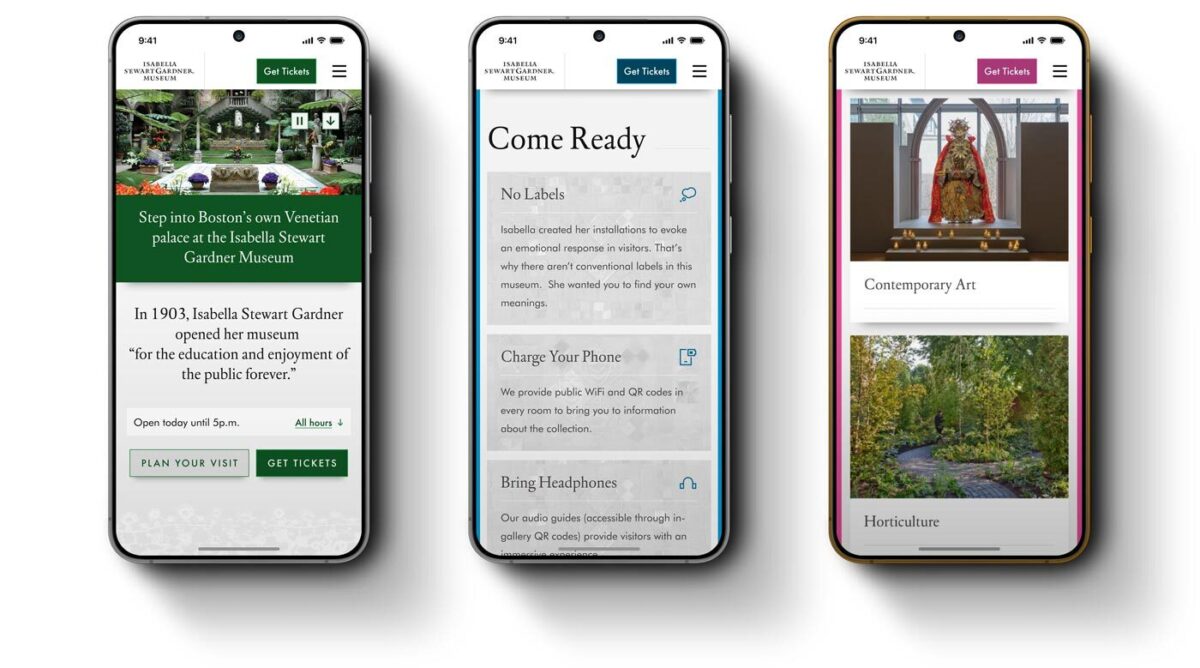
- “Gentle elegance” design philosophy: Translated the Gardner’s intimate character into digital form through subtle details—lace patterns and mosaic elements—that inject personality without overwhelming content
- Strategic page redesigns: Reimagined Visit page balances practical planning information with pathways to deeper content exploration
- Performance infrastructure: Built technical foundation for speed, reliability, and long-term maintainability
The Result
The Isabella Stewart Gardner Museum now operates a digital experience system that reflects its institutional values—intimate, intentional, and accessible to all.
The platform performs measurably better across every key visitor behavior. The Museum’s team has infrastructure that supports their mission with clear pathways for ongoing optimization as visitor needs evolve.
The Gardner’s digital presence now prepares visitors for an extraordinary experience, removes barriers to access, and extends the Museum’s distinctive character beyond its physical walls.
Why This Matters
Cultural institutions must honor their distinct identity while meeting contemporary expectations for digital access and usability. The Gardner demonstrates how these priorities reinforce rather than conflict.
By treating digital experience as an integrated system, Oomph helped the Gardner build infrastructure that scales with their mission—creating operational capacity to measure, learn, and continuously improve how they serve visitors online.
This transformation moves metrics: measurable engagement growth, operational efficiency, and strategic flexibility. More fundamentally, it builds systems that help organizations do their most important work better.
If your Drupal site relies on Acquia Search leveraging Solr, you’re likely facing a migration from Acquia Search to SearchStax. We’ve guided numerous organizations through this transition and want to share our proven approach to help you navigate this change successfully.
Before diving into the migration process, this transition presents an excellent opportunity to reassess your search strategy entirely. While Solr remains a powerful and robust solution, the search landscape has evolved significantly with innovative alternatives now available. For organizations considering broader platform transitions, this moment offers strategic value beyond search improvements. Modern React-based solutions can deliver dramatically faster user experiences. Our recent work with ONS demonstrates this potential—by replacing their Solr solution with Algolia Instant Search, we helped them achieve a 40% improvement in search response times while creating a more intuitive experience for their members.
Why the Move to SearchStax?
Acquia announced earlier this year that they’re sunsetting their Acquia Search offering in 2026, positioning SearchStax as the recommended migration path through their new partnership. This transition offers enhanced search capabilities and more direct control over your search environment through SearchStax’s comprehensive dashboard, providing visibility into Solr server performance, data analysis tools, search preview functionality, and advanced configuration options.
The architectural similarity ensures a seamless end-user experience—Solr remains the foundation, requiring no front-end changes for this migration path while delivering improved administrative control.
Our Proven Migration Framework
Through multiple successful migrations, we’ve developed a structured approach that minimizes risk and ensures smooth transitions. Here’s our step-by-step framework:
Phase 1: Foundation Setup
- Secure access to the SearchStax dashboard for complete environment management
- Install the SearchStax modules, including the critical “Solr to SearchStax Site Search Migration” module
- Configure and commit your basic settings to establish the foundation
Phase 2: Testing and Validation
- Deploy changes to DEV or STAGE environments for comprehensive testing
- Validate search functionality, performance, and user experience
- Identify and resolve any configuration issues before production deployment
Phase 3: Production Implementation
- Push validated changes to production environment
- Execute core migration steps including server migration (Drupal’s SearchStax authentication automatically generates endpoint and token configurations), index migration to transfer existing search indexes, and view switching to activate SearchStax indexes across your site
Phase 4: Configuration Management
- Implement configuration overrides and ignores to ensure environment-specific settings
- Secure sensitive data while maintaining dedicated SearchStax server settings per environment
- Export SearchStax indexes and updated views from production to feature branch
- Commit and deploy changes in your next release cycle
Phase 5: Transition Management
- Maintain Acquia search indexes temporarily for rollback capability
- Monitor performance and user experience during initial transition period
- Complete final cleanup by disabling Acquia search module and migration tools once stability is confirmed
Addressing Technical Challenges
Our experience across multiple migrations has revealed common technical hurdles that require proactive attention. Configuration issues with Boost by Date Processor settings, Highlighted Fields errors during index rebuilding, and Facet configuration mismatches between environments are frequent challenges. The key to success lies in early identification during lower environment testing and leveraging Acquia support resources to resolve issues before they impact production.
Each migration presents unique challenges based on your specific configuration and content structure. Our approach prioritizes thorough testing and validation to surface these issues early, ensuring smooth production deployment.
Strategic Search Optimization
Successful migration extends beyond technical implementation. Understanding your content architecture, user behavior patterns, and business objectives enables you to optimize search effectiveness during the transition. This migration provides an ideal opportunity to evaluate search performance metrics, refine content indexing strategies, and enhance user experience design.
By following this proven framework and preparing for potential challenges, your organization can successfully transition to SearchStax while improving both administrative capabilities and user search experience. The result is a more robust, manageable search solution that positions your site for future growth and enhanced user engagement.
Our comprehensive migration expertise extends beyond search implementations to complete platform transformations, ensuring your digital infrastructure supports your long-term strategic objectives.
Ready to begin your SearchStax migration? Don’t wait until the 2026 deadline creates a migration rush. Our fixed-price SearchStax migration service ($2,500) provides the structured, proven approach outlined in this guide—from foundation setup through transition management. Get started with your SearchStax migration today.
In 2026, the way people discover and engage with digital content has shifted. Traditional Search Engine Optimization (SEO) is no longer the only strategy that brings people to your website. Meet Generative Engine Optimization (GEO), the emerging frontier for organizations looking to earn visibility through AI-driven platforms like ChatGPT, Google’s Gemini, and Perplexity.
If your organization hasn’t begun adapting its content strategy for GEO, now is the time. Here’s what GEO is, why it matters, and how to start optimizing for it.
What is GEO and How Is It Different From SEO?
While SEO focuses on improving your visibility on traditional search engine results pages (SERPs) through keywords, backlinks, and technical performance, GEO is about making your content the answer in AI-generated responses.
Rather than presenting users with a list of links, GEO centers on AI tools that synthesize information. These platforms use large language models (LLMs) to provide direct answers to questions. Instead of competing for a top 10 ranking on Google, you’re aiming to be cited, summarized, or linked to by tools like Gemini or ChatGPT.
In short: SEO gets you found, GEO gets you featured.
Why GEO Matters in 2026
AI tools are no longer sidekicks to Google—they’re central to how people research, compare options, and make decisions. As of late 2025, ChatGPT receives over 4.5 billion monthly visits, while Perplexity processes over 500 million searches per month. Google remains the dominant force in online search with billions of daily visits, but with the direct integration of Gemini into search results, the way people find information is changing. Users can now get answers without ever clicking through to your website—a “zero-click search result.”
If your content isn’t showing up in AI answers, you’re missing visibility with a massive and growing segment of your audience. Depending on what your digital experience delivers, this affects brand recognition, traffic and lead potential, and your credibility as an authority in your space.
In 2026, AI summaries are the new front page of search.
How GEO Works: What AI Tools Are Looking For
Each generative engine has its quirks, but several patterns are emerging across platforms:
1. Structure Matters More Than Ever
AI tools rely on clear, structured content. Use schema markup generously—particularly FAQPage, Organization, Article, and Product types. Structured data helps AI understand your content contextually, making it easier to reference in generated answers.
Tip: Google’s Structured Data Markup Helper is a great place to start reviewing your schema.
2. E-E-A-T Principles Still Rule
Google’s Expertise, Experience, Authoritativeness, and Trustworthiness (E-E-A-T) framework, a core concept for SEO, now extends to AI tools like Gemini. Show credentials, cite data, link to reputable sources, and provide content authored by credible experts.
If you have certifications, awards, partnerships, or original research, feature them clearly.
3. Conversation > Keywords
GEO is less about keywords and more about natural language. Write in a conversational tone and frame your content in terms of questions and answers. Think: “What are the best family vacation spots in California?” instead of “California vacation destinations.”
4. Content Freshness is Key
AI platforms—especially Perplexity, which indexes content daily—prioritize content that’s up to date. Refresh evergreen posts annually and use a content calendar to track when to review content. Prioritize articles with titles like “Top” or “Best,” as these perform well in answer generation, particularly on ChatGPT.
5. Visuals Are Increasingly Important
Gemini and Perplexity are both investing in multimodal search. Media assets like charts, videos, and well-optimized images can increase the chance of being featured. Also make sure your image alt text, captions, and surrounding content are descriptive.
6. Prioritize Performance & Mobile-Responsiveness
A site that performs well on mobile loads quickly, displays clearly on small screens, and avoids frustrating interactions like unclickable buttons or pop-ups. Poor mobile performance—including slow Core Web Vitals—can hurt your rankings, which in turn reduces your visibility to LLMs that rely on search results as input sources.
Tool-Specific GEO Tips
Gemini (Google)
- Optimize for the Search Generative Experience (SGE) with crawlable content and Core Web Vitals in check.
- Use a hub and spoke content model to build topical authority. This model organizes content around a central “hub” topic page that then links to related and more detailed “spoke” pages.
- Regularly monitor impressions and click-through rates in Google Search Console. A dip in clicks with high impressions could signal that your content is being used in AI answers.
Perplexity
- With an emphasis on factual accuracy, source transparency, and user control over search scope, sources are essential. Focus on citations and factual, digestible content.
- Use Question & Answer formatting to align with Perplexity’s research focus.
- Include multimedia assets and data points that back up your authority—charts, diagrams, and maps in addition to video and images.
ChatGPT
- Embrace personalization. ChatGPT seeks out phrases like “top” or “best” that give users the feeling of receiving personalized insights.
- Optimize your About Us page to clearly articulate your mission and values. ChatGPT often uses this to evaluate trustworthiness and authority.
- Strengthen your backlink profile to compete with high-authority sources like Wikipedia, Reddit, and news outlets frequently cited by the model.
Tracking GEO Performance
A consequence of AI summaries is that websites may see a drop in clicks and visits within their analytics, particularly a decrease in organic traffic month over month. With users getting answers from AI-generated search responses, they may no longer need to visit your website for information. However, those users who do click through often stay longer and discover more pages than they did previously.
Websites may also see an increase in impressions or referrals from AI assistants. This data is increasingly important to track.
Even if AI tools don’t always send traffic directly, you can still measure their impact:
- Google Analytics 4 (GA4) Segmentation: Create segments by referral source (e.g., chat.openai.com, perplexity.ai, gemini.google.com) to track AI-specific sessions.
- Landing Page Analysis: AI tools often link deep into your site. Use GA4 to monitor which long-tail pages are receiving AI-generated traffic.
- Google Search Console: Identify FAQ-style queries with high impressions but low CTR. These may indicate your content is being summarized in AI answers.
What This Makes Possible
For organizations investing in GEO, the shift isn’t just about traffic—it’s about creating the foundation for how your brand shows up when decisions are made. When your content is structured, current, and authoritative, you’re positioned to be the answer AI platforms cite. That visibility translates into trust, consideration, and the ability to shape how your expertise is perceived across the platforms your audiences use most.
Organizations that optimize for GEO now are building systems that can adapt as AI search continues to evolve, ensuring their digital presence performs across both traditional and emerging channels.
Action Items for Digital Teams
- Audit your existing content with these optimization strategies in mind. You can use AI tools like Gemini to identify optimization opportunities for particular pages.
- Update schema across all major content types, especially Q&A and organizational pages.
- Refresh your high-performing or evergreen content regularly, especially pieces tied to seasons, events, or top lists.
- Revise your content strategy to include multimedia assets, structured data, and topic clustering.
- Optimize your About page and author bios to strengthen trust signals for LLMs.
Final Thoughts
Optimizing for GEO is a fundamental shift in how people find and interact with content. As AI-generated answers become a dominant part of the discovery experience, your organization’s ability to show up in these spaces affects whether you gain trust or go unnoticed.
By embracing schema, writing conversationally, and refreshing content with purpose, your digital presence can evolve to meet the moment—one where the best answer often wins over the best ranking.
Ready to optimize your content for AI-powered search? Let’s talk about what that looks like for your organization.
Drupal has long been known for its flexibility, robustness, and scalability. But for many marketers and content creators, that flexibility can come with a steep learning curve — especially when it comes to building layouts and managing design without the help of a developer. That’s about to change in a big way.
Enter Drupal Canvas (previously called Experience Builder), a new initiative in Drupal that promises to radically streamline and simplify how we build and design pages. While still in its early stages, Experience Builder is ready for testing and experimentation — and it’s something marketers should absolutely have on their radar.
What is Drupal Canvas?
Drupal Canvas is the evolution of Drupal’s current method of flexible page building called Layout Builder. It takes what we know from layout builder and expands it into a unified, user-friendly tool that allows non-developers to build and theme websites directly in the browser. It’s a huge leap toward making Drupal more accessible for site builders, marketers, and content creators alike.
Unlike other page builders, Canvas doesn’t just provide drag-and-drop layout tools. It leverages Drupal’s core strengths — structured data, fine-grained access controls, and reusable components — to ensure consistency across channels and scalability across enterprise-level websites. This makes it uniquely powerful for large organizations managing multiple digital properties.
Dries Buytaert, Drupal’s founder, described it as a response to the fragmented landscape of site-building options in Drupal today. The vision is to consolidate functionality from tools like Paragraphs and Layout Builder into a single, cohesive solution. One that’s intuitive, efficient, and packed with modern capabilities.
Here is a fantastic video demo from DrupalCon Atlanta that was shown by Dries during the keynote address:
Why Now?
The timing couldn’t be better. While Layout Builder was a step in the right direction when it launched in 2018, its limitations became clear as more site builders demanded easier workflows, styling tools, and richer content composition features.
At recent Drupal conventions, the community has rallied around the idea of enhancing user experience across the board. As part of the broader Drupal CMS, Canvas is a key component in bringing Drupal’s usability in line with the expectations of modern content teams.
Why I’m Excited About It
As an engineer who has worked closely with Drupal for years, what excites me most is how Canvas can bridge the many gaps in Drupal’s current page-building ecosystem. Today, there are so many ways to structure content — Blocks, Paragraphs, Layout Builder, Panels — that choosing the right one can be overwhelming.
Drupal Canvas is shaping up to be that “one-stop-shop” we’ve needed. It reduces decision fatigue and gives teams a faster way to get projects off the ground without needing to architect every page structure from scratch.
Even better, it supports creating single-page overrides, component-level editing, and even React-based components right in the editor. That’s something I’ve personally looked forward to for a long time. The ability to build and save reusable components that can be dropped into any page makes this a tool that truly enhances productivity — not just for developers, but for marketers and content creators, too.
My First Look
I had the chance to see Drupal Canvas in action at DrupalCon Atlanta this year. The live demos were impressive and really opened my eyes to what this tool could do, both for newcomers to Drupal and seasoned site builders. Along with Drupal CMS, and recipes, Canvas is easily one of the hottest topics in the Drupal ecosystem right now.
The energy in the room during the sessions was palpable — people are genuinely excited about this. It’s not just another experimental module; it’s a shift in how we think about building on Drupal.
A Game-Changer for Marketers
One of the biggest barriers for marketing teams has always been reliance on developers to make even small layout edits. That’s starting to change.
With Canvas, non-developers will be able to build out dynamic, visually engaging pages — without needing to dive into code. That’s a massive win, especially for small teams in government, education, or nonprofit sectors, where resources are limited and time is of the essence.
Being able to make changes quickly, reuse content intelligently, and maintain a consistent brand without touching a template file is something many organizations have wanted for years. Drupal Canvas delivers on that promise.
Want to Try It Yourself?
If you’re curious to see what the buzz is about, you have two great options to get started:
- Try it yourself: Head to Drupal.org and download the latest version of Drupal CMS. It now comes with an optimized installer that makes getting started faster than ever. Once you’re up and running, you can add the Drupal Canvas module and start exploring.
- See it in action: Not ready to dive in alone? Schedule an implementation consultation with our team for a live demo and personalized guidance on how Drupal CMS can work for your organization.
Looking Ahead
It’s important to note that this is just the alpha version of the Canvas initiative. The team behind it is committed to rapid iteration and community feedback, which means what we’re seeing today is just the beginning.
If this is the foundation, I can only imagine how powerful the tool will become in the next year or two. The Drupal community is known for its collaborative spirit and constant innovation — and Canvas is shaping up to be one of the most important steps forward in years.
So if you’re a marketer, content strategist, or anyone who’s ever been frustrated by the limits of page building in Drupal — now’s the time to dive in. Drupal Canvas is here, and it’s ready to change the game. Ready to explore Drupal Canvas for your organization? Contact us for a complimentary consultation.
Today I learned about a military term that has come into the culture: VUCA, which stands for volatility, uncertainty, complexity, and ambiguity. That certainly describes our current times.
All of this VUCA makes me concentrate on what is stable and slow to change. Its easy to get distracted by that which changes quickly and shines in the light. Its harder to be grateful for what changes slowly. Its harder to see what those things might even be.
In the face of AI and the way it will transform all industries (if not now, very soon), its important to remember what AI can not yet do well. Maybe it will learn how to create a facsimile of these traits in the future as it becomes more “human” (trained on human data with all its flaws might mean it has embedded within it those traits we find undeniably human). However, these skills seem like the ones that can help us navigate the VUCA that is life today.
Be Curious
AI can ask follow-up questions for clarification, but it does not (yet) ask questions for its own curiosity. It asks when it has been directed to do something. It does not sit idle and wonder what the world is like beyond the walls of the chat window.
Humans and high-order animals have curiosity. We seek information and naturally have questions about our world — why is the sky blue? why does the wind blow? why do waves crash onto the shore?
In our operations, Oomph prides itself on Discovery. This is our chance to ask the big questions — why does your business work the way it does? why are those your goals? who is your audience you have vs. the audience you want?
In life and work, curiosity is one of our best traits. This means trying new tools, changing our processes and habits for improved outcomes, and exploring something new just to see what it can do. Even with all the VUCA in the world, approaching uncertainty with curiosity keeps us open and engaged with what we can learn next.
Use Judgement
Another important human trait is judgement, and this continues to be invaluable as humans are needed to evaluate AI outputs.
AI is very good at creating dozens, if not hundreds of outputs. In fact, probabilistic (not deterministic) output is the strength and sometimes weakness of AI — you almost never get the same answer twice.
Our human expertise is needed to curate these outputs. We need to discard what is average and unremarkable to find the outputs that are surprising and valuable. We need to use our judgement and experience to find the ideas that are applicable to the client, the project, and the moment. Given the same 100 outputs, the right ones might be a different selection depending on the problem we want to solve and the industry in which it will be applied.
Exude Empathy
In the world of design and creating software for humans, empathy is what drives the decisions we need to make. In the flow of vibe coding, our judgments will drive technical and architectural decisions while empathy drives interface design and product feature decisions. Humans are still the ones who need to find the problems that are worth solving.
The language on the page, the helpfulness of the tooltip, and the order in which the form elements appear are some examples of how empathy drives interactions. Empathy helps team members identify confusion and redundancy.
Further, until we are designing for AI Agents and robots as our product’s primary users, we are designing for humans. This means we need to continue to ask humans for feedback, monitor human behavior on our sites and in our apps, and understand why they make the decisions they make. All of this continues to make empathy an important human trait to cultivate.
Make Connections
Mike Bechtel, Chief Futurist at Deloitte Consulting, gave a talk at SXSW this year about how the future favors polymaths instead of specialists. His argument boils down to this: AI is a specialist at almost anything but what humans have shown over time is that the greatest inventions and insights come from disparate teams putting their expertise together or individuals making new connections between disciplines.
Novel ideas are mash-ups of existing ideas more than brand-new ideas that have never been thought of. And these mash-ups come from curious humans who have broad experience, not deep specialization. They are the ones who can identify and bring the specialists together if need be, but most of all, they can make the connections and see the bigger picture to create new approaches.
Support Culture
No matter how smart AI gets, it doesn’t “read the room.” It doesn’t build relationships between others, react to group dynamics, or pick up on body language. In an ambiguous human way, it does not sense when something “feels off.”
In group settings, humans command culture. AI won’t directly help you build trust with a client. It won’t read the faces in the room or over Zoom and pause for questions. It won’t sense that people are not engaging and reacting, and therefore you need to change a tactic while speaking. AI is interested in the facts and not the feelings.
Broad team culture and the culture that exists between individuals is built and nurtured by the humans within them. AI might help you craft a good sales pitch, internal memo, or provide ice breaker ideas, but in the end, humans deliver it. Mentoring, supporting culture, collaborating, and building trust continue to be human endeavors.
Break Patterns
AI is very good at replicating patterns and what has already been created. AI is very good at using its vast amount of data to emphasize best practices with patterns that are the most prevalent and potentially the most successful. But it won’t necessarily find ways to break existing patterns to create new and disruptive ones.
Asking great questions (being curious), applying our experience and judgement, and doing it all with empathy for the humans we support leads to creative, pattern-breaking solutions that AI has not seen before. Best practices don’t stay the best forever. Changes in technology and our interface with it create new best practices.
The easiest answer (the common denominator that AI may reach for) is not always the best solution. There is a time and a place to repeat common patterns for efficiency, but then there are times when we need to create new patterns. Humans will continue to be the ones who can make that judgement.
Be Human
AI will continue to evolve. It may get better at some of the attributes I mention — or at best, it may get better at looking like it has empathy, supports culture, and mashes existing patterns together to create new ones. But for humans, these traits come more naturally. They don’t have to be trained or prompted to use these traits.
Of all these traits, curiosity may be the most important and impactful one. AI has become our answer-engine, making it less necessary to know it all. But we need to continue to be curious, to wonder about “what if?” AI shouldn’t tell us what to ask, but it should support us in asking deeper questions and finding disparate ideas that could create a new approach.
We no longer need to learn everything. All the answers to what is already known can be provided. It is up to humans to continue with curiosity into what we do not yet know.
Search and SEO are evolving rapidly in the wake of new AI options. Many of our clients are concerned about continuing to receive a return on their SEO investment. They worry about putting effort into the right places. And they worry about how to prepare for a drastic shift in the landscape, should it come.
The speed of evolution has made these questions difficult to answer with authority. But we conducted research, asked some experts, and have some theories that put these fears into context. Hopefully, they can help your organization navigate these uncharted waters.
Do AI Overviews reduce click-through rates?
In 2024, Google introduced AI-generated answers to queries in its search results. These “AI Overviews” are more likely to appear when a visitor phrases their search query like a question, using “what,” “how,” or “why” language. These overviews provide citations to their sources and a right sidebar (on laptops) with other references. Some are calling the traffic these overviews generate “zero-click” searches.

While the answer is yes, click-through rates have reduced by as much as 10%, others argue that most websites will be unaffected. For one, Google has scaled back their AI Overviews to only 1.28% of its billions of daily searches. This will likely increase now that AI has become less likely to provide incorrect answers, but the misconception that AI Overviews are everywhere is overblown.
Further, the same article goes on to assert that 96.5% of all AI Overviews appear for informational keywords — meaning very few overviews are created for transactional, navigational, and local searches. Informational questions are much easier and safer for AI to answer and will likely remain the dominant use case.
Others argue that AI Overviews keep low-performing traffic away from your site. For many years, Google has already been answering queries with information cards. When you Google a business, you are likely to get a card with the business name, phone number, web address, and even a map with their location. Popular businesses might include reviews and specific details like daily open hours. These information cards have already been taking traffic away from your site. But was that the traffic that you wanted?
These folks argue, if the searcher just wanted to know an answer to a question they had while having a conversation with a friend, they would have come to your site for that information and then left. Their visit would have counted as a bounce and negatively affected your monthly traffic data. Same with the ones that just needed a phone number or wanted to know what time you close. They would have come to your website for that one thing and then left.
Google’s own research says that when people use AI Overviews to start understanding a topic, they end up searching more frequently and express higher satisfaction with the results. Their position is that these overviews scratch the surface and help visitors ask more in-depth follow-up questions. Other recent studies have found that click-through increased for companies featured in AI Overviews, while those without an AI Overview lost traffic.
One thing is for sure: AI Overviews’ prominent position at the top of the results have pushed down organic results and made it harder for high-ranking organic websites to get noticed.
Takeaway:
Mixed. Yes, it is possible that AI Overviews are preventing click-through. It is also possible this traffic was not going to convert. And depending on your product and position in the market, AI Overviews might drive slightly more traffic than organic search. Either way, the result is an even more competitive search landscape than before.
Should I optimize my content for AI Overviews?
The most obvious next question is “How can my brand rank for AI Overviews?” While this is an important question, remember that AI Overviews often include citations from multiple sources. So while your business may rank for an overview, it is likely not going to be alone.
The answer to this question is more of the same things you should already know. In order to rank highly, you should:
- Follow SEO best practices
- Be authentic (leverage first-hand experiences like anecdotes, reference data sources, and be as unique as possible with your perspective)
- Anticipate next steps (what does someone need to learn and in which order)
- Use structured data (schema, JSON, etc.)
- Include multimedia (images, video, gifs)
Lots of SEO companies want to help your business rank, and AI Overviews is the next frontier. But from all the articles we have reviewed (and there were many), the same best practices apply — there are no shortcuts to great content.
Takeaway
Yes, optimize your content for AI Overviews, but this does not mean you need to do more than what you are already doing. To be a highly quoted source within your industry has benefits for brand recognition and trust, but just like long-tail keywords, these searches may have low volume. In the end, it is an investment vs. return question. There is a significant overlap between the sources cited in AI Overviews and the top organic search results, therefore, if your site already ranks well, you can’t do much more to get into an AI Overview.
Should I continue investing in SEO for Google?
Some clients worry that Google will be unseated as the dominant search engine now that tools like OpenAI’s ChatGPT have seen an explosion of millions of users. While these tools are indeed experiencing hockey-stick growth, Google completely dominates search volume.
SparkToro charted a 20% growth in search queries for Google in 2024, and crunched the numbers to conclude Google receives 373 times more searches than ChatGPT.
To put that into context, Google handles 14 billion searches per day. The next closest competitor is Bing search with 613.5 million per day, followed by Yahoo, DuckDuckGo, and then Chat GPT. In other words, your investment would see a larger return if your team optimized content for Bing.com than for ChatGPT.
These numbers are fresh from March 2025. Things can change, of course, but AI tools are not used only for search, have a relatively small market share, and do not get used daily. They suffer from not being the default tool at hand, which for most people, is a web browser. Google remains synonymous with search for a large percent of the population.
Takeaway
Yes, continue to invest in SEO for Google specifically. Google is still the biggest player in the search market, and their share is gaining, not decreasing (yet).
If we don’t implement structured data, are we losing out on AI crawler traffic?
Structured data is great for all SEO, so actually, you should implement structured data like Schema.org for across-the-board SEO value.
For those of you using Google Tag Manager (GTM), you might know that you get some structured data for free. When a Googlebot crawls your site, it includes structured JSON data that it creates client-side, which means that Google gets the structured data but it is inaccessible to any other crawler. If the data existed server-side, other bots could access it.
Most non-Google robot crawlers do not execute Javascript, therefore, they miss out on anything rendered in the browser. These crawlers include Bing, Yahoo, ChatGPT, Claude, and Perplexity. So again, server-side structured data would benefit all the search engine crawlers that are not Google.
But do LLMs really need structured data?
Large Language Models (LLMs) use statistical analysis to predict what word will follow the previous set of words. They do not understand language as much as they can mathematically reproduce its patterns. Therefore, they create structure from unstructured data all the time.
But while LLMs process and understand unstructured text, providing structured data would significantly help interpret and categorize your content effectively and accurately.
Takeaway
The short answer is no, LLMs do not require structured data to create meaningful connections between content and search intent. But structured data would help them and any other search service to correctly label, tag, and organize your data. The longer answer is an investment in structured metadata would pay off in dividends for all search engines and crawlers.
How can we prepare for SEO’s evolving future?
In mid-2024, when Google first introduced AI Overviews, some in the SEO/SERP industry claimed sites could lose up to 25% of their traffic. That has not come to pass, with some sites reporting as high as 12% and others lows of 8.9% and 2.6% — not insignificant, but lower than expected. And the data is still coming in, with others reporting increases in traffic with specific kinds of intent.
While AI increasingly shapes search results, content strategy will need to shift for sites to remain visible and relevant. High-quality, authoritative, and authentic content that offers depth, accuracy, and unique insights is still valuable currency. AI algorithms are designed to identify and prioritize quality, trustworthy, and well-researched content for inclusion in their summaries.
Sites should continue to target long-tail and question-based keywords to align content with visitor’s increase in natural language queries. This type of content is often more challenging for AI to fully synthesize and may still necessitate user click-through for a comprehensive understanding. Going deeper to investigate specific intents behind longer conversational queries could also be crucial for attracting relevant traffic.
Finally, diversifying content formats by incorporating video, infographics, and interactive elements will continue to enhance engagement and provide unique value that text-based AI summaries don’t fully replicate. And optimizing content for featured snippets remains important, as appearing in these snippets increases the likelihood of a website’s content being cited within AI Overviews.
Takeaway
The fundamentals of great content and best-practice SEO has not changed as dramatically as the tools that crawl your site and serve your content have.
Final Thoughts
Anything in the tech space evolves rapidly, and SEO is no exception. While the methods and the tools we leverage might change, the fundamentals remain strong. Keep doing what you have been doing, keep being curious, and keep asking these important questions of those in your circle whom you trust. We’re all figuring these things out in real time and can benefit from each other’s expertise.
If you have in-depth questions about SEO, content management, and the evolving AI-powered landscape, reach out to our team and we’ll always do our best to answer them thoughtfully and from multiple angles.
AI disclaimer: Google’s Deep Research was used for initial exploration and source gathering. All sources cited in this article were reviewed by the author. ChatGPT was used for follow up questions, as well as AI Overviews for examples of common questions. This article synthesizes these sources and was written by a human.
Digital accessibility can be difficult to stay ahead of. The laws have been evolving and now the European Union (EU) has entered the arena with their own version of the Americans with Disabilities Act (ADA).
If your business sells products, services, and/or software to European consumers, this law will apply to you.
The good news:
- The EU enacted this legislation to make it easier for businesses to comply across its various member states.
- Just like the ADA, many EU member states have specified the Web Content Accessibility Guidelines (WCAG) as their basis for measuring conformance.
The bad news:
- Each member country can define its regulations and its penalties. One infraction within the EU could accumulate fines from multiple countries.
Keep reading for a breakdown of how the Act works and what your business needs to prepare.
What is the European Accessibility Act?
In 2019, the EU formally adopted the European Accessibility Act (EAA). The primary goal is to create a common set of accessibility guidelines for EU member states and unify the diverging accessibility requirements in member countries. The EU member states had two years to translate the act into their national laws and four years to apply them. The deadline of June 28, 2025 is now looming.
The EAA covers a wide array of products and services, but for those that own and maintain digital platforms, the most applicable items are:
- Computers and operating systems
- Banking services and bill payments
- E-books
- Online video games
- Websites and mobile services, including e-commerce, bidding (auction) services, accommodations booking, online courses and training, and media streaming services
Who Needs to Comply?
The EAA requires that all products and services sold within the EU be accessible to people with disabilities. The EAA applies directly to public sector bodies, ensuring that government services are accessible. But it goes further as well. In short, private organizations that regularly conduct business with or provide services to public-facing government sites should also comply.
Examples of American-based businesses that would need to comply:
- Ecommerce platforms with customers who may reside in Europe. Ecommerce is typically worldwide, so this category is particularly important
- Companies that provide healthcare support via Telehealth services if offered to travelers from Europe. Drug manufacturers who offer products available to a European audience and are required to post treatment guidelines and side effects
- Hospitality platforms that attract European tourists. This includes hotels, cruise lines, tour guides and groups, and destinations such as theme parks and other amenities
- Universities and colleges who attract foreign students from Europe and elsewhere
- Banking and financial institutions who have European customers
There are limited exemptions. Micro-enterprises are exempt, and they are defined as small service providers with fewer than 10 employees and/or less than €2 million in annual turnover or annual balance sheet total.
What is required?
Information about the service
Service providers are required to explain how a service meets digital accessibility requirements. We recommend providing an accessibility statement that outlines the organization’s ongoing commitment to accessibility. It should include:
- A broad overview of the service in plain (non-technical) language
- Detailed guidelines and explanations on using the service
- An explanation of how the service aligns with the digital accessibility standards listed in Annex I of the European Accessibility Act
Compatibility and assistive technologies
Service providers must ensure compatibility with various assistive technologies that individuals with disabilities might use. This includes screen readers, alternative input devices, keyboard-only navigation, and other tools. This is no different than ADA compliance in the United States.
Accessibility of digital platforms
Websites, online applications, and mobile device-based services must be accessible. These platforms should be designed and developed in a way that makes them perceivable, operable, understandable, and robust (POUR) for users with disabilities. Again, this is no different than ADA compliance in the United States.
Accessible support services
Communication channels for support services related to the provided services must also be accessible. This includes help desks, customer support, training materials, self-serve complaint and problem reporting, user journey flows, and other resources. Individuals with disabilities should be able to seek accessible assistance and information.
What are the metrics for compliance?
The EAA is a directive, not a standard, which means it does not promote a specific accessibility standard. Each member country can define its regulations for standards and conformance and define their penalties for non-compliance. Each country in which your service is determined to be non-compliant can apply a fine, which means that one infraction could accumulate fines from multiple countries.
Just like the Americans with Disabilities Act, most EU member states are implementing Web Content Accessibility Guidelines 2.1 AA as their standard, which is great news for organizations that already invest in accessibility conformance.
If a member country chooses to use the stricter EN 301 549, which still uses WCAG as its baseline, there are additional standards for PDF documents, the use of biometrics, and technology like kiosks and payment terminals. These standards go beyond the current guidelines for business in the United States.
Accessibility overlays (3rd Party Widgets)
It should be noted that the EAA specifically recommends against accessibility overlay products and services — a third-party service that promises to make a website accessible without any additional work. Oomph has said for a long time that plug-ins will not fix your accessibility problem, and the EAA agrees, stating:
“Claims that a website can be made fully compliant without manual intervention are not realistic, since no automated tool can cover all the WCAG 2.1 level A and AA criteria. It is even less realistic to expect to detect automatically the additional EN 301549 criteria.”
The goals for your business
North American organizations that implemented processes to address accessibility conformance are well-positioned to comply with the EAA by June 28, 2025. In most cases, those organizations will have to do very little to comply.
If your organization has waited to take accessibility seriously, the EAA is yet another reason to pursue conformance. The deadline is real, the fines could be significant, and the clock is ticking.
Need a consultation?
Oomph advises clients on accessibility conformance and best practices from health and wellness to higher education and government. If you have questions about how your business should prepare to comply, please reach out to our team of experts.
Additional Reading
Deque is a fantastic resource for well-researched and plain English articles about accessibility: European Accessibility Act (EAA): Top 20 Key Questions Answered. We suggest starting with that article and then exploring related articles for more.
The U.S. is one of the most linguistically diverse countries in the world. While English may be our official language, the number of people who speak a language other than English at home has actually tripled over the past three decades.
Statistically speaking, the people you serve are probably among them.
You might even know they are. Maybe you’ve noticed an uptick in inquiries from non-English speaking people or tracked demographic changes in your analytics. Either way, chances are good that organizations of all kinds will see more, not less, need for translation — especially those in highly regulated and far-reaching industries, like higher education and healthcare.
So, what do you do when translation becomes a top priority for your organization? Here, we explain how to get started.
3 Solutions for Translating Your Website
Many organizations have an a-ha moment when it comes to translations. For our client Lifespan, that moment came during its rebrand to Brown Health University and a growing audience of non-English speaking people. For another client, Visit California, that moment came when developing their marketing strategies for key global audiences.
Or maybe you’re more like Leica Geosystems, a longtime Oomph client that prioritized translation from the start but needed the right technology to support it.
Whenever the time comes, you have three main options:
Manual translation and publishing
When most people think of translating, manual translation comes to mind. In this scenario, someone on your team or someone you hire translates content by hand and uploads the translation as a separate page to the content management system (CMS).
Translating manually will offer you higher quality and more direct control over the content. You’ll also be able to optimize translations for SEO; manual translation is one of the best ways to ensure the right pages are indexed and findable in every language you offer them. Manual translation also has fewer ongoing technical fees and long-term maintenance attached, especially if you use a CMS like Drupal which supports translations by default.
“Drupal comes multi-lingual out of the box, so it’s very easy for editors to publish translations of their site and metadata,” Oomph Senior UX Engineer Kyle Davis says. “Other platforms aren’t going to be as good at that.”
While manual translation may sound like a winning formula, it can also come at a high cost, pushing it out of reach for smaller organizations or those who can’t allocate a large portion of their budget to translate their website and other materials.
Integration with a real-time API
Ever seen a website with clickable international flags near the top of the page? That’s a translation API. These machine translation tools can translate content in the blink of an eye, helping users of many different languages access your site in their chosen language.
“This is different than manual translation, because you aren’t optimizing your content in any way,” Oomph Senior UX Engineer John Cionci says. “You’re simply putting a widget on your page.”
Despite their plug-and-play reputation, machine translation APIs can actually be fairly curated. Customization and localization options allow you to override certain phrases to make your translations appropriate for a native speaker. This functionality would serve you well if, like Visit California, you have a team to ensure the translation is just right.
Though APIs are efficient, they also do not take SEO or user experience into account. You’re getting a direct real-time translation of your content, nothing more and nothing less. This might be enough if all you need is a default version of a page in a language other than English; by translating that page, you’re already making it more accessible.
However, this won’t always cut it if your goal is to create more immersive, branded experiences — experiences your non-English-speaking audience deserves. Some translation API solutions also aren’t as easy to install and configure as they used to be. While the overall cost may be less than manual translation, you’ll also have an upfront development investment and ongoing maintenance to consider.
Use Case: Visit California
Manual translation doesn’t have to be all or nothing. Visit California has international marketing teams in key markets skilled in their target audiences’ primary languages, enabling them to blend manual and machine translation.
We worked with Visit California to implement machine translation (think Google Translate) to do the heavy lifting. After a translation is complete, their team comes in to verify that all translated content is accurate and represents their brand. Leveraging the glossary overrides feature of Google Cloud Translate V3, they can tailor the translations to their communication objectives for each region. In addition, their Drupal CMS still allows them to publish manual translations when needed. This hybrid approach has proven to be very effective.
Third-party translation services
The adage “You get what you pay for” rings true for translation services. While third-party translation services cost more than APIs, they also come with higher quality — an investment that can be well worth it for organizations with large non-English-speaking audiences.
Most translation services will provide you with custom code, cutting down on implementation time. While you’ll have little to no technical debt, you will have to keep on top of recurring subscription fees.
What does that get you? If you use a proxy-based solution like MotionPoint, you can expect to have content pulled from your live site, then freshly translated and populated on a unique domain.
“Because you can serve up content in different languages with unique domains, you get multilingual results indexed on Google and can be discovered,” Oomph Senior Digital Project Manager Julie Elman says.
Solutions like Ray Enterprise Translation, on the other hand, combine an API with human translation, making it easier to manage, override, moderate, and store translations all within your CMS.
Use Case: Leica Geosystems
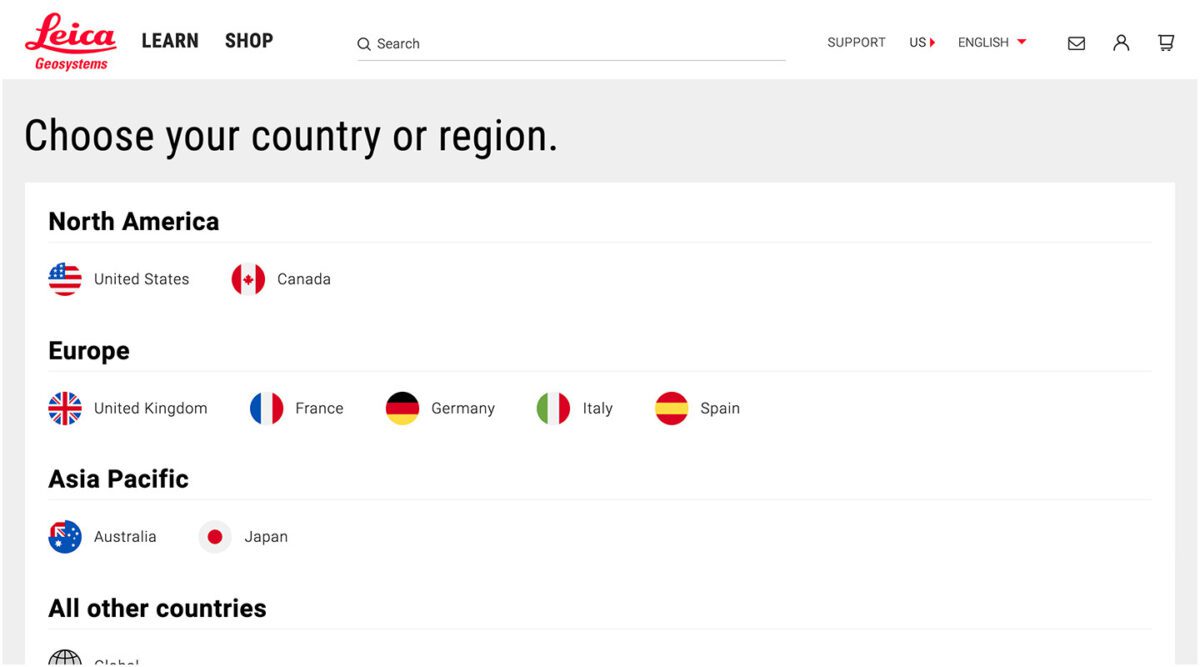
Leica’s Drupal e-commerce store is active in multiple countries and languages, making it difficult to manage ever-changing products, content, and prices. Oomph helped Leica migrate to a single-site model during their migration from Drupal 7 to 8 back in 2019.
“Oomph has been integral in providing a translation solution that can accommodate content generation in all languages available on our website,” says Jeannie Records Boyle, Leica’s e-Commerce Translation Manager.
This meant all content had one place to live and could be translated into all supported languages using the Ray Enterprise Translation integration (formerly Lingotek). Authors could then choose which countries the content should be available in, making it easier to author engaging and accurate content that resonates around the world.
“Whether we spin up a new blog or product page in English or Japanese, for example, we can then translate it to the many other languages we offer, including German, Spanish, Norwegian Bokmål, Dutch, Brazil Portuguese, Italian, and French,” Records Boyle says.
Taking a Strategic Approach to Translation
Translation can be as simple as the click of a button. However, effective translation that supports your business goals is more complex. It requires that you understand who your target audiences are, the languages they speak, and how to structure that content in relation to the English content you already have.
The other truth about translation is that there is no one-size-fits-all option. The “right” solution depends on your budget, in-house skills, CMS, and myriad other factors — all of which can be tricky to weigh.
Here at Oomph, we’ve helped many clients make their way through website translation projects big and small. We’re all about facilitating translations that work for your organization, your content admins, and your audience — because we believe in making the Web as accessible as possible for all.
Want to see a few recent examples or dive deeper into your own website translation project? Let’s talk.
THE BRIEF
The RISD Museum publishes a document for every exhibition in the museum. Most of them are scholarly essays about the historical context around a body of work. Some of them are interviews with the artist or a peek into the process behind the art. Until very recently, they have not had a web component.
The time, energy, and investment in creating a print publication was becoming unsustainable. The limitations of the printed page in a media-driven culture are a large drawback as well. For the last printed exhibition publication, the Museum created a one-off web experience — but that was not scalable.
The Museum was ready for a modern publishing platform that could be a visually-driven experience, not one that would require coding knowledge. They needed an authoring tool that emphasized time-based media — audio and video — to immediately set it apart from printed publications of their past. They needed a visual framework that could scale and produce a publication with 4 objects or one with 400.

THE APPROACH
A Flexible Design System
Ziggurat was born of two parents — Oomph provided the design system architecture and the programmatic visual options while RISD provided creative inspiration. Each team influenced the other to make a very flexible system that would allow any story to work within its boundaries. Multimedia was part of the core experience — sound and video are integral to expressing some of these stories.
The process of talking, architecting, designing, then building, then using the tool, then tweaking the tool pushed and pulled both teams into interesting places. As architects, we started to get very excited by what we saw their team doing with the tool. The original design ideas that provided the inspiration got so much better once they became animated and interactive.
Design/content options include:
- Multiple responsive column patterns inside row containers
- Additionally, text fields have the ability to display as multiple columns
- “Hero” rows where an image is the primary design driver, and text/headline is secondary. Video heroes are possible
- Up to 10-colors to be used as row backgrounds or text colors
- Choose typefaces from Google Fonts for injection publication-wide or override on a page-by-page basis
- Rich text options for heading, pull-quotes, and text colors
- Video, audio, image, and gallery support inside any size container
- Video and audio player controls in a light or dark theme
- Autoplaying videos (where browsers allow) while muted
- Images optionally have the ability to Zoom in place (hover or touch the image to see the image scale by 200%) or open more
There are 8 chapters total in RAID the Icebox Now and four supporting pages. For those that know library systems and scholarly publications, notice the Citations and credits for each chapter. A few liberally use the footnote system. Each page in this publication is rich with content, both written and visual.
RAPID RESPONSE
An Unexpected Solution to a New Problem
The story does not end with the first successful online museum publication. In March of 2020, COVID-19 gripped the nation and colleges cut their semesters short or moved classes online. Students who would normally have an in-person end-of-year exhibition in the museum no longer had the opportunity.
Spurred on by the Museum, the university invested in upgrades to the Publication platform that could support 300+ new authors in the system (students) and specialized permissions to limit access only to their own content. A few new features were fast-tracked and an innovative ability for some authors to add custom javascript to Department landing pages opened the platform up for experimentation. The result was two online exhibitions that went into effect 6 weeks after the concepts were approved — one for 270+ graduate students and one for 450+ undergraduates.


Oomph has been quiet about our excitement for artificial intelligence (A.I.). While the tech world has exploded with new A.I. products, offerings, and add-ons to existing product suites, we have been formulating an approach to recommend A.I.-related services to our clients.
One of the biggest reasons why we have been quiet is the complexity and the fast-pace of change in the landscape. Giant companies have been trying A.I. with some loud public failures. The investment and venture capitalist community is hyped on A.I. but has recently become cautious as productivity and profit have not been boosted. It is a familiar boom-then-bust of attention that we have seen before — most recently with AR/VR after the Apple Vision Pro five months ago and previously with the Metaverse, Blockchain/NFTs, and Bitcoin.
There are many reasons to be optimistic about applications for A.I. in business. And there continue to be many reasons to be cautious as well. Just like any digital tool, A.I. has pros and cons and Oomph has carefully evaluated each. We are sharing our internal thoughts in the hopes that your business can use the same criteria when considering a potential investment in A.I.
Using A.I.: Not If, but How
Most digital tools now have some kind of A.I. or machine-learning built into them. A.I. has become ubiquitous and embedded in many systems we use every day. Given investor hype for companies that are leveraging A.I., more and more tools are likely to incorporate A.I.
This is not a new phenomenon. Grammarly has been around since 2015 and by many measures, it is an A.I. tool — it is trained on human written language to provide contextual corrections and suggestions for improvements.
Recently, though, embedded A.I. has exploded across markets. Many of the tools Oomph team members use every day have A.I. embedded in them, across sales, design, engineering, and project management — from Google Suite and Zoom to Github and Figma.
The market has already decided that business customers want access to time-saving A.I. tools. Some welcome these options, and others will use them reluctantly.
Either way, the question has very quickly moved from should our business use A.I. to how can our business use A.I. tools responsibly?
The Risks that A.I. Pose
Every technological breakthrough comes with risks. Some pundits (both for and against A.I. advancements) have likened its emergence to the Industrial Revolution of the early 20th century. And a high-level of positive significance is possible, while the cultural, societal, and environmental repercussions could also follow a similar trajectory.
A.I. has its downsides. When evaluating A.I. tools as a solution to our client’s problems, we keep this list of drawbacks and negative effects handy, so that we may review it and think about how to mitigate their negative effects:
- A.I. is built upon biased and flawed data
- Bias & flawed data leads to the perpetuation of stereotypes
- Flawed data leads to Hallucinations & harms Brands
- Poor A.I. answers erode Consumer Trust
- A.I.’s appetite for electricity is unsustainable
We have also found that our company values are a lens through which we can evaluate new technology and any proposed solutions. Oomph has three cultural values that form the center of our approach and our mission, and we add our stated 1% For the Planet commitment to that list as well:
- Smart
- Driven
- Personal
- Environmentally Committed
For each of A.I.’s drawbacks, we use the lens of our cultural values to guide our approach to evaluating and mitigating those potential ill effects.
A.I. is built upon biased and flawed data
At its core, A.I. is built upon terabytes of data and billions, if not trillions, of individual pieces of content. Training data for Large Language Models (LLMs) like Chat GPT, Llama, and Claude encompass mostly public content as well as special subscriptions through relationships with data providers like the New York Times and Reddit. Image generation tools like Midjourney and Adobe Firefly require billions of images to train them and have skirted similar copyright issues while gobbling up as much free public data as they can find.
Because LLMs require such a massive amount of data, it is impossible to curate those data sets to only what we may deem as “true” facts or the “perfect” images. Even if we were able to curate these training sets, who makes the determination of what to include or exclude?
The training data would need to be free of bias and free of sarcasm (a very human trait) for it to be reliable and useful. We’ve seen this play out with sometimes hilarious results. Google “A.I. Overviews” have told people to put glue on pizza to prevent the cheese from sliding off or to eat one rock a day for vitamins & minerals. Researchers and journalists traced these suggestions back to the training data from Reddit and The Onion.
Information architects have a saying: “All Data is Dirty.” It means no one creates “perfect” data, where every entry is reviewed, cross-checked for accuracy, and evaluated by a shared set of objective standards. Human bias and accidents always enter the data. Even the simple act of deciding what data to include (and therefore, which data is excluded) is bias. All data is dirty.
Bias & flawed data leads to the perpetuation of stereotypes
Many of the drawbacks of A.I. are interrelated — All data is dirty is related to D.E.I. Gender and racial biases surface in the answers A.I. provides. A.I. will perpetuate the harms that these biases produce as they become easier and easier to use and more and more prevalent. These harms are ones which society is only recently grappling with in a deep and meaningful way, and A.I. could roll back much of our progress.
We’ve seen this start to happen. Early reports from image creation tools discuss a European white male bias inherent in these tools — ask it to generate an image of someone in a specific occupation, and receive many white males in the results, unless that occupation is stereotypically “women’s work.” When AI is used to perform HR tasks, the software often advances those it perceives as males more quickly, and penalizes applications that contain female names and pronouns.
The bias is in the data and very, very difficult to remove. The entirety of digital written language over-indexes privileged white Europeans who can afford the tools to become authors. This comparably small pool of participants is also dominantly male, and the content they have created emphasizes white male perspectives. To curate bias out of the training data and create an equally representative pool is nearly impossible, especially when you consider the exponentially larger and larger sets of data new LLM models require for training.
Further, D.E.I. overflows into environmental impact. Last fall, the Fifth National Climate Assessment outlined the country’s climate status. Not only is the U.S. warming faster than the rest of the world, but they directly linked reductions in greenhouse gas emissions with reducing racial disparities. Climate impacts are felt most heavily in communities of color and low incomes, therefore, climate justice and racial justice are directly related.
Flawed data leads to “Hallucinations” & harms Brands
“Brand Safety” and How A.I. can harm Brands
Brand safety is the practice of protecting a company’s brand and reputation by monitoring online content related to the brand. This includes content the brand is directly responsible for creating about itself as well as the content created by authorized agents (most typically customer service reps, but now AI systems as well).
The data that comes out of A.I. agents will reflect on the brand employing the agent. A real life example is Air Canada. The A.I. chatbot gave a customer an answer that contradicted the information in the URL it provided. The customer chose to believe the A.I. answer, while the company tried to say that it could not be responsible if the customer didn’t follow the URL to the more authoritative information. In court, the customer won and Air Canada lost, resulting in bad publicity for the company.
Brand safety can also be compromised when a 3rd party feeds A.I. tools proprietary client data. Some terms and condition statements for A.I. tools are murky while others are direct. Midjourney’s terms state,
“By using the Services, You grant to Midjourney […] a perpetual, worldwide, non-exclusive, sublicensable no-charge, royalty-free, irrevocable copyright license to reproduce, prepare derivative works of, publicly display, publicly perform, sublicense, and distribute text and image prompts You input into the Services”
Midjourney’s Terms of Service Statement
That makes it pretty clear that by using Midjourney, you implicitly agree that your data will become part of their system.
The implication that our client’s data might become available to everyone is a huge professional risk that Oomph avoids. Even using ChatGPT to provide content summaries on NDA data can open hidden risks.
What are “Hallucinations” and why do they happen?
It’s important to remember how current A.I. chatbots work. Like a smartphone’s predictive text tool, LLMs form statements by stitching together words, characters, and numbers based on the probability of each unit succeeding the previously generated units. The predictions can be very complex, adhering to grammatical structure and situational context as well as the initial prompt. Given this, they do not truly understand language or context.
At best, A.I. chatbots are a mirror that reflects how humans sound without a deep understanding of what any of the words mean.
A.I. systems are trying its best to provide an accurate and truthful answer without a complete understanding of the words it is using. A “hallucination” can occur for a variety of reasons and it is not always possible to trace their origins or reverse-engineer them out of a system.
As many recent news stories state, hallucinations are a huge problem with A.I. Companies like IBM and McDonald’s can’t get hallucinations under control and have pulled A.I. from their stores because of the headaches they cause. If they can’t make their investments in A.I. pay off, it makes us wonder about the usefulness of A.I. for consumer applications in general. And all of these gaffes hurt consumer’s perception of the brands and the services they provide.
Poor A.I. answers erode Consumer Trust
The aforementioned problems with A.I. are well-known in the tech industry. In the consumer sphere, A.I. has only just started to break into the public consciousness. Consumers are outcome-driven. If A.I. is a tool that can reliably save them time and reduce work, they don’t care how it works, but they do care about its accuracy.
Consumers are also misinformed or have a very surface level understanding of how A.I. works. In one study, only 30% of people correctly identified six different applications of A.I. People don’t have a complete picture of how pervasive A.I.-powered services already are.
The news media loves a good fail story, and A.I. has been providing plenty of those. With most of the media coverage of A.I. being either fear-mongering (“A.I. will take your job!”) or about hilarious hallucinations (“A.I. suggests you eat rocks!”), consumers will be conditioned to mistrust products and tools labeled “A.I.”
And for those who have had a first-hand experience with an A.I. tool, a poor A.I. experience makes all A.I. seem poor.
A.I.’s appetite for electricity is unsustainable
The environmental impact of our digital lives is invisible. Cloud services that store our lifetime of photographs sound like featherly, lightweight repositories that are actually giant, electricity-guzzling warehouses full of heat-producing servers. Cooling these data factories and providing the electricity to run them are a major infrastructure issue cities around the country face. And then A.I. came along.
While difficult to quantify, there are some scientists and journalists studying this issue, and they have found some alarming statistics:
- Training GPT-3 required more than 1,200 MWh which led to 500 metric tons of greenhouse gas emissions — equivalent to the amount of energy used for 1 million homes in one hour and the emissions of driving 1 million miles. GPT-4 has even greater needs.
- Research suggests a single generative A.I. query consumes energy at four or five times the magnitude of a typical search engine request.
- Northern Virginia needs the equivalent of several large nuclear power plants to serve all the new data centers planned and under construction.
- In order to support less consumer demand on fossil fuels (think electric cars, more electric heat and cooking), power plant executives are lobbying to keep coal-powered plants around for longer to meet increased demands. Already, soaring power consumption is delaying coal plant closures in Kansas, Nebraska, Wisconsin, and South Carolina.
- Google emissions grew 48% in the past five years in large part because of its wide deployment of A.I.
While the consumption needs are troubling, quickly creating more infrastructure to support these needs is not possible. New energy grids take multiple years and millions if not billions of dollars of investment. Parts of the country are already straining under the weight of our current energy needs and will continue to do so — peak summer demand is projected to grow by 38,000 megawatts nationwide in the next five years.
While a data center can be built in about a year, it can take five years or longer to connect renewable energy projects to the grid. While most new power projects built in 2024 are clean energy (solar, wind, hydro), they are not being built fast enough. And utilities note that data centers need power 24 hours a day, something most clean sources can’t provide. It should be heartbreaking that carbon-producing fuels like coal and gas are being kept online to support our data needs.
Oomph’s commitment to 1% for the Planet means that we want to design specific uses for A.I. instead of very broad ones. The environmental impact of A.I.’s energy demands is a major factor we consider when deciding how and when to use A.I.
Using our Values to Guide the Evaluation of A.I.
As we previously stated, our company values provide a lens through which we can evaluate A.I. and look to mitigate its negative effects. Many of the solutions cross over and mitigate more than one effect and represent a shared commitment to extracting the best results from any tool in our set
Smart
- Limit direct consumer access to the outputs of any A.I. tools, and put a well-trained human in the middle as curator. Despite the pitfalls of human bias, it’s better to be aware of them rather than allow A.I. to run unchecked
- Employ 3rd-party solutions with a proven track-record of hallucination reduction
Driven
- When possible, introduce a second proprietary dataset that can counterbalance training data or provide additional context for generated answers that are specific to the client’s use case and audience
- Restrict A.I. answers when qualifying, quantifying, or categorizing other humans, directly or indirectly
Personal
- Always provide training to authors using A.I. tools and be clear with help text and microcopy instructions about the limitations and biases of such datasets
1% for the Planet
- Limit the amount of A.I. an interface pushes at people without first allowing them to opt in — A.I. should not be the default
- Leverage “green” data centers if possible, or encourage the client using A.I. to purchase carbon offset credits
In Summary
While this article feels like we are strongly anti-A.I., we still have optimism and excitement about how A.I. systems can be used to augment and support human effort. Tools created with A.I. can make tasks and interactions more efficient, can help non-creatives jumpstart their creativity, and can eventually become agents that assist with complex tasks that are draining and unfulfilling for humans to perform.
For consumers or our clients to trust A.I., however, we need to provide ethical evaluation criteria. We can not use A.I. as a solve-all tool when it has clearly displayed limitations. We aim to continue to learn from others, experiment ourselves, and evaluate appropriate uses for A.I. with a clear set of criteria that align with our company culture.
To have a conversation about how your company might want to leverage A.I. responsibly, please contact us anytime.
Additional Reading List
- “The Politics of Classification” (YouTube). Dan Klyn, guest lecture at UM School of Information Architecture. 09 April 2024. A review of IA problems vs. AI problems, how classification is problematic, and how mathematical smoothness is unattainable.
- “Models All the Way Down.” Christo Buschek and Jer Thorp, Knowing Machines. A fascinating visual deep dive into training sets and the problematic ways in which these sets were curated by AI or humans, both with their own pitfalls.
- “AI spam is already starting to ruin the internet.” Katie Notopoulos, Business Insider, 29 January 2024. When garbage results flood Google, it’s bad for users — and Google.
- Racial Discrimination in Face Recognition Technology, Harvard, 24 October 2020. The title of this article explains itself well.
- Women are more likely to be replaced by AI, according to LinkedIn, Fast Company, 04 April 2024. Many workers are worried that their jobs will be replaced by artificial intelligence, and a growing body of research suggests that women have the most cause for concern.
- Brand Safety and AI, Writer.com. An overview of what brand safety means and how it is usually governed.
- AI and designers: the ethical and legal implications, UX Design, 25 February 2024. Not only can using training data potentially introduce legal troubles, but submitting your data to be processed by A.I. does as well.
- Can Generative AI’s Hallucination Problem be Overcome? Louis Poirier, C3.ai. 31 August 2023. A company claims to have a solution for A.I. hallucinations but doesn’t completely describe how in their marketing.
- Why AI-generated hands are the stuff of nightmares, explained by a scientist, Science Focus, 04 February 2023. Whether it’s hands with seven fingers or extra long palms, AI just can’t seem to get it right.
- Sycophancy in Generative-AI Chatbots, NNg. 12 January 2024. Human summary: Beyond hallucinations, LLMs have other problems that can erode trust: “Large language models like ChatGPT can lie to elicit approval from users. This phenomenon, called sycophancy, can be detected in state-of-the-art models.”
- Consumer attitudes towards AI and ML’s brand usage U.S. 2023. Valentina Dencheva, Statistica. 09 February 2023
- What the data says about Americans’ views of artificial intelligence. Pew Research Center. 21 November 2023
- Exploring the Spectrum of “Needfulness” in AI Products. Emily Campbull, The Shape of AI. 28 March 2024
- AI’s Impact On The Future Of Consumer Behavior And Expectations. Jean-Baptiste Hironde, Forbes. 31 August 2023.
- Is generative AI bad for the environment? A computer scientist explains the carbon footprint of ChatGPT and its cousins. The Conversation. 23 May 2023
Everyone’s been saying it (and, frankly, we tend to agree): We are currently in unprecedented times. It may feel like a cliche. But truly, when you stop and look around right now, not since the advent of the first consumer-friendly smartphone in 2008 has the digital web design and development industry seen such vast technological advances.
A few of these innovations have been kicking around for decades, but they’ve only moved into the greater public consciousness in the past year. Versions of artificial intelligence (AI) and chatbots have been around since the 1960s and even virtual reality (VR)/augmented reality (AR) has been attempted with some success since the 1990s (That Starner). But now, these technologies have reached a tipping point as companies join the rush to create new products that leverage AI and VR/AR.
What should we do with all this change? Let’s think about the immediate future for a moment (not the long-range future, because who knows what that holds). We at Oomph have been thinking about how we can start to use this new technology now — for ourselves and for our clients. Which ideas that seemed far-fetched only a year ago are now possible?
For this article, we’ll take a closer look at VR/AR, two digital technologies that either layer on top of or fully replace our real world.
VR/AR and the Vision Pro
Apple’s much-anticipated launch into the headset game shipped in early February 2024. With it came much hype, most centered around the price tag and limited ecosystem (for now). But after all the dust has settled, what has this flagship device told us about the future?
Meta, Oculus, Sony, and others have been in this space since 2017, but the Apple device has debuted a better experience in many respects. For one, Apple nailed the 3D visuals, using many cameras and low latency to reproduce a digital version of the real world around the wearer— in real time. All of this tells us that VR headsets are moving beyond gaming applications and becoming more mainstream for specific types of interactions and experiences, like virtually visiting the Eiffel Tower or watching the upcoming Summer Olympics.
What Is VR/AR Not Good At?
Comfort
Apple’s version of the device is large, uncomfortable, and too heavy to wear for long. And its competitors are not much better. The device will increasingly become smaller and more powerful, but for now, wearing one as an infinite virtual monitor for the entire workday is impossible.
Space
VR generally needs space for the wearer to move around. The Vision Pro is very good at overlaying virtual items into the physical world around the wearer, but for an application that requires the wearer to be fully immersed in a virtual world, it is a poor experience to pantomime moving through a confined space. Immersion is best when the movements required to interact are small or when the wearer has adequate space to participate.
Haptics
“Haptic” feedback is the sense that physical objects provide. Think about turning a doorknob: You feel the surface, the warmth or coolness of the material, how the object can be rotated (as opposed to pulled like a lever), and the resistance from the springs.
Phones provide small amounts of haptic feedback in the form of vibrations and sounds. Haptics are on the horizon for many VR platforms but have yet to be built into headset systems. For now, haptics are provided by add-on products like this haptic gaming chair.
What Is VR/AR Good For?
Even without haptics and free spatial range, immersion and presence in VR is very effective. It turns out that the brain only requires sight and sound to create a believable sense of immersion. Have you tried a virtual roller coaster? If so, you know it doesn’t take much to feel a sense of presence in a virtual environment.
Live Events
VR and AR’s most promising applications are with live in-person and televised events. In addition to a flat “screen” of the event, AR-generated spatial representations of the event and ways to interact with the event are expanding. A prototype video with Formula 1 racing is a great example of how this application can increase engagement with these events.
Imagine if your next virtual conference were available in VR and AR. How much more immersed would you feel?
Museum and Cultural Institution Experiences
Similar to live events, AR can enhance museum experiences greatly. With AR, viewers can look at an object in its real space — for example, a sarcophagus would actually appear in a tomb — and access additional information about that object, like the time and place it was created and the artist.
Museums are already experimenting with experiences that leverage your phone’s camera or VR headsets. Some have experimented with virtually showing artwork by the same artist that other museums own to display a wider range of work within an exhibition.
With the expansion of personal VR equipment like the Vision Pro, the next obvious step is to bring the museum to your living room, much like the National Gallery in London bringing its collection into public spaces (see bullet point #5).
Try Before You Buy (TBYB)
Using a version of AR with your phone to preview furniture in your home is not new. But what other experiences can benefit from an immersive “try before you buy” experience?
- Test-drive a new car with VR, or experience driving a real car on a real track in a mixed-reality game. As haptic feedback becomes more prevalent, the experience of test-driving will become even closer to the real thing.
- Even small purchases have been using VR and AR successfully to trial their products, including AR for fashion retail, eyeglass virtual try-ons, and preview apps for cosmetics. Even do-it-yourself retailer Lowe’s experimented with fully haptic VR in 2018. But those are all big-name retailers. The real future for VR/AR-powered TBYB experiences will allow smaller companies to jump into the space, like Shopify enabled for its merchants.
- Visit destinations before traveling. With VR, you could visit fragile ecosystems without affecting the physical environment or get a sense of the physical space before traveling to a new spot. Visitors who require special assistance could preview the amenities beforehand. Games have been developed for generic experiences like deep sea diving, but we expect more specific travel destinations to provide VR experiences of their own, like California’s Redwood Forest.
What’s Possible With VR/AR?
The above examples of what VR/AR is good at are just a few ways the technology is already in use — each of which can be a jumping-off point for leveraging VR/AR for your own business.
But what are some new frontiers that have yet to be fully explored? What else is possible?
- What if a digital sculptor or 3D model maker could create new three-dimensional models in a three-dimensional virtual space? The application for architects and urban planners is just as impactful.
- What if medical training could be immersive, anatomically accurate, and reduce the need for cadavers? What if rare conditions could be simulated to increase exposure and aid in accurate diagnoses?
- What if mental health disorders could be treated with the aid of immersive virtual environments? Exposure therapy can aid in treating and dealing with anxiety, depression, and PTSD.
- What if highly skilled workers could have technical mentors virtually assist and verify the quality of a build? Aerospace, automotive, and other manufacturing industry experts could visit multiple locations virtually and go where they’re needed most.
- What if complex mathematic-based sciences could provide immersive, data-manipulative environments for exploration? Think of the possibilities for fields like geology, astronomy, and climate change.
- What if movies were told from a more personal point of view? What if the movie viewer felt more like a participant? How could someone’s range of experiences expand with such immersive storytelling?
Continue the AR/VR Conversation
The Vision Pro hasn’t taken the world by storm, as Apple likely hoped. It may still be too early for the market to figure out what AR/VR is good for. But we think it won’t go away completely, either. With big investments like Apple’s, it is reasonable to assume the next version will find a stronger foothold in the market.
Here at Oomph, we’ll keep pondering and researching impactful ways that tomorrow’s technology can help solve today’s problems. We hope these ideas have inspired some of your own explorations, and if so, we’d love to hear more about them.
Drop us a line and let’s chat about how VR/AR could engage your audience.