
Museum websites have a unique duality. Unlike many other digital platforms, their primary goal is to encourage visitors to come in person. Their website may feature engaging articles or archives, cool virtual experiences, or highlight important research, but the physical space remains the heart of the museum, home to priceless collections and host to educational tours and programs. While the digital experience is still an essential one, the main objective of most museums is to welcome people through their doors.
That is why the Visit section of a museum website is extra important. Visitors are looking for a single page that clearly outlines everything they need to know: admission prices and hours, what they can and can’t bring, accommodations for nursing mothers or individuals with disabilities, and so much more. Then again, different people need to know different information, so how do you keep everything together without it ballooning out of control? Despite its importance, many museum websites miss the opportunity to provide clear, concise, and accessible visit information in one central place.
A Survey of Website Visit Page Trends for Museums
As part of a recent engagement with the Isabella Stewart Gardner Museum in Boston, we conducted a cohort analysis of other leading museum and cultural organization websites. The study focused on key elements of museum digital platforms including menu design, navigation, and the Prepare for your Visit page. We noticed a theme that several Visit pages on museum websites felt like long, endless scrolls. They’re often filled with lots of information, but a lack of structure or thoughtful design makes them difficult to quickly parse. Through this exercise of finding what is and isn’t working well and questioning why, we walked away with a strong sense of what makes a successful Visit page.
Answer Visitors’ Top Questions
Who, what, where, when, how. When thinking about what information should be contained on the Visit page, these timeless questions are a strategic starting point. Though simple, they are the questions visitors will ask themselves before they arrive at the museum. These questions can take many forms, but for the Visit page, we’re prioritizing logistics:
- Where is the museum located?
- What does it cost?
- When is it open?
- How do I get there?
- Who can come along?
If you are writing the content for this page, start by answering these key questions.
You may have your content set, but you also need to think about how it is prioritized through strategic page design. You should make sure that the most important information (usually hours and admission prices) is at the top of the page and always visible. Don’t hide this information in accordions. And even if your admission is always free, point that out. Visitors want to have that information before they visit your museum, so make sure it is clearly stated. After all, free or reduced pricing is often an enticing reason for many to come!
Despite what you may think, duplicating some key content in different locations across your website can be helpful, as long as it doesn’t get confusing. Just because you have the hours on the homepage, doesn’t mean you should skip it on the Visit page. Presenting the information in different formats can also be helpful. For example, MoMA’s visitor guide provides a contained experience which includes a lot of content that can be found elsewhere on the site, but organized for a particular need (someone coming to the museum now).
Strike the Balance between Enough and Too Much with Accordions
Nearly every Visit page we studied used accordions. When you’re looking at a long list of content, the option of tucking away big chunks of it into a collapsible block sounds pretty appealing. That said, there are ways to do it well and plenty of ways it can go wrong.
Whenever you use an accordion, you’re asking users to click or tap to see more. While requiring an action like this can be a nice way to keep visitors engaged, whatever they see before interacting needs to accurately represent what’s inside. Let’s say a user wants to know whether they can carry a backpack around the museum. A generic heading — like “Guidelines” — doesn’t speak to its contents and the user could easily overlook it. Accordions that are organized well and labeled clearly — more like ”What You Can Bring in the Gallery” — can improve content organization and reduce cognitive load.
Also take care to make sure that the accordions are built in a way that everyone can use them. Test them with a screen reader and navigate through with only your keyboard to make sure they are meeting accessibility standards.
Our recommendation: use accordions, but strategically. Don’t have more than 7 or 8 and never add essential information there that visitors would be looking for at a quick glance.
Guidelines & Policies
One large category that sometimes stumps museum stakeholders is where to put all the guidelines and policies that they often need to state, sometimes even for legal protections. Oftentimes these get lumped into a large accordion or series of accordions on the Visit page, without the key policies pulled out and clearly stated for visitors looking for quick guidance on whether strollers are allowed in the galleries or whether they can take photos with their new fancy camera.
Particularly when you have an extensive list of guidelines, a successful approach can be linking to a larger guidelines and policies page with the information organized by clear headings and categories (which is also good for SEO/GEO), as seen on The Frick’s website. Just remember our earlier point about duplicate content: For essential guidelines, such as bags and security policies, consider also including this information on the main Visit page.
Help Visitors Plan Their Day
Planning your Visit is a big topic and depending on your museum’s particular offerings, might encompass a lot. Preparing ahead can include everything from directions and parking, what’s on view, amenities (dining, shopping), types of tours offered and at what times, etc. The goal for this content is to make it easy for visitors on the day of their visit, both logistically and emotionally. At the end of the day, you want visitors to get the most out of their time at the museum. Assess what is considered essential information that should be included on the main Visit page, but also what might warrant getting its own subpage. This is where in-page linking can be your best friend.
- Setting Expectations — Setting the right expectations is especially important when a museum provides an experience that deviates from the norm. For the Isabella Stewart Gardner Museum, for instance, they do not have wall labels for every object on display and instead rely on audio and room guides accessible via QR codes throughout the Museum. In their use case, making sure visitors know to bring headphones and have a fully charged phone is key information that may not be applicable to other cultural organizations, nor assumed by visitors before arriving.
- Themed Itineraries — One trend we uncovered in our cohort analysis is the rise of themed itineraries, giving visitors different ways to experience a museum. When creating these, consider what makes your museum unique and the audience groups you want to serve. For example, if you have a garden, you might design a “Garden Lover” itinerary that highlights outdoor spaces alongside artworks featuring landscapes or floral still lifes. Or, if time is the constraint, you could offer a one-hour itinerary like MoMA’s thoughtfully titled “The Unmissables.”
- Keeping the Delightful — In our conversations with museum stakeholders and throughout our cohort analysis, we learned that it’s common for most visitors to arrive at a museum having done very little, if any, preparation about the type of experience they will receive. Though every museum operates a little differently and has its own quirks, people come thinking they know what to expect based on past experiences. The resulting surprise can be anywhere from delightful to disorienting. Balancing the element of surprise with the right amount of logistical information for expectation setting can be a challenge, but hopefully a fun one to think through.
Prioritize an Easy Mobile Experience
Visitors often state that they want to “disconnect” while at a museum. They might be happy to pull out their phone for a photo, but otherwise want to spend their time and energy on the physical space around them. We truly love that for them, but also know that the website can, at times, meaningfully enhance the visitor experience. When thinking about what types of content should be considered from a mobile-first perspective, these come to mind:
- Maps — Include key features like restrooms and elevators. Enable common gestures like pinch-to-zoom and panning. Bonus points if the map is interactive, for example letting the user tap on a gallery to see what’s in it.
- Audio Guides — Provide basic controls, including play/pause, skip forward and backward (e.g. 15 seconds), and speed control. Let users access the transcript for greater accessibility.
- Artwork Information — This is especially important in the instance, like at the Gardner, where wall labels are not displayed in-situ and visitors are encouraged to access these via their phone in the galleries. They’ve addressed the need with digital Room Guides.
Ultimately, any content that is meant to be accessed while at the museum — member login and event schedule, for example — needs to be optimized for mobile. It’s especially important for this content to be easy to use and navigable on a small screen. We don’t want visitors to get lost in their phones or frustrated and ultimately give up. It needs to be intuitive to be a smooth piece of the whole experience.
Building a Successful Visit Page for Museums
Similar to building a successful navigation for a museum website, the first task of any organization looking to refresh their Visit page is to put yourself in the shoes of your visitors. Come up with a few key user journeys for various audiences. What would a family with small children need to know before coming to the museum? How about a person who requires a wheelchair or someone with low vision? What information would a student be searching the Visit page for?
Beyond walking through the experience first-hand yourself, it helps to get an outside perspective. If you have the means to talk to visitors while they’re on-site, that can lead to some fascinating insights on their in-gallery experience. However, know that you’ll most likely encounter a positive bias in their responses. Not only are they enjoying a day at the museum, but it can be tough to give critical feedback to someone standing right in front of them.
To counter that bias, gather feedback from additional sources: pop-up or email surveys, controlled usability testing, and website analytics. All of that data together can help give you the building blocks to ensure your visit page strikes the balance between being engaging and informative. By prioritizing clarity, accessibility, and thoughtful design, museums can ensure that visitors arrive knowledgeably at ease and excited to explore.
A well-crafted Visit page is more than just a logistics hub, it’s the digital admissions desk of your museum.
When done right, it reduces friction, answers essential questions, and sets the stage for a memorable in-person experience. Ultimately, the Visit page isn’t just about driving attendance, it’s about shaping the visitor’s journey from the very first click to the moment they step through your doors.
Learn more about building a successful Visit page in a Case Study of our 2025 Re-Architecture project for the Isabella Stewart Gardner Museum.
By Rachel Heidenry & Rachel Hart
Museum websites are beautifully complex. As the digital counterpart to a physical space, they serve many essential functions. They must reflect the museum’s mission and values, while guiding users clearly to key areas of information. Museums with collections often need dedicated sections for research and archives; zoos may focus on telling the stories of their animals; and contemporary art institutions sometimes even use their sites as platforms for artists to showcase new work. At the same time, nearly all museum websites must serve practical needs like selling tickets or memberships, promoting events or fundraisers, and providing essential visitor information, like hours and directions.
Managing that much critical and varied information is a challenge for any website, which is why strong information architecture (IA) is essential. A successful navigation should be intuitive and accessible, with clear labels and well-organized categories.
Mobile-responsiveness is also crucial, especially for visitors who need quick access to find information, like admission prices or the current exhibitions, or who want to purchase tickets on the go.
For cultural organizations, a strong menu and navigation system is arguably the most important indicator of a successful website.
A Survey of Website Navigation Trends for Art Museums
While not all cultural organizations prioritize aesthetics, art museums inherently do. As institutions dedicated to the presentation of art, they think critically about how visual design shapes their brand identity. In some cases, aesthetics can overshadow usability, resulting in beautiful or cutting-edge websites that are ultimately difficult for both internal staff members and external visitors to navigate.
As part of a recent engagement with the Isabella Stewart Gardner Museum in Boston, we conducted a cohort analysis of other leading museum websites. The study focused on key elements of art museum digital platforms including menu design, navigation, content organization, and user flows. One striking insight was that many art museum websites avoid dropdown menus, instead favoring a simple list of four or five top-level categories. These are often labeled with opaque or “insider” terms, raising questions like: What does “Programs” signify? Does “Art” lead to the permanent collection or temporary exhibitions? Does the general population know the difference? And where in the world is the museum’s blog?
Let’s take a look at the building blocks of a site’s navigation and what we learned from reviewing a cohort of cultural institution websites.
Utility Navigation
The utility navigation should help visitors quickly access essential information. As the name suggests, the utility navigation traditionally contains tools and actions (like login, search, and language select) that help visitors use the website. You’ll typically see it as a secondary list of items above the main menu, often in a smaller font.
When deciding what to include in it, consider your primary visitors’ goals: What do they need to know or do on your website? Museums often use the utility navigation to drive high-value actions like purchasing tickets or memberships. Our analysis also showed that museums with online shops frequently included links to the store or member login portals when relevant. In general, it’s best practice to limit the utility navigation to 2-4 key items, not including search.
- Open/Closed Status — More museum websites are starting to include an open/closed status directly in the utility navigation, as demonstrated by The Huntington’s website. This enhancement directly improves user experience and is particularly valuable on mobile where this status sits at the very top of the page. (Some museums, like MoMA, include this status elsewhere on the homepage which is a second best option).
- Tickets, Tickets, Tickets — For most museums, ticket sales or memberships drive revenue. Our findings show that successful museum websites don’t shy away from putting that fact front and center, with optimal placement in the utility navigation as simply “Tickets” and “Join.” Even better is if the “Tickets” link/button stands out through a distinctive design or unique brand color, like this pop of yellow on the MFA Boston’s website that makes the button unmissable.
The Dropdown or Mega Menu
Museums have a lot of content. And the larger the institution, the more content its website undoubtedly has to provide visitors. Our analysis showed that institutions that embrace the dropdown menu are overall easier to navigate and more often mobile-friendly. The bottom line: you don’t want visitors to your website to have to go down rabbit holes to find essential information.
- Dropdown Usability — Just having dropdowns on your menu isn’t enough. You still need to make sure the design is usable and accessible. Make sure you can move your mouse around without losing your place, and that you can navigate through menu items only using a keyboard. Mega menus provide the space for further grouping of sub-items or helpful descriptive text, but don’t fill them with too much or you risk overwhelming users. A well-designed menu dropdown can even take the place of a top-level landing page for the section, a pattern we saw on several museum websites.
- Menu Subpages — If you do have dropdown menus, be strategic about what pages you feature in the subnavigation. Resist including every single website subpage—many museums unfortunately attempt to accommodate too many categories. With competing departments and stakeholders, limiting selections sometimes proves challenging, but aim for 3-6 subpages. To supplement, you can create deeper content tiers within sections themselves and rely on structured in-page linking to help users discover additional site content.
Categories & Language
A navigation menu requires words (obviously). These are among the first words anyone sees when they land on your website. Thus they set the tone and expectation for what kind of museum you are, while also telling the story of what someone can do both on-site and online. Making sure the words that comprise the navigation are distinctive, accessible, and concise is key.
- Titles & Character Counts — Sometimes the hardest part of finalizing a navigation is agreeing on the words that comprise it. You might have figured out the general categories, but should you call the permanent collection “Collection” or “Art” or something else entirely? User testing provides essential validation and can help museum stakeholders move beyond insider terminology towards language that resonates with broader audiences. Whatever category headings you land on, consider length carefully. You rarely want to have more than 2 words and definitely strive to stay under 20 characters.
- “What’s On” — Many museum sites are adopting the “What’s On” category to capture Events and Exhibitions together. This colloquium is already widely used for British museums and reflects a more casual and (arguably) approachable language. If you’re considering this category title, think about your particular audience and if that phrase will resonate with visitors. Keeping it classic with “Exhibitions” or “Events” is perfectly fine too and is still widely in use.
Hamburger Menu
To keep the main navigation simple and clean, some museums, like The Barnes Foundation, opt to put additional links behind a hamburger menu, even at desktop widths. In this way, less significant information does not busy up the navigation, but visitors can still intuitively click through to find other key subpages. If you do this, be sure to still repeat the top level menu items, as this pop-out navigation will become your mobile view.
- Collapsed Menus — Whether hamburger menus, accordions, or other collapsible components, make sure that the most important information is always visible. Though most users these days recognize and understand the hamburger menu icon, hiding menu items behind a click or tap means they might be overlooked. Whether on desktop or mobile, determine what highly important items (like today’s hours or a link to purchase tickets) should always be visible on the page.
- Side Menus — Many websites use side menus to help users navigate to deeply nested content, but these constrain available width and cut into key page content. For museums who pay close attention to how the website looks and how images are being displayed, this may be reason enough to avoid this solution. If ensuring that artwork images are never cropped or obstructed is part of your acceptance criteria, this is not the route for your site. If you choose to forego the side menu, take care to help visitors move through the deeper content on your site with another solution, like a horizontal subnavigation bar or structured on-page links.
Conclusion: Building a Successful Navigation for Museums
If you are a cultural institution that is starting to rethink your website navigation, the first step is to put yourself in the shoes of your visitor. It’s critical to put aside internal org charts and take a user-centered design approach. Come up with a few key user journeys for various audiences. How would a first-time visitor purchase a ticket? How would a repeat visitor find more information about a particular work of art they loved? And then navigate your site as your user would. What are the pain points? What works well? What makes absolutely no sense at all?
Once you’ve done that, be sure to take a step back from your website to see what types of content you have and the common ways they might intersect. This is important for establishing the key categories of your site, as well as its subcategories. You’ll often be surprised at the connections you can make and the overlaps in content that can be streamlined together.
From there, you have the building blocks to start conceptualizing your new navigation, one that is usable, clear, and beautifully intuitive. Learn more about building a successful navigation in a Case Study of our 2025 Re-Architecture project for the Isabella Stewart Gardner Museum.
Drupal has long been known for its flexibility, robustness, and scalability. But for many marketers and content creators, that flexibility can come with a steep learning curve — especially when it comes to building layouts and managing design without the help of a developer. That’s about to change in a big way.
Enter Drupal Canvas (previously called Experience Builder), a new initiative in Drupal that promises to radically streamline and simplify how we build and design pages. While still in its early stages, Experience Builder is ready for testing and experimentation — and it’s something marketers should absolutely have on their radar.
What is Drupal Canvas?
Drupal Canvas is the evolution of Drupal’s current method of flexible page building called Layout Builder. It takes what we know from layout builder and expands it into a unified, user-friendly tool that allows non-developers to build and theme websites directly in the browser. It’s a huge leap toward making Drupal more accessible for site builders, marketers, and content creators alike.
Unlike other page builders, Canvas doesn’t just provide drag-and-drop layout tools. It leverages Drupal’s core strengths — structured data, fine-grained access controls, and reusable components — to ensure consistency across channels and scalability across enterprise-level websites. This makes it uniquely powerful for large organizations managing multiple digital properties.
Dries Buytaert, Drupal’s founder, described it as a response to the fragmented landscape of site-building options in Drupal today. The vision is to consolidate functionality from tools like Paragraphs and Layout Builder into a single, cohesive solution. One that’s intuitive, efficient, and packed with modern capabilities.
Here is a fantastic video demo from DrupalCon Atlanta that was shown by Dries during the keynote address:
Why Now?
The timing couldn’t be better. While Layout Builder was a step in the right direction when it launched in 2018, its limitations became clear as more site builders demanded easier workflows, styling tools, and richer content composition features.
At recent Drupal conventions, the community has rallied around the idea of enhancing user experience across the board. As part of the broader Drupal CMS, Canvas is a key component in bringing Drupal’s usability in line with the expectations of modern content teams.
Why I’m Excited About It
As an engineer who has worked closely with Drupal for years, what excites me most is how Canvas can bridge the many gaps in Drupal’s current page-building ecosystem. Today, there are so many ways to structure content — Blocks, Paragraphs, Layout Builder, Panels — that choosing the right one can be overwhelming.
Drupal Canvas is shaping up to be that “one-stop-shop” we’ve needed. It reduces decision fatigue and gives teams a faster way to get projects off the ground without needing to architect every page structure from scratch.
Even better, it supports creating single-page overrides, component-level editing, and even React-based components right in the editor. That’s something I’ve personally looked forward to for a long time. The ability to build and save reusable components that can be dropped into any page makes this a tool that truly enhances productivity — not just for developers, but for marketers and content creators, too.
My First Look
I had the chance to see Drupal Canvas in action at DrupalCon Atlanta this year. The live demos were impressive and really opened my eyes to what this tool could do, both for newcomers to Drupal and seasoned site builders. Along with Drupal CMS, and recipes, Canvas is easily one of the hottest topics in the Drupal ecosystem right now.
The energy in the room during the sessions was palpable — people are genuinely excited about this. It’s not just another experimental module; it’s a shift in how we think about building on Drupal.
A Game-Changer for Marketers
One of the biggest barriers for marketing teams has always been reliance on developers to make even small layout edits. That’s starting to change.
With Canvas, non-developers will be able to build out dynamic, visually engaging pages — without needing to dive into code. That’s a massive win, especially for small teams in government, education, or nonprofit sectors, where resources are limited and time is of the essence.
Being able to make changes quickly, reuse content intelligently, and maintain a consistent brand without touching a template file is something many organizations have wanted for years. Drupal Canvas delivers on that promise.
Want to Try It Yourself?
If you’re curious to see what the buzz is about, you have two great options to get started:
- Try it yourself: Head to Drupal.org and download the latest version of Drupal CMS. It now comes with an optimized installer that makes getting started faster than ever. Once you’re up and running, you can add the Drupal Canvas module and start exploring.
- See it in action: Not ready to dive in alone? Schedule an implementation consultation with our team for a live demo and personalized guidance on how Drupal CMS can work for your organization.
Looking Ahead
It’s important to note that this is just the alpha version of the Canvas initiative. The team behind it is committed to rapid iteration and community feedback, which means what we’re seeing today is just the beginning.
If this is the foundation, I can only imagine how powerful the tool will become in the next year or two. The Drupal community is known for its collaborative spirit and constant innovation — and Canvas is shaping up to be one of the most important steps forward in years.
So if you’re a marketer, content strategist, or anyone who’s ever been frustrated by the limits of page building in Drupal — now’s the time to dive in. Drupal Canvas is here, and it’s ready to change the game. Ready to explore Drupal Canvas for your organization? Contact us for a complimentary consultation.
Digital accessibility can be difficult to stay ahead of. The laws have been evolving and now the European Union (EU) has entered the arena with their own version of the Americans with Disabilities Act (ADA).
If your business sells products, services, and/or software to European consumers, this law will apply to you.
The good news:
- The EU enacted this legislation to make it easier for businesses to comply across its various member states.
- Just like the ADA, many EU member states have specified the Web Content Accessibility Guidelines (WCAG) as their basis for measuring conformance.
The bad news:
- Each member country can define its regulations and its penalties. One infraction within the EU could accumulate fines from multiple countries.
Keep reading for a breakdown of how the Act works and what your business needs to prepare.
What is the European Accessibility Act?
In 2019, the EU formally adopted the European Accessibility Act (EAA). The primary goal is to create a common set of accessibility guidelines for EU member states and unify the diverging accessibility requirements in member countries. The EU member states had two years to translate the act into their national laws and four years to apply them. The deadline of June 28, 2025 is now looming.
The EAA covers a wide array of products and services, but for those that own and maintain digital platforms, the most applicable items are:
- Computers and operating systems
- Banking services and bill payments
- E-books
- Online video games
- Websites and mobile services, including e-commerce, bidding (auction) services, accommodations booking, online courses and training, and media streaming services
Who Needs to Comply?
The EAA requires that all products and services sold within the EU be accessible to people with disabilities. The EAA applies directly to public sector bodies, ensuring that government services are accessible. But it goes further as well. In short, private organizations that regularly conduct business with or provide services to public-facing government sites should also comply.
Examples of American-based businesses that would need to comply:
- Ecommerce platforms with customers who may reside in Europe. Ecommerce is typically worldwide, so this category is particularly important
- Companies that provide healthcare support via Telehealth services if offered to travelers from Europe. Drug manufacturers who offer products available to a European audience and are required to post treatment guidelines and side effects
- Hospitality platforms that attract European tourists. This includes hotels, cruise lines, tour guides and groups, and destinations such as theme parks and other amenities
- Universities and colleges who attract foreign students from Europe and elsewhere
- Banking and financial institutions who have European customers
There are limited exemptions. Micro-enterprises are exempt, and they are defined as small service providers with fewer than 10 employees and/or less than €2 million in annual turnover or annual balance sheet total.
What is required?
Information about the service
Service providers are required to explain how a service meets digital accessibility requirements. We recommend providing an accessibility statement that outlines the organization’s ongoing commitment to accessibility. It should include:
- A broad overview of the service in plain (non-technical) language
- Detailed guidelines and explanations on using the service
- An explanation of how the service aligns with the digital accessibility standards listed in Annex I of the European Accessibility Act
Compatibility and assistive technologies
Service providers must ensure compatibility with various assistive technologies that individuals with disabilities might use. This includes screen readers, alternative input devices, keyboard-only navigation, and other tools. This is no different than ADA compliance in the United States.
Accessibility of digital platforms
Websites, online applications, and mobile device-based services must be accessible. These platforms should be designed and developed in a way that makes them perceivable, operable, understandable, and robust (POUR) for users with disabilities. Again, this is no different than ADA compliance in the United States.
Accessible support services
Communication channels for support services related to the provided services must also be accessible. This includes help desks, customer support, training materials, self-serve complaint and problem reporting, user journey flows, and other resources. Individuals with disabilities should be able to seek accessible assistance and information.
What are the metrics for compliance?
The EAA is a directive, not a standard, which means it does not promote a specific accessibility standard. Each member country can define its regulations for standards and conformance and define their penalties for non-compliance. Each country in which your service is determined to be non-compliant can apply a fine, which means that one infraction could accumulate fines from multiple countries.
Just like the Americans with Disabilities Act, most EU member states are implementing Web Content Accessibility Guidelines 2.1 AA as their standard, which is great news for organizations that already invest in accessibility conformance.
If a member country chooses to use the stricter EN 301 549, which still uses WCAG as its baseline, there are additional standards for PDF documents, the use of biometrics, and technology like kiosks and payment terminals. These standards go beyond the current guidelines for business in the United States.
Accessibility overlays (3rd Party Widgets)
It should be noted that the EAA specifically recommends against accessibility overlay products and services — a third-party service that promises to make a website accessible without any additional work. Oomph has said for a long time that plug-ins will not fix your accessibility problem, and the EAA agrees, stating:
“Claims that a website can be made fully compliant without manual intervention are not realistic, since no automated tool can cover all the WCAG 2.1 level A and AA criteria. It is even less realistic to expect to detect automatically the additional EN 301549 criteria.”
The goals for your business
North American organizations that implemented processes to address accessibility conformance are well-positioned to comply with the EAA by June 28, 2025. In most cases, those organizations will have to do very little to comply.
If your organization has waited to take accessibility seriously, the EAA is yet another reason to pursue conformance. The deadline is real, the fines could be significant, and the clock is ticking.
Need a consultation?
Oomph advises clients on accessibility conformance and best practices from health and wellness to higher education and government. If you have questions about how your business should prepare to comply, please reach out to our team of experts.
Additional Reading
Deque is a fantastic resource for well-researched and plain English articles about accessibility: European Accessibility Act (EAA): Top 20 Key Questions Answered. We suggest starting with that article and then exploring related articles for more.
Change is the only constant in life, and the same goes for accessibility. Our understanding of how to create truly accessible websites is always evolving, and so are the standards for measuring if we’ve succeeded.
The most recent update to the Website Content Accessibility Guidelines (WCAG) — released on October 5, 2023 — is the latest attempt to help brands make their digital experiences more accessible for all users.
Don’t panic, WCAG 2.2 isn’t an overhaul. But it does shift the previous standards, delivering more specific and, in some cases, more realistic guidelines that make compliance easier (good news, website managers!). While WCAG 2.2 isn’t cause for alarm, it is something to get out in front of. Here’s what to know about WCAG, the ins and outs of the latest updates, and what it all means for your website.
What Is WCAG, Anyway?
The Web Content Accessibility Guidelines set the standard for accessible website design. WCAG first issued design guidance in 1999, but the 2008 WCAG 2.0 laid the groundwork for accessibility today. Those standards created a framework for designing websites that are perceivable, operable, understandable, and robust for people of varying abilities.
2018’s WCAG 2.1 wasn’t a radical departure from its predecessor, but it did add criteria related to mobile devices and users with vision and cognitive impairments. By 2023, accessibility had become widely understood and embraced as essential for inclusive design. That shift helped usher in WCAG 2.2, an update based on multiple years of research and review.
WCAG 2.2 adds nine new success criteria split across three different levels, A, AA, and AAA:
- Level A: This is the WCAG minimum, and it now includes two additional success criteria.
- Level AA: Websites that achieve AA status go beyond the basics. We advise our clients to achieve Level AA as much as possible, depending on their audience.
- Level AAA: Websites that implement all WCAG guidelines to the highest degree can achieve AAA status. We recommend our clients do so when it suits their website and their users’ needs. For example, a healthcare organization serving older patients may need the highest level of color contrast on its site, while a university serving young students may not.
The WCAG 2.2 update didn’t just add criteria; it made some criteria obsolete, others weaker, and still others more essential than ever. Specifically, WCAG 2.2 promoted 2.4.7 Focus Visible from Level AA to Level A, which means all websites will need visual indicators that show which page feature is in focus. It also changed the recommended size of touch targets, making it easier for designers everywhere to comply.
What WCAG Standard Am I Required to Meet?
The standard you’re required to meet depends on your industry:
- State and Local Governments: Organizations in the public sector have the most explicit accessibility requirements. The Department of Justice (DOJ) recently announced a proposed rule that requires state and local governments to meet WCAG 2.1 Level AA standards for their websites and mobile apps.
- Private Sector: Accessibility in the private sector is less regulated, but complying with WCAG guidelines is in your best interest. One reason is that noncompliance could open your company up to a lawsuit. A recent report estimated that 4,220 ADA website lawsuits would be filed by the end of 2023 — almost double the number filed in 2018.
Though there is no official standard in courts, the DOJ has referenced WCAG 2.1 Level AA in past filings. We expect the courts to slowly start referencing 2.2 as cases catch up, but it might take another year for version 2.2 to become the standard.
While wanting to stay out of court is understandable, legal requirements are only one reason to adopt WCAG. Millions of users around the world use screen readers and other assistive devices. Those users have buying power and they want to engage with your organization, whether that’s registering to vote, signing up for a class, or making an appointment with their healthcare provider. When your website is accessible, you’re able to connect with the broadest audience possible — likely earning more loyal users in the process.
WCAG 2.2 Checklist
While achieving inclusive website design is an exciting prospect, the nuts and bolts of getting there can feel anything but. Here, we help you visualize what the new guidelines mean in practice. You might be surprised by how accessible your website already is.
Guideline 2.4: Navigable
The standards under guideline 2.4 address anything that will make it easier for users to move through your website.
2.4.11 Focus Not Obscured (Minimum) (AA)
- What It Means: The indicator that signals which page element is in focus is unobscured. “Sticky” elements on the page that don’t move as the user scrolls are the most common culprits that obscure key features.
- How To Succeed: People who can’t use a mouse need to see where the keyboard has focus. You’ll have succeeded if the item that has keyboard focus is at least partially visible as a user moves from one interactive element to another.
2.4.12 Focus Not Obscured (Enhanced) (AAA)
- What It Means: This also addresses the visibility of the keyboard focus, but it offers a path for organizations that want to go the extra mile.
- How To Succeed: You can satisfy 2.4.11 with partial visibility, but 2.4.12 requires complete visibility of the keyboard focus.
2.4.13 Focus Appearance (AAA)
- What It Means: This is an additional measurement criterion for how a website visually indicates what the keyboard focuses on. WCAG recommends a 3:1 contrast ratio for the colors for the focus state vs. the non-focus state and an outline or border around the entire element that is at least 2 CSS pixels thick. Background colors are acceptable as long as they still satisfy the contrast ratio.
- How To Succeed: WCAG 2.1 was ambiguous about what it meant for a focus indicator to be visible. This update clarifies what’s required with clear benchmarks for contrast and thickness/visibility.
Guideline 2.5: Input Modalities
An “input” is an action a user takes to elicit a response from your website — think clicking a button or dragging and dropping a feature. These standards govern the design of those inputs.
2.5.7 Dragging Movements (AA)
- What It Means: When an interface provides drag-and-drop functionality, there should be a simple pointer alternative that does not require drag-and-drop. This is more relevant for apps and web tools that will need to provide an alternative interface.
- How To Succeed: This standard serves users who can’t use a mouse or touch screen to drag items. You meet the standard by allowing a user to choose not to use the supplied drag-and-drop functionality unless dragging is considered “essential.”
2.5.8 Target Size (Minimum) (AA)
- What It Means: A minimum size and minimum space for an interactive element allows a user to choose one action without accidentally triggering a nearby action.
- How To Succeed: Some people with physical impairments may not be able to click buttons that are close together. For example, they might hit the “Cancel” button instead of “Submit,” forcing them to start the process over again. You can succeed with this guideline by ensuring the size of the target for pointer inputs is at least 24 by 24 CSS pixels, with some exceptions.
Guideline 3.2: Predictable
This guideline covers repeating features that may appear across your web pages, such as email sign-up forms or support widgets.
3.2.6 Consistent Help (A)
- What It Means: When a site or app has a help feature, it appears in the same location consistently.
- How To Succeed: People who need help can find it more easily if it’s in the same place. If a web page contains help mechanisms that repeat across pages, they should occur in the same order relative to other content on the page — unless the user initiates the change. Those help items can include human contact details, human contact mechanisms, self-help options, or a fully automated contact mechanism (i.e., a chat feature).
Guideline 3.3: Input Assistance
Many websites include elements that help users take certain actions. This could include directing a user to re-enter information or to make sure two fields match. Guideline 3.3 addresses this type of assistance, increasing WCAG’s support of those with cognitive disabilities. This puts the onus on developers to provide simple and secure methods for all users.
3.3.7 Redundant Entry (A)
- What It Means: Ask for information only once in the same session.
- How To Succeed: Some people with cognitive disabilities have difficulty remembering what they entered. If you’re asking the user to re-enter information they previously added, the field must either be auto-populated or the previous answer must be available for the user to select. The exception is if the user is re-entering information essential or required for security or the previous information is no longer valid.
3.3.8 Accessible Authentication (Minimum) (AA)
- What It Means: Don’t make people solve, recall, or transcribe something to log in.
- How To Succeed: Some people with cognitive disabilities can’t solve puzzles, memorize a username and password, or retype one-time passcodes. This guideline considers remembering a password or solving a puzzle (like a CAPTCHA) a cognitive function test. Websites that comply won’t require that step unless the step also provides an alternate authentication method, an assistive mechanism, a test with simple object recognition, or a test to identify non-text content the user provided to the website.
3.3.9 Accessible Authentication (Enhanced) (AAA)
- What It Means: This builds upon 3.3.8, offering developers a greater opportunity to include users with cognitive disabilities.
- How To Succeed: The success criteria for 3.3.9 are narrower than for 3.3.8. Websites meet the enhanced standard when a cognitive function test isn’t part of authentication unless the website also offers an alternative authentication method or a mechanism to assist the user with the test.
Walking the Walk of WCAG
A commitment to accessibility is two-fold. It requires understanding what the most recent guidelines are (the talk) and putting those guidelines into practice (the walk).
While it might seem like Level AAA accessibility is the way to go, the reality is that accessible websites are nuanced. Some level of accessibility is non-negotiable, but the ideal level for your site very much depends on your industry, your users, and how mature your website is — all factors we can better assess with an accessibility audit.
If you’re building a new website, embedding WCAG principles is smart. But if you’re WCAG 2.1 compliant and a refresh is a year or two off, WCAG 2.2 may be able to wait. Curious about where your website stands? Let’s talk about it.
The world of digital accessibility can be daunting. There are many regulations and ways in which a website can be accessible or inaccessible. Many of us don’t understand what a good or bad experience looks like, and we think we can’t possibly understand people who rely solely on assistive technology to use the web.
It doesn’t have to be daunting, though. And with anything, the key is to start small. To those who create websites or own/manage one, the first step to understanding accessibility is empathy. If more people used assistive technology, more people would understand the difference between a terrible experience and a great one. Don’t be scared of learning about accessibility tools, because you might already be more familiar with them than you realize.
Have you ever broken your dominant hand and been forced to use a keyboard instead of a mouse or trackpad? Have you tried to complete a payment form really quickly to snag concert tickets, and figured out that using the keyboard can be much faster?
Have you been in loud surroundings and tried to watch a video? How great are captions? Have you realized that captions are assistive technology? There are alternate modes of consuming content and using a digital product that are beneficial to a much wider audience than the audience it was created for.
With some instruction, we hope more people feel comfortable using a keyboard to navigate a website. We also hope that more of you are brave enough to try a screen reader as well, or at least watch our video to experience what that experience can be like.
Video Tutorial
Our video is 37 minutes and we provide a break-down of the different minute-marks below if you’d like to jump to a certain area. (All cookies must be accepted for the video to play. You may also view on YouTube directly.)
Table of Contents
- 00:00 — Using a Keyboard
- 02:00 — The tab key
- 02:20 — A “Skip to Content” link and why that is so useful
- 03:40 — “Focus ring” style
- 04:20 — An example of an inaccessible drop-down menu
- 05:40 — An example of an inaccessible link (no focus ring)
- 07:40 — Common article card patterns and how they work with a keyboard
- 10:45 — The Screen Reader Experience
- 11:10 — Invoking VoiceOver with Command F5
- 12:35 — Tabbing through interactive elements
- 12:54 — Skip to Content link
- 13:07 — Company logo
- 13:55 — Projects link
- 14:31 — Topics
- 15:55 — About Us link, inaccessible to keyboard users
- 16:16 — Reading of non-interactive elements with Control Option arrows
- 16:50 — Reading content, Headings, links
- 18:50 — Visually hidden heading but screen reader accessible
- 19:55 — Alt text image examples
- 20:06 — Kittens, no alt tag present
- 21:06 — Doggos, empty alt tag
- 23:00 — Squirrels, descriptive alt text
- 23:48 — Article content examples
- 23:53 — Article 1 example, too many links
- 25:37 — Article 2 example, too much content
- 26:32 — Article 3 example, hidden content
- 27:44 — Article 4 example, alternate pattern
- 30:02 — Voiceover’s Rotor Feature, control option U
- 30:15 — Headings menu
- 30:55 — Empty heading element
- 31:50 — Other Rotor menus
- 32:18 — Non-visited Links menu
- 33:01 — All Links menu
- 33:40 — “Click here” and “Read more” link text
- 35:09 — Landmarks menu
- 35:25 — Form Controls menu
- 36:06 VoiceOver off and wrap up
For those who want to learn a little more, below we collect a few keyboard command cheatsheets for navigating a webpage or using VoiceOver on a Mac. Links to additional resources for setting up and getting started with VoiceOver are also included.
More Resources
Keyboard User Cheatsheet
- Tab key — Navigate from link to link
- For sighted users who can still use a mouse: Getting started on a page might mean clicking into the top left corner to get the keyboard focus to be within the browser window and not on the desktop or in the browser (URL bar)
- In a Checkbox list in a form, the tab key will move from one element to another
- Return key (Enter) — “Presses” a link to open the destination or perform the one page action (for buttons)
- Spacebar
- When over an interactive element in a navigation, spacebar opens the element. Arrow keys may move up and down through the open list, or the tab key can be used. Spacebar again should toggle the element closed.
- In a Checkbox list in a form, the spacebar chooses the element currently in focus
- Escape key — Close most items that have been opened, like pop-up modal windows
- Arrows Up/Down — Generally, scrolls the page
- In a Radio Button group in a form, Tab will select the group of options while arrow keys will traverse the list
- With a Select list in a form, Tab makes the list active. Arrow keys traverses the list. Enter key selects the option in focus.
- Any letter key — With a Select list in a form, Tab makes the list active. When active and open, a letter key will jump to that letter in the list. Useful for long lists, like States or Countries.
VoiceOver Cheatsheet
These key commands reflect the default set-up for Mac OSX — I have not made any modifications. Of course, power users will modify these commands to fit their needs.
The default VoiceOver key command combination is ^Control ⌥Option. This combination is used to ensure key combinations do not conflict with other quick key commands through the OS and Apps.
Many key commands for navigating a webpage are the same as a Keyboard user. Return, Spacebar, and Arrow keys all work the same.
- ⌘Command F5 — Open and start Voiceover
- ^Control ⌥Option Arrow Right — Read next string of text
- ^Control ⌥Option Arrow Left — Read previous string of text
- ^Control ⌥Option Space — “Presses” a link or button
- For some elements, VoiceOver will announce that there are “Actions available.” Access the Actions menu with ^Control ⌥Option Space, and navigate the menu with the up and down arrow keys; press VO-Space to select a custom action.
- ^Control ⌥Option M — Access the Apple Menu (File, Edit, View, etc.). Escape Key returns to the web page content.
- ^Control ⌥Option H twice quickly — Commands Help menu
- While inside, arrow keys move up and down in lists. Left and Right arrows move from one list to another. Return key chooses an element from a list
- ^Control ⌥Option K — Keyboard Help. Similar to Command Help, but here, keys can be pressed without having any effect on the system (like a practice session). Escape key exits the Keyboard Help session
- ^Control ⌥Option U — Open the Rotor
- While inside, arrow keys move up and down in Rotor lists. Left and Right arrows move from one list to another. Return key chooses an element from a list, closes the Rotor, and moves focus to the selected element. Escape key exits the Rotor
- Traversing the page by Element Type:
- ^Control ⌥Option H — Find next heading
- ^Control ⌥Option L — Find next link (different from the Tab key as it will look for Links only, not buttons that perform on-page actions)
- ^Control ⌥Option J — Find next form control
- ^Control ⌥Option T — Find next table
- ^Control ⌥Option X — Find next list
- ^Control ⌥Option F — Find next frame
Additional Resources to Start Using VoiceOver
- Welcome to VoiceOver, Apple website
- Deep dive into using VoiceOver and customizing the system to work the way you prefer
Conclusion
With some practice, we hope you might find that using a keyboard to navigate can be your superpower. When filling out forms, for example, I use the keyboard almost exclusively to quickly move from one field to another and to find my state in a long drop-down list. Unless, of course, I run into another poorly coded form that is not accessible. Lucky for me, I can go back to using a mouse. But some do not have that option, and for them, our empathy should turn into empowerment and we shall demand better from our design and development practices.
For questions or to discuss how to make your next project more accessible, please contact us anytime.
More in Our Accessibility Series
Notable articles from the Accessibility category:
Warning: This article mentions domestic abuse.
You may call your site audience your “users,” but ultimately, they’re just people. Imperfect people with imperfect lives — sometimes to an extreme degree.
During the COVID-19 pandemic, there was a massive rise in domestic violence. This type of violence can take many forms, including technical abuse, where technology is used to control, harass, or intimidate someone. It can look different in various situations, from an abuser constantly sending phone or text messages to controlling the sites or devices their partner can access. Even sharing a store rewards phone number can have unintended consequences. The range of opportunities for abuse is endless.
In the book Design for Safety,” author Eva PenzeyMoog cites an NPR survey that found “85 percent of shelters they surveyed were helping survivors whose abusers were monitoring their activity and location through technology.” This is an alarming statistic. Domestic violence prevention isn’t something that is taught in schools — how would people know how to protect themselves before it’s too late?
As professionals creating digital products, it’s our responsibility to create “for good.” How can we be advocates for safety in design? According to Design for Safety, as an advocate, you must “support vulnerable users to reclaim power and control.” A website could have an easy-to-use interface but still provide pathways for users to experience abuse from domestic perpetrators. Ultimately, this leaves victims vulnerable while giving them a false sense that they have more control than they genuinely do.
During the website creation process, you should aim to design for safety. A key step is to identify “ways your product can be abused, then ways to prevent that abuse.” For example, to help address any abuse or harassment captured while on a call, Google Meet has the function to “report abuse.” You can attach a video clip when you report, and they will investigate and then take action on their end. By proactively planning around safety, your organization can deepen trust with users while doing your part to prevent domestic violence.
Case Study
This past year, Oomph worked with a nonprofit website, which helps the general public understand their legal issues, to perform a user experience discovery and redesign. The site provides individuals with low incomes and limited English with local laws written in plain English. Users visit the site for legal information on various topics, including evictions, government benefits, domestic violence restraining orders and family law. A subsection of the audience uses the website to look for resources dealing with domestic violence.
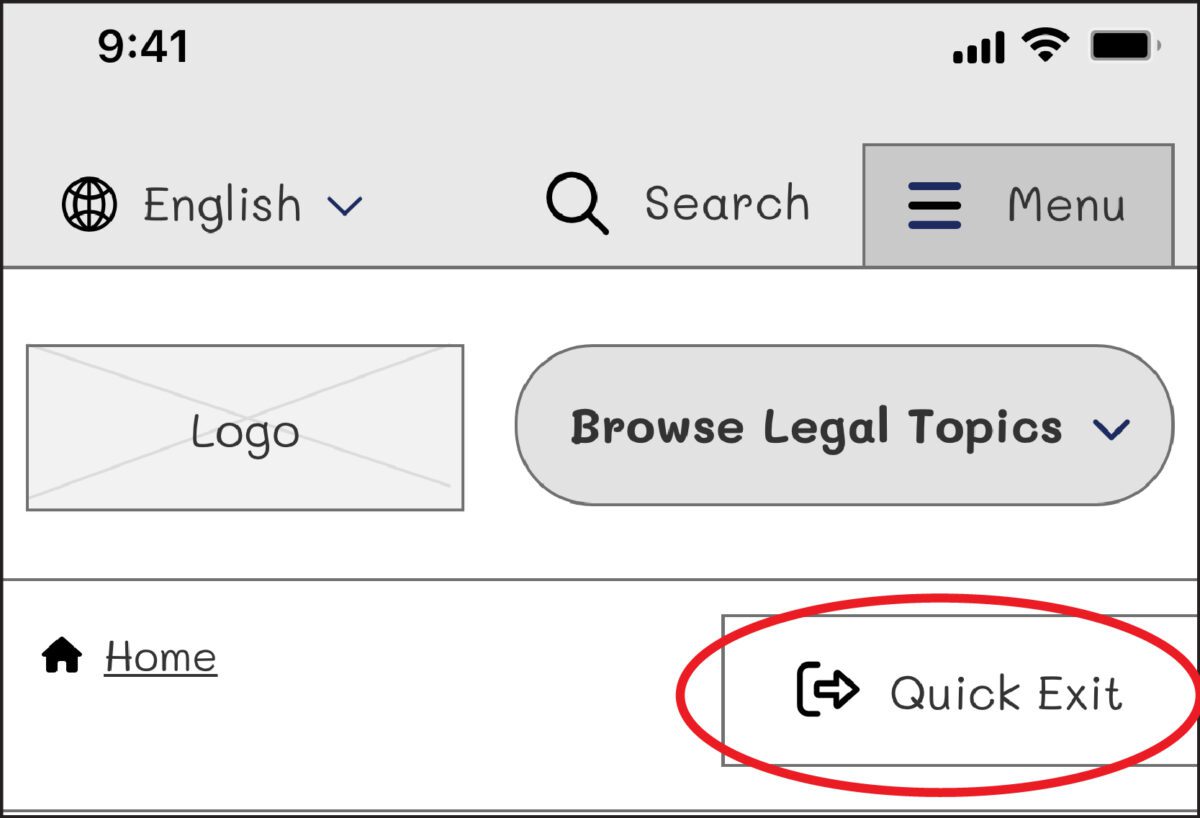
When designing for this audience, we needed a way to support users who may need to exit a page quickly if they are interrupted by a potential abuser while scrolling through sensitive information, such as divorce or domestic violence resources. The site had previously utilized an “Escape” button on pages that dealt with those sorts of topics. When approaching the redesign, we wanted to ensure this button would always appear but wouldn’t interfere with other audiences, such as someone looking for information about traffic tickets. It had to walk a fine line between in-your-face and too subtle to be helpful to ensure users could see and interact with it.
When dealing with “trauma-informed” design, designers must “prioritize comfort over technological trends” (Design for Safety). Our challenge was amplified by a lack of standards for a quick exit button’s function, especially for a site with multiple audiences. Since these buttons are a relatively new best practice and little research on them exists, we were careful in our strategic approach. A quick exit button is not ingrained in a user’s mental model, making its intended action new to most people. Those who feel they might need it have to recognize its function as soon as possible.
Approach to the Quick Exit Button
While designing the quick exit button, we considered its placement, colors, and typographic style to ensure that:
- The button was easy to understand and used by people who needed it,
- The language was not retraumatizing,
- The button wasn’t so big and distracting that it took away from the overall experience of the site for those who didn’t need it, and
- The button’s position was easily accessible on a range of device sizes and types.
Our first wireframe called the button “Quick Exit.” When we tested the prototype, all five participants did not understand what the exit button meant. This emphasized how important the language on the button is. For those who have dealt with domestic violence, even the word “escape” could be harmful to hear. Additionally, since audiences view the website in different languages, we wanted to ensure that the button’s translation would not adversely affect the layout.
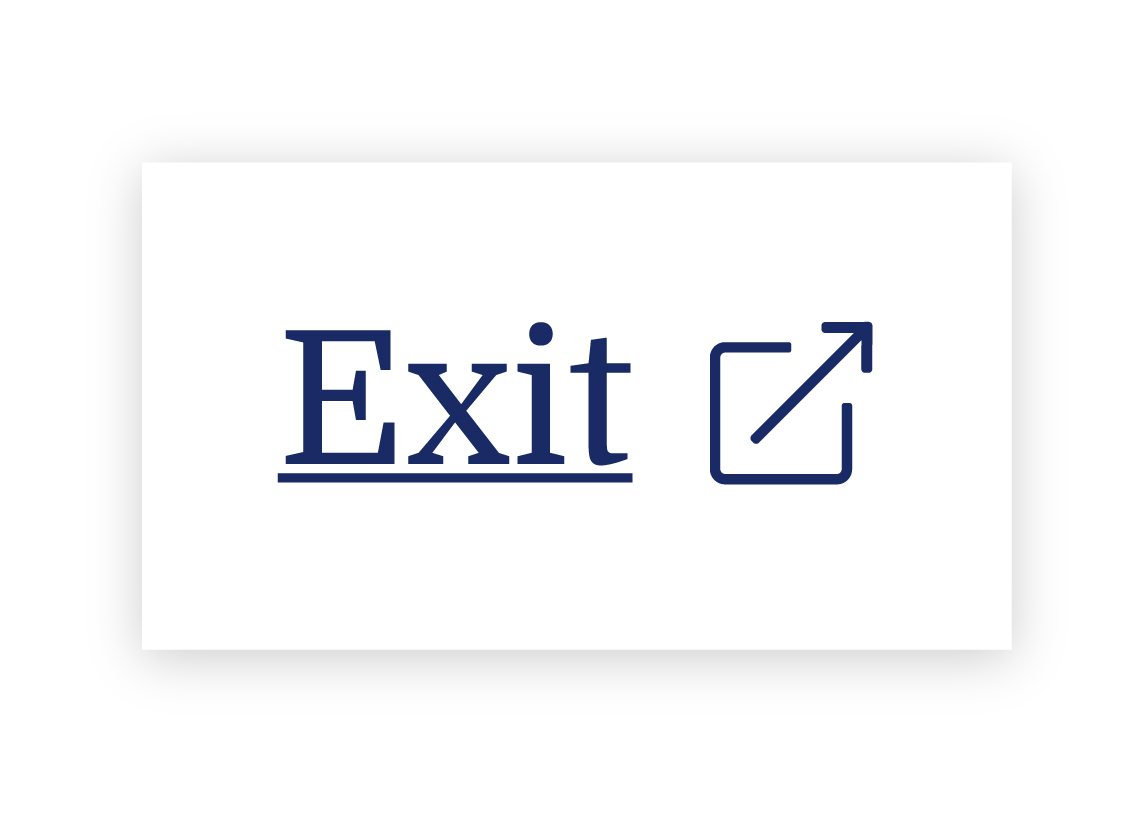
On our next iteration, we tried using the term “Exit” with the icon globally known for “external link.” But this still wasn’t clear enough for our users: Where would the exit bring you? To a page called “Exit”?
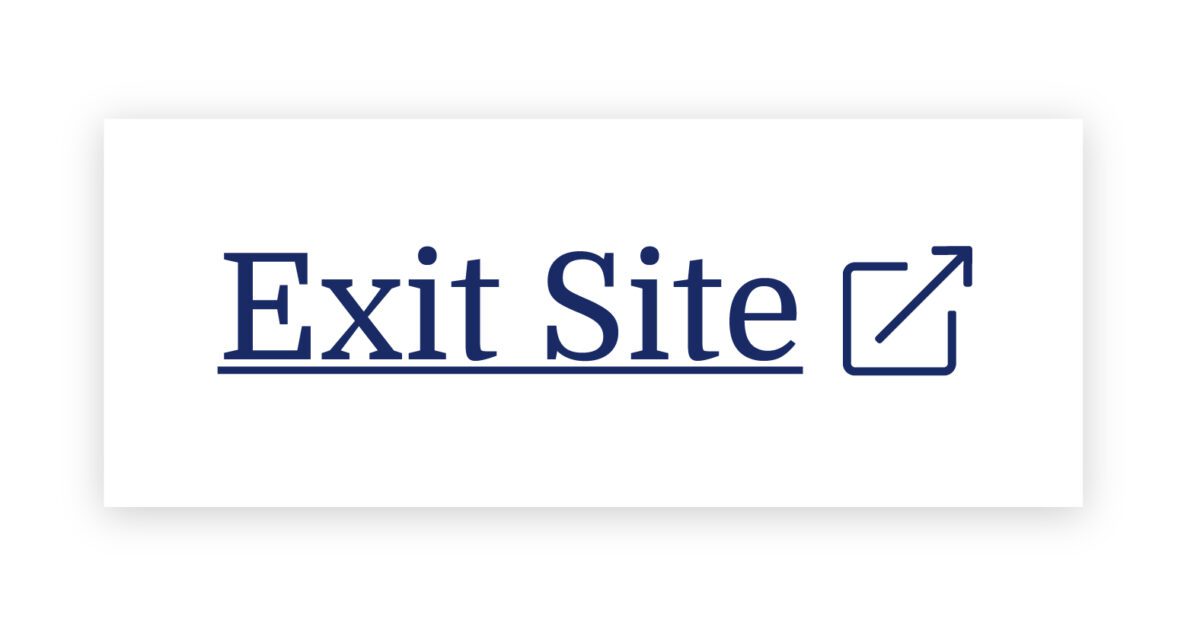
We needed to explain exactly what the button did, so we opted to use the universal external link icon with “Exit Site” as a label to best communicate what the button would do. Although it does not describe where you will end up, it clearly explains that you will leave the website.
To further help users understand what the button was for, we then created a pop-up at the start of the user’s journey that educates people on the button’s purpose:
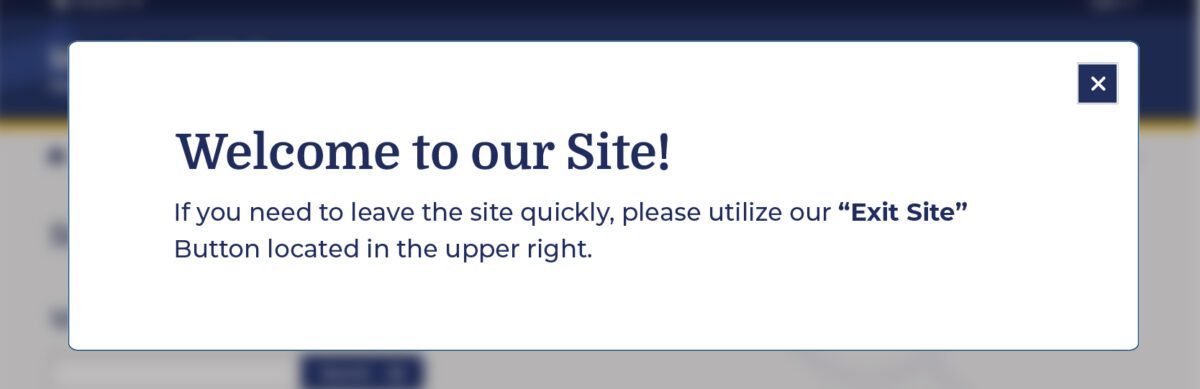
Overall, there was a delicate balance we had to achieve in managing all audiences that typically view the site. We wanted to ensure that we were educating all users but not preventing users from getting help for other topics, such as information about the right to an education or disability. The pop-up, however, had additional considerations we needed to weigh as well: What if their abuser sees it upon landing? What if the user who needs it ignores it?
An alternate approach focused more on domestic violence victims is the California Victims Resource Center’s (CVRC) website, 1800victims.org. When landing on the site, visitors are first educated with a pop-up, which includes reading the website’s Terms of Use and agreeing to the terms before they can enter.
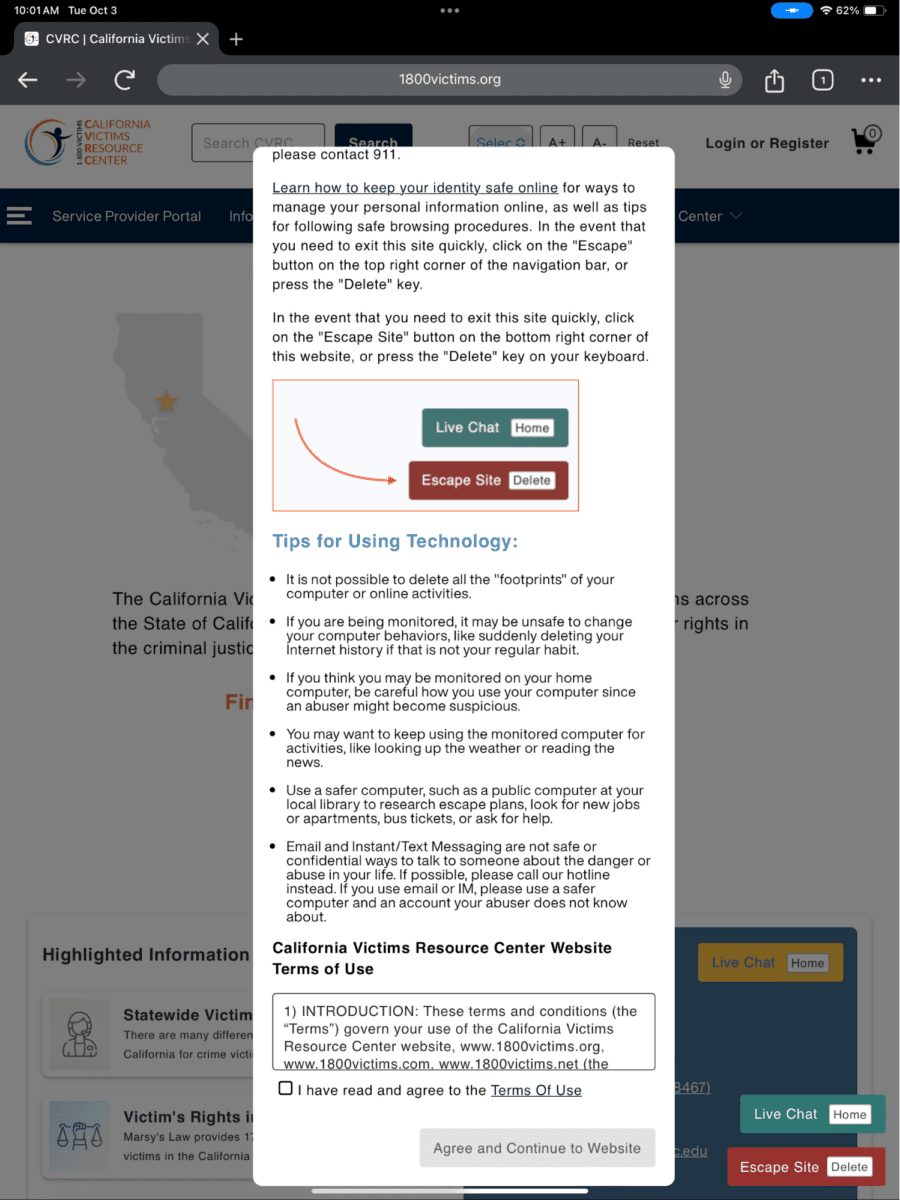
Additionally, when the user clicks the escape button (or uses the keyboard short-cut “Delete”), they are brought to a new tab that displays ABC News. The 1800victims site is changed to Netflix — with all traces of the CVRC gone. According to Columbia Health, this follows best practice because “a blank history can raise suspicion from your abuser.” This would be the safest approach for users.
To give back to the open-source community, the Oomph team turned our approach for this client into the “Quick Exit” Drupal Module. If you would like to add this kind of functionality to your own Drupal website, the module is a great place to start.
Designing for Safety
We must consider how users dealing with domestic violence may feel when they are visiting a site with sensitive content. By including information to educate users upon landing, we can help more people understand how to use a quick exit button if they find themselves in a situation where they need to swiftly leave a website. As an advocate for user safety and domestic violence prevention, you can proactively create a safety net for others by starting to review your work through the lens of how it may be abused prior to releasing it into the world.
This article is just one look at how organizations can design for safety using a quick exit button. By talking about these issues and advocating to protect users in your own design process, we can all take a step toward helping prevent domestic violence. Even if one person is helped or informed by Oomph’s quick exit button design on the website, it will be a success in our eyes.
Need help incorporating safety-focused design into your website or mobile apps? Let’s chat about your needs.
If you or someone you may know is struggling with domestic abuse, please visit or call the National Domestic Violence Hotline at 800-799-7233. For further reading on creating digital products with a safety mindset, we recommend Eva PenzeyMoog’s book Design for Safety available from A Book Apart.
In good times and bad, healthcare is deeply ingrained in our lives. From the beginning to the end, our providers monitor our growth, treat our illnesses and injuries, and keep us as healthy as possible.
But healthcare organizations can no longer take that provider-patient dynamic for granted. In the wake of the COVID-19 pandemic, more patients than ever distrust the healthcare system. The healthcare industry is also working to recover from the $206.2 billion hit it took in 2020, driven largely by forced delays in preventative care and elective surgeries.
As the healthcare sector finds its footing post-COVID, providers have a tremendous opportunity to build stronger patient relationships than ever before. In 2022, 83% of healthcare consumers said they wanted to make their health and wellness a priority again, while another 37% said they wanted to be more engaged with their healthcare. So where should providers start? With a laser focus on user experience (UX).
As telehealth and retail disrupters like CVS and Amazon gain momentum, it’s easier than ever for patients to get a flu shot or a test for strep throat – a convenience that patients love. These healthcare disruptors also have a leg up in the virtual world, since they’re powered by the modern digital platforms that patients have come to expect.
To find a way forward, traditional healthcare organizations need to focus on creating a strong UX and digital presence that can both compete with disruptors and satisfy the regulatory requirements unique to healthcare (we’re looking at you, HIPAA).
Why Your Patients Expect Better UX
Once upon a time, patients believed that doctors knew best. They went to the healthcare provider down the street and trusted that the provider had the expertise to resolve their health woes.
In 2023, patients are informed consumers. 60% of patients research online before choosing a provider, many of whom consult the healthcare organization’s website. If this isn’t reason enough to revamp your digital footprint, 40% of patients also say they prefer to book appointments online.
Together, these statistics illustrate a growing demand among patients for more robust, patient-friendly digital experiences. The issue is that this is exactly what healthcare organizations have struggled to do for years. At Oomph, some of the most common challenges we see among healthcare brands include:
- Exceptionally fragmented platforms and digital presence
- Siloed back-end systems that make it difficult to map and track patient health information (PHI)
- Complex organizational structures that inhibit quick innovation
Yet there are exciting examples of innovation across the industry, too. Forward-thinkers like the Cleveland Clinic are proof that healthcare UX can and should be innovative — largely because better digital capabilities enhance the patient experience, fueling stronger relationships that benefit providers and the patients they serve.
Our healthcare team at Oomph works with providers of all sizes to uncover digital solutions that make sense for their size and structure, budget, and patient needs. Here, Oomph UI Designer Alyssa Varsanyi shares best practices they’ve developed in partnership with our healthcare clients.
Our 4 Healthcare UX Best Practices
1. Be Accessible and Inclusive
Accessibility is non-negotiable for any digital experience. It’s even more important for provider sites, which are likely serving people with a wide range of conditions — all of whom need and deserve complete and immediate access to healthcare.
To create a healthcare UX accessible to all, healthcare organizations should:
- Follow WCAG Guidelines, including color contrast
- Incorporate inclusive language, including diversity, equity, and inclusion principles
- Use plain language standards, which means language that’s clear, concise, and legible for readers of all education levels
2. Create a Safe Space
In healthcare, protecting patient data is table stakes. To create a safe space, you have to think not just about patient confidentiality but also about building trust. A thoughtful digital environment with inclusive language can go a long way to helping patients feel seen, heard, and cared for.
Websites like Cedars-Sinai are a great example of how websites can be built around trust. Their platform exemplifies how language can be the foundation for a credible site, especially when paired with supportive modules like sources and testimonials.
To take the same approach to your site:
- Communicate progress: Patients want to know where they stand. Find ways to reflect the status of their care, whether that’s upcoming appointments or prescriptions in need of renewal.
- Follow conventions: Your patients aren’t visiting your site to learn something new. Keep consistent with healthcare standards and terminology so patients can easily recognize different tools and features.
- Prevent errors: Mistakes happen. Patients enter their birth date incorrectly or accidentally click the “Schedule” button before they’re ready. The best healthcare platforms both eliminate conditions that can lead to errors and add preventative steps, like prompting the patient to confirm their selection.
- Offer solutions: If and when errors occur, explain them in plain language and with a visual treatment so the patient can understand how to fix them without having to call customer support.
3. Make Navigation Easy
Many patients come to healthcare systems with an immediate need — a parent needs to find an open appointment NOW for their child’s pre-season sports physical, or a cooking enthusiast needs to locate an urgent care on a Sunday to patch up the new chopping-related cut on their hand.
In either scenario — and countless others that people face daily — it’s critical that patients can easily find the right information at the right time and in the right way.
To make this a reality, healthcare organizations should strive to:
- Consider specific users: How do they speak? What imagery resonates with them? Speaking your patients’ language will help patients move through your platforms more intuitively.
- Prioritize visibility: Patients shouldn’t have to remember where it was that they could schedule an appointment or view their records. Make important elements and actions easily and frequently accessible.
- Mirror real-world conditions: No one wants to get lost down a digital hallway. Make it simple for patients to find what they need – like bill payment – then easily return to where they started.
As technical as these tactics are, don’t forget to show empathy, too. It is possible to show compassion online, like how Stanford Health poses the question, “What can we help you find?” Emotional asks like this can illustrate an organization’s genuine desire to be helpful to their patients.
4. Build Responsive Experiences
Healthcare needs don’t wait until patients are sitting in front of their computers. Think about an adult child peeking over their senior parent’s shoulder while they search for a specialist, or a new parent scrolling through their phone at midnight while cradling their sick baby.
Now imagine those people frantically pinching at the screen so they can read the entire text block or find the right button. Stressful, right?
Patients should be able to seamlessly access healthcare anytime anywhere, which means designs must be responsive. Keep in mind:
- Device types: Designs need to render and be easy to use on all screen sizes.
- Clean designs: Focus on the most need-to-know information so the design and content don’t distract from the actions and features your patients care about. This also makes your platform more accessible on smaller screens.
What does that look like in practice? Consider the Summit Health website. Its simple navigation makes it easy for patients to find what they’re looking for, while the responsive design enables patients to engage on the go.
Healthcare UX Is a Journey, Not a Destination
At Oomph, we’ve seen firsthand how these healthcare UX best practices transformed the patient experience of our many healthcare clients. Even still, it’s important to note that UX isn’t one-size-fits-all. A national network of hospitals may need a very different digital patient experience than an owner-operated group of general practice clinics.
So how do you start building a UX that works for you and your patients? Research and testing.
UX audits, user research, and usability testing are all keys to the lock that is an effective UX strategy. By identifying what’s working and what’s not, what your patients want and what they don’t, you can put your organization on an evidence-based path to world-class UX.
Interested in exploring ways to improve UX for your own patients? We’re here to help.
Humans encounter thousands of words every day. As a website owner, that means your site content is vying for your user’s attention alongside emails from their colleagues, the novel on their nightstand, and even the permission slip scrunched at the bottom of their kid’s backpack.
How do you cut through the clutter to create site content that people actually want to read?
While you may already be choosing topics that are the most interesting and relevant for your audience, the structure of your writing may not be optimized for how people read. By understanding your audience’s reading behaviors following best practices for readability and accessibility, you can make sure your content works with people’s natural tendencies – not against them – to create a more engaging digital experience. An added bonus: Google shares many of those same tendencies, so content that’s designed well for humans is also more likely to perform well for organic SEO.
As a digital platform partner to many clients with content-rich sites, Oomph often works with brands to redesign their content for digital success. Here’s a look at the basic principles we apply to any site design – and how you can use them to your advantage.
How People Read Online
When we dive into a book, we typically settle in for a long haul, ready to soak up each chapter one by one. But when we open up a website, it’s more like scanning a newspaper or the entire bookshelf – we’re looking for something specific to catch our eye. We quickly scan, looking for anything that jumps out at us. If we see something interesting, then we’ll slow down and start reading in more detail.
Think of it like an animal following an information “scent,” identifying a mixture of clues that are likely to lead to the content you’re looking for. Most people will decide which pages to visit based on how likely the page will have the answer they’re looking for and how long it’s going to take to get the answer.
Users need to be hooked within a few moments of looking at a website or they’ll move on. They need to be able to identify and understand key factors like:
- The point of the information and why they should keep reading
- Whether they can trust the information and the source
- The type of content provided and any action expected from them, like signing up for an event
- How visually engaging and readable the content is
The takeaway for brands? Writing with your readers’ needs in mind is a way to show them you care and want to help them solve their problem. It’s also the key to achieving your site goals.
Your site content does more than just convey information – it’s about building trust, establishing rapport, and creating a connection that goes beyond the page. Whether you’re trying to sell a product or promote a cause, crafting content around your audience’s needs, desires, and preferences is the most effective way to compel them to take action. Here are four ways to set your website content up for success.
1. Put your data to work.
If you’re looking to refresh your current site, data can help you make informed choices about everything from your content strategy to your layout and design. Use digital reporting tools to answer questions like:
- Is our target audience visiting our site – and are other audiences visiting that we don’t know about yet?
- Which content do visitors download or engage with most frequently?
- What does a typical site visit look like? Are there places where users are getting stuck or bouncing off?
Google Analytics is a go-to tool for understanding the basics of who is visiting your site and how they’re engaging with your content. You can track metrics like session duration, traffic sources, and top-performing pages, all of which can help you better understand what your audience is looking for and what you want to tell them.
Additional tools like Screaming Frog and Hotjar can give you even deeper insights, helping you track content structure and real-time user interactions.
2. Create a simple and consistent content structure.
When it comes to site content, consistency is like the foundation of a house (minus the power tools and hard hats).
A well-structured site not only helps users navigate and understand your content more easily, but also enhances the visual appeal and flow of the site. Think of it like a dance floor – you want your users to be able to move smoothly from one section to the next, without any awkward missteps.
That means focusing on shorter sentences, bullet points, and clear subheadings, all backed up by engaging visuals that serve as resting points for the eye. And while you’re at it, don’t forget to declutter your content — users don’t want to wade through a sea of unnecessary words just to find the nuggets of gold.
Ask yourself: Does this content flow smoothly, is it easy to scan, and does it make my key messages stand out? If the answer is yes, then you’re on your way to successful content.
3. Make sure visuals and content play nicely together.
When it comes to enhancing your content with visuals, the key is to strike a balance between style and substance. Your design should complement your content, not compete or distract from it.
Beyond their aesthetic appeal, well-designed visuals are important for creating a sense of credibility with users. Think back to the concept of information scent: If your design looks sloppy or inconsistent, users are less likely to trust the information you’re presenting. So make sure you’re using design elements wisely, creating ample white space, and avoiding anything that makes your content feel like a sales pitch.
4. Focus on accessibility.
When it comes to site content, accessibility can’t be ignored. Content should be engaging and informative and also conform to the , Website Content Accessibility Guidelines (WCAG). Tools like SortSite can help identify these issues and guide you toward accessibility success.
There are a number of things all sites need to consider:
- Using consistent text stylings, including text color, leading, kerning, and tracking.
- Design to support individuals with visual impairments, assistive technology like screen readers, and those that require navigation via the keyboard only
- Following heading orders and grouping content together to make it easier to scan. For example: Following a heading level 2 with a heading level 3 when the ideas are related, but starting with a new heading 2 if changing to a new section of thought.
- Using multiple methods to indicate action items and descriptive text for buttons and alternative text.
- PDFs can be useful, but are also big accessibility red flags, so it’s best to avoid using them when possible. If a PDF is a must, make sure it follows accessibility best practices.
Designing Engaging Content Doesn’t Need To Be a Full-Time Job
If you already have a library of content, auditing the content that already exists can be daunting. And sometimes, you need a little help from your friends. That’s where third-party experts (like us!) come in.
During our website discovery process, we use strategies like content and analytics audits, UX heuristics, and user journey mapping to help position client sites for success. We’ll help you identify areas for improvement, highlight opportunities for growth, and guide you toward achieving content greatness.
Ready for a fresh perspective on your content? We’d love to talk about it.
Have you ever tried to buy tickets to a concert and experienced the frustration and eventual rage of waiting for pages to load, unresponsive pages, unclear next steps, timers counting down, or buttons not working to submit — and you probably still walked away with zero tickets? Yeah, you probably had some choice words, and your keyboard and mouse might have suffered your ire in the process.
As a website owner, you strive to create a seamless user experience for your audience. Ideally, one that doesn’t involve them preparing to star in their own version of the printer scene in Office Space. Despite your best efforts, there will be times when users get frustrated due to slow page loads, broken links, navigation loops, or any other technical issues. This frustration can lead to what the industry calls “rage clicks” and “thrashed cursors.” When your users are driven to these actions, your website’s reputation, engagement, and return visits can be damaged. Let’s dig in to discuss what rage clicks and thrashed cursors are and how to deal with frustrated users.
First of all, what are Rage Clicks?
Rage clicks are when a user repeatedly clicks on a button or link when it fails to respond immediately — the interface offers no feedback that their first click did something. This bad user experience doesn’t motivate them to return for more. These clicks are likely often accompanied by loud and audible sighs, groans, or even yelling. “Come on, just GO!” might ring a bell if you’ve ever been in this situation. Rage clicks are one of the most frustrating things a user can experience when using a website or app.
Rage Clicks are defined technically by establishing that:
- At least three clicks take place
- These three clicks happen within a two-second time frame
- All clicks occur within a 100px radius

Similarly, what is a Thrashed Cursor?
A thrashed cursor is when a user moves the cursor back and forth over a page or element, indicating impatience or confusion. Various issues, including slow page load times, broken links, unresponsive buttons, and unclear navigation, can cause users to exhibit these digital behaviors. It can also indicate the user is about to leave the site if they cannot find that solution quickly.
Thrashed cursors are defined technically by establishing that:
- There is an area on the page where a user was moving their mouse erratically
- An established pattern of “thrashing” occurs around or on specific elements or pages
- Higher rate of user exits from the identified pages
Why do Rage Clicks and Thrashed Cursor happen?
Common reasons rage clicks and thrashed cursors happen are:
- Poor Design: Poor design is one of the most common reasons for rage clicks and thrashed cursors. If the website has a confusing layout or navigation structure, it can be frustrating for users to find what they’re looking for. Or, they may assume an element is clickable; when it’s not, it can be irksome. Underlined text is an excellent example, as users often associate underlines with links.
- Technical Issues: Technical issues such as slow loading times, broken links, or non-responsive buttons can cause rage clicks and thrashed cursors. Users expect the website to work correctly; when it doesn’t, they can become annoyed or frustrated. If they click a button, they expect the button to do something.
- Lack of Clarity: If the website’s content is unclear or poorly written, it can cause confusion and frustration for users. They may struggle to understand the information provided or find it challenging to complete the intended action. Content loops can be a good example of this. Content loops happen when users repeatedly go back and forth between pages or sections of a website, trying to find the information they need. Eventually, they’ll become frustrated, leading to this user leaving the website.

How do you resolve issues that lead to Rage Clicks and Thrashed Cursors?
Now that we know what rage clicks and thrashed cursors are and why they happen, how do you resolve it, you may be asking. Here are a few things a digital partner can help you with that can significantly reduce the risk of your users resorting to these behaviors.
Use Performance Measuring Tools
By employing performance measuring, you can analyze the data collected, gain valuable insights into how users interact with your platform, and identify areas for improvement. For example, if you notice a high number of rage clicks on a specific button or link, it may indicate that users are confused about its functionality or that it’s not working correctly. Similarly, if you see a high number of thrashed cursors on a particular page, it may suggest that users are struggling to navigate or find the information they need.
Tools that support Friction or Frustration measurement:
- Clarity (from Microsoft)
- ContentSquare
- Heap
- HotJar
- Mouseflow
- Quantum Metric
Conduct User Experience Exercises and Testing
Identifying the root causes of rage clicks and thrashed cursors can be done through a UX audit. A partner can examine your website design, functionality, and usability, identifying areas of improvement.
- User Journey Mapping: User journey mapping involves mapping the user’s journey through your website from a starting point to a goal, identifying pain points along the way, and determining where users may get stuck or frustrated.
- Usability Testing: Usability testing involves putting the website in front of real users and giving them tasks to complete. The tester then looks to identify issues, such as slow loading times, broken links, or confusing navigation.
- User Surveys: User surveys can be conducted in various ways, including online surveys, in-person interviews, and focus groups. These surveys can be designed to gather information about users’ perceptions of the website, interactions with the website, and satisfaction levels. Questions can be designed to identify areas of frustration, such as difficult-to-find information, slow page load times, or confusing navigation. It’s wise to keep surveys short, so work with your partner to select the questions to garner the best feedback.
- Heat Mapping: Heat mapping involves analyzing user behavior on your website, identifying where users are clicking, scrolling, and spending their time. This can identify areas of the website that are causing frustration and leading to rage clicks and thrashed cursors.
Focus on Website Speed Optimization
A digital experience consultancy can synthesize findings from UX research and performance-measuring tools and work to optimize your website for quicker page loads and buttons or links that respond immediately to user actions.
- Image Optimization: Optimizing images on your website will significantly improve page loading times. A partner can help you optimize server settings and compress images to reduce their size without sacrificing quality.
- Minification: Minification involves reducing the size of HTML, CSS, and JavaScript files by removing unnecessary characters such as white space, comments, and line breaks. This can significantly improve page loading times.
- Caching: Caching involves storing frequently accessed website data on a user’s device, reducing the need for data retrieval and improving website speed.
- Content Delivery Network (CDN): A CDN is a network of servers distributed worldwide that store website data, improving website speed by reducing the distance between the user and the server.
- Server Optimization: Server optimization involves optimizing server settings and configurations, such as increasing server resources, using a faster server, and reducing request response time. Website owners frequently skip this step and don’t select the right hosting plan, which can cost more money through lost users and lower conversions.
Resolve Technical Issues
A digital experience partner can help resolve any technical issues that may be causing frustration for your users. These issues may include broken links or buttons, 404 errors, slow page load times, and server errors. Technical issue resolution can involve various activities, including code optimization, server maintenance, and bug fixes that work to ensure that everything is working correctly and address any issues that arise promptly. The resolution of technical issues will improve website performance, reducing the likelihood of user frustration and rage clicks.
Next Steps
User frustration can negatively impact user satisfaction and business outcomes. Partnering with a digital experience firm can be a valuable investment to mitigate these issues. Through the use of tools, UX audits, user surveys, website speed optimization, and technical issue resolution, a partner can identify and address the root causes of user frustration, improving the overall user experience — leading to an increase in user engagement, satisfaction, and loyalty, which means improved conversion rates, higher customer retention, and ultimately, increased revenue for your business.
If your customers are hulking out, maybe it’s time to call us!
Not a lot of people get excited about creating an annual report. Yay! Let’s dive into last year’s operational metrics! If you and your colleagues fall into that camp, this statement should help stoke a little enthusiasm:
A compelling annual report can make the difference in reaching your goals for the coming year — and maybe even exceeding them.
Your annual report (also known as an “impact report” at many nonprofits) can be pivotal in earning the trust and support of key stakeholders. Read on to learn how a strong story, good design, and the right format can transform your company data into an invaluable outreach tool.
Why the Quality of Your Annual Report Matters
A good annual report communicates more than just financial performance and forecasts. It provides stakeholders with a deeper understanding of what you do, why you do it, and how well you do it — and gives them a reason to trust, invest in, and/or work with your brand.
This is crucial for nonprofits that rely heavily on fundraising or volunteers, or for-profit companies that need to attract and retain investors and employees. In the health and wellness sector, it’s a key opportunity for organizations to show how they’ve followed through on their commitments to contribute to the health and wellness of communities.
With an engaging design and thoughtful content, an annual report can be a powerful tool for fundraising, marketing, and recruiting. Done well, it’s also a good way to strengthen your brand reputation.
By contrast, a poorly done annual report can downplay your strengths and successes. It can also diminish your brand image, particularly if your website and other channels are more thoughtfully designed. In that case, the annual report may feel like an afterthought to readers who rely on its information.
How Your Annual Report Can Engage Key Audiences
While current and potential donors or investors tend to be the primary audiences for annual reports, there are a number of other stakeholders to take into account. Employees, customers, alumni, partners, and community leaders are all part of the ecosystem that benefits from, and drives value for, your organization.
Creating a multi-faceted report with content that speaks to different audiences can help you earn the trust and support of a range of key stakeholders. Here’s how.
Strengthen your investor or donor base
With an easy-to-digest record of accomplishments and impact, your annual report can help convince current and potential donors, sponsors, or investors that your organization is a solid investment. It’s also a great way to recognize those who helped you achieve your goals over the year or to reconnect with disengaged supporters.
Motivate your employees or volunteers
An engaging report can congratulate your team on their wins and highlight the innovation, commitment, and cooperation that underpin your success. By showing people how their work affects everything from stock value to community impact, you’ll reinforce why the work they do every day makes a difference and how they fit into the bigger picture.
Capture more customers or clients
Whether they’re buying your products or receiving the benefits of your services, most people want to do business with brands that genuinely care about them. Your annual report can include stories and visuals that showcase your mission and core values, as well as highlighting initiatives that put customers or clients first.
Enhance vendor or partner relationships
External partners want to know what they can expect from you and what’s expected of them — and just about everyone wants to feel appreciated. Your annual report can leverage data to show your financial strength and longevity while highlighting the level of quality and commitment you expect from vendors and partners. It can also spotlight those who went above and beyond, reinforcing those relationships.
6 Best Practices for an Engaging Annual Report
It’s not easy to distill an entire year’s worth of data into a single report that’s digestible, engaging, and convincing. The best annual reports tend to combine clear and purposeful storytelling with a little creativity.
Choose a unifying theme
One of the best ways to craft a cohesive narrative for your annual report is to choose an overarching theme and create relevant content around it. Centralizing your accomplishments around a main message will keep the report focused and better support your core objectives.
Some organizations anchor their reports by opening with their mission statements. Others use marketing-driven catchphrases like “Poised for the 21st Century.” We love the 2021 annual report from AIDS Foundation Chicago — it’s built around the theme “A Better Normal,” opens with a leaders’ letter, and includes a list of strategic priorities linked to different report sections.
Use visual elements to express impact
It’s easy for a message to get lost if it’s not presented in the right way. Design matters! Use things like photos, infographics, and other visual elements to bring your goals and successes to life. This will also help keep readers engaged with your content. In a nutshell: aim for more visuals and fewer words.
The Blue Cross Blue Shield of Rhode Island 2021 Annual Report does a great job of using impactful imagery and colorful visuals to illustrate their mission and key accomplishments.
Make it interactive
At the end of the day, you want people to read what you’ve put together. One of the best ways to keep readers engaged is to create an immersive experience with interactive features. Let your audience click through slides, watch videos, or expand graphics for more information.
TOMS’s 2022 Impact Report combines videos and dynamic visuals with lots of clickable content to cover a ton of info without making readers wade through long blocks of text.
Create a web page, not a PDF
While PDFs are easy to share online or in print, they can be clunky to interact with, they’re hard to read on mobile, and they’re notoriously inaccessible.
Here are some important advantages to building a web page instead:
- Web pages can be optimized for different digital devices
- You can use SEO techniques to help increase exposure
- They can easily meet diverse accessibility needs
Plus, since they’re native to web browsers, web pages make it easier for readers to navigate to additional resources or take action. And, well, PDFs just aren’t as much fun to scroll through as the 2020 Mailchimp Annual Report.
Employ data visualization
Numbers alone are easy to skim right over. Visual representations of data, however, get readers to think about the content in a more constructive way, like identifying trends or significant changes. Visualizations also help transform complex data into easy-to-understand information that’s more enjoyable to read.
Start Network’s 2019 Annual Report shows how to use color, graphics, and animation to bring life to your data.
Connect the data to real people
This is especially important for nonprofits and for-profit social enterprises, where it’s crucial to convey the impact of your work. You can humanize facts and data — and make an emotional connection with readers — by including stories and images showing how your product or service impacted the lives of real people.
For a wonderful example of how to incorporate real stories, check out Fairtrade Foundation’s 2019 Annual Report.
Why It’s All Worth It
Think about all the marketing and outreach methods your team uses to attract support for your organization. Of all those methods, the annual report provides a unique chance to showcase the full breadth of your value and impact. To unabashedly brag about yourselves, if you will.
For health and wellness organizations in particular, an annual report is a great opportunity to share community impact over the past year and highlight important investments or initiatives that impact the health and lives of the individuals they serve.
Is it a significant investment? It can be. But if you invest in making your annual report as engaging and compelling as possible, it can pay for itself by helping to fulfill your fundraising or recruitment goals — and spotlighting the crucial role your organization plays in the world at large.
Need help crafting your next annual report? Reach out to us today.
Digital customer experience (DCX) is fast becoming a key factor in how consumers choose whom to do business with. Every digital interaction contributes to an overall feeling about your brand — which means digital touchpoints like apps and chatbots can play a big part in what customers think of your company.
What story do you want those interactions to tell? What kind of experiences do you want people to share with others?
This article covers five ways to assess and improve your digital customer experience so you can attract, delight, and retain your target customers.
But First – What IS Digital Customer Experience?
Customer experience, or CX, is the perception that customers form based on all of their interactions, in-person or online, with your brand. If CX is about carefully and consistently meeting your customers’ needs, Digital Customer Experience is the online expression of those efforts.
Digital customer experience is the part of your CX journey that involves digital interactions via your website, mobile app, social media accounts, digital kiosks, etc. Wherever your customers are engaging with your people, products, or services through the internet, it’s a digital experience.
DCX is their perception of those moments.
Brands with a great DCX provide a personalized and consistent online experience throughout the customer journey. Whether someone is considering becoming a client, placing an order, or searching for information, every digital interaction has to be easy and enjoyable.
5 Ways to Improve Your Digital Customer Experience
Technology is a wonderful tool for improving the customer experience, whether mining data for customer insights or leveraging AI for personalization. But technology alone can’t deliver an exceptional digital customer experience. Your DCX strategy must include a human component — one that focuses on customer care through empathy and authenticity. Here’s how to ensure your digital customer experience lives up to your users’ expectations.
Know your target audience
To deliver the kind of digital experience your customers will love, you have to know what they want. Who’s buying your product, and why? When they visit your website or app, what are they hoping to accomplish?
Delighting your customers requires knowing their goals, understanding their pain points, and providing interactions that meet their specific needs. The upshot? 68% of customers will spend more money with a brand that understands and treats them like an individual.
Here are three crucial steps:
- Use qualitative and quantitative analyses to learn about your audience. The more you understand their preferences and behaviors, the better you can create an experience that meets their needs.
- Apply a user-centered design process, which relies on deeply understanding your audience to craft usable, accessible digital interfaces.
- Incorporate personalization techniques to adapt the digital experience for individual users. More than anything else, this will help make the customer journey smooth and enjoyable.
Adopt an omnichannel mindset
Customers expect seamless interactions from brands throughout their journey, whether through digital or non-digital channels. In fact, brands with the strongest omnichannel customer engagement strategies retain an average of 89% of their customers, in comparison to 33% of companies with weak strategies.
Knowing that today’s consumers often jump from channel to channel as they browse, buy, or get in touch, DCX leaders embrace an omnichannel strategy. Note that this is different from a multichannel approach, where customers access multiple channels in separate interactions. An omnichannel approach integrates all digital touchpoints to create a seamless, personalized experience.
Here are a few key ways to create personalized experiences that resonate across all your digital channels:
- Use instantly recognizable brand elements and visual designs
- Make the transition from one channel to another easier
- Save search history and preferences across devices
- Synchronize ads and other promotional content
Get help from experts
Expert assessments can remove the guesswork around optimizing your digital customer experience. A digital CX audit, for instance, will show you what’s working and what could be better, as well as providing actionable insights and a prioritized roadmap.
CX specialists will look beyond the basic digital experience (clunky design, system bugs, etc…) to assess whether your digital channels are effectively serving your customers’ needs. A professional audit can help determine things like:
- Are there critical issues affecting usability and access?
- What elements of the journey most impact users’ experience?
- What are your competitors doing, and how can you differentiate?
- Where are your greatest strengths and growth opportunities?
Make customer feedback easy
Most companies know that customer feedback is crucial for improving the customer experience. But many fall short in providing easy, effective options for people to reach them.
Offering multiple, easy-to-use communication options across your digital channels is one more way to delight your customers. Help people engage with you via the medium of their choice, so they can communicate through the interface they’re most comfortable with.
That could be a chat function or contact form on your website, or the commenting and messaging features on your social profiles. Or, maybe it’s good old-fashioned phone calls and emails. Whatever the avenue, make it easy to find and intuitive to use.
One more thing: when someone does reach out, respond quickly. The faster a problem is resolved, the better the experience.
Plan for the post-launch reality
You might design and launch an amazing new website, app, or service that delights your customers and sends revenue through the roof. But, without a long-term plan to keep it effective and relevant, your digital CX will likely diminish over time.
To maintain the quality of customer experience across all your digital touchpoints, apply a measurement framework based on the principles above:
- Are you meeting users’ current and evolving needs?
- Do you provide a seamless omnichannel experience?
- Are you gathering — and implementing — user feedback?
Remember, too, that new technological trends are going to keep emerging and influencing consumer expectations. Be prepared to evolve what digital CX looks like for your business, especially if it means extending your digital services to new platforms or devices.
Putting the “C” in Digital CX
Technology has made so many things possible for today’s consumers that, ultimately, the power is in their hands. As digital capabilities continue to evolve, people may become increasingly selective about which brands earn their trust and business — and companies will need to make the digital customer experience more beneficial for both sides.
As you can see from the steps above, the key is putting your customers’ needs above all else.
If you’re not sure where to start, you’re not alone! We’ve helped dozens of clients dive into customer research, omnichannel strategies, and strategic planning for digital platforms. Reaching out to a digital CX expert (like Oomph) can help you do things right the first time, saving you time and money and, most importantly, building a foundation to get results.
Excited about crafting an exceptional DCX? So are we. Check out our DCX audit service to learn how we can help set you up for success.