
AI agents don’t read content the way humans do. They operate inside strict token budgets — fixed limits on how much text they can process at once. When your content exceeds that budget, the agent doesn’t skim. It cuts. Understanding where those cuts happen, and why, is the actual foundation of AI content strategy right now.
The optimization community has spent two years talking about “writing for AI” without confronting this constraint directly. Token limits aren’t a technical footnote. They’re the architectural fact that determines whether your content gets cited, summarized, or silently discarded.
Context Windows Don’t Determine What Agents Actually Read
Modern language models advertise context windows measured in hundreds of thousands of tokens. GPT-4o handles 128,000. Claude 3.5 handles 200,000. It’s tempting to assume that means an AI agent will happily consume an entire website and synthesize it. That’s not how deployed agents work in practice.
Most AI systems that retrieve web content use a retrieval-augmented generation (RAG) architecture. The agent doesn’t read your page from top to bottom. It queries a vector database, pulls the passages most semantically relevant to the query, and feeds only those passages into the model’s active context. The effective reading window for any single passage runs between 375 and 1,500 words.
Your content competes passage by passage, not page by page.
The agent isn’t evaluating whether your article is good. It’s evaluating whether a specific block answers the query it’s trying to resolve.
Sequential Content Architecture Fails at Passage-Level Extraction
Oomph’s GEO audit work across clients in multiple verticals has surfaced one consistent pattern: the passages that earn AI citations contain a complete unit of information within 150 to 300 words, with claim, evidence, and implication all present. Passages that require surrounding context get retrieved less often, and cited almost never.
The explanation is structural. Most web content is written to be read in order. Context builds across sections. Arguments develop over paragraphs. Evidence appears after setup. Sequential structure serves readers who move through an article from beginning to end. AI retrieval systems pull individual passages without surrounding context, which means content that relies on sequential reading will fail at the extraction stage.
When a RAG system pulls a passage from your article, it gets that passage without surrounding content. If your best insight sits in paragraph four of section three, after two paragraphs of setup and a transition, the retrieved passage is incomplete. The agent gets the insight without the framing that makes it intelligible. It can’t cite what it can’t understand in isolation.
Token-Aware Content Architecture Prioritizes Information Density Over Narrative Flow
SEO-first content prioritizes keyword density, internal linking, and time-on-page signals. Token-aware content organizes around a different variable: how much answerable information exists per unit of text, and whether each block can stand alone.
The practical difference shows up in four places.
Opening sentences carry the full answer. AI retrieval systems, including those powering Perplexity, ChatGPT search, and Google’s AI Overviews, are trained to extract the first one to two sentences of a passage as the primary answer candidate. If your opening sentence is context-setting (“The world of digital marketing has changed dramatically…”), that slot is wasted. If it’s answer-first (“Brands that structure content for passage-level extraction appear more frequently in AI-generated responses across the major platforms”), the agent has something to pull.
Headers state findings, not topics. “Content Strategy Best Practices” tells an AI agent nothing about whether this section answers its query. “Passage-Dense Content Gets Retrieved More Often Than Narrative-First Content” gives the agent a decision signal before it reads the body text. Header specificity is a retrieval signal, not just a UX preference.
Paragraph length maps to token chunks. Most RAG implementations chunk content at natural paragraph breaks. A 600-word paragraph becomes a single chunk that may or may not surface as a coherent answer. Five 120-word paragraphs, each containing a discrete claim with evidence, become five distinct retrieval candidates that an agent can evaluate independently.
Lists and tables survive extraction better than prose. Structured data holds up under chunking because each list item or table row is a self-contained unit. Narrative that relies on transitional connectives (“building on that point,” “as we saw above”) breaks when extracted from context.
None of these principles require abandoning good writing. They require front-loading the substance. The writer who saves the insight for the closing paragraph is writing for suspense. The content that gets cited leads with the answer.
Technical Signals Tell Agents Where to Look and What to Trust
Content structure gets you into the retrieval pool. Technical signals affect whether you’re weighted toward the top of it.
The llms.txt standard is the clearest example of a technical signal designed specifically for AI agents. A file placed at your domain root tells AI crawlers which content is authoritative, which is supplementary, and which sections are meant to inform rather than be cited. Oomph has implemented llms.txt across multiple client properties. The consistent finding is that agents using this signal weight the flagged authoritative content over other content on the same domain that isn’t marked up.
Structured data functions as a secondary retrieval signal. An FAQ schema turns a list of questions into machine-readable answer pairs. An Article schema with explicit author attribution, publication date, and about markup gives an AI agent metadata that affects both retrieval ranking and citation confidence. Agents are more likely to cite content when they can verify its provenance without inference.
Robots.txt deserves specific attention here. Blocking AI crawlers with a broad disallow rule does more than limit indexing. It determines whether any AI system trained on web crawl data ever incorporates your content into its model weights. Companies that blocked AI crawlers in 2023 and 2024, reasoning that they didn’t want their content used for training, may now find themselves underrepresented in AI responses across platforms they didn’t anticipate. The decision to block or allow specific crawlers (GPTBot, ClaudeBot, Anthropic-ai, PerplexityBot) affects citation share of voice, not just training data.
A Token-Aware Content Audit Finds Three Failure Modes Every Time
Running a token-aware audit on an existing content library typically surfaces the same problems across clients and verticals.
The first is setup debt. A significant portion of most articles’ opening sections contains no retrievable information: context-setting, background, and framing that made sense in a sequential reading model. An audit quantifies this debt and flags it for rewrite priority.
The second is information burial. High-value claims, the specific sourced insights that AI agents want to cite, frequently appear in the middle or end of articles. This is a holdover from the long-form content era of 2012–2016, when longer articles ranked better and writers front-loaded engagement hooks rather than answers. An audit maps where citable claims live relative to passage boundaries.
The third is structural mismatch. Social sharing content follows emotional arcs: story, tension, release, punchline. That pattern performs poorly under AI retrieval. An audit distinguishes between content that should keep its social-sharing structure and content that should be restructured for agent consumption, and flags which pieces warrant investment in both.
The Gap Still Favors Brands That Restructure First
The signals that drove content strategy for the past decade (keyword rankings, time-on-page, backlink profiles) don’t disappear. A new constraint joins them, one that’s structurally different from anything in traditional SEO: can an AI agent extract a complete, citable unit of information from your content without reading the whole article?
That question has a concrete answer for every piece of content on your site. Each passage either holds up in isolation or it doesn’t. The same binary applies to every header and every technical signal on the page.
The brands showing up in AI-generated responses right now aren’t necessarily the ones with the best content. They’re the ones whose content happens to be structured the way AI agents retrieve it. The gap between those groups is still wide enough that structural changes move fast. It won’t stay that way.
Ready to find out how your content holds up under AI retrieval? Oomph’s GEO audit process maps exactly where your content gets cut, buried, or missed, and what to restructure first. Get in touch with our team to start with a token-aware content audit.
Brands with strong traditional SEO rankings are getting skipped by ChatGPT, Perplexity, and Google’s AI Overviews. Not because their content is bad, but because it’s structured for a retrieval system that AI pipelines don’t use. Four days at SEO Week NYC 2026 laid out exactly what’s broken and what fixes it.
You’ve likely watched this play out already: rankings hold, but traffic from AI-generated answers goes to competitors. Or a prospect mentions they “looked it up” before calling, more recently meaning they asked an AI. The problem isn’t your SEO. It’s that the signals AI systems use to decide what to cite are often different than the signals that determine traditional rankings, and most brand sites haven’t been built for them yet.
AI Systems Filter Out Most Content Before They Ever Read It
AI retrieval pipelines evaluate content through a series of eligibility checks before a model ever sees it. Content that fails those checks can’t be cited, regardless of its quality or ranking. Krishna Madhavan, Principal Product Manager at Microsoft AI, opened the conference by describing what he called the “invisible, converged web”: a layer of grounding confidence scores, safety filters, publisher controls, and attribution signals that sits between your content and the AI systems your audience is using. If your content doesn’t carry the right signals, it gets filtered out at that layer. It never reaches the model.
This is the structural gap most brands don’t know they have. A page can rank on the first page of Google and be completely absent from AI-generated answers on the same topic, because ranking signals and retrieval eligibility signals are different. Google evaluates pages. AI pipelines evaluate whether individual content blocks are structured, sourced, and verified enough to ground a response. Madhavan’s framing was precise: modern SEO and GEO now feel less like ranking tactics and more like a distributed systems challenge, where the goal is coordinating the signals that let AI pipelines trust and reuse your content.
In every GEO audit we run at Oomph, most brand sites are missing at least two of those signals. The most common gaps are invisible in standard SEO tooling, which is exactly why brands with strong traditional performance are still surprised when their AI citation share is near zero.
Traffic Metrics Will Lie to You About Your AI Search Performance
AI Overviews, ChatGPT, and Perplexity are answering questions in your category and not sending traffic to your site, but your analytics won’t show you that as a problem, because there’s no traffic to track. Jori Ford, Chief Marketing and Product Officer at FoodBoss, introduced the HEO (Hybrid Engine Optimization) framework at SEO Week specifically to address this measurement gap. Her Hybrid Engine Score is a weekly composite that tracks both traditional ranking performance and AI citation performance in a single number. Measuring them separately, or measuring only one, gives you an incomplete and often misleading picture of your actual search visibility.
Dale Bertrand of Fire&Spark extended this into the CFO conversation that most marketing leaders are currently losing. If your traffic is down but AI-influenced conversions are up, you’re actually winning. GA4 misses most AI-driven attribution, so you look like you’re failing. Bertrand’s work with global brands showed that revenue-focused GEO consistently produces stronger business outcomes than traffic-focused SEO when you measure far enough downstream. The brands building that measurement and implementation frameworks now are the ones who’ll be able to defend AI search investment in 12 months, when leadership starts asking why organic traffic hasn’t recovered.
“Revenue-focused GEO consistently produces stronger business outcomes than traffic-focused SEO.”
A Weak Paragraph Loses to a Strong One Every Time
AI systems retrieve at the paragraph level, not the page level, which means every paragraph on your site now competes independently to be cited. Mike King’s session was the most direct of the conference on this point. His framing: Google has been operating semantically for over a decade, most SEO tooling still does keyword math, and the gap between what tools measure and what AI systems actually evaluate has become the opportunity for brands willing to close it. A well-structured, well-evidenced paragraph on a thinner site gets cited ahead of a buried, unfocused paragraph on a high-authority domain.
The practical consequence for your content team is specific. Paragraphs need to open with their conclusion, not build toward it. Each paragraph should address one provable idea with enough context that it can be extracted and stand alone. Sourcing needs to be explicit and named. An unnamed statistic is an assertion an AI system can’t ground.
The brands we work with who’ve rebuilt their content architecture around these requirements are seeing measurable improvement in AI citation rates within 60–90 days. That improvement shows up in AI Overview appearances and third-party platform citations before it shows up in traffic numbers.
Four Technical Requirements Now Sit Between Your Content and AI Citation
Structured, sourced, crawlable, and machine-readable content gets cited by AI systems. Content missing any one of those properties gets filtered before retrieval. Andrea Volpini, CEO of WordLift, described the staged retrieval process AI systems use: models don’t consume your site whole, they pull from a pre-filtered subset of content that met a minimum bar for structure and verifiability. Content that isn’t structured, connected, and verifiable gets excluded from that subset, regardless of how good it is as writing.
The four technical requirements that determine whether your content clears that bar are: AI crawler access confirmed in your robots.txt; schema markup that is complete, accurate, and present on key pages; an llms.txt file that correctly tells AI agents what they can use from your site; and content blocks written so individual paragraphs can stand alone as cited answers. In every GEO audit we run at Oomph, most brand sites are missing at least two. None of these are advanced configurations. They’re the new baseline for being retrievable. Platforms like Scrunch can show you exactly where you stand across ChatGPT, Perplexity, Gemini, and Google AI Overviews: which prompts surface your brand, which source pages are driving citations, and where competitors are getting cited in your place.
The Brands That Close This Gap First Will Be Significantly Harder to Displace
AI citation compounds the same way that traditional search authority compounds. Brands that establish consistent citation history build a signal advantage that takes competitors real time to close. The difference from traditional SEO is that the window to build that advantage early is shorter, because the field is moving fast and the gap between brands actively building for AI retrieval and brands waiting to see how it develops is widening every month.
The sequencing for closing that gap is straightforward. Technical access for AI crawlers comes first, because you can’t be cited if you can’t be read. Schema markup and structured data come next, because they’re the verification signals AI systems use to trust your content.
Passage-level content architecture follows. Reformatting existing strong content for standalone paragraph retrieval is often faster than creating new content. Third-party brand presence on the platforms AI models train on comes last, because it’s the authority signal that determines whether an AI system treats your content as a credible source or skips it in favor of one it recognizes.
At Oomph, we run GEO audits that score your site across all four of these dimensions and return a prioritized 30-day action plan. If you’re not sure where your brand stands on AI visibility, the audit tells you exactly which gaps are costing you citations right now. Talk to us about a GEO audit.
This week Salesforce signed a deal to acquire Contentful, and most of the coverage is filing it under CMS M&A. I think that misses what’s actually being bought. The interesting part is what an AI agent does with a content platform.
An agent doesn’t take your content and show it to someone. It reads structured, governed source material – your context – and writes the content itself: the answer, the reply, the assembled page, generated on the fly, per customer, per channel. So the most valuable thing you can hand an agent is context it can trust.
That distinction matters more than it sounds. Agents are moving into production quickly, and they will answer your customers and your own staff straight from that material. Point one at clean, governed context and it’s useful. Point it at stale, contradictory, ungoverned content and it will hand back a fluent, confident, wrong answer. Garbage in, confident-sounding garbage out. Either way, it’s speaking for you.
I’ve argued before that content won the web, but context wins the agents, that the CMS was quietly becoming the layer agents reason over. This deal is the biggest CRM on the planet putting real money behind exactly that. Oomph is a gold-certified Contentful partner. We build on the platform daily, and we’ve integrated it with Salesforce and the systems around it. So I’ve been watching this one closely.
So look at what Salesforce already owned. Customer data, and plenty of it – they paid $8 billion for Informatica last year to pull it all together. CRM, marketing, commerce, service. Agentforce on top, ready to act. The one thing they couldn’t pull out of a customer record was the context an agent needs to say something trustworthy: approved product facts, current pricing, the disclosure that has to run in a regulated market, the brand voice, and the right localized version for each audience. Contentful holds all of that. It fits a pattern, too – Informatica, then Momentum, Qualified, Cimulate, and now Contentful. That’s a company building an agent stack on purpose, one acquisition at a time. They decided the context layer was worth buying rather than building.
A customer record can’t tell an agent what it’s allowed to say
Your CRM knows who the customer is. It has no idea what you’re allowed to say to them.
That gap is the whole game. Ask an agent “what’s the current return policy in Germany for this product line” and it will answer either way. Whether the answer is right comes down to three things. Your data tells the agent who is asking. Your context, the structured, governed, current truth behind everything, is what it reasons from. And the content is what the agent generates out of that context in the moment. Data and content are the parts most companies already plan for. Context is the part that gets treated as an afterthought, and it’s the part an agent leans on most.
Jujhar Singh, who runs the applications group at Salesforce, framed the deal around three things working together: the data, the AI-driven content, and the experience. Context is the thread running through all of it. The agent generates the content live, the experience is only as good as what it generates, and both stand on whether the context underneath is trustworthy. That’s what Salesforce bought: the governed context everything else gets built from.
The old acronym survives. The job is changing.
For twenty-five years a CMS has been a Content Management System: somewhere to keep content and push it onto a page for a person to read. An agent uses the same system for a different job. It reasons over that governed context and generates whatever needs to be said from there. Same three letters, new system. The CMS is turning into a Context Management System, and Salesforce just paid to own one.
The headless platforms saw this coming. They had already solved the hard parts an agent needs – structured models, versioning, permissions, and audit trails – and were adding the connective tissue to talk to agents directly. When the biggest player in the category backs that direction with a checkbook, the rest of the market should take the hint.
The old job doesn’t go anywhere, to be clear. Plenty of organizations are running Contentful today purely to manage website content, several of them clients of ours, and that work is the foundation the rest of this gets built on. The structured models, the editorial workflows, the governance, the API-first delivery you set up to run a modern website are the exact things an agent reasons over. You built it to publish pages. You were also building the context layer, whether you planned to or not.
And context reaches well beyond the public website. A lot of it lives in intranets and internal systems: the policies, the procedures, the product knowledge, and the operational detail that actually run the business. That changes who owns the platform. For most of its life a CMS was a marketing purchase, a tool for the brand and the website. Once agents need that governed internal context too, it outgrows marketing, and ownership moves to IT, data, and the enterprise. That shift is already underway, and if you sit in one of those teams, it’s landing on your desk whether you asked for it or not.
The part most of the coverage will skip
The blast radius isn’t the same for everyone. For a retailer, a wrong answer is a bad refund. For a hospital, a bank, a university, or a regulator, it’s a misinformed patient, an exposed internal document, or a benefit you never actually offered. Same technology, very different exposure, which is why governed context is a bigger deal for the organizations we work with most – in healthcare, higher education, government, and associations – than the headlines suggest.
There’s a sovereignty question here too, and it lands hardest on the public sector. Contentful is a German company, and bringing it under a US owner pulls it under US law, including the CLOUD Act. With the EU moving to restrict sensitive public-sector data on US clouds, a government or higher-ed buyer should put that on the question list, not in a footnote.
Where this leaves you
The instinct in most organizations is to make more content. The work that matters now is getting your context in order – structured, current, owned, and governed – because your agents will generate from it whether it’s clean or not. The content platform becomes a system of record: where brand, policy, product knowledge, and compliance live, and where your agents go to find the truth.
If you already run Contentful, the practical news is reassuring. Salesforce has said it keeps operating on the same platform, APIs, and support model, with tighter Agentforce integration as the roadmap rather than a forced migration. Nothing about your current build breaks. The move now is to point the foundation you’ve built at what’s coming next, and that’s a conversation we’re already having with clients.
The organizations that get their context right now are the ones whose agents will be worth trusting later. The big platforms have started spending real money to get there. The window to do the unglamorous work before your agents go live is open right now, and I don’t think it stays open long.
Oomph is a digital experience consultancy serving regulated industries and mission-driven organizations, including healthcare, higher education, government, and associations, where compliance, accessibility, and trust are non-negotiable.
Let me be upfront about something. When I started digging into how universities handle student data, I genuinely expected to find a mixed bag. Some good, some bad, nothing too shocking. What I actually found was a picture far messier than most institutions would like to admit publicly.
The Data Challenge Universities Actually Face
Higher education has a data complexity problem that’s genuinely different in scale from most other sectors. On a single campus, you’ve got admissions offices, finance departments, health centers, libraries, research labs, and dozens of other units, all touching personal data in ways that rarely get coordinated. Then the General Data Protection Regulation arrived in 2018 and essentially said: sort it out, or pay for it.
Some universities sorted it out. Others are still finding their footing, six-plus years on.
That’s not a criticism. It’s a structural reality. A retailer knows roughly what data it holds and why. A university processes the personal information of students, staff, alumni, research participants, visiting scholars, applicants who never enrolled, donors, and contractors, often simultaneously, often under completely different legal bases. The scope is genuinely daunting.
Student records alone are an iceberg. Grades, health accommodations, financial aid history, disciplinary notes, mental health referrals. Each category carries its own sensitivity tier under the regulation, and special category data (health information, for instance) requires explicit protections that can’t be bolted on as an afterthought.
Research is where things get particularly complicated. Academic research can receive a degree of flexibility under GDPR, but that flexibility comes with strings attached: ethics board approval, data minimization obligations, retention schedules that actually get followed. A number of research departments are still operating on informal data management practices, and the gaps show.
What GDPR Actually Requires (Without the Legal Fog)
When people talk about GDPR compliance, they tend to either catastrophize it into a terrifying bureaucratic maze or wave it away as box-ticking. Neither framing is accurate.
At its core, the regulation asks institutions to answer some fairly practical questions. Do you know what personal data you hold? Where it lives? Who can access it? Under what legal basis are you processing it? And how long are you keeping it before you delete it?
That last one trips universities up constantly. Retention schedules exist on paper at most institutions. Whether the systems actually enforce deletion is a different conversation entirely.
Then there’s the rights side of things. Individuals, including students and staff, have the right to access their data, correct inaccuracies, request deletion under certain circumstances, and object to specific types of processing. Universities need workable processes for handling these requests, not a generic email address that someone checks when they get around to it.
Lawful basis matters too. There’s a tendency in higher education to lean on legitimate interests as a catch-all justification for data processing, but that’s not how it works. Processing needs a clearly identified basis, documented before the processing starts, not reverse-engineered after a complaint arrives.
The Consent Problem on Campus
Consent under GDPR must be freely given, specific, informed, and unambiguous. That last word does a lot of work.
The challenge with universities and consent is structural. When a student applies for a place, registers for courses, or uses campus health services, there’s an inherent power imbalance at play. Can a student genuinely refuse to consent to data processing when saying no might affect their access to university services? GDPR is fairly clear that where a meaningful power imbalance exists, consent isn’t a reliable legal basis. Yet plenty of institutions still rely on it for processing activities where a stronger basis would be more appropriate.
Alumni engagement sits in particularly awkward territory. Sending a fundraising appeal to a graduate decades later requires a legitimate legal basis.
“We’ve always done it” isn’t one. Neither is a pre-ticked opt-in buried in a registration form from years ago.
Third-Party Vendors and the Supply Chain Nobody Talks About
Universities run sprawling technology ecosystems. Student information systems, virtual learning environments, library databases, HR platforms, research repositories, catering apps. Behind each of those sits a vendor processing personal data on the institution’s behalf.
Under GDPR, data processors must have written agreements in place with controllers. Those agreements need to specify what data is being processed, for what purpose, under what security standards, and what happens to the data when the contract ends.
In practice, many universities have signed vendor contracts where the data processing terms weren’t exactly scrutinized closely. US-based edtech vendors in particular sometimes arrive with terms drafted for a pre-GDPR world, or for US legal frameworks that don’t map neatly onto European requirements. Negotiating those terms retroactively is tedious and uncomfortable. But it’s necessary.
The Schrems II decision added another layer of complexity. Transferring personal data outside the UK or EU requires additional safeguards: standard contractual clauses, transfer impact assessments, the full apparatus. International research collaborations and cloud services with US data centers both fall squarely into this territory.
Breach Notification: The 72-Hour Clock Nobody Loves
A personal data breach must be reported to the relevant supervisory authority within 72 hours of the institution becoming aware of it. Not three working days. Seventy-two hours, including weekends.
Universities experience breaches. Phishing attacks that compromise staff email accounts. Misconfigured databases. Laptops stolen from cars. The breach itself isn’t always the compliance failure. The failure is not having the detection and reporting processes in place so that when something goes wrong, the right people know quickly and the clock starts accurately.
Data protection officers at universities often describe the internal challenge as a political one. When a breach happens, the instinct from senior leadership is frequently to investigate quietly before involving regulators. That instinct is understandable. It’s also legally risky. The 72-hour requirement isn’t aspirational.
Where Universities Actually Stand
The honest answer is: it depends enormously on the institution.
Some large research universities have invested significantly in data protection infrastructure. Dedicated DPOs with real authority, properly resourced information governance teams, institution-wide data audits, staff training that goes beyond an annual click-through module. These institutions are in a reasonably strong position.
Smaller institutions, often with less resource and less specialist expertise, sometimes find GDPR compliance still sitting largely with whoever got handed the responsibility without the budget or headcount to match it. That’s a resourcing problem as much as a knowledge one.
The UK’s Information Commissioner’s Office has taken enforcement action in higher education. Fines have been issued. Reprimands published. The sector isn’t flying under the radar.
What Good Actually Looks Like
The institutions handling this well tend to share a few common traits. Data protection is genuinely embedded in how decisions get made, not consulted at the end of projects as a compliance sign-off. Their Records of Processing Activities document is actively maintained and regularly reviewed. Staff who handle sensitive data receive meaningful training rather than performative e-learning. And the DPO has a direct line to senior leadership, not a reporting line buried three layers down in legal or IT.
Perhaps most importantly, these institutions treat GDPR compliance as an ongoing discipline rather than a project with a finish line.
The data landscape keeps changing, the technology keeps changing, and the regulation, while stable in text, continues to be interpreted in new ways through enforcement decisions and case law.
Building systems robust enough to adapt to that reality is, ultimately, the whole game.
Structured content distribution is the decoupling of content from presentation through a headless CMS and Content as a Service (CaaS) architecture. It is a sound strategy for organizations managing complex content distribution networks across multiple channels.
To be the most successful, this digital transformation requires organizations to change both their publishing workflows and their content ownership structures. Governance complexity affects 41% of CaaS adopters (PDF), workflow mismatches impact a third, and training requirements average 14 to 18 weeks.
We have implemented these systems for clients in healthcare, financial services, and higher education, and the pattern is consistent: the three failures that kill structured content initiatives are the preview gap, the ownership vacuum, and the training deficit. Here is what we have learned about each one — and what actually works.
The Promise
The pitch for structured content distribution is compelling: create content once, store it as modular data in a headless CMS, deliver it via API to any channel (web, mobile, kiosks, AI agents) without reformatting. The CaaS market is projected to reach $2.8 billion by 2035, and over 65% of enterprises have adopted headless CMS architectures.
What they do not tell you is that integration challenges affect 46% of adopters using legacy CMS platforms, and that 31% of enterprises encounter deployment delays exceeding six months. The technology works, but the governance requires just as much attention and is often overlooked. We have seen this avoidable pattern repeat across many structured content implementations.
Why Do Structured Content Migrations Stall?
In short, because organizations implement the technology without redesigning how their teams create, review, approve, and own content. That’s the governance problem.
A headless CMS decouples content from presentation. But most editorial teams have spent years, sometimes decades, working in systems where creating content and seeing how it looks are the same activity. WordPress, Drupal, and even SharePoint have a visual editing experience: build a page, see the page, publish the page.
Structured content does not work this way. Authors fill in fields like title, body, metadata, and related entries to publish content objects, not pages. As one analysis of Contentful’s editorial interface notes, “content editors work in structured content entry forms without seeing how content will render in production.” The front-end determines how those objects appear to users.
That architectural distinction is the correct one for consistent omnichannel delivery. It is also the one most likely to break editorial workflow expectations when teams do not deliberately plan for this big shift. In our experience, three governance failures account for the vast majority of structured content stalls.
What Is the Preview Gap, and Why Does It Derail Teams?
The preview gap is the loss of visual context that editorial teams experience when moving from a WYSIWYG (what you see is what you get) environment to a structured content interface, and it is the most immediate friction point in any headless CMS migration.
Authors who previously built pages visually are now filling in form fields and trusting that a front-end will render them correctly. The shift from “building a page” to “managing a content object” takes adjustment, and “once teams adapt, the structured approach tends to produce more consistent, reusable content.” The problem is what happens before they adapt.
What happens is that authors create workarounds. They paste formatted content into rich text fields, breaking the structured model. They submit tickets to developers asking “what will this look like?” multiple times per week. They maintain shadow documents in Google Docs so they can see their work in context. Every workaround is a governance failure — content that exists outside the system, formatting that undermines the content model, and developer time consumed by preview requests instead of feature development.
The planning that pays off includes building live preview environments for as many content sources as possible. This development work typically gets deprioritized because it is not user-facing, but it determines the success of the new system. As one migration guide puts it, headless platforms deliver excellent editorial experiences “when configured correctly — visual editing, live preview, flexible page-building, role-based permissions. But that configuration is work, it doesn’t happen by default.” Budget for it, build it first, and do not launch editorial access without it.
What Is the Ownership Vacuum?
The ownership vacuum is what happens when structured content crosses departmental boundaries without clear governance over who maintains the content model, who approves changes to shared components, and who is accountable when content is reused in a context the original author never intended.
In a traditional CMS, the marketing team owns the marketing pages, the product team owns product pages, etc. Structured content breaks this model deliberately — a product description created once might appear on the website, in a mobile app, in an email campaign, and through a chatbot simultaneously. But governance complexity affects 41% of CaaS adopters, and multi-team collaboration across 6 to 10 departments increases governance overhead by 27%.
Questions seldom asked include:
- When the compliance team changes a regulatory disclaimer, who is responsible for verifying that the change renders correctly across every channel consuming that content object?
- When marketing adds a field to the product content type, who assesses the downstream impact on the mobile app and the support knowledge base?
We have seen organizations discover these questions six months post-launch, usually during a content audit that reveals inconsistencies no one can trace. In regulated industries — healthcare, financial services, higher education — those inconsistencies are compliance risks.
Knowing these pitfalls ahead of time can lead to the establishment of a content model governance board before migration begins. A small, cross-functional group (typically 3 to 5 people spanning content strategy, development, and compliance) owns the content model as a shared organizational asset. They approve changes to content types, evaluate reuse implications, and maintain a living inventory of where shared content objects appear. This role does not exist in traditional CMS organizations because it’s not needed. But in structured content environments, it is absolutely necessary.
Why Does the Training Deficit Compound Everything?
Because organizations allocate 90% of their transformation budgets to technology and implementation, and only 10% to change management — the part that determines whether anyone actually uses the system they built.
Training requirements for CaaS implementations average 14 to 18 weeks, the elapsed time from initial exposure to genuine editorial fluency. This training creates the confidence for authors to create, structure, and publish content without reverting to old habits or filing developer tickets. Most implementation budgets account for a one-day training session and a knowledge base article. The gap between that and actual fluency is where adoption dies.
The compounding effect of the training deficit makes this particularly damaging. Undertrained authors hit the preview gap and panic. Without clear governance ownership, there is no one to answer their questions authoritatively. They build workarounds. Those workarounds corrupt the content model. The corrupted content model undermines the case for structured content. Stakeholders lose confidence. The transformation stalls.
BCG’s study of 850+ companies found that only 35% of digital transformations meet their value targets globally. The failure rate is a change management problem that looks like a core problem with the technology itself.
To avoid this failure spiral, structure editorial onboarding as a phased engagement, not a one-and-done event. In our implementations, we start with a pilot group of 3 to 5 authors working with the system while the front-end is still being built. They surface friction points the development addresses in real-time. When the broader editorial team is onboarded, the common pain points have been resolved, and the pilot group serves as advocates who can answer questions and support their peers. This approach adds little cost and dramatically improves adoption velocity.
What Should Organizations Do Before Starting a Structured Content Migration?
Treat governance design as a foundation to build a successful digital transformation:
- Audit your editorial workflows as they actually operate. Map who creates content, who reviews it, who approves it, and where informal workarounds exist. As one migration planning guide advises, most publishing workflows “are often based on legacy systems, informal approvals, or staff availability. The result? Delays, missed steps, and content that never quite gets finished.” Your structured content governance must account for the real workflow, not the theoretical one.
- Define content model ownership before selecting a platform. Determine who will own the content model as an organizational asset, who can request changes, and what the approval process looks like. This governance structure should be platform-agnostic — it is an organizational decision, not a technical one. We have helped clients build this through our roadmapping and strategy engagements, and it consistently reduces mid-project governance confusion.
- Budget for editorial experience parity. If your authors currently have WYSIWYG editing, live preview, and visual page building, do not assume they will accept a simpler and more limiting form-based interface. Calculate the development effort required to provide contextual preview in your new architecture and include it in the implementation scope, not as a phase-two enhancement. Phase two rarely arrives before editorial frustration does.
Wrap Up
The CaaS pitch is not wrong. Structured content distribution is the right architecture for organizations publishing across multiple channels, and it is increasingly the right architecture for AI readiness — structured data is what AI systems consume most effectively. But the promise underestimates the organizational effort to make it successful.
Technology is the easy part. Governance, training, and editorial adoption are harder, and that is where implementations succeed or fail.
We have built these systems on Contentful, Drupal, and composable architectures for organizations in regulated industries where getting content wrong has real consequences. The lesson we keep relearning is the same one: start with the team, not the platform.
Bill Gates wrote “Content is King” back in 1996. He was right for about thirty years. On the open web, the winners were the ones who could produce, distribute, and monetize content at scale. That era shaped how we built digital products, how we organized marketing teams, and how we thought about content platforms.
That era is getting a new chapter.
When content becomes context
In the age of agents, content is context. It’s the raw material an AI uses to answer a customer’s question, draft a proposal, summarize a policy, or make a decision on behalf of your business.
If your context is a mess, your agent is a mess. Garbage in, confident-sounding garbage out.
For organizations in healthcare, higher education, and associations (industries where we work every day) that governance layer isn’t a nice-to-have. A health system deploying an agent to answer patient questions needs to know which clinical protocol is current, who approved it, and what the agent is and isn’t allowed to cite. An association managing member benefits can’t afford an agent that surfaces a two-year-old policy document as current guidance. And it’s not just the regulated organizations themselves. The enterprise technology companies that serve these industries, the SaaS platforms, the data providers, the system integrators, face the same challenge: if the content powering their products isn’t structured and governed, the agents built on top of it will inherit every gap. The stakes in regulated industries make the content-as-context problem concrete and urgent, but the same dynamics show up everywhere brand, voice, and accuracy matter: retail pricing, financial disclosures, B2B product specifications, public sector policy. Different risk profiles, same fundamental problem.
This isn’t theoretical. Gartner predicts that 40% of enterprise applications will include task-specific AI agents by the end of 2026, up from less than 5% in 2025. The shift is already moving from prediction to product.
The platforms we work with every day show the movement clearly. The Drupal AI Initiative launched last June and hit $1 million in funding within five months, with the Drupal AI and AI Agents modules reaching production-ready status in October 2025. Acquia built on that foundation with Acquia Source, shipping three AI agents for its Drupal-powered SaaS CMS in December. Contentful open-sourced its MCP server and has been publishing active guidance on agentic content operations. These aren’t experiments. They’re shipping.
Across the category, the pattern is broad. Contentstack launched Agent OS in September 2025 and introduced what it calls the “Context Economy” as its positioning. Kontent.ai shipped what it calls an Agentic CMS the following month. The Model Context Protocol that Anthropic introduced in late 2024 has become the connective tissue, adopted by OpenAI, Google DeepMind, and most of the CMS world.
The platforms are ready. The question is whether your content is.
What agents actually need
An agent doesn’t want a rendered web page. It wants structured, canonical, permissioned, versioned truth. That means:
- Structure so the agent can reason over content rather than scrape through marketing copy
- Versioning so it knows which policy, price, or product spec is current
- Permissions so the agent answering a customer question can’t pull from an internal-only HR doc
- Freshness signals so stale content doesn’t get treated as authoritative
- Governance so legal, brand, and compliance can trust what the agent says on their behalf
That’s the same job a mature content platform has been doing for years, just pointed at a new kind of consumer.
We’ve seen this movie before
Every channel shift exposes whether your content was ever really structured to begin with. CD-ROM, then the web, then mobile, now agents. Each one forces organizations to untangle content from presentation. Headless CMS platforms like Drupal, Contentful, Sanity, and Strapi won that argument. Content as structured data, delivered via API, rendered wherever you need it.
Agents are the most demanding channel yet. They don’t just display your content. They consume it, reason over it, and then take action. If your content is trapped inside HTML blobs or buried in PDFs that no one’s touched since 2021, it’s not ready to be context. Structure is the whole game now.
Where context lives today
Right now, company context is scattered across:
- Websites and headless CMS platforms
- GitHub repos full of markdown
- Confluence, Notion, SharePoint, Google Drive
- Salesforce, HubSpot, and a dozen other systems of record
- PDFs, Slack threads, and somebody’s laptop
Some of these are built for governance. Most aren’t. GitHub is hands-down great for technical content and version control, but marketing and legal teams aren’t opening pull requests to update a pricing page. Notion is excellent for collaboration, weak on structured content models and role-based delivery. Every organization I talk to has some version of this scatter, and it’s about to become a much bigger problem.
The rise of the Context Management System
The old acronym still works. CMS. New job.
Headless CMS platforms have quietly solved about 70% of what agents need. Structured content models. API-first delivery. Editorial workflows. Roles and permissions. Versioning. Audit trails. What they’re adding now is the connective tissue. Acquia is embedding AI agents directly into Drupal-powered workflows through Acquia Source, and Contentful has open-sourced its MCP server to let agents take action on content operations. Across the rest of the category, Sanity launched its Content Agent in January 2026, and Storyblok, Brightspot, and dotCMS have released MCP servers of their own. MCP servers, vector indexing, semantic metadata, agent-optimized delivery endpoints. That’s a much smaller leap than building the whole governance layer from scratch.
The “just throw it all in a vector database” approach has real merit as a retrieval layer. Retrieval is one job. Governance is a different one: who owns canonical truth, who approved the content, when it expires, and who’s allowed to see it. That’s always been the CMS job. It matters more now, not less.
For teams working on Drupal, Contentful, or Acquia Source, this is encouraging. The architectural decisions those platforms made years ago (structured data, granular revisioning, API-first design) turn out to be exactly what AI agents need. Your investment in content architecture is paying off in ways you didn’t plan for. Call it a head start.
What to do about it
If you’re building agentic products, or planning to, the content question is the quiet one that will bite you later. This is the work we’re spending most of our time on with clients right now. A few forward moves:
- Audit where your content actually lives and who owns it. You will be surprised.
- Pick a source of truth for each category of content. Don’t let five systems claim the same ground.
- Get your structured content models right. If your content is trapped inside HTML, it isn’t ready to be context.
- Build the governance layer before you need it. Versioning, permissions, approval workflows. Your legal team will thank you. So will your agent.
- Connect your CMS to your agents via MCP or equivalent. This is how context flows. Do it early.
Content was king when the battle was for attention. Context is king now that the battle is for correctness. Agents are only as good as the material you feed them, and that material has to be managed with the same rigor we’ve applied to code, to data, and yes, to content itself.
The organizations that treat content governance as infrastructure, not a cleanup project, will be the ones whose agents are trustworthy from day one. That window is shorter than it looks.
Summary
Most content strategies optimize for one outcome: ranking. Ranking is only half the visibility equation now. Citation-Ready Content Architecture, developed at Oomph, helps organizations build content that performs across traditional search results and AI-generated answers simultaneously. It rests on three principles – modular structure, demonstrated authority, and extractable specificity – and we apply it with clients in healthcare, higher education, and government where being cited accurately is as important as being found.
This crystallized during a client conversation earlier this year. We were looking at their analytics – a major healthcare organization – and the pattern was striking. Impressions were climbing. Rankings were stable. But clicks were dropping steadily, month over month. The content was being surfaced by Google, but patients were getting their answers from AI Overviews without ever visiting the site.
That’s a visibility problem most of us weren’t trained to solve – and it requires a different content architecture.
Gartner predicts traditional search volume will drop 25% by the end of 2026 as users migrate to AI-powered answer engines. Ahrefs found that 80% of URLs cited by ChatGPT, Perplexity, and Copilot don’t rank in Google’s top 100 for the original query. And the Pew Research Center’s study of 68,879 actual Google searches found that only 8% of users clicked a traditional result when an AI Overview appeared, compared to 15% without one – roughly half the click-through rate.
Content that ranks and content that gets cited aren’t always the same – but they can be, if you build for both from the start. That’s Citation-Ready Content Architecture.
What Is Citation-Ready Content Architecture?
Citation-Ready Content Architecture is the practice of structuring digital content so it simultaneously ranks in traditional search engine results and gets extracted, synthesized, and cited by AI answer engines like ChatGPT, Google AI Overviews, and Perplexity. Developed by Oomph as a framework for regulated industries, it combines modular content structure, demonstrated authority signals, and extractable specificity into a unified content design principle – replacing the need to maintain separate SEO and GEO strategies.
The key word in that definition is “simultaneously.” That means content architecturally designed to work across every discovery surface – ranked results, AI summaries, voice assistants, whatever comes next – because the underlying structure supports all of them.
In our work with clients across healthcare, higher education, and government, we’ve found this transition isn’t a massive lift for organizations with strong content fundamentals. The gap between SEO-optimized and citation-ready content is structural, not substantive – it’s about how content is organized, not whether it’s good.
Why Do Organizations Need a New Content Architecture Now?
Information discovery has forked. Content built for only one path leaves visibility on the table.
Two parallel discovery systems now exist. Traditional search ranks your content in a list users scan. AI-powered answer engines synthesize information from multiple sources into a single response – often without the user ever clicking through to your site.
The research is unambiguous. The foundational Princeton GEO study demonstrated that content optimized for generative engines can boost visibility by up to 40% in AI responses. But it also showed that the most effective strategies vary by domain – what works for a law firm doesn’t necessarily work for a children’s hospital. A March 2026 study from researchers at the University of Tokyo found that structural optimization alone – independent of content changes – improved citation rates by 17.3% across six major generative engines.
The most striking finding: research from AirOps found that pages ranking number one in Google were cited by ChatGPT 3.5 times more often than pages outside the top 20. Strong SEO remains the foundation. Citation-ready architecture is what makes that foundation legible to AI systems too.
What Are the Three Principles of Citation-Ready Content?
The framework rests on three principles. Each serves both search engines and AI systems simultaneously – that dual purpose is the point.
Modular structure
AI systems don’t read your article start to finish and decide whether to cite the whole thing. They extract passages – a definition, a data point, a direct answer to a specific question. Content with clear headings, self-contained sections, and answer-first paragraphs gives both search algorithms and AI systems clean material to work with.
We’ve written about how LLMs index and use content – and the takeaway is that the same accessibility principles that help AI crawlers parse your pages also make your content more citation-worthy. Semantic HTML, logical heading hierarchies, and sections that can stand on their own aren’t new concepts. They’re just worth more now than they’ve ever been.
Demonstrated authority
Being cited by AI systems has become a meaningful competitive advantage. BrightEdge found that sites earning citations inside AI Overviews see CTR increases of up to 35% compared to traditional organic rankings alone. Websites with author schema are 3x more likely to appear in AI answers, and sites implementing structured data and FAQ blocks saw a 44% increase in AI search citations.
In practice, demonstrated authority means: Author credentials on every piece. Original data and research when you have it. Linked sources for every claim. Topical depth across related content – not one-off articles, but interconnected clusters that demonstrate sustained expertise.
Authority isn’t just a ranking signal – it’s the entry qualification for AI inclusion.
Extractable specificity
This is the one that separates citation-ready content from content that’s merely well-written. AI systems select content that provides extractable facts – numbers, definitions, named frameworks, concrete comparisons. Content that gestures at a topic (“there are many factors to consider”) gets skipped in favor of content that states something specific and citable.
The Princeton study found that adding statistics to content improved AI visibility by 41%, and citing credible sources improved visibility by 115% for lower-ranked pages. That 115% figure is significant: it means content that isn’t winning the traditional ranking game can still earn AI citations by being specific and well-sourced.
How Does This Apply Differently in Regulated Industries?
For regulated industries, the stakes are higher and the timeline compressed – but the structural fit is actually better.
Conductor’s Q1 2026 analysis of 21.9 million searches found that healthcare queries trigger AI Overviews at a rate of 48.75% – nearly double the overall average. For healthcare organizations and universities, AI is already mediating close to half the informational queries that drive patient acquisition and enrollment.
The structural advantage for regulated industries is real. Organizations in regulated industries – healthcare systems, universities, government agencies – produce content that’s inherently tied to their institutional expertise. A hospital publishing evidence-based patient education content is structurally closer to citation-ready than a SaaS company publishing tangentially related blog posts for keyword volume. The authority is real. The specificity is built in by the nature of the content. What’s typically missing is the formatting and schema work that makes it extractable.
When we optimize content for GEO, the biggest wins often come from restructuring content that already exists – not creating new content from scratch.
What Should You Do First to Make Your Content Citation-Ready?
Start with what you have. The gap is almost always structural, not substantive.
- Audit your top 20 pages for extractability. Read the first paragraph of each section in isolation. Does it directly answer a question someone would ask an AI tool? If it doesn’t, restructure it. AI systems pull from the opening sentences of well-structured sections. Bury your answer three paragraphs in and it won’t get cited.
- Implement the schema that AI systems actually use. FAQPage, Organization, Article, and author schema across your priority content. Author schema is especially high-impact – BrightEdge’s research shows it triples your likelihood of appearing in AI answers.
- Track AI visibility alongside traditional rankings. Oomph’s GEO Analytics and Reporting service configures tracking in GA4 and Google Search Console to monitor AI bot traffic and AI-generated search impressions. At minimum, watch for the pattern of rising impressions with declining clicks – that’s the clearest signal that AI is summarizing your content without sending visitors.
- Build for reuse from the start. Every new piece of content should include at least one standalone definition, one specific data point, and one direct answer to a question your audience would ask an AI tool. Make it easy for AI systems to cite you. That’s the architecture.
In 20 years of building digital experiences, I’ve watched a handful of shifts fundamentally change how content needs to be structured. Mobile was one. Accessibility-first was another. The shift to AI-mediated discovery is the next.
Citation-Ready Content Architecture isn’t a bolt-on to your existing strategy – it’s the design principle that makes your existing strategy work across today’s fragmented discovery environment. Organizations that build for it now will compound that advantage as AI-mediated search grows. Those that wait will be optimizing for a world that has already moved on.
We’re helping clients across healthcare, higher education, and government make this shift. If your analytics show that pattern – impressions climbing, clicks dropping – start here.
As direct website traffic decreases and LLMs slurp up text from multiple sources to mix together and redistribute to users, it has never been more important to maintain high-quality online content. A ROT analysis — which stands for Redundant, Obsolete, Trivial — is a framework through which we can evaluate site content to improve it for usability, SEO, retrieval, and GEO.
This is a flexible exercise that can apply to a variety of digital properties: web pages, PDFs, intranets, social media pages, call center databases, support knowledgebases… Anywhere that you, as an organization, are speaking to your audience, you have an opportunity to share knowledge, build trust, and solidify your brand image.
Similarly, ROTten content can mislead users, seed doubt, and damage your reputation.
When you use a ROT analysis to kickstart a content clean-up project, you’re ensuring that users and bots alike find only your latest, clearest, most accurate and relevant information. When done properly, it can even set up your team for better content production and management in the future.
How Oomph Approaches Content ROT Analyses
Every ROT analysis looks a little different depending on the industry, content, and what a particular audience needs.
Make a Plan
Before jumping into dashboards and spreadsheets, we start with a conversation. With any project, we need to understand what problems your organization needs to solve: What’s important to you and your users? Where are you struggling? This is our chance to understand the why behind your content.
As we learn more about what you need, we’ll define what ROT is for your organization. What existing policies do you have in place around archiving old or outdated content? If you don’t have policies, what makes sense for you? What key user journeys should the analysis focus on? We’ll answer these questions and more to make sure we’re going into the analysis with a clear vision of what your content should look like so we can see where it’s missing the mark.
Find the ROT
Let’s get into what ROT looks like specifically and where we look for it.
Redundant means the content communicates information in more than one place. This can result in an inefficient information architecture and messy user paths. There are times duplicate content can be helpful, like when separate task flows require some of the same information. That’s why it’s important to know upfront what journeys are most important to prioritize. In these cases, when the same content shows up in multiple places across a website or app, it’s important to have a method for keeping all content in sync. If it’s possible to edit this content in a single place while distributing it across multiple pages, that can be a great method for maintaining a single source of truth.
Redundant might also refer to several articles written over time that deal with the same topics in similar ways. This can result in the newest content on the topic having its SEO/GEO cannibalized by older content on the same topic. Users might more easily find older content when you want them to find the latest.
Obsolete content includes outdated information, language, and (probably broken) links. This type of ROT is especially damaging when it’s related to products, services, or something users are trying to take action on. It’s important to keep in mind your entire digital landscape; Maybe you’ve updated the content on your main service page, but did you remember to update automated emails, support articles, and meta descriptions? What pages aren’t built directly into a user flow but can still be found by Google?
Consider whether it makes sense to archive or unpublish old content, like past news and events. And consider your audience: Is there a reason users would be looking for a historical record, and is that need strong enough to justify keeping it available? If you do choose to keep outdated information published, make sure that it’s clear to users that the content is old and consider providing a link to the latest version.
Trivial content can be harder to define and is highly subjective based on the organization. This might look like “fluff” pieces shared for the sake of SEO or maintaining a publishing schedule, or excessive marketing language that ultimately doesn’t serve you or your users. It might be low-traffic fine print details that apply to a specific audience who typically finds it another way. Maybe it’s content that is related to but outside of your core business function. You’ll need to make some decisions about what is important to you.
To find ROT, we’ll use a variety of collection and measurement tools. SortSite, Screaming Frog, and Siteimprove can locate broken links, orphaned pages, and other SEO issues. Google Analytics, Hotjar, Contentsquare, and MS Clarity can show common user flows and help identify trivial content. Data from these tools can also prioritize the analysis by surfacing what content is most important to users. If a page gets a lot of traffic, we know that it needs to be clear, up-to-date, and accurate. If a page isn’t visited much, we need to ask whether it should be more highly trafficked, consolidated with higher performing content, or removed.
Deliverables and Next Steps
After all this sorting and evaluating, you might be wondering what you’ll tangibly get out of the process. We know content teams are busy, and going through a review can feel like adding more work to the pile. How can we help prioritize meaningful progress here?
The big outcome is one of my personal favorites: a clean, annotated, actionable spreadsheet. Specifically, we’ll put together an audit of your content with links, page titles, notes on whether the content falls into any of the three ROT categories, and what to do about it: keep, modify, combine, or delete. Depending on the tools your content team uses or what you are willing to subscribe to, we might prepare dashboards and reports directly within an app that your team can use as an ongoing progress tracker. Wherever this list of to-do’s lives, we’ll help you prioritize it so you can start ticking off the most crucial items. Depending on what we decided in early scoping agreements, we can even help work through some high-impact issues, like bulk deleting content, suggesting rewrites, and fixing broken links.
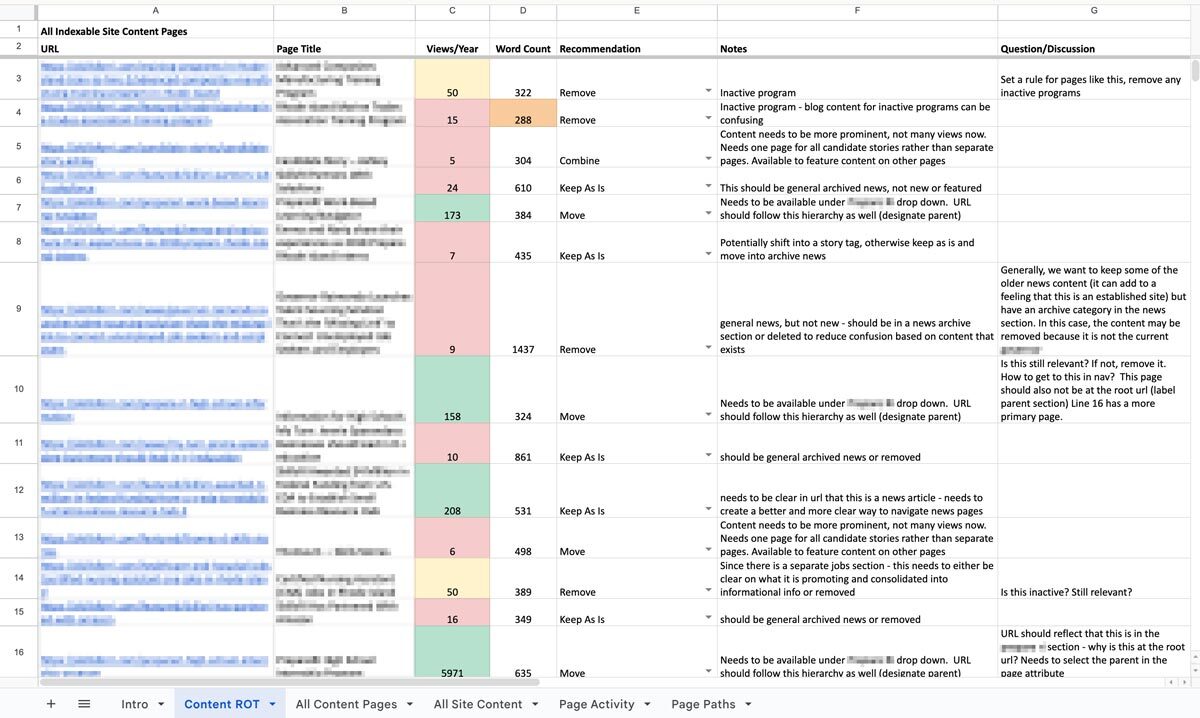
We can also set up an ongoing content hygiene plan. While a dedicated content ROT analysis is a great way to identify and work through issues, an effective content plan should prevent ROT as much as possible and reduce the need for a large effort in the future. This might involve setting up policies, practices, and tools to guide future content management. We’ll help you find ways to see the bigger picture when updating or developing new content to make sure all pieces are accounted for. And when ROT falls through the cracks, you’ll have a plan to regularly review site content, setting ahead of time the when, what, and who.
One Piece in the Puzzle of Strong Content
As we continue to inspect the quality of your website and other digital properties, we can use this ROT analysis as a jumping off point. The initial audit may lead directly into a deeper content audit to evaluate URL paths, heading usage, performance metrics, reading level, and more. As we consider reworking, combining, and cutting entire pages, we may find the need to restructure your information architecture and taxonomy structures, in part or in whole, informed by research exercises like card sorts and tree tests. Depending on what we’ve found in the existing content and how it needs to change, we might suggest changes to your content model, adding, modifying, or removing content types and the relationships between them.
A content ROT analysis is a flexible and fruitful way to take a fresh look at your content ecosystem. If you need help getting started, let us know. We’d love to dig in with you!
Compliance with the California Consumer Privacy Act (CCPA), as amended by the California Privacy Rights Act (CPRA), is a mandatory legal obligation for covered businesses, with significantly increased financial and operational risks starting in 2025.
The Critical Risk: Escalating Fines and Penalties
As of January 1, 2025, the California Privacy Protection Agency (CPPA) increased monetary thresholds and fines to align with the Consumer Price Index.
- Civil Penalties: Businesses face up to $2,663 per unintentional violation and up to $7,988 per intentional violation or those involving minors.
- No Total Cap: Because each individual consumer affected by a breach or non-compliant practice can count as a separate violation, total fines for large-scale data incidents can quickly reach millions of dollars.
- Private Right of Action: Consumers can sue for statutory damages between $107 and $799 per incident (or actual damages) following a data breach involving unencrypted personal data.
Key Deadlines and New Requirements (2026–2028)
Regulators have moved from a passive to an active enforcement model, removing the mandatory “grace period” for fixing violations before penalties are applied.
- Mandatory Risk Assessments (Effective Jan 1, 2026): Businesses must conduct risk assessments for “significant risk” processing, such as selling/sharing personal data or using sensitive information.
- Automated Decisionmaking (ADMT): New requirements for technologies that replace human decision-making (e.g., for credit or employment) go into effect, with a compliance deadline of January 1, 2027.
- Mandatory Reporting: Organizations must begin reporting their risk assessment activities to the CPPA by April 1, 2028.
Does This Apply to My Business?
A for-profit business must comply if it does business in California and meets any of the following:
- Gross annual revenue exceeds $26.625 million (updated for 2025).
- Buys, sells, or shares the personal information of 100,000 or more California residents or households.
- Derives 50% or more of its annual revenue from selling or sharing personal data.
Operational Impact of Non-Compliance
Beyond fines, non-compliance can lead to court-ordered injunctions, mandatory regular audits, and the required deletion of valuable data assets. It also risks significant reputational damage and customer churn, as modern consumers increasingly prioritize data security when choosing where to spend.
Is your website ready for California’s evolving privacy standards? Non-compliance isn’t just a legal risk — it’s a business one that can result in millions in fines, mandatory audits, and lasting reputational damage. Our team helps organizations like yours navigate complex regulatory requirements with confidence, so you can focus on what matters most. Talk to our team today.
To avoid significant financial penalties, which increased on January 1, 2025 to up to $7,988 per intentional violation, your website must function as a compliant interface for consumer privacy rights. Use this checklist to assess your current standing.
1. Mandatory Homepage Links
- “Do Not Sell or Share My Personal Information”: A clear and conspicuous link must be in the footer or header if you sell or share data for targeted advertising. This includes:
- Retargeting Ads: Uploading your email list to Facebook (Meta), Google, or LinkedIn to show ads to those specific users or to find “Lookalike” audiences.
- Data Brokerage: Selling your email list to another company or “renting” it out for their own marketing.
- Third-Party Analytics: Sharing email-linked identifiers with ad networks that track users across multiple unrelated websites.
- “Limit the Use of My Sensitive Personal Information”: Required if you collect sensitive data (e.g., precise geolocation, health info, or race) for purposes beyond providing the core service.
- Alternative Option: You may use a single, combined link labeled “Your Privacy Choices” or “Your California Privacy Choices” that includes an icon if desired.
2. Automated Privacy Signals (Global Privacy Control)
- GPC Detection: Your website must automatically detect and honor “Global Privacy Control” (GPC) signals from user browsers (e.g., Brave, DuckDuckGo) as a valid opt-out request.
- Status Confirmation: As of January 1, 2026, you must display a clear confirmation to the user, such as a message stating “Opt-Out Request Honored,” when a GPC signal is detected.
3. Notice at Collection
- Timely Disclosure: You must provide a notice at or before the point of collection (e.g., on a sign-up form or via a cookie banner).
- Content Requirements: The notice must list categories of personal and sensitive info collected, the specific purpose for each, and how long each category will be retained.
4. Consumer Rights Intake (DSARs)
- Dual Methods: You must provide at least two designated methods for submitting requests (e.g., a web form and a toll-free number).
- Verification: Establish a process to verify a consumer’s identity without requiring them to create a new account solely for the request.
5. Technical & Policy Maintenance
- Accessibility: All notices must follow Web Content Accessibility Guidelines (WCAG) and be available in every language in which you conduct business.
- Annual Update: The online Privacy Policy must be reviewed and updated at least once every 12 months.
- No “Dark Patterns”: Ensure the user interface is symmetrical; for example, it should not be significantly harder to “Opt-Out” than it is to “Opt-In”.
Is your website one missing link or undetected signal away from a costly CCPA violation? Oomph’s team can walk you through a compliance audit, identify gaps in your current setup, and help you implement the technical and content updates needed to protect your organization. Get in touch with us today to book your CCPA compliance call.
Website accessibility has shifted from a “best practice” to a strictly codified legal requirement. Federal and state regulations have eliminated previous ambiguities, making WCAG 2.1 Level AA the mandatory technical standard for digital content. With updated deadlines now in place, organizations have a renewed window to get it right.
1. The Compliance Deadline: What’s Changed
The U.S. Department of Justice (DOJ) finalized a rule under Title II of the ADA that sets a firm compliance deadline for many entities:
- April 24, 2027: Deadline for public entities (and many private partners) serving populations of 50,000 or more to achieve full WCAG 2.1 Level AA conformance.
- April 26, 2028: Deadline for smaller entities.
- Private Sector Impact: While the DOJ rule focuses on public entities, it solidifies WCAG 2.1 AA as the de-facto legal standard for private businesses in Title III lawsuits, which saw a 102% increase in recent years.
2. Why WCAG 2.1 Level AA?
Unlike older versions, WCAG 2.1 includes 17 additional criteria specifically designed for mobile accessibility and users with cognitive disabilities. Compliance is measured by the “POUR” Principles:
- Perceivable: Users must be able to see or hear content (e.g., Alt-Text for images, captions for video).
- Operable: The site must work without a mouse (e.g., Keyboard-only navigation, no keyboard traps).
- Understandable: Content must be predictable with clear error messaging on forms.
- Robust: Code must be “clean” enough to work with all current and future assistive technologies, like screen readers.
3. Compliance Risks to Keep in Mind
- No “Grandfathering” for New Content: Any digital asset (PDFs, videos, or web pages) posted after the compliance deadline must be compliant from day one.
- Vendor Liability: Business owners are legally responsible for their website’s accessibility, even if they use third-party platforms or templates.
- Inadequacy of “Overlay” Widgets: The DOJ has clarified that automated widgets or “overlays” alone cannot guarantee ADA compliance; true accessibility requires fixing the underlying code.
- California-Specific Penalties: Under California’s Unruh Act, businesses can face statutory damages of $4,000+ per violation in addition to federal ADA settlements.
4. Future-Proofing: Looking Toward WCAG 3.0
While WCAG 2.1/2.2 is the current law, WCAG 3.0 is in development (expected no earlier than 2028). It will move from a pass/fail model to a Bronze, Silver, and Gold scoring system. Achieving WCAG 2.1 Level AA now effectively places an organization at the “Bronze” level, providing a solid foundation for future shifts.
Is your website ready for the April 2027 deadline? Achieving WCAG 2.1 Level AA compliance requires more than a quick fix. It means addressing the underlying code, auditing every digital asset, and building accessibility into your process from the ground up. Whether you’re starting an audit, planning remediation, or building something new, get in touch with our team to start the conversation.
Overview
edX operates one of the world’s largest digital learning catalogs, serving millions of learners through professional certificates, microcredentials, and degree programs from top universities and institutions worldwide. As the platform evolved from its MOOC origins into a revenue-driving marketplace of credentialed programs, digital experience became central to competitive differentiation and learner acquisition.
The challenge wasn’t course quality or platform stability—it was operational velocity. Marketing teams couldn’t move fast enough to support growth, and the content architecture that served 1,000 courses was breaking under the weight of 4,000. For edX and parent company 2U, this represented a structural constraint on growth, not a publishing workflow problem.
The Challenge
When Content Architecture Becomes a Growth Limiter
edX faced a common problem for organizations operating at scale: their content and data systems were tightly coupled, creating dependencies that slowed marketing execution and limited experimentation.
Discovery Was Breaking at Scale: Thousands of courses existed in internal systems of record, but marketing pages struggled to surface the right context—audience fit, learning outcomes, format options, and credential value. Paid and organic traffic landed on pages that couldn’t adapt to query intent or learner type, creating friction in the conversion path.
Content Velocity Required Engineering: Every new program launch, campaign page, or SEO test required custom development. Editors faced a choice between rigid templates that couldn’t express program nuance or hard-coded pages that created bottlenecks with engineering. This constrained speed to market and limited the team’s ability to test, iterate, and optimize.
Platform Coupling Created Organizational Drag: Course metadata lived in proprietary databases. Marketing narratives lived elsewhere. Assembling a page required manual coordination across systems and teams. For a platform competing in an increasingly crowded eLearning market, this wasn’t a workflow issue—it was a structural constraint on growth capacity.
Our Approach
Building a Content Operating System for Scale
Oomph worked with edX to design and implement a content architecture that decoupled marketing execution from platform dependencies. The goal wasn’t to replace existing systems—it was to create the right separation of concerns so teams could operate independently at scale.
System Design: Oomph implemented Contentful as a central content orchestration layer, integrated with edX’s existing course databases. Course data remained authoritative in internal systems, while marketing and narrative content moved into a structured CMS. Pages were dynamically assembled using structured course metadata, modular editorial content, and reusable components governed by design system rules.
This architecture allowed edX to scale content output without duplicating data, increasing engineering dependency, or sacrificing brand consistency.

Content Governance at Scale: Oomph structured content models and component libraries to enforce design system standards while giving editors flexibility to adapt messaging by audience, channel, or campaign. Taxonomy and metadata schemas were designed to support SEO systematically rather than through manual optimization. Reusable content patterns minimized duplication across credential types and program categories.
Operational Enablement: The system was designed to shift content creation and optimization from engineering to marketing. Editors could launch program pages, build campaign landing experiences, and iterate based on performance—all without custom development. This freed engineering to focus on platform capabilities while giving marketing teams the speed and flexibility needed to support business growth.
What This Made Possible
The new content architecture fundamentally changed how edX’s marketing teams could operate:
Speed to Market: New program launches no longer required bespoke page builds or engineering sprints. Campaign landing pages could be adapted by audience segment or acquisition channel in real time. Testing and iteration became routine rather than exceptional.
Systematic SEO: Content structure improved indexability across thousands of URLs. Program-level pages could be optimized without breaking templates or creating technical debt. Internal linking, metadata, and taxonomy became consistent by design rather than through manual intervention.
Scalable Operations: Following launch, edX published approximately 1,000 new pages without additional headcount. Content creation centralized into a single system of record, eliminating duplicate workflows and reducing coordination overhead. Marketing teams gained operational independence while maintaining governance and brand standards.
Foundation for Performance: The system created a clear path for data-informed optimization. Structured content made A/B testing feasible at scale. Clear ownership and reduced dependencies positioned the team to measure, learn, and iterate on conversion performance over time.
The result
edX transformed its content operations from project-based execution to a scalable operating model. Marketing teams gained the speed and flexibility to support growth while maintaining brand consistency and governance at scale. Engineering dependencies for routine marketing needs were eliminated, freeing technical resources for platform innovation.
For higher-ed and eLearning platforms competing on learner experience and acquisition efficiency, this represents a shift in operating model—not just a technology implementation.
As part of ongoing platform optimization, edX implemented Cloudflare image optimization to improve Core Web Vitals, reduce bandwidth consumption, and enhance performance for global users—demonstrating the kind of continuous improvement the new architecture was designed to support.
Why This Matters
Organizations operating digital marketplaces face a common tension: growth requires speed and flexibility, but scale requires structure and governance. The answer isn’t choosing between the two—it’s designing systems that deliver both.
Oomph’s work with edX demonstrates how strategic content architecture can unlock operational capacity without adding headcount, enable marketing velocity without sacrificing brand standards, and create the foundation for data-informed optimization at scale.
This is how complex organizations move the metrics that matter: by building resilient systems that scale, adapt, and perform.