
It’s no secret: Higher education institutions are complex.
Between multiple campuses, multiple audiences, and a high volume of content, higher ed marketing and communications teams have a ton to juggle.
And that’s before you throw a new website into the mix.
Not long ago, the team at Oomph partnered with the University of Colorado (CU) and Keene State College (KSC) to redesign sites for each institution. While their asks – and end products – were unique, the processes had a lot in common. So much so that we’re peeling back the curtain on our discovery process to give other higher ed institutions the tools to deliver websites that meet business goals and audience needs.
In this article, we’re turning our lessons learned into a discovery playbook that can help higher education institutions set the stage for a successful site redesign.
The Projects
University of Colorado Giving Platform
The University of Colorado has an active and engaged alumni network that loves supporting all things CU. The university came to Oomph because it needed a donor funds platform that could keep up. The goals of the discovery process were to:
- Document existing conditions, strengths and weaknesses, and stakeholder perceptions.
- Compare the strengths and weaknesses of the current site to similar ones from other colleges and universities.
- Refocus and align on core audiences that visit the site.
- Recommend ways to improve and enhance existing content and storytelling.
- Evaluate and make recommendations for a modern technology stack
While CU had a gut feeling about what it would take to meet internal expectations and keep prospective donors happy, gut feelings aren’t enough to build a website. CU knew that a professional perspective and data-backed analysis would lay a firm foundation for the site redesign.
Keene State College Main Website
KSC, a public liberal arts college in New Hampshire, wanted a refreshed main website that would resonate with prospective students, current students, and alumni alike. For KSC, key goals during discovery were to:
- Better understand the needs and more deeply define their primary audience: prospective students.
- Identify navigation patterns that would make it easier for students and their parents to find the content they need.
- Define design styles that create a more welcoming website experience and support storytelling during the future redesign.
The team came to Oomph with ideas but wanted research validation and guidance to nurture those ideas into a strategic design plan.
The Approach
For both projects, Oomph utilized our in-depth discovery process to validate assumptions, clarify priorities, and gain buy-in across the organizations.
KSC and CU both had a good sense of the work they needed to be done. But having a feel for the floorplan doesn’t mean you’re ready to build your dream house. Whether it’s a home or a website, both projects need an architect: an experienced professional who can consider all the requirements and create a strategic framework that’s able to support them. That work should happen before deciding what paint to put on the walls.
In our initial review, Oomph found that both sites had similar challenges: They struggled to focus on one key audience and to easily guide users through the site to the desired content. Our question was: How do we solve those struggles in a new website?
To answer it, we led KSC and CU through discovery processes that included:
- An intake questionnaire and live sessions with key stakeholders to understand the goals and challenges holding the current sites back.
- Defining strengths and areas for improvement with methods like a UX audit, a content and analytics audit, and a cohort analysis.
- Creating user journey maps that rolled audience, website, and competitive insights into a unified vision for the new user experience.
- Delivering a final set of data-backed recommendations that translated needs and wants into actionable next steps, equipping both teams to secure organizational approval and move the projects forward.
The Insights
Discovery isn’t a one-size-fits-all. However, our experiences with KSC and CU highlighted some common challenges that many higher-ed institutions face. Our insights from these projects offer a starting point for other institutions kicking off their own website redesigns.
- Start with your audience’s needs.
Who is your primary audience? Figure out who they are, then really drill down on their needs, preferences, and desired actions. This can be uniquely challenging for higher education institutions because they serve such a wide range of people.
Data is how you overcome that hurdle. As part of discovery, we:
- Completed a UX audit with tools like the BASIC heuristics framework to see which parts of the user flow are working and which need an overhaul.
- Rounded out those findings with a content audit to understand how users engaged with the site content.
- Completed a cohort analysis to see how the sites stacked up against their higher-ed peers.
When you do that work, you get a birds-eye view into what your audience really needs – and what it’ll take for your website to be up to the challenge.
Take KSC. The existing site attempted to serve multiple audiences, creating a user journey that looked like this:
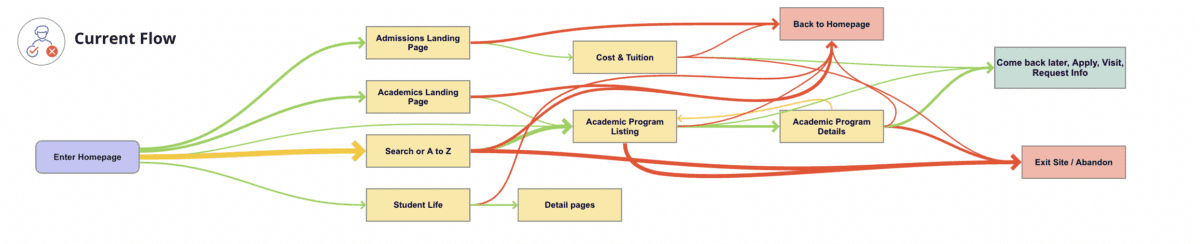
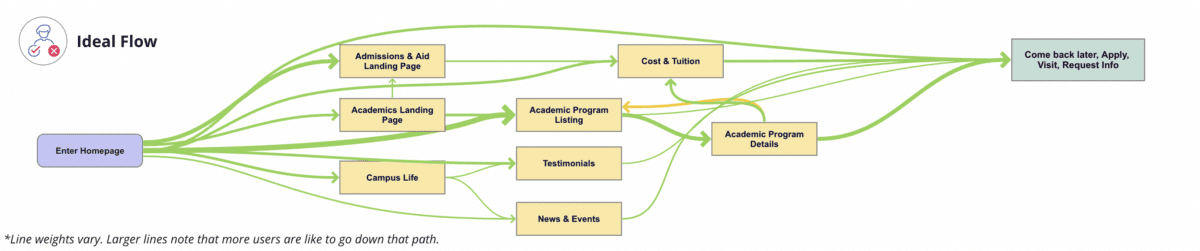
We identified a primary audience of prospective students, specifically local high school students and their parents/guardians. When you speak directly to those students, you get a simpler, cleaner user journey that looks like this:
- Define organized and clear navigation to support user journeys.
Your navigation is like a map. When all the right roads are in place, it should help your users get where they want to go.
That makes your navigation the starting point for your redesign. Your goal is to define where content will live, the actions users can take upon arrival, and, equally important, the content they won’t see at first. This then informs what goes where – the header nav, the footer nav, or the utility nav – because each has unique and complementary purposes.
With both KSC and CU, discovery was our opportunity to start building a navigation that would serve the primary audience we had already uncovered. For CU, the current navigation:
- Made it difficult for donors to find what they need. Search, Write-In Fund, and “Page Not Found” were among the top 20 most visited pages, indicating that users weren’t easily finding their way.
- Didn’t engage donors, which showed up in the low number of returning visits.
- Needed to help donors more quickly find what they need without having to search the entire site.
Current CU navigation:

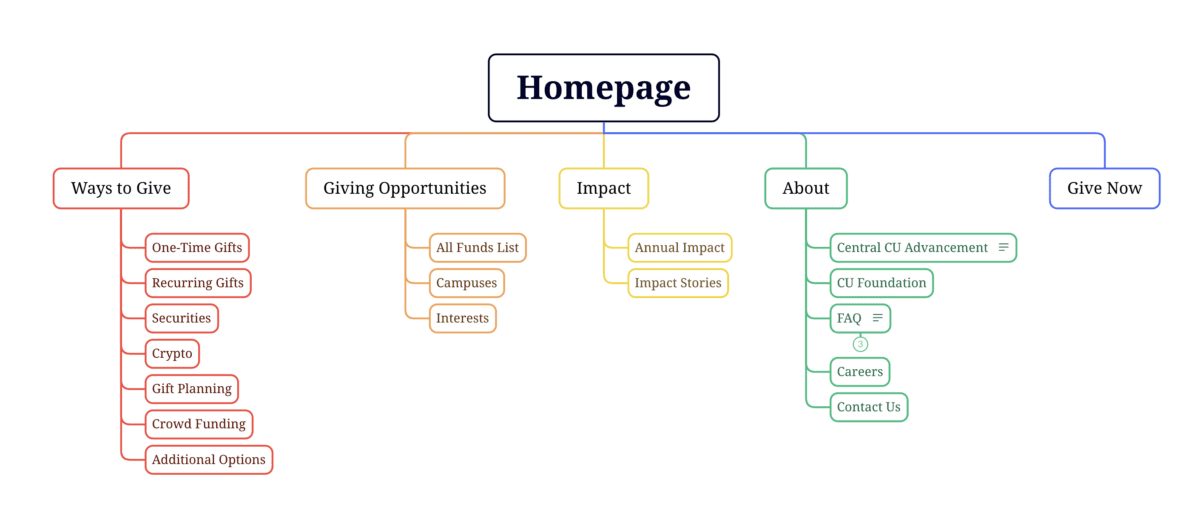
During discovery, we created an updated navigation that would appeal to its primary audience of prospective donors, while still meeting the needs of secondary audiences (returning donors and giving professionals).
Proposed CU navigation:
- Find an optimal blend of branding, design, and content – especially for the home page and other high-visibility areas.
The design and content you choose for your site should resonate with your target audience and enhance the navigation you already defined. In that way, your home page is like your storefront. What will you put on the sign or display in the windows so people will actually walk inside?
That’s the secret sauce behind this part of discovery: deciding what your primary audience really needs to know and how best to showcase it.
To help KSC speak to prospective students, we recommended:
- Using movement, color, and text styles to add visual impact to important content and create a welcoming, curated experience.
- Prioritizing diversity in visuals, so wide a range of students could picture themselves as part of the student body.
- Using stats and testimonials to build trust and foster a feeling of belonging.
CU wanted to connect with prospective donors, so we suggested a design that:
- Incorporated more storytelling and impact stories to show the positive ripple effect of every dollar donated.
- Included strategic calls to action to pull users deeper into the site.
- Added social sharing to enable donors to highlight their generosity and feel a deeper sense of connection.
- Probe additional areas where needed (and skip where it’s not).
Our hot take: There is such a thing as too much data. If you’re wading through pools of information that isn’t relevant to your end user, it can muddy the waters and make it harder to identify what’s worth acting on.
With that in mind, this step will change from project to project. Ask yourself, what else does my audience need to feel like they got what they came for?
For KSC, that involved additional strategy work – like the information architecture – that helped the institution gear up for later design phases. CU, on the other hand, needed significant technical discovery to address the level of custom code required, limited page building capabilities and clunky e-commerce integration. We recommended an updated tech stack, including a new donation platform and payment gateway, that would improve security, simplify maintenance, and enhance the user experience.
- Plan for a system that allows for easy updates later.
As they say, the only constant is change. This rings especially true for higher ed institution websites, where content is plentiful and multiple stakeholders need to make site updates.
To make sure CU and KSC’s sites continued to work for them long after our projects had ended, our discovery included suggestions around:
- Choosing the right content management system (CMS). We ensured each site had CMS capabilities that would allow non-tech-savvy team members to maintain and update the content.
- Establish design systems and templates for ease and consistency. For CU, that involved creating repeatable page layouts for their fund pages for simpler authoring and visual polish.
Start Your Redesign on the Right Foot
A thorough, well-researched, and well-organized discovery is key for designing a website that meets all of your – and your audience’s – needs.
Need a fresh perspective on your higher ed site redesign? Let’s talk about it.
There’s a new acronym on the block: MACH (pronounced “mock”) architecture.
But like X is to Twitter, MACH is more a rebrand than a reinvention. In fact, you’re probably already familiar with the M, A, C, and H and may even use them across your digital properties. While we’ve been helping our clients implement aspects of MACH architecture for years, organizations like the MACH Alliance have recently formed in an attempt to provide clearer definition around the approach, as well as to align their service offerings with the technologies at hand.
One thing we’ve learned at Oomph after years of working with these technologies? It isn’t an all-or-nothing proposition. There are many degrees of MACH adoption, and how far you go depends on your organization and its unique needs.
But first, you need to know what MACH architecture is, why it’s great (and when it’s not), and how to get started.
What Is MACH?
MACH is an approach to designing, building, and testing agile digital systems — particularly websites. It stands for microservices, APIs, cloud-native, and headless.
Like a composable business, MACH unites a few tried-and-true components into a single, seamless framework for building modern digital systems.
The components of MACH architecture are:
- Microservices: Many online features and functions can be separated into more specific tasks, or microservices. Modern web apps often rely on specialized vendors to offer individual services, like sending emails, authenticating users, or completing transactions, rather than a single provider to rule them all.
- APIs: Microservices interact with a website through APIs, or application programming interfaces. This allows developers to change the site’s architecture without impacting the applications that use APIs and easily offer those APIs to their customers.
- Cloud-Native: A cloud-based environment hosts websites and applications via the Internet, ensuring scalability and performance. Modern cloud technology like Kubernetes, containers, and virtual machines keep applications consistent while meeting the demands of your users.
- Headless: Modern Javascript frameworks like Next.js and Gatsby empower intuitive front ends that can be coupled with a variety of back-end content management systems, like Drupal and WordPress. This gives administrators the authoring power they want without impacting end users’ experience.
Are You Already MACHing?

Even if the term MACH is new to you, chances are good that you’re already doing some version of it. Here are some telltale signs:
- You have one vendor for single sign-on (SSO), one vendor to capture payment information, another to handle email payment confirmations, and so on.
- You use APIs to integrate with tech solutions like Hubspot, Salesforce, PayPal, and more.
- Your website — or any website feature or application — is deployed within a cloud environment.
- Your website’s front end is managed by a different vendor than its back end.
If you’re doing any of the above, you’re MACHing. But the magic of MACH is in bringing them all together, and there are plenty of reasons why companies are taking the leap.
5 Benefits of MACH Architecture
If you make the transition to MACH, you can expect:
- Choice: Organizations that use MACH don’t have to settle for one provider that’s “good enough” for the countless services websites need. Instead, they can choose the best vendor for the job. For example, when Oomph worked with One Percent for America to build a platform offering low-interest loans to immigrants pursuing citizenship, that meant leveraging the Salesforce CRM for loan approvals, while choosing “Click and Pledge” for donations and credit card transactions.
- Flexibility: MACH architecture’s modular nature allows you to select and integrate individual components more easily and seamlessly update or replace those components. Our client Leica, for example, was able to update its order fulfillment application with minimal impact to the rest of its Drupal site.
- Performance: Headless applications often run faster and are easier to test, so you can deploy knowing you’ve created an optimal user experience. For example, we used a decoupled architecture for our client Wingspans to create a stable, flexible, and scalable site with lightning-fast performance for its audience of young career-seekers.
- Security: Breaches are generally limited to individual features or components, keeping your entire system more secure.
- Future-Proofing: A MACH system scales easily because each service is individually configured, making it easier to keep up with technologies and trends and avoid becoming out-of-date.
5 Drawbacks of MACH Architecture
As beneficial as MACH architecture can be, making the switch isn’t always smooth sailing. Before deciding to adopt MACH, consider these potential pitfalls.
- Complexity: With MACH architecture, you’ll have more vendors — sometimes a lot more — than if you run everything on one enterprise system. That’s more relationships to manage and more training needed for your employees, which can complicate development, testing, deployment, and overall system understanding.
- Challenges With Data Parity: Following data and transactions across multiple microservices can be tricky. You may encounter synchronization issues as you get your system dialed in, which can frustrate your customers and the team maintaining your website.
- Security: You read that right — security is a potential pro and a con with MACH, depending on your risk tolerance. While your whole site is less likely to go down with MACH, working with more vendors leaves you more vulnerable to breaches for specific services.
- Technological Mishaps: As you explore new solutions for specific services, you’ll often start to use newer and less proven technologies. While some solutions will be a home run, you may also have a few misses.
- Complicated Pricing: Instead of paying one price tag for an enterprise system, MACH means buying multiple subscriptions that can fluctuate more in price. This, coupled with the increased overhead of operating a MACH-based website, can burden your budget.
Is MACH Architecture Right for You?
In our experience, most brands could benefit from at least a little bit of MACH. Some of our clients are taking a MACH-lite approach with a few services or apps, while others have adopted a more comprehensive MACH architecture.
Whether MACH is the right move for you depends on your:
- Platform Size and Complexity: Smaller brands with tight budgets and simple websites may not need a full-on MACH approach. But if you’re managing content across multiple sites and apps, managing a high volume of communications and transactions, and need to iterate quickly to keep up with rapid growth, MACH is often the way to go.
- Level of Security: If you’re in a highly regulated industry and need things locked down, you may be better off with a single enterprise system than a multi-vendor MACH solution.
- ROI Needs: If it’s time to replace your system anyway, or you’re struggling with internal costs and the diminishing value of your current setup, it may be time to consider MACH.
- Organizational Structure: If different teams are responsible for distinct business functions, MACH may be a good fit.
How To Implement MACH Architecture
If any of the above scenarios apply to your organization, you’re probably anxious to give MACH a go. But a solid MACH architecture doesn’t happen overnight. We recommend starting with a technology audit: a systematic, data-driven review of your current system and its limitations.
We recently partnered with career platform Wingspans to modernize its website. Below is an example of the audit and the output: a seamless and responsive MACH architecture.
The Audit
- Surveys/Questionnaires: We started with some simple questions about Wingspan’s website, including what was working, what wasn’t, and the team’s reasons for updating. They shared that they wanted to offer their users a more modern experience.
- Stakeholder Interviews: We used insights from the surveys to spark more in-depth discussions with team members close to the website. Through conversation, we uncovered that website performance and speed were their users’ primary pain points.
- Systems Access and Audit: Then, we took a peek under the hood. Wingspans had already shared its poor experiences with previous vendors and applications, so we wanted to uncover simpler ways to improve site speed and performance.
- Organizational Structure: Understanding how the organization functions helps design a system to meet those needs. The Wingspans team was excited about modern technology and relatively savvy, but they also needed a system that could accommodate thousands of authenticated community members.
- Marketing Plan Review: We also wanted to understand how Wingspans would talk about their website. They sought an “app-like” experience with super-fast search, which gave us insight into how their MACH system needed to function.
- Roadmap: Wingspans had a rapid go-to-market timeline. We simplified our typical roadmap to meet that goal, knowing that MACH architecture would be easy to update down the road.
- Delivery: We recommended Wingspans deploy as a headless site (a site we later developed for them), with documentation we could hand off to their design partner.
The Output
We later deployed Wingspans.com as a headless site using the following components of MACH architecture:
- Microservices: Wingspans leverages microservices like Algolia Search for site search, Amazon AWS for email sends and static site hosting, and Stripe for managing transactions.
- APIs: Wingspans.com communicates with the above microservices through simple APIs.
- Cloud-Native: The new website uses cloud-computing services like Google Firebase, which supports user authentication and data storage.
- Headless: Gatsby powers the front-end design, while Cosmic JS is the back-end content management system (CMS).
Let’s Talk MACH
As MACH evolves, the conversation around it will, too. Wondering which components may revolutionize your site and which to skip (for now)? Get in touch to set up your own technology audit.
Have you ever tried to buy tickets to a concert and experienced the frustration and eventual rage of waiting for pages to load, unresponsive pages, unclear next steps, timers counting down, or buttons not working to submit — and you probably still walked away with zero tickets? Yeah, you probably had some choice words, and your keyboard and mouse might have suffered your ire in the process.
As a website owner, you strive to create a seamless user experience for your audience. Ideally, one that doesn’t involve them preparing to star in their own version of the printer scene in Office Space. Despite your best efforts, there will be times when users get frustrated due to slow page loads, broken links, navigation loops, or any other technical issues. This frustration can lead to what the industry calls “rage clicks” and “thrashed cursors.” When your users are driven to these actions, your website’s reputation, engagement, and return visits can be damaged. Let’s dig in to discuss what rage clicks and thrashed cursors are and how to deal with frustrated users.
First of all, what are Rage Clicks?
Rage clicks are when a user repeatedly clicks on a button or link when it fails to respond immediately — the interface offers no feedback that their first click did something. This bad user experience doesn’t motivate them to return for more. These clicks are likely often accompanied by loud and audible sighs, groans, or even yelling. “Come on, just GO!” might ring a bell if you’ve ever been in this situation. Rage clicks are one of the most frustrating things a user can experience when using a website or app.
Rage Clicks are defined technically by establishing that:
- At least three clicks take place
- These three clicks happen within a two-second time frame
- All clicks occur within a 100px radius

Similarly, what is a Thrashed Cursor?
A thrashed cursor is when a user moves the cursor back and forth over a page or element, indicating impatience or confusion. Various issues, including slow page load times, broken links, unresponsive buttons, and unclear navigation, can cause users to exhibit these digital behaviors. It can also indicate the user is about to leave the site if they cannot find that solution quickly.
Thrashed cursors are defined technically by establishing that:
- There is an area on the page where a user was moving their mouse erratically
- An established pattern of “thrashing” occurs around or on specific elements or pages
- Higher rate of user exits from the identified pages
Why do Rage Clicks and Thrashed Cursor happen?
Common reasons rage clicks and thrashed cursors happen are:
- Poor Design: Poor design is one of the most common reasons for rage clicks and thrashed cursors. If the website has a confusing layout or navigation structure, it can be frustrating for users to find what they’re looking for. Or, they may assume an element is clickable; when it’s not, it can be irksome. Underlined text is an excellent example, as users often associate underlines with links.
- Technical Issues: Technical issues such as slow loading times, broken links, or non-responsive buttons can cause rage clicks and thrashed cursors. Users expect the website to work correctly; when it doesn’t, they can become annoyed or frustrated. If they click a button, they expect the button to do something.
- Lack of Clarity: If the website’s content is unclear or poorly written, it can cause confusion and frustration for users. They may struggle to understand the information provided or find it challenging to complete the intended action. Content loops can be a good example of this. Content loops happen when users repeatedly go back and forth between pages or sections of a website, trying to find the information they need. Eventually, they’ll become frustrated, leading to this user leaving the website.

How do you resolve issues that lead to Rage Clicks and Thrashed Cursors?
Now that we know what rage clicks and thrashed cursors are and why they happen, how do you resolve it, you may be asking. Here are a few things a digital partner can help you with that can significantly reduce the risk of your users resorting to these behaviors.
Use Performance Measuring Tools
By employing performance measuring, you can analyze the data collected, gain valuable insights into how users interact with your platform, and identify areas for improvement. For example, if you notice a high number of rage clicks on a specific button or link, it may indicate that users are confused about its functionality or that it’s not working correctly. Similarly, if you see a high number of thrashed cursors on a particular page, it may suggest that users are struggling to navigate or find the information they need.
Tools that support Friction or Frustration measurement:
- Clarity (from Microsoft)
- ContentSquare
- Heap
- HotJar
- Mouseflow
- Quantum Metric
Conduct User Experience Exercises and Testing
Identifying the root causes of rage clicks and thrashed cursors can be done through a UX audit. A partner can examine your website design, functionality, and usability, identifying areas of improvement.
- User Journey Mapping: User journey mapping involves mapping the user’s journey through your website from a starting point to a goal, identifying pain points along the way, and determining where users may get stuck or frustrated.
- Usability Testing: Usability testing involves putting the website in front of real users and giving them tasks to complete. The tester then looks to identify issues, such as slow loading times, broken links, or confusing navigation.
- User Surveys: User surveys can be conducted in various ways, including online surveys, in-person interviews, and focus groups. These surveys can be designed to gather information about users’ perceptions of the website, interactions with the website, and satisfaction levels. Questions can be designed to identify areas of frustration, such as difficult-to-find information, slow page load times, or confusing navigation. It’s wise to keep surveys short, so work with your partner to select the questions to garner the best feedback.
- Heat Mapping: Heat mapping involves analyzing user behavior on your website, identifying where users are clicking, scrolling, and spending their time. This can identify areas of the website that are causing frustration and leading to rage clicks and thrashed cursors.
Focus on Website Speed Optimization
A digital experience consultancy can synthesize findings from UX research and performance-measuring tools and work to optimize your website for quicker page loads and buttons or links that respond immediately to user actions.
- Image Optimization: Optimizing images on your website will significantly improve page loading times. A partner can help you optimize server settings and compress images to reduce their size without sacrificing quality.
- Minification: Minification involves reducing the size of HTML, CSS, and JavaScript files by removing unnecessary characters such as white space, comments, and line breaks. This can significantly improve page loading times.
- Caching: Caching involves storing frequently accessed website data on a user’s device, reducing the need for data retrieval and improving website speed.
- Content Delivery Network (CDN): A CDN is a network of servers distributed worldwide that store website data, improving website speed by reducing the distance between the user and the server.
- Server Optimization: Server optimization involves optimizing server settings and configurations, such as increasing server resources, using a faster server, and reducing request response time. Website owners frequently skip this step and don’t select the right hosting plan, which can cost more money through lost users and lower conversions.
Resolve Technical Issues
A digital experience partner can help resolve any technical issues that may be causing frustration for your users. These issues may include broken links or buttons, 404 errors, slow page load times, and server errors. Technical issue resolution can involve various activities, including code optimization, server maintenance, and bug fixes that work to ensure that everything is working correctly and address any issues that arise promptly. The resolution of technical issues will improve website performance, reducing the likelihood of user frustration and rage clicks.
Next Steps
User frustration can negatively impact user satisfaction and business outcomes. Partnering with a digital experience firm can be a valuable investment to mitigate these issues. Through the use of tools, UX audits, user surveys, website speed optimization, and technical issue resolution, a partner can identify and address the root causes of user frustration, improving the overall user experience — leading to an increase in user engagement, satisfaction, and loyalty, which means improved conversion rates, higher customer retention, and ultimately, increased revenue for your business.
If your customers are hulking out, maybe it’s time to call us!
In our previous post we broadly discussed the mindset of composable business. While “composable” can be a long term company-wide strategy for the future, companies shouldn’t overlook smaller-scale opportunities that exist at every level to introduce more flexibility, longevity, and reduce costs of technology investments.
For maximum ROI, think big, then start small
Many organizations are daunted by the concept of shifting a legacy application or monolith to a microservices architecture. This is exacerbated when an application is nearing end of life.
Don’t discount the fact that a move to a microservices architecture can be done progressively over time, unlike the replatform of a monolith which is a huge investment in both time and money that may not be realized for years until the new application is ready to deploy.
A progressive approach allows organizations to:
- Move faster and allow for adjustments as needed
- Begin realizing returns on investments faster
- Reduce risk by making smaller investments and deployments
- Ease budgeting process by funding an overhaul in stages
- Improve quality by minimizing the scope of tests
- Save money on initial investment and maintenance where services are centralized
- Benefit from longevity of a component-based system
Prioritizing the approach by aligning technical architecture with business objectives
As with any application development initiative, aligning business objectives with technology decisions is essential. Unlike replatforming a monolith, however, prioritizing and planning the order of development and deployments is crucial to the success of the initiative.
Start with clearly defining your application with a requirements and feature matrix. Then evaluate each using three lenses to see priorities begin to emerge:
- With a current state lens, evaluate each item. Is it broken? Is it costly to maintain? Is it leveraged by multiple business units or external applications?
- Then with a future state lens, evaluate each item. Could it be significantly improved? Could it be leveraged by other business units? Could it be leveraged outside the organization (partners, etc…)? Could it be leveraged in other applications, devices, or locations?
- Lastly, evaluate the emerging priority items with a cost and effort lens. What is the level of effort to develop the feature as a service? What is the likely duration of the effort?
Key considerations when planning a progressive approach
Planning is critical to any successful application development initiative, and architecting a microservices based architecture is no different. Be sure to consider the following key items as part of your planning exercises:
- Remember that rearchitecting a monolith feature as a service can open the door to new opportunities and new ways of thinking. It is helpful to ask “If this feature was a stand alone service, we could __”
- Be careful of designing services that are too big in scope. Work diligently to break down the application into the smallest possible parts, even if it is later determined that some should be grouped together
- Keep security front of mind. Where a monolith may have allowed for a straightforward security management policy with everything under one roof, a services architecture provides the opportunity for a more customized security policy, and the need to define how separate services are allowed to communicate with each other and the outside world
In summary
A microservices architecture is an approach that can help organizations move faster, be more flexible and agile, and reduce costs on development and maintenance of software applications. By taking a progressive approach when architecting a monolith application, businesses can move quickly, reduce risk, improve quality, and reduce costs.
If you’re interested in introducing composability to your organization, we’d love to help! Contact us today to talk about your options.
Digital customer experience (DCX) is fast becoming a key factor in how consumers choose whom to do business with. Every digital interaction contributes to an overall feeling about your brand — which means digital touchpoints like apps and chatbots can play a big part in what customers think of your company.
What story do you want those interactions to tell? What kind of experiences do you want people to share with others?
This article covers five ways to assess and improve your digital customer experience so you can attract, delight, and retain your target customers.
But First – What IS Digital Customer Experience?
Customer experience, or CX, is the perception that customers form based on all of their interactions, in-person or online, with your brand. If CX is about carefully and consistently meeting your customers’ needs, Digital Customer Experience is the online expression of those efforts.
Digital customer experience is the part of your CX journey that involves digital interactions via your website, mobile app, social media accounts, digital kiosks, etc. Wherever your customers are engaging with your people, products, or services through the internet, it’s a digital experience.
DCX is their perception of those moments.
Brands with a great DCX provide a personalized and consistent online experience throughout the customer journey. Whether someone is considering becoming a client, placing an order, or searching for information, every digital interaction has to be easy and enjoyable.
5 Ways to Improve Your Digital Customer Experience
Technology is a wonderful tool for improving the customer experience, whether mining data for customer insights or leveraging AI for personalization. But technology alone can’t deliver an exceptional digital customer experience. Your DCX strategy must include a human component — one that focuses on customer care through empathy and authenticity. Here’s how to ensure your digital customer experience lives up to your users’ expectations.
Know your target audience
To deliver the kind of digital experience your customers will love, you have to know what they want. Who’s buying your product, and why? When they visit your website or app, what are they hoping to accomplish?
Delighting your customers requires knowing their goals, understanding their pain points, and providing interactions that meet their specific needs. The upshot? 68% of customers will spend more money with a brand that understands and treats them like an individual.
Here are three crucial steps:
- Use qualitative and quantitative analyses to learn about your audience. The more you understand their preferences and behaviors, the better you can create an experience that meets their needs.
- Apply a user-centered design process, which relies on deeply understanding your audience to craft usable, accessible digital interfaces.
- Incorporate personalization techniques to adapt the digital experience for individual users. More than anything else, this will help make the customer journey smooth and enjoyable.
Adopt an omnichannel mindset
Customers expect seamless interactions from brands throughout their journey, whether through digital or non-digital channels. In fact, brands with the strongest omnichannel customer engagement strategies retain an average of 89% of their customers, in comparison to 33% of companies with weak strategies.
Knowing that today’s consumers often jump from channel to channel as they browse, buy, or get in touch, DCX leaders embrace an omnichannel strategy. Note that this is different from a multichannel approach, where customers access multiple channels in separate interactions. An omnichannel approach integrates all digital touchpoints to create a seamless, personalized experience.
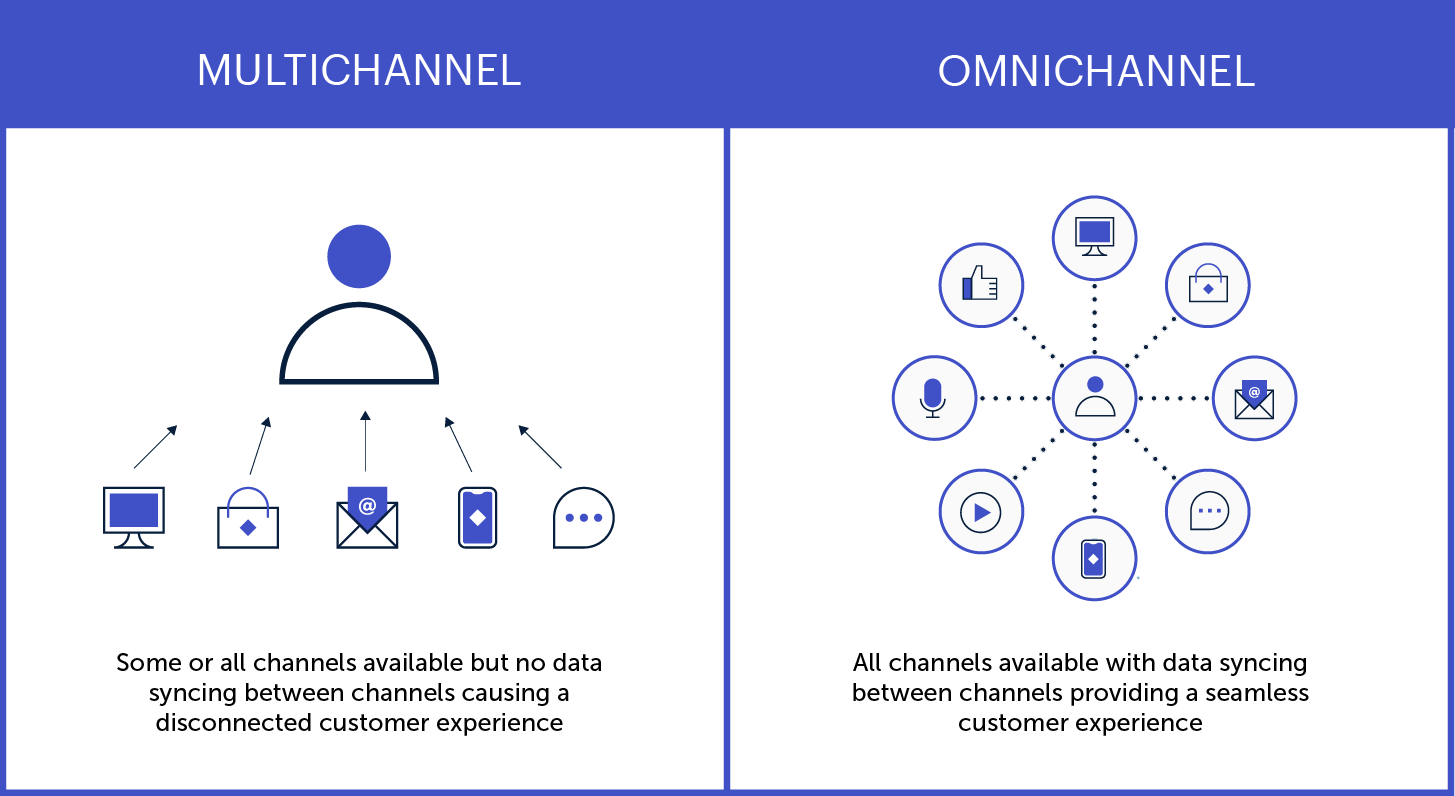
Here are a few key ways to create personalized experiences that resonate across all your digital channels:
- Use instantly recognizable brand elements and visual designs
- Make the transition from one channel to another easier
- Save search history and preferences across devices
- Synchronize ads and other promotional content
Get help from experts
Expert assessments can remove the guesswork around optimizing your digital customer experience. A digital CX audit, for instance, will show you what’s working and what could be better, as well as providing actionable insights and a prioritized roadmap.
CX specialists will look beyond the basic digital experience (clunky design, system bugs, etc…) to assess whether your digital channels are effectively serving your customers’ needs. A professional audit can help determine things like:
- Are there critical issues affecting usability and access?
- What elements of the journey most impact users’ experience?
- What are your competitors doing, and how can you differentiate?
- Where are your greatest strengths and growth opportunities?
Make customer feedback easy
Most companies know that customer feedback is crucial for improving the customer experience. But many fall short in providing easy, effective options for people to reach them.
Offering multiple, easy-to-use communication options across your digital channels is one more way to delight your customers. Help people engage with you via the medium of their choice, so they can communicate through the interface they’re most comfortable with.
That could be a chat function or contact form on your website, or the commenting and messaging features on your social profiles. Or, maybe it’s good old-fashioned phone calls and emails. Whatever the avenue, make it easy to find and intuitive to use.
One more thing: when someone does reach out, respond quickly. The faster a problem is resolved, the better the experience.
Plan for the post-launch reality
You might design and launch an amazing new website, app, or service that delights your customers and sends revenue through the roof. But, without a long-term plan to keep it effective and relevant, your digital CX will likely diminish over time.
To maintain the quality of customer experience across all your digital touchpoints, apply a measurement framework based on the principles above:
- Are you meeting users’ current and evolving needs?
- Do you provide a seamless omnichannel experience?
- Are you gathering — and implementing — user feedback?
Remember, too, that new technological trends are going to keep emerging and influencing consumer expectations. Be prepared to evolve what digital CX looks like for your business, especially if it means extending your digital services to new platforms or devices.
Putting the “C” in Digital CX
Technology has made so many things possible for today’s consumers that, ultimately, the power is in their hands. As digital capabilities continue to evolve, people may become increasingly selective about which brands earn their trust and business — and companies will need to make the digital customer experience more beneficial for both sides.
As you can see from the steps above, the key is putting your customers’ needs above all else.
If you’re not sure where to start, you’re not alone! We’ve helped dozens of clients dive into customer research, omnichannel strategies, and strategic planning for digital platforms. Reaching out to a digital CX expert (like Oomph) can help you do things right the first time, saving you time and money and, most importantly, building a foundation to get results.
Excited about crafting an exceptional DCX? So are we. Check out our DCX audit service to learn how we can help set you up for success.
Since the early days of Oomph, we’ve worked with clients to create a variety of online educational experiences. Platforms to practice Buddhism. Platforms for cardiologists to be better informed. For teachers to be better prepared for the classroom. For high-tech product users to become more proficient.
Here’s the process we’ve seen work:
- Define the purpose of the platform.
- Identify students’ needs and expectations.
- Choose the learning tools that best achieve your objectives.
…and here’s what we’ve seen too many folks do: skip the purpose and dive right into posting videos on something like Teachable. While that might work for some business models, it’s not effective for most others.
By understanding what is at stake for the learner, you can understand how to support their learning
As online learning continues to grow, we need a different way of thinking about how people learn via online systems. By considering what’s at stake in a given situation — in other words, how important is it that students learn the material — we can identify four primary categories of learning purpose. Once you know which category your platform falls into, you can design it with the tools and features that best achieve your learning objectives.
Let’s explore those four purpose categories and how they shape the online learning experience.
1. Entertainment (or “No Stakes”) Learning
Entertainment learning is driven purely by curiosity. Students might see this type of learning as truly fun, maybe even as an alternative to other forms of entertainment (like watching a movie).
In this case, there are no stakes — no real consequences for the student who gives up mid-way through a class. As for the educator, the only risks are related to losing viewers and market share. An example of this type of learning platform is Masterclass, which has mastered the art of marketing entertainment learning. Masterclass doesn’t really care if you learn the material, as long as you’re enjoying the experience.
Most entertainment learning is delivered through polished content designed to sell as many courses to as many people as possible. Neither the platform nor the student are truly invested in the learning.
What’s the purpose?
As an example, let’s say Sam the Student is intrigued by sailing. They may never actually do it, but they wants to know what it involves. In this case, Sam is simply consuming the content.
What’s needed:
Successful entertainment learning platforms focus more on user acquisition and user retention versus how well users absorb and apply the content. Such platforms benefit from:
- Good content production quality
- Celebrity and well-known “expert” instructors
- Effective marketing (like compelling trailers)
2. Student Stakes Learning
Like entertainment learning, student stakes learning is also student-driven. The difference is that there are real consequences, which means the student has a purpose beyond simply consuming the content. But the consequences apply to the student, not the educator. Think about studying for a driver’s license test — if you don’t pass, you don’t get your license. DMV isn’t responsible for helping you learn; they’ll just re-administer the test.
What’s the purpose?
To continue the boating example: by this time, Sam has become a frequent sailor and wants to learn how to forecast off-shore weather without needing a computer. In this case, retaining the content is essential, so they can put it to use.
What’s needed:
Student stakes learning needs to incorporate content retention techniques. It also helps to hold students accountable for their learning. Content should be shorter and focus on comprehension. Student stakes learning platforms benefit from:
- Accountability systems, such as reminders and check-ins
- Retention tools, such as study guides, quizzes, and practical homework
- Community features that support accountability and engagement
- A focus on completion, giving the student a tangible finish line
3. Educator Stakes Learning
In this kind of learning, there are consequences for the student, but the stakes are higher for the educator. Think of higher education at colleges and universities, where a school’s reputation is at stake. This could also apply to a management training program, which can impact overall company performance, or to a business trying to educate users on a topic in the hopes they’ll buy a related product.
Comprehension and completion are key in educator stakes learning, which is why it often includes a certificate of completion or an accreditation of some kind, so the educator can verify that the student actually learned the material.
What’s the purpose?
Sam has now decided to become a commercial boat captain, and their potential employer wants them to pass a certification course. Here, Sam’s demonstrating knowledge of the material is highly important to the educator.
What’s needed:
Because educator stakes learning hinges on comprehension, it’s important to focus on helping students both retain course material and sufficiently demonstrate their knowledge of it. These kinds of platforms often include:
- Real-world activities to apply knowledge or practice skills
- Required homework, with follow-up peer or instructor feedback
- Accountability systems and/or partners, to ensure task completion
4. Broad Stakes Learning
Broad stakes learning impacts the student, the educator and often society in general, and knowledge of the material must be refreshed on a regular basis. Consider a warehouse that trains its staff on the proper use of heavy equipment. For an employee, their job is likely on the line; for the company, the safety of their workforce and their reputation is at stake; and for all the company’s employees, there are issues of personal safety and trust.
What’s the purpose?
Sam now aspires to become a ferry boat captain, which means they’ll be responsible for passengers, vehicles, and cargo. The local authority requires that they pass a certification each year to demonstrate current knowledge of the material, to ensure they’ll be a safe and competent captain.
What’s needed:
Ongoing retention of content is critical here, along with staying current on new information. So, broad stakes learning platforms generally use bite-sized material with frequent reviews, quizzes, and feedback. Students learn a topic, review the topic, review it again, and take a quiz; if they missed any questions, they’ll likely get additional help and get tested again. Later on, there may be additional communications and usually a refresher course or two.
Learning platforms that support broad stakes learning often use the tools from educator stakes learning, with some additions:
- Community connections and feedback
- Post-training follow-ups and refresher courses
- Q&A sessions and other interactive, direct-feedback learning activities
- Long-term assignments that focus on ongoing retention and real-world practice
A Different Way of Thinking
As you can see, there is no one-size-fits-all digital learning experience. That’s why a medical association administering doctor certifications needs a very different platform from, say, an HR department offering manager training. Different industries leverage different kinds of learning, which require different educational tools.
If you’re planning to embark on an online learning initiative, be sure to align your efforts around your core purpose. Without a clear roadmap, well, we’ve seen what happens. Remember how online learning was thrust into the spotlight during the pandemic? One thing became painfully clear: not every online learning platform actually worked.
That’s because many of those platforms were thrown together without regard for basic learning principles. Above all, online learning platforms must be built to serve the purpose behind the educational experience. Like we said earlier: define your purpose, identify your students’ needs, and choose the right tools for the job.
Looking to develop an online learning experience for your organization? We’d love to help you develop the best possible tools. Contact us today to learn more.
When companies merge, successfully combining digital assets like websites, intranets, apps, and other platforms takes more than just squishing things together. Poorly merged digital properties can diminish brand equity, squander years of SEO value, and even drive away customers or employees — ultimately tanking the value the merger was supposed to create.
The challenge is that you’re bringing together two end-user communities with different experiences and expectations. And it’s easy to assume the bigger or faster-growing company has the better digital platform, even when there’s a lot you could learn from the smaller company’s practices.
That’s why we recommend a collaborative, UX-centered approach to combining digital properties, to ensure you’re leveraging the best of both worlds. In this article, we’ll share a sample of UX analyses that can help set up a new combined platform for success.
First, let’s talk about leveraging the right mindset.
A Different Approach
Typically, when combining digital platforms, companies tend to take a top-down approach, meaning there’s a hierarchy of decision-making based on which platform is believed to be better. But the calculus can change a lot when those decisions are made from the end users’ point of view instead.
From a practical standpoint, these companies are usually trying to create efficiencies and add new competencies while carefully messaging the benefits of the merger for their customers. They focus on things like branding, SEO, and consolidating social media — all of which are important, and none of which truly shapes the platform user’s experience.
To be fair, before the merger, both companies were likely focused on trying to create the best possible user experience for their customers. Now that they’re joining forces, each brings a unique set of learnings and techniques to the table. Which begs the question: what if your new partner handles some aspects of UX better than you?
Working collaboratively through in-depth Acquisition Analysis gives you an opportunity to extract the best from all digital properties, as either company’s platforms may have features, functionality, or content that does a better job of meeting business goals. How do you know which elements will be more successful? By auditing both platforms with tools like the ones we’ll talk about next.
When merging, don’t assume the bigger company should swallow the smaller and all its digital assets. There might be many things that the smaller company is doing better.
Conducting UX Audits
To preserve SEO value and cull the best-performing content for the new platform, many companies conduct content and SEO audits, often using free or paid tools. These usually involve flagging duplicate content, comparing performance metrics, and using R.O.T. (redundant/outdated/trivial) analyses.
What many organizations miss, however, is the opportunity to conduct UX and customer audits while directly comparing digital platforms. These can provide invaluable insights about the mental models and behaviors of users.
At a minimum, we recommend comparing both platforms using Nielsen Norman Group’s 10 usability heuristics. Setting the standard for user interface design for almost three decades, these guidelines give you a great baseline for identifying which parts of each platform are the most user-friendly. You can also compare heatmaps and scrollmaps to assess which platform does a better job of engaging users in ways that matter to your business goals.
Here are some other examples of UX analyses we conduct for clients when merging digital platforms:
Five second test
With existing customers or representatives of your target audience, ask users to view a page for five seconds and then answer a few questions about it. You’re looking for gut feelings here, as first impressions can tell you a lot about a page’s effectiveness.
Questions might include:
- What does the site tell you about the company’s personality?
- What’s something you think you could do on that website?
- Did anything stand out as new or surprising to you?
This test should be done for multiple pages on a website, not just the homepage. It’s especially valuable for product or service pages, where you can assess whether specific features are easily visible and accessible.
Customer interview comparison
For this assessment, enlist 5 to 10 customers for each business. Have the customers of Company A use Company B’s platform and vice versa, asking them to explain the value each company offers. You can also ask users what’s missing when they use the other company’s website. What’s different and better (or worse) than before? The answers can help you determine which brand and functional elements are essential to the user experience for each platform.
This test can also provide insights about the impact of elements you may not have previously considered, like the quality of photography or the order in which information is presented. These elements can set expectations and affect how people use the platform, all of which contributes to building users’ trust.
For a more in-depth analysis of user engagement and preferences, try gathering a combination of quantitative and qualitative data.
Site map analysis
Given that the merging companies are likely in the same or similar industries, there will probably be overlap between the site maps for each company’s website. But there will also be elements that are unique to each site. To successfully blend the information architecture of both properties, you’ll need to determine which elements work best for your target audience.
In addition to comparing analytics for the different websites to see which elements are most effective, here are a few other research methods we recommend:
Cohort analysis
Looking at other websites in your industry, examine their site structures and the language they use (e.g. “Find a doctor” vs. “Find a provider”). This reflects visitors’ expectations of what information they’ll get and where they can find it. You can also identify areas where you should deviate from the norm, including language that’s more authentic and unique to your brand.
Card sort
Card sorting helps you understand how to structure content in a way that makes sense to your users, so they can find what they’re looking for. Participants group labeled notecards according to criteria they would naturally use. For example, if you have a car rental site, you could ask users to organize different vehicle models into groups that make sense to them. While your company might use terms like “family car” or “executive sedan,” your customers might have completely different perceptions.
Tree testing
Tree testing helps you evaluate a proposed site structure by asking users to find items based solely on the menu structure and terminology. Using an online interface (Treejack is a popular one) that displays only navigation links without layout or design, users are asked to complete a series of 10–15 tasks. This can show you how easy it is for site visitors to find and use information. This test is often used after card sorting sessions to confirm that the findings from the card sorting exercise are correct.
Use Information, Not Intuition
Like we said, just because a larger company acquires a smaller one doesn’t mean its digital properties have nothing to learn from the other’s. Better practices could exist in either place, and it would be a shame to lose any unique value the smaller company’s platform might offer.
With so many robust tools available for UX analysis, there’s no reason not to gather the crucial data that will help you decide which features of each platform will best achieve your business goals. When combining digital properties, the “1 + 1 = 3” trope only works if you truly glean the best of both worlds.
Need help laying the groundwork for merging separate digital platforms? Our strategic UX experts can craft a set of research exercises to help your team make the best possible decisions. Contact us today to learn more.
You’ve just rolled out an important new feature on your platform, and it’s time to answer the all-important question: is it getting the results you want? If you’ve set up an analytics tool, you can look at performance indicators like registrations, logins, downloads, or shares. But that kind of quantitative data will only get you so far.
Let’s say that new feature isn’t having the impact you’d hoped for — maybe registrations are lacking or engagement is low. You have a problem you need to solve, but you don’t have any information about why it’s happening. And you may have an entirely different underlying problem you need to address.
Where can you find actionable information? Enter qualitative research.
By answering the why behind what’s happening, qualitative data provides context for problems that surface through quantitative analysis. It helps you uncover the root of the problem you have and can also reveal problems you didn’t even know existed.
In this article, we’ll cover how to use both types of research to inform your platform design.
First, the Numbers: Quantitative Research
When you’re evaluating the performance of a digital platform, a good place to start is the cold, hard numbers. Quantitative research provides numerical data that can indicate, at a glance, whether your platform is meeting your business objectives. It can also show the scale of any problems and help prioritize which ones to address.
One major benefit of quantitative data is benchmarking. Tracking your data over time reveals whether UI changes are producing the results you want — and can help you measure the ROI of your efforts. You can also compare your data to an industry benchmark or a competitor’s stats as a barometer for your own performance.
Here are some examples of quantitative research methods:
Web analytics
This data describes what people are doing with your platform: where they go, what they click on, what features they use. It’s good for finding problems and monitoring the performance of content or features.
A/B testing
Here, you’re using experiments to compare different UI designs. By creating two live versions of the same element, like a call-to-action button, you can see which one performs best. Learn more in our article on A/B testing.
Surveys and questionnaires
Surveys let you gather information about your users’ preferences, attitudes, and behaviors, and they can produce a combination of quantitative and qualitative data. For easy-to-capture numerical data, use techniques like ratings and multiple-choice questions.
Usability testing
By measuring user experience with hard data, you can test how easy (or not) a platform feature is to use. Let’s say you just released a reminder function, and you want to know if users can create a reminder in two minutes or less. You can run a test where you ask participants to set a reminder, and measure what percentage are able to complete the task within two minutes.
Now that you’ve got a sense of what users are doing on your platform, let’s look at ways to learn why and how they’re doing it.
Now for the Words: Qualitative Research
Qualitative research can help you investigate why something is happening, identify ways to fix problems, and even determine whether you should phase out a feature or redesign it. Using detailed, contextual descriptions of users’ experiences, you can dive deeper into exactly which elements are working well and which are problematic.
Quantitative and qualitative research both provide useful data, but they’re more powerful when used together.
Unlike with quantitative research, you don’t need a ton of data points to get usable info. For example, if you see five customers in a row walk into the corner of a display in a retail store’s entrance, you can safely assume that most visitors will do the same thing.
You may be avoiding qualitative data because it seems expensive. And some techniques, like focus groups, require a greater investment than others. But, because you don’t need an enormous amount of data, qualitative research can be very cost-effective. It might even save you money by helping you identify and fix problems faster.
Here are some examples of qualitative research methods:
User Interviews
There are a number of different ways to handle user interviews, depending on the type and specificity of info you’re looking for. Here are a few:
- Talk to a subset of your platform users and ask what they like, don’t like, and why. What could be improved?
- Listen to users narrate their experience as they move through your platform, to learn how they feel about particular elements or tasks.
- Give test subjects a post-task survey, to capture their experiences while they’re fresh.
Focus Groups
These are similar to user interviews, but they’re done in a group setting. The advantage of a group is that it can often generate more feedback, as people tend to open up when they hear the experiences of others. Just be sure you have a moderator who gives everyone a chance to speak.
Field Studies
What people say they do… is often not what they actually do. Watching platform users in their natural environment can reveal gaps in your understanding of the user experience. You can use direct observation, interviews, contextual inquiry, and usability tests to learn how people do things and why they do them in particular ways.
Diary Study
This method asks users to document their experiences over time, making it useful for understanding longer-term behaviors. You can learn things like what motivates people to use certain features, what they’re trying to accomplish, how they feel, and what their overall journey looks like.
User Surveys
As opposed to quantitative surveys, qualitative surveys use open-ended questions to learn what users think and feel in their own words. One common pitfall: avoid leading questions. Instead of asking, say, “How easy was it to find the info you needed?”, ask “Describe your experience looking for that information.”
Like Peanut Butter & Jelly
Quantitative and qualitative research both provide useful data, but they’re more powerful when used together. Remember that quantitative data can tell you when there’s a problem with your platform design, but you’ll need qualitative data to know how to fix it.
Chances are, you’ll use them at different times. Qualitative research can be done during the initial design phase, once you have a working product, or during a redesign. It’s especially valuable at the beginning of a design process because it can help you focus on what your users need and why. Quantitative research is generally done only when you have a working product (either at the beginning or end of a design cycle), so you can measure the results of a design or change.
Want to learn more about how data-driven design can improve your platform performance? We’d love to help. Contact us today to schedule a call.
In the age of hyper-personalization by the likes of Amazon and Netflix, customized user experiences are now table stakes for digital platforms. Businesses that invest in personalization are rewarded with loyalty and revenue. Those that don’t, get left behind.
But making that investment isn’t a straightforward affair. Many services that pitch themselves as personalization tools don’t even come close to creating a truly customized experience. And today’s savvy web users aren’t fooled:
- 74% of customers feel frustrated when website content isn’t personalized.
- 84% of consumers say being treated like a person, not a number, is important to winning their business.
Where we’ve seen businesses stumble is in substituting personification for true personalization. While personalization involves tailoring content based on direct personal information, personification is based on categories of consumers, not individual people.
Here’s what you need to know about the difference.
Perils of Personification
Gartner defines personification as “the delivery of relevant digital experiences to individuals based on their inferred membership in a defined customer segment, rather than their personal identity.” It’s the digital equivalent of calling someone “buddy” or “champ” because you can’t remember their name. I know that I know you, but I don’t know who you are.
Personification tools can track user behavior and use AI to place users into, say, one of several marketing personas you’ve developed. But in terms of driving meaningful, personalized interactions with users, personification falls down.
Here are a few critical issues with commonly used personification tools:
User Session Data
Information about a user’s interactions with an application is stored temporarily on the application’s server, not the browser.
EXAMPLE: During this session, I see that you’ve visited a piece of content that falls in a specific category. For the rest of your session, I can serve up other content tagged with the same category (often in Featured, Related, or You May Also Like sections).
PROBLEM 1: As soon as the browser session is closed, the user data is lost.
PROBLEM 2: The moment you switch from one device (e.g. mobile) to another (e.g. tablet) you lose all session data.
Contextual Data
Marketing automation or location intelligence software can use AI to gather environmental data about a user to deliver customized content or services.
EXAMPLE: I see that you’re in Los Angeles, California. Knowing your local weather, time zone, and other regional attributes, I can tailor the content you see to be more specific to your area.
PROBLEM: I have to ask you first if I can track your location, and you might say no.
First Party Cookie Data
By storing information about a user’s behavior directly on a domain, site owners can collect analytics data and remember language settings, among other functions.
EXAMPLE: Last time you visited my website, you commented on a certain piece of content. I may even have asked, “Do you want to see more of this type of content?” Now that you’re back, I can serve up newly published content of the same type. I can even feature it right on the homepage.
PROBLEM 1: I need to ask you if I can use cookies with you, and you can say no.
PROBLEM 2: If you clear the cookies in your browser, I’ll lose that valuable data.
PROBLEM 3: Another family member is using the same application on the same device, and now I’m getting mixed signals. This is completely messing with my AI.
Bottom line: personification is not really personalization. Even worse, you may lose your data and have to start from square one. To deliver true personalization, you need first-party data from authenticated users. Instead of guessing who your customer is, get to know who they really are.
Next-Level Personalization
True personalization is difficult to achieve outside of a digital platform, where people register as users (versus just casually visiting a website). Once someone becomes an authenticated user, it’s easier to learn a number of things about them.
83% of consumers are willing to share their data to enable personalized experiences. Platform users in particular are more open to providing personal information, because they’re specifically looking for a customized experience. With that first-party data, you can track preferences and interactions to improve the user experience. And you’re not going to lose the historical data when a user closes a session or clears their cookies.
Here are some key benefits:
- I actually know who you are, and over time I can continue to learn more about you and your interests. Plus, I’ll only lose that data if you quit my tool, service, or platform.
- Your data follows you across any devices where you use my application (mobile, tablet, desktop, etc.).
- I can start a two-way conversation with you, so you can tell me how you want to personalize your experience and what kind of content you want to see.
- I can reach out to you with personalized suggestions, driving more engagement and giving you a reason to return more often.
- While you can always say no to first-party cookies if you have privacy concerns, by signing up for my platform, you’re indicating a level of trust and consent.
Looking for Middle Ground?
In the end, you’ll deliver the best personalization (and earn the most engagement) by building an interactive platform and leveraging first-party data. But what if you have a decent website, and you’re not ready to shift to a platform?
You could approach it as a testing ground for personalization instead. By creating a series of micro-interactions using personification tools, you can test whether your users actually want a personalized experience, and if so, what they want to personalize.
Let’s say you’re a news outlet. You could just let people come and read your content online. At the next level, you can try to guess who they are through personification (via cookie requests, location prompts, etc.). If users are interacting with your prompts, it’s likely they’re interested in having a personalized experience.
Finally, you could build a platform for registered users and offer true personalization. You’ll not only deliver a better user experience, you’ll increase engagement and return visits — not to mention sales and other revenue.
At whatever level you can, go the extra mile and give your users what they want. We’re happy to help! Contact us today to learn more.
While the terminology was first spotlighted by IBM back in 2014, the concept of a composable business has recently gained much traction, thanks in large part to the global pandemic. Today, organizations are combining more agile business models with flexible digital architecture, to adapt to the ever-evolving needs of their company and their customers.
Here’s a high-level look at building a composable business.
What is a Composable Business?
The term “composable” encompasses a mindset, technology, and processes that enable organizations to innovate and adapt quickly to changing business needs.
A composable business is like a collection of interchangeable building blocks (think: Lego) that can be added, rearranged, and jettisoned as needed. Compare that with an inflexible, monolithic organization that’s slow and difficult to evolve (think: cinderblock). By assembling and reassembling various elements, composable businesses can respond quickly to market shifts.
Gartner offers four principles of composable business:
- Discovery: React faster by sensing when change is happening.
- Modularity: Achieve greater agility with interchangeable components.
- Orchestration: Mix and match business functions to respond to changing needs.
- Autonomy: Create greater resilience via independent business units.
These four principles shape the business architecture and technology that support composability. From structural capabilities to digital applications, composable businesses rely on tools for today and tomorrow.
So, how do you get there?
Start With a Composable Mindset…
A composable mindset involves thinking about what could happen in the future, predicting what your business may need, and designing a flexible architecture to meet those needs. Essentially, it’s about embracing a modular philosophy and preparing for multiple possible futures.
Where do you begin? Research by Gartner suggests the first step in transitioning to a composable enterprise is to define a longer-term vision of composability for your business. Ask forward-thinking questions, such as:
- How will the markets we operate in evolve over the next 3-5 years?
- How will the competitive landscape change in that time?
- How are the needs and expectations of our customers changing?
- What new business models or new markets might we pursue?
- What product, service, or process innovations would help us outpace competitors?
These kinds of questions provide insights into the market forces that will impact your business, helping you prepare for multiple futures. But you also need to adopt a modular philosophy, thinking about all the assets in your organization — every bit of data, every process, every application — as the building blocks of your composable business.
…Then Leverage Composable Technology
A long-term vision helps create purpose and structure for a composable business. Technology is the tools that bring it to life. Composable technology begets sustainable business architectures, ready to address the challenges of the future, not the past.
For many organizations, the shift to composability means evolving from an inflexible, monolithic digital architecture to a modular application portfolio. The portfolio is made up of packaged business capabilities, or PBCs, which form the foundation of composable technology.
The ABCs of PBCs
PBCs are software components that provide specific business capabilities. Although similar in some respects to microservices, PBCs address more than technological needs. While a specific application may leverage a microservice to provide a feature, when that feature represents a business capability beyond just the application at hand, it is a PBC.
Because PBCs can be curated, assembled, and reassembled as needed, you can adapt your technology practically at the pace of business change. You can also experiment with different services, shed things that aren’t working, and plug in new options without disrupting your entire ecosystem.
When building an application portfolio with PBCs, the key is to identify the capabilities your business needs to be flexible and resilient. What are the foundational elements of your long-term vision? Your target architecture should drive the business outcomes that support your strategic goals.
Build or Buy?
PBCs can either be developed internally or sourced from third parties. Vendors may include traditional packaged-software vendors and nontraditional parties, such as global service integrators or financial services companies.
When deciding whether to build or buy a PBC, consider whether your target capability is unique to your business. For example, a CMS is something many businesses need, and thus it’s a readily available PBC that can be more cost-effective to buy. But if, through vendor selection, you find that your particular needs are unique, you may want to invest in building your own.
Real-World Example
While building a new member retention platform for a large health insurer, we discovered a need to quickly look up member status during the onboarding process. Because the company had a unique way of identifying members, it required building custom software.
Although initially conceived in the context of the platform being created, a composable mindset led to the development of a standalone, API-first service — a true PBC providing member lookup capability to applications across the organization, and waiting to serve the applications of the future.
A Final Word
Disruption is here to stay. While you can’t predict every major shift, innovation, or crisis that will impact your organization, you can (almost) future-proof your business with a composable approach.
Start with the mindset, lay out a roadmap, and then design a step-by-step program for digital transformation. The beauty of an API-led approach is that you can slowly but surely transform your technology, piece by piece.
If you’re interested in exploring a shift to composability, we’d love to help. Contact us today to talk about your options.
If you can’t measure it, you can’t improve it. It’s true for your business, and it’s true for your digital platform. Yet we’ve seen organizations from startups to enterprises neglect to incorporate measurement into their platform strategy.
Data shows you what is and isn’t working in your platform. And, unlike most websites, platforms provide detailed information about known users across specific touchpoints — accurate, first-party data that doesn’t rely on cookies or fuzzy analytics. Actionable insights await; you just have to know what you’re measuring for.
Here’s how to take a strategic approach to measuring platform performance.
Start From the Top
Measuring the success of your platform involves the same general principles used in strategic planning. Start from the top and work your way down:
- What are your organization’s overall goals?
- What are the business objectives that drive those goals?
- What does your platform need to accomplish, in order to support those objectives?
- What is the core purpose your platform must meet to achieve its goals?
Once you define your platform’s core purpose, you can identify which metrics to track. Just make sure that if you move the needle on those metrics, you’re truly moving the needle for your business.
Here’s an example: Let’s say you run a healthcare system whose primary goal is to save lives. To meet that goal, your employees need speedy access to your procedures for patient care. So, you build an intranet platform in order to provide the fastest possible access to that critical information. Your core purpose is to make sure this information is as easy to find as possible, so employees have critical information at critical moments.
What Should You Measure?
You’ve identified your platform’s core purpose. Next question is, what is the core interaction your platform relies on to achieve that purpose? What’s the single most important thing you need users to do? That action determines how you define an “active” platform user, and it’s the key driver for what you should measure.
Just like with social media, where the term “monthly active users” is widely used but has many different meanings, business platforms often have unique definitions of an active user. A company intranet focused on employee engagement might define an active user as someone who posts content a certain number of times per month. A business platform offering exclusive deals to attract new customers might define an active user as a customer who redeems at least one deal per year.
Whatever your platform’s purpose is, you need to be tracking metrics related to your definition of an active user, in order to optimize the core interaction that drives your business goals.
Examples of Useful Metrics
Before we dive into the list, there’s a caveat: Just because you can measure a ton of metrics doesn’t mean you should. Too much data can be distracting, and paying attention to too many metrics can create confusion and cause analysis paralysis. The goal of measurement isn’t to manage a dashboard; it’s to make decisions and take actions that drive positive business outcomes.
Choose a primary goal, define a core objective and active user, and aim for up to five core metrics to measure success. Here are some examples:
Growth
If your business goals depend on having a large number of platform users, you might use one of the following growth measures:
- Total number of users over time
- Rate at which new people join the platform
- Rate of user attrition in a given period
Reach
This is useful for platforms where you’re looking to engage a certain proportion of a population, such as your employees or your customer base. You might track:
- Total number of registered users
- Percentage of total registered users that are active
- Total logins versus unique logins
Engagement
Engagement covers a lot of ground, and it’s easy to get lost in the weeds. Focus on the metrics that tell you how people are responding to your efforts to engage them at various touchpoints. Here are some examples:
- Number of posts per user / Average number of responses per post
- Number of unique users completing an action, like submitting a form
- Number of support requests (are users confused?)
Begin at the Beginning
It’s a mistake to think about measurement only after you’ve built your platform. Remember, platform measurement isn’t as easy as dropping in base Google Analytics code. Platform metrics are deep and nuanced, so you need to think strategically from the start. Plan the key metrics up front, and incorporate measurement into your platform roadmap from the beginning.
Your game plan, in a nutshell:
- Decide what to measure
- Implement tracking capabilities
- Measure platform performance
- Analyze the results and find actionable insights
- Make decisions: what’s working, and what needs to change?
Establishing measurement practices early on enables you to continually track, analyze, and optimize performance over the life of your platform. Already launched? Fear not. It’s never too late to implement measurement techniques to optimize platform performance.
If you’re thinking about how to be more strategic with platform measurement, we’d love to help. Feel free to reach out with any questions you have.